Why is annotation created withgeom_text() pixellated? How can I make it more crisp?
You should useannotate(geom = "text") instead ofgeom_text() for annotation.
See example
In the following visualisation we have annotated a histogram with a red line and red text to mark the mean. Note that both the line and the text appears pixellated/fuzzy.
mean_hwy<-round(mean(mpg$hwy),2)ggplot(mpg,aes(x=hwy))+geom_histogram(binwidth=2)+geom_segment( x=mean_hwy, xend=mean_hwy, y=0, yend=35, color="red")+geom_text( x=mean_hwy, y=40, label=paste("mean\n",mean_hwy), color="red")
This is becausegeom_text() draws the geom once per each row of the data frame, and plotting these on top of each other. For annotation (as opposed to plotting the data using text as geometric objects to represent each observation) useannotate() instead.

How can I make sure all annotation created withgeom_text() fits in the bounds of the plot?
Setvjust = "inward" andhjust = "inward" ingeom_text().
See example
Suppose you have the following data frame and visualization. The labels at the edges of the plot are cut off slightly.
df<-tibble::tribble(~x,~y,~name,2,2,"two",3,3,"three",4,4,"four")ggplot(df,aes(x=x, y=y, label=name))+geom_text(size=10)
You could manually extend axis limits to avoid this, but a more straightforward approach is to setvjust = "inward" andhjust = "inward" ingeom_text().

How can I annotate my bar plot to display counts for each bar?
Either calculate the counts ahead of time and place them on bars usinggeom_text() or letggplot() calculate them for you and then add them to the plot usingstat_count() withgeom = "text".
See example
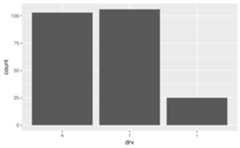
Suppose you have the following bar plot and you want to add the number of cars that fall into eachdrv level on their respective bars.
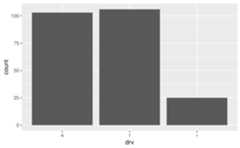
One option is to calculate the counts withdplyr::count() and then pass them to thelabel mapping ingeom_text(). Note that we expanded the y axis limit to get the numbers to fit on the plot.
mpg|>dplyr::count(drv)|>ggplot(aes(x=drv, y=n))+geom_col()+geom_text(aes(label=n), vjust=-0.5)+coord_cartesian(ylim=c(0,110))
Another option is to letggplot() do the counting for you, and access these counts withafter_stat(count) that is mapped to the labels to be placed on the plot withstat_count().
ggplot(mpg,aes(x=drv))+geom_bar()+stat_count(geom="text",aes(label=..count..), vjust=-0.5)+coord_cartesian(ylim=c(0,110))#> Warning: The dot-dot notation (`..count..`) was deprecated in ggplot2 3.4.0.#> ℹ Please use `after_stat(count)` instead.
How can I annotate my stacked bar plot to display counts for each segment?
First calculate the counts for each segment (e.g. withdplyr::count()) and then place them on the bars withgeom_text() usingposition_stack(vjust = 0.5) in theposition argument to place the values in the middle of the segments.
See example
Suppose you have the following stacked bar plot.

You can first calculate the counts for each segment withdplyr::count(), which will place these values in a column calledn.
mpg|>count(class,drv)#> # A tibble: 12 × 3#> class drv n#> <chr> <chr> <int>#> 1 2seater r 5#> 2 compact 4 12#> 3 compact f 35#> 4 midsize 4 3#> 5 midsize f 38#> 6 minivan f 11#> 7 pickup 4 33#> 8 subcompact 4 4#> 9 subcompact f 22#> 10 subcompact r 9#> 11 suv 4 51#> 12 suv r 11You can then pass this result directly toggplot(), draw the segments with appropriate heights withy = n in theaesthetic mapping andgeom_col() to draw the bars, and finally place the counts on the plot withgeom_text().

How can I display proportions (relative frequencies) instead of counts on a bar plot?
Either calculate the proportions ahead of time and place them on bars usinggeom_text() or letggplot() calculate them for you and then add them to the plot usingstat_count() withgeom = "text".
See example
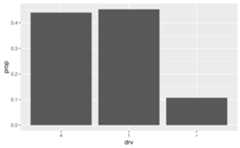
Suppose you have the following bar plot but you want to display the proportion of cars that fall into eachdrv level, instead of the count.
One option is to calculate the proportions withdplyr::count() and then usegeom_col() to draw the bars

Another option is to letggplot() do the calculation of proportions for you, and access these counts with..prop... Note that we also need to thegroup = 1 mapping for this option.