
geom_path() connects the observations in the order in which they appearin the data.geom_line() connects them in order of the variable on thex axis.geom_step() creates a stairstep plot, highlighting exactlywhen changes occur. Thegroup aesthetic determines which cases areconnected together.
Usage
geom_path( mapping=NULL, data=NULL, stat="identity", position="identity",..., arrow=NULL, arrow.fill=NULL, lineend="butt", linejoin="round", linemitre=10, na.rm=FALSE, show.legend=NA, inherit.aes=TRUE)geom_line( mapping=NULL, data=NULL, stat="identity", position="identity",..., orientation=NA, arrow=NULL, arrow.fill=NULL, lineend="butt", linejoin="round", linemitre=10, na.rm=FALSE, show.legend=NA, inherit.aes=TRUE)geom_step( mapping=NULL, data=NULL, stat="identity", position="identity",..., orientation=NA, lineend="butt", linejoin="round", linemitre=10, arrow=NULL, arrow.fill=NULL, direction="hv", na.rm=FALSE, show.legend=NA, inherit.aes=TRUE)Arguments
- mapping
Set of aesthetic mappings created by
aes(). If specified andinherit.aes = TRUE(the default), it is combined with the default mappingat the top level of the plot. You must supplymappingif there is no plotmapping.- data
The data to be displayed in this layer. There are threeoptions:
If
NULL, the default, the data is inherited from the plotdata as specified in the call toggplot().A
data.frame, or other object, will override the plotdata. All objects will be fortified to produce a data frame. Seefortify()for which variables will be created.A
functionwill be called with a single argument,the plot data. The return value must be adata.frame, andwill be used as the layer data. Afunctioncan be createdfrom aformula(e.g.~ head(.x, 10)).- stat
The statistical transformation to use on the data for this layer.When using a
geom_*()function to construct a layer, thestatargument can be used to override the default coupling between geoms andstats. Thestatargument accepts the following:A
Statggproto subclass, for exampleStatCount.A string naming the stat. To give the stat as a string, strip thefunction name of the
stat_prefix. For example, to usestat_count(),give the stat as"count".For more information and other ways to specify the stat, see thelayer stat documentation.
- position
A position adjustment to use on the data for this layer. Thiscan be used in various ways, including to prevent overplotting andimproving the display. The
positionargument accepts the following:The result of calling a position function, such as
position_jitter().This method allows for passing extra arguments to the position.A string naming the position adjustment. To give the position as astring, strip the function name of the
position_prefix. For example,to useposition_jitter(), give the position as"jitter".For more information and other ways to specify the position, see thelayer position documentation.
- ...
Other arguments passed on to
layer()'sparamsargument. Thesearguments broadly fall into one of 4 categories below. Notably, furtherarguments to thepositionargument, or aesthetics that are requiredcannot be passed through.... Unknown arguments that are not partof the 4 categories below are ignored.Static aesthetics that are not mapped to a scale, but are at a fixedvalue and apply to the layer as a whole. For example,
colour = "red"orlinewidth = 3. The geom's documentation has anAestheticssection that lists the available options. The 'required' aestheticscannot be passed on to theparams. Please note that while passingunmapped aesthetics as vectors is technically possible, the order andrequired length is not guaranteed to be parallel to the input data.When constructing a layer usinga
stat_*()function, the...argument can be used to pass onparameters to thegeompart of the layer. An example of this isstat_density(geom = "area", outline.type = "both"). The geom'sdocumentation lists which parameters it can accept.Inversely, when constructing a layer using a
geom_*()function, the...argument can be used to pass on parametersto thestatpart of the layer. An example of this isgeom_area(stat = "density", adjust = 0.5). The stat's documentationlists which parameters it can accept.The
key_glyphargument oflayer()may also be passed on through.... This can be one of the functions described askey glyphs, to change the display of the layer in the legend.
- arrow
Arrow specification, as created by
grid::arrow().- arrow.fill
fill colour to use for the arrow head (if closed).
NULLmeans usecolouraesthetic.- lineend
Line end style (round, butt, square).
- linejoin
Line join style (round, mitre, bevel).
- linemitre
Line mitre limit (number greater than 1).
- na.rm
If
FALSE, the default, missing values are removed witha warning. IfTRUE, missing values are silently removed.- show.legend
logical. Should this layer be included in the legends?
NA, the default, includes if any aesthetics are mapped.FALSEnever includes, andTRUEalways includes.It can also be a named logical vector to finely select the aesthetics todisplay. To include legend keys for all levels, evenwhen no data exists, useTRUE. IfNA, all levels are shown in legend,but unobserved levels are omitted.- inherit.aes
If
FALSE, overrides the default aesthetics,rather than combining with them. This is most useful for helper functionsthat define both data and aesthetics and shouldn't inherit behaviour fromthe default plot specification, e.g.annotation_borders().- orientation
The orientation of the layer. The default (
NA)automatically determines the orientation from the aesthetic mapping. In therare event that this fails it can be given explicitly by settingorientationto either"x"or"y". See theOrientation section for more detail.- direction
direction of stairs: 'vh' for vertical then horizontal,'hv' for horizontal then vertical, or 'mid' for step half-way betweenadjacent x-values.
Details
An alternative parameterisation isgeom_segment(), where each linecorresponds to a single case which provides the start and end coordinates.
Orientation
This geom treats each axis differently and, thus, can thus have two orientations. Often the orientation is easy to deduce from a combination of the given mappings and the types of positional scales in use. Thus, ggplot2 will by default try to guess which orientation the layer should have. Under rare circumstances, the orientation is ambiguous and guessing may fail. In that case the orientation can be specified directly using theorientation parameter, which can be either"x" or"y". The value gives the axis that the geom should run along,"x" being the default orientation you would expect for the geom.
Missing value handling
geom_path(),geom_line(), andgeom_step() handleNA as follows:
If an
NAoccurs in the middle of a line, it breaks the line. No warningis shown, regardless of whetherna.rmisTRUEorFALSE.If an
NAoccurs at the start or the end of the line andna.rmisFALSE(default), theNAis removed with a warning.If an
NAoccurs at the start or the end of the line andna.rmisTRUE,theNAis removed silently, without warning.
See also
geom_polygon(): Filled paths (polygons);geom_segment(): Line segments
Aesthetics
geom_path() understands the following aesthetics. Required aesthetics are displayed in bold and defaults are displayed for optional aesthetics:
| • | x | |
| • | y | |
| • | alpha | →NA |
| • | colour | → viatheme() |
| • | group | → inferred |
| • | linetype | → viatheme() |
| • | linewidth | → viatheme() |
Learn more about setting these aesthetics invignette("ggplot2-specs").
Examples
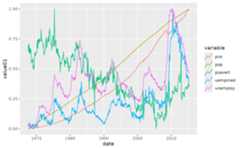
# geom_line() is suitable for time seriesggplot(economics,aes(date,unemploy))+geom_line()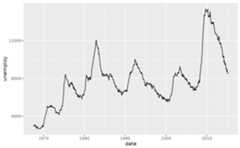 # separate by colour and use "timeseries" legend key glyphggplot(economics_long,aes(date,value01, colour=variable))+geom_line(key_glyph="timeseries")
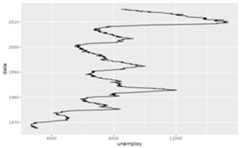
 # You can get a timeseries that run vertically by setting the orientationggplot(economics,aes(unemploy,date))+geom_line(orientation="y")
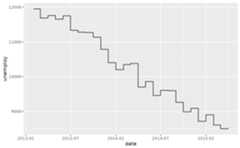
 # geom_step() is useful when you want to highlight exactly when# the y value changesrecent<-economics[economics$date>as.Date("2013-01-01"),]ggplot(recent,aes(date,unemploy))+geom_line()
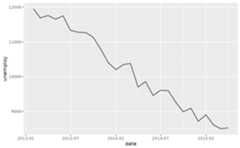 ggplot(recent,aes(date,unemploy))+geom_step()
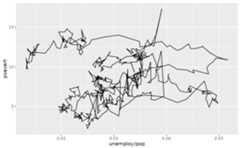
 # geom_path lets you explore how two variables are related over time,# e.g. unemployment and personal savings ratem<-ggplot(economics,aes(unemploy/pop,psavert))m+geom_path()
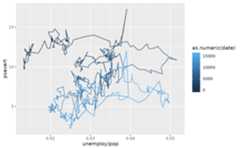
 m+geom_path(aes(colour=as.numeric(date)))
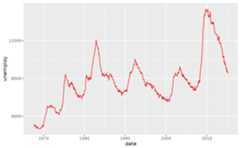
 # Changing parameters ----------------------------------------------ggplot(economics,aes(date,unemploy))+geom_line(colour="red")
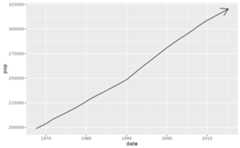
 # Use the arrow parameter to add an arrow to the line# See ?arrow for more detailsc<-ggplot(economics,aes(x=date, y=pop))c+geom_line(arrow=arrow())
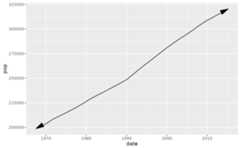
 c+geom_line( arrow=arrow(angle=15, ends="both", type="closed"))
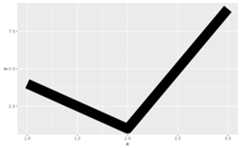
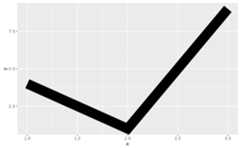
 # Control line join parametersdf<-data.frame(x=1:3, y=c(4,1,9))base<-ggplot(df,aes(x,y))base+geom_path(linewidth=10)
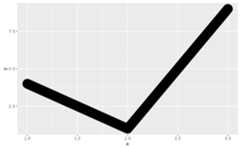
 base+geom_path(linewidth=10, lineend="round")
 base+geom_path(linewidth=10, linejoin="mitre", lineend="butt")
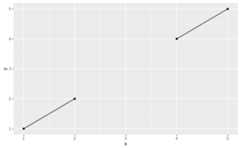
 # You can use NAs to break the line.df<-data.frame(x=1:5, y=c(1,2,NA,4,5))ggplot(df,aes(x,y))+geom_point()+geom_line()#>Warning:Removed 1 row containing missing values or values outside the scale#> range (`geom_point()`).
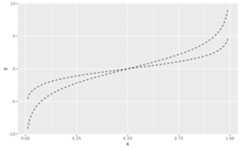
 # \donttest{# Setting line type vs colour/size# Line type needs to be applied to a line as a whole, so it can# not be used with colour or size that vary across a linex<-seq(0.01,.99, length.out=100)df<-data.frame( x=rep(x,2), y=c(qlogis(x),2*qlogis(x)), group=rep(c("a","b"), each=100))p<-ggplot(df,aes(x=x, y=y, group=group))# These workp+geom_line(linetype=2)
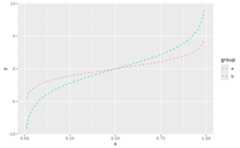
 p+geom_line(aes(colour=group), linetype=2)
 p+geom_line(aes(colour=x))
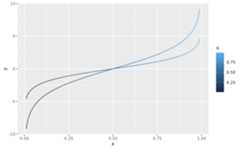 # But this doesn'tshould_stop(p+geom_line(aes(colour=x), linetype=2))# }