
Colors
How can I change the color of the bars in my bar plot?
If using the same color for all bars, define thefill argument ingeom_bar() (orgeom_col()). If assigning color based on another variable, map the variable to thefillaesthetic, and if needed, use one of thescale_fill_*() functions to set colors.
See example
You can set all bars to be a given color with thefill argument ofgeom_bar().

Alternatively, if the colors should be based on a variable, this should be should happen in theaes() mapping.

And if you want to then customize the colors, one option isscale_fill_manual(), which allows you to manually assign colors to each bar. See otherscale_fill_*() functions for more options for color choices.
ggplot(mpg,aes(x=drv, fill=drv))+geom_bar()+scale_fill_manual(values=c("purple","orange","darkblue"))
Spacing and widths
How can I increase the space between the bars in my bar plot?
Set thewidth ofgeom_bar() to a small value to obtain narrower bars with more space between them.
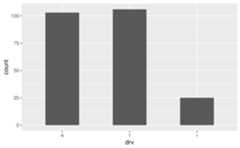
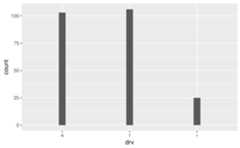
How can I remove the space between the bars and the x-axis?
Adjust theexpand argument inscale_y_continuous(), e.g. addscale_y_continuous(expand = expansion(mult = c(0, 0.05))) to remove the expansion on the lower end of the y-axis but keep the expansion on the upper end of the y-axis at 0.05 (the default expansion for continuous scales).
See example
By default ggplot2 expands the axes so the geoms aren’t flush against the edges of the plot.

To remove the spacing between the bars and the x-axis, but keep the spacing between the bars and the top of the plot, use the following.

To achieve the opposite, switch the values inmult. Note that the tallest bar is now flush against top of the plot.
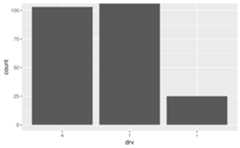
To adjust spacing around the x-axis, adjust theexpand argument inscale_x_discrete(). Note that this places the bars flush against the left side and leaves some space on the right side.

The default look of a bar plot can be achieved with the following.
ggplot(mpg,aes(x=drv))+geom_bar()+scale_x_discrete(expand=expansion(add=0.6))+scale_y_continuous(expand=expansion(mult=0.05))
How do I ensure that bars on a dodged bar plot have the same width?
Setposition = position_dodge2(preserve = "single") ingeom_bar().
See example
In the following plot the bars have differing widths within each level ofdrv as there are differing levels ofclass represented.
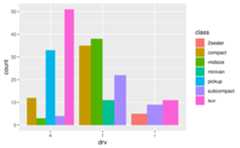
You can useposition_dodge2() withpreserve = "single" to address this.
ggplot(mpg,aes(x=drv, fill=class))+geom_bar(position=position_dodge2(preserve="single"))
Stacked bar plots
How can I create a stacked bar plot displaying a conditional distribution where each stack is scaled to sum to 100%?
Useposition = "fill" ingeom_bar() orgeom_col(). If you also want to show percentages on the axis, usescales::label_percent().
See example
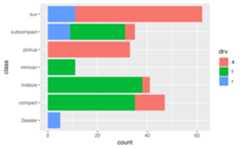
The following plot is useful for comparing counts but not as useful for comparing proportions, which is what you need if you want to be able to make statements like “in this sample, it’s more likely to have a two-seater car that has rear-wheel drive than an SUV that has rear-wheel drive”.
position = "fill" will generate a bar plot with bars of equal length and the stacks in each bar will show the proportion ofdrv for that particularclass.
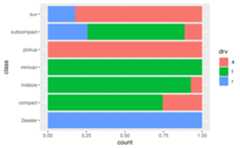
If you want to show percentages instead of proportions on the x-axis, you can define this inscale_x_continuous() withscales::label_percent().
ggplot(mpg,aes(y=class, fill=drv))+geom_bar(position="fill")+scale_x_continuous(name="percentage", labels=scales::label_percent(accuracy=1))
How can I create a stacked bar plot based on data from a contingency table of to categorical variables?
First reshape the data (e.g. withtidyr::pivot_longer()) so that there is one row per each combination of the levels of the categorical variables, then usegeom_col() to draw the bars.
See example
Suppose you have the following data from an opinion poll, where the numbers in the cells represent the number of responses for each party/opinion combination.
poll<-tribble(~party,~agree,~disagree,~no_opinion,"Democrat",20,30,20,"Republican",15,20,10,"Independent",10,5,0)You can first pivot the data longer to obtain a data frame with one row per party/opinion combination and a new column,n, for the number of responses that fall into that category.
poll_longer<-poll|>pivot_longer( cols=-party, names_to="opinion", values_to="n")poll_longer#> # A tibble: 9 × 3#> party opinion n#> <chr> <chr> <dbl>#> 1 Democrat agree 20#> 2 Democrat disagree 30#> 3 Democrat no_opinion 20#> 4 Republican agree 15#> 5 Republican disagree 20#> 6 Republican no_opinion 10#> 7 Independent agree 10#> 8 Independent disagree 5#> 9 Independent no_opinion 0Then, you can pass this result toggplot() and create a bar for eachparty on they (orx, if you prefer vertical bars) axis and fill the bars in with number of responses for eachopinion.

To plot proportions (relative frequencies) instead of counts, useposition = "fill" ingeom_col().

How can I make a grouped bar plot?
Map the variable you want to group by to thex oryaesthetic, map the variable you want to color the vars by to thefill aesthetic, and setposition = "dodge" ingeom_bar().
See example
Suppose you have data from a survey with three questions, where respondents select “Agree” or “Disagree” for each question.
survey<-tibble::tribble(~respondent,~q1,~q2,~q3,1,"Agree","Agree","Disagree",2,"Disagree","Agree","Disagree",3,"Agree","Agree","Disagree",4,"Disagree","Disagree","Agree")You’ll first want to reshape these data so that each row represents a respondent / question pair. You can do this withtidyr::pivot_longer(). Then, pass the resulting longer data frame toggplot() group responses for each question together.
survey|>tidyr::pivot_longer( cols=-respondent, names_to="question", values_to="response")|>ggplot(aes(x=question, fill=response))+geom_bar(position="dodge")
How can I make a bar plot of group means?
Either calculate the group means first and usegeom_col() to draw the bars or let ggplot2 calculate the means withstat_summary() withfun = "mean" andgeom = "bar".
See example
One option for calculating group means is usingdplyr::group_by() followed bydplyr::summarise(). Then, you can pass the resulting data frame toggplot() and plot bars usinggeom_col().

Alternatively, you can usestat_summary() to let ggplot2 calculate and plot the means.
ggplot(mpg,aes(x=drv, y=hwy))+stat_summary(fun="mean", geom="bar")
Axes and axis limits
Why do the bars on my plot disappear when I specify an axis range withylim()? How can I get the bars to show up within a given axis range?
ylim() is a shortcut for supplying thelimits argument to individual scales. When either of these is set, any values outside the limits specified are replaced withNA. Since the bars naturally start aty = 0, replacing part of the bars withNAs results in the bars entirely disappearing from the plot. For changing axis limits without dropping data observations, set limits incoord_cartesian() instead. Also note that this will result in a deceiving bar plot, which should be avoided in general.
See example
In the following plot the y-axis is limited to 20 to 120, and hence the bars are not showing up.
ggplot(mpg,aes(x=drv))+geom_bar()+ylim(c(20,120))#> Warning: Removed 3 rows containing missing values or values outside the scale range#> (`geom_bar()`).
In order to obtain a bar plot with limited y-axis, you need to instead set the limits incoord_cartesian().
ggplot(mpg,aes(x=drv))+geom_bar()+coord_cartesian(ylim=c(20,110))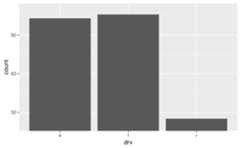
This is, indeed, a deceiving plot. If you’re using a bar plot to display values that could not take the value of 0, you might choose a different geom instead. For example, if you have the following data and plot.

Also suppose that you want to cut off the bars aty = 1000 since you know that the variable you’re plotting cannot take a value less than 1000, you might usegeom_point() instead.
# don't do thisggplot(df,aes(x=x, y=y))+geom_col()+coord_cartesian(ylim=c(1000,1150))
# do thisggplot(df,aes(x=x, y=y))+geom_point(size=3)