
Dynamic Links Deprecation FAQ
We launched Firebase Dynamic Links over 7 years ago to make URLs more powerful - for example, dynamically changing the destination of a link based on run-time conditions.
Over the years, the web and mobile ecosystems have evolved with technologiessuch asApp Links,Google Play Instant ,Universal Links, andApp Clips and havemade user journeys across apps and the web more seamless and predictable foryour app users. We believe you and your users will benefit more fromadopting these technologies directly and continuing to move the ecosystemforward. However, alongside these new changes, the original native APIs thatFirebase Dynamic Links were built on also evolved and presented new challenges.
For example, ecosystem changes impacted our ability to provide a consistentlystable experience for one of Firebase Dynamic Links’ core features - giving appusers a smooth transition into the app post-install, regardless of platform.
Instead of continuing to support a less than ideal experience, we have decidedto sunset Firebase Dynamic Links, and to refocus our resources on solving otherdeveloper pain points.
We understand that this change will require your time to evaluate and adoptalternative solutions or platform providers in the market.
We are continuing to evolve Firebase to meet your needs as the ecosystemcontinues to evolve and change. We'll continue to launchnew features andupdates across Firebase products, and are committed to helpingyou excel in your app development journeys.
What do I need to know?
On August 25th, 2025, Firebase Dynamic Links will shut down. All links served byFirebase Dynamic Links (both hosted on custom domains and page.link subdomains)will stop working and you will no longer be able to create new links.
To help you decide how to migrate from Firebase Dynamic Links, we will continueto update this FAQ document with additional information for you to consider, aswell as provide migration guides for different migration scenarios that mightmatch the way you use Firebase Dynamic Links today.
We will also continue to update this guide with more FAQs as the deprecationmoves forward towards the August 25th, 2025 sunset date and we discover anyadditional issues as we help support you in your migration efforts.
See the FAQs below to help answer some of your most important questions.
To start your migration, please take a look at"How should I migratefrom the service" FAQ further below.
When will Firebase Dynamic Links stop working?
On August 25th, 2025, Firebase Dynamic Links will shut down. All links servedby Firebase Dynamic Links (both those hosted on custom domains and on page.linksubdomains) will stop working.
How much time will I have to migrate?
You have until August 25th, 2025 to complete your migration.
Will new and existing links continue to work?
Yes, your new and existing links will continue to work until the Dynamic Linksservice is shut down on August 25th, 2025.
Will I be able to keep or transfer the automatically provisioned .page.link domains used for links?
No, once the Firebase Dynamic Links service is shut down any .page.link domainswill no longer be available. We recommend looking throughthis question list toevaluate how to best migrate from the service,and if full-feature parity is needed,following this guidanceon exporting your metadata and migrating to another deep linking serviceprovider using a new domain.
What will happen to my links and in my app(s) when Firebase Dynamic Links is sunset (on August 25th, 2025)?
When Firebase Dynamic Links is sunsetted, you can expect that:
- All links clicked will return a HTTP 404 status response to end users.
All HTTP requests to:
- https://firebasedynamiclinks.googleapis.com/v1/shortLinks (Short Links API)
- https://firebasedynamiclinks.googleapis.com/v1/SHORT_DYNAMIC_LINK/linkStats(Link Stats API)
will return a 400/403 HTTP Status response.
The error responses above will begin gradually on August 25, 2025 untileventually reaching 100% error response rates after the sunset date has passed.
The following behavior based on which SDK platform version and API call madein your app:
iOS
Use case API call Status code Behavior Will your app crash? Create Short Link shorten (Swift)
shortenUrl (Swift)
shortenWithCompletion (Objective-C)
403 Error is emitted with failure reason No* First Open Attribution Gets called automatically onFirebaseApp.configure (Swift)/FIRApp.configure (Objective-C)
400 No errors are emitted, but an FDL object is sent back with empty data No* Reopen Attribution handleUniversalLink (Swift)
handleUniversalLink (Objective-C)
400 Error is emitted with failure reason No* Android
Note: The SDKs themselves will not cause your app to crash. Your applicationcode must handle the changed API responses.Use case API call Status code Behavior Will your app crash? Create Short Link buildShortDynamicLink (Kotlin)
buildShortDynamicLink (Java)
403 Error is emitted with failure reason No* First Open Attribution getDynamicLink(getIntent()) (Kotlin)
getDynamicLink(getIntent()) (Java)
400 Task returns a success response, but FDL data will be empty No* Reopen Attribution getDynamicLink(getIntent()) (Kotlin)
getDynamicLink(getIntent()) (Java)
400 Task returns a success response, but FDL data will be empty No* Accept Invitation AppInvite module in Google Play Services invoked when handling intentredirection (from *.page.link or custom domain) 400 Shows a spinner when Google Play Services is invoked and disappears whena 400 response is returned No*
How should I migrate from the service?
We've found that different developers have different needs when it comes tousing Firebase Dynamic Links.
Depending on your own use cases and evaluation of your Firebase Dynamic Linksusage, it’s likely one of the scenarios below will match with your needs.
What should I do if I need full feature parity with Firebase Dynamic Links?
For this scenario, we recommend you use other deep-linking service providers /vendors, such as Adjust, Airbridge, AppsFlyer, Bitly, Branch, Kochava, Singular,and other similar providers in the market. (Note, these providers have not beenvetted by Google, but do provide similar functionality to Firebase DynamicLinks).
You can also export yourdeep-link metadata, which can make it easier to migrate your links towhichever provider you choose.
To help find a provider with matching features to Firebase Dynamic Links, referto the following list of features below.
Firebase Dynamic Links Features:
- Routes users to the correct store for their device from a single click (andfalls back to a webpage if needed)
- Provides users with a continuation of journey after downloading and installingyour app view a deferred deep link
- Provides users with a contextual experience via deep-linked content in yourapp (when already installed)
- Provides analytics data related to dynamic link click events
- Provides the ability to create short-link URLs
- Provides the ability to add metadata to links for social sharing
What if I only care about deep-linking to my app after it has already been installed?
For this scenario, we recommend usingApp Links andUniversalLinks which are platform-supported ways for developers toprovide deep-linking experiences for their users.
Check outthis guide formore details on how to migrate to using App Links and Universal Links.
This guide also describes how to optionally use Firebase Hosting to host thenecessary domain and asset link verification files on the domain you plan to usefor your new links (e.g. assetlinks.json file for App Links,apple-app-site-association file for Universal Links).
What if my app no longer needs features from Firebase Dynamic Links and doesn’t need a replacement for it?
For this scenario, you may not need to take any action in your app to handlethe upcoming sunset, however we recommend:
Reviewing your existing Firebase Dynamic Links following theguide on exporting your link metadata to ensure yourusers and app will not be impacted once the links are no longer being served.
Deleting your Firebase Dynamic Links URL prefixes in theFirebase console. Note: URL prefix domains will automatically be deletedafter August 25th, 2025.
Removing the Firebase Dynamic Links SDK from your apps.
If you see a migration scenario that doesn't cover your own needs,please reach out to let us know
What should I do after I complete my migration?
Once you havefinishedmigrating from Firebase Dynamic Links, make sure to delete all your URLdomain prefixes (FDL domains) associated with your previous Firebase DynamicLinks in your project.
You can do this by:
- Navigating to the Firebase Dynamic Links section in the Firebase console
Selecting the URL prefix you want to delete from the left-hand side selector
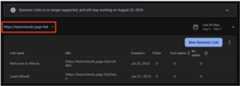
Clicking on the three dots menu next to the 'New Dynamic Link' button
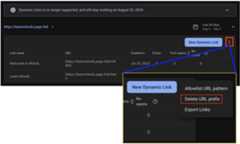
Selecting 'Delete URL Prefix'
Entering the URL prefix to confirm you want to delete it, and clicking on'Delete URL Prefix'
Once you have finished deleting all URL domain prefixes, your Firebase projectwill be marked as having completed the migration from Firebase Dynamic Links.This will also remove the pop-up reminder you may have seen in the Firebaseconsole for your project.
Note that this action will delete all your Firebase Dynamic Links oncecompleted, so make sure you have fully migrated from the service before deletingyour URL domain prefixes.
Will I still be able to use the Firebase Dynamic Links APIs?
The Firebase Dynamic Links APIs for Short Links andAnalytics will remain available until the sunset date on August 25th, 2025.
After that date these APIs will no longer be available for use, andthe service will beshut down.
How can I export my link metadata?
Please refer to theguide onexporting your link metadata for instructions on how to export your linkmetadata.
How can I get my Firebase Dynamic Links link analytics data?
You can use theexport guideto retrieve your Firebase Dynamic Links metadata, which includes the link itself.
You can use theFirebaseDynamic Links Analytics API to retrieve link statistics data for each ofyour Firebase Dynamic Links. This Analytics API is limited to ~5 QPS. For anexample on how to operate within that request limit when using the API, pleaserefer to thisCloudTask sample.
You can also useGoogle Analytics andexport your data for a subset of link analytics data, including App Updatesevents which are unique to Google Analytics.
If you require a higher request rate to help with your migration, please contactus atFirebase Support.
What will happen to existing links metadata after the sunset date (August 25th, 2025)?
Your domain and link metadata will be marked for deletion on August 25th, 2025and purged in accordance withour data retention policy.
Firebase Dynamic Links impacts on Firebase Authentication flows
I want to enable email link authentication in Firebase Authentication for my project. Will I need to onboard Firebase Dynamic Links?
No, you don't need to onboard Firebase Dynamic Links as onboarding is no longerpossible. Instead, you can follow the updated guides on getting started withemail link authentication to enable and implement it for your project:
See full list ofactionsthat are impacted by this change.
How are the following Authentication features impacted: email link authentication, password reset, and email verification?
Email link authentication and your out of band email actions with Firebase willcontinue to work, however you will need to upgrade to the latestFirebase Authentication SDKs and migrate to the new solution in order to continueusing these actions after theFirebase Dynamic Links service is shut down on August25, 2025.
You can follow the guides linked below for instructions on how to complete themigration:
See a full list ofactions that are impacted by this.
Important: If you have older versions of your app that do not use the new version of the Authentication SDK, these specific Authentication features will no longer work in those older app versions after theDynamic Links shutdown.How are OAuth flow implementations with Firebase Authentication Android SDK versions below v20.0.0 or BoM versions below 26.0.0 impacted?
You will need to update to the latest Firebase Authentication Android SDK (atleast v20.0.0) in order to continue using your OAuth flow implementation in yourAndroid apps.
Are Firebase Authentication email actions on web apps impacted?
No. Firebase Dynamic Link deprecation only impacts handling incoming URLs on mobile devices.
How are implementations using the Firebase JS SDK libraries to authenticate OAuth providers in a Cordova app impacted?
The Firebase JS SDK uses Firebase Dynamic Links to implement OAuthauthentication flows in Cordova apps. You will need to modify yourimplementation of the flow by carrying out the OAuth flow manually and passingthe resulting OAuth credential to Firebase to complete the authentication flow.
See theCordova guide for more details.
What are some alternative options to Firebase Dynamic Links?
Please see the"How should I migrate from the service" FAQ which details differentmigration scenarios and provides migration guides for various alternativesavailable.
Except as otherwise noted, the content of this page is licensed under theCreative Commons Attribution 4.0 License, and code samples are licensed under theApache 2.0 License. For details, see theGoogle Developers Site Policies. Java is a registered trademark of Oracle and/or its affiliates.
Last updated 2025-12-17 UTC.