
What can you do with Firebase In-App Messaging?
Engage your audience in meaningful ways with modifications to the style,targeting, and scheduling of your messages entirely through theFirebaseconsole.Firebase In-App Messaging offers message templates for you to experiment with and customize toyour liking.
Customize your message UI
You can style your messages with templates that are designed for creatingengaging and clean user interfaces. Here are the available templates:
| Message Template | Description |
|---|---|
| Card |
|
| Modal |
|
| Image only |
|
| Banner |
|
Learn more about messaging templates
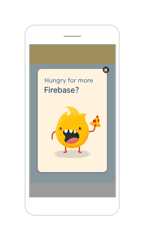
Use theImage only message template, uploading your designed message to:
- Incorporate the exact colors, fonts, and formatting that are tailored toyour app's aesthetic and branding.
- Offer a themed promotion. Send out your Halloween discount in a message witha custom scary font and background pattern. The entire message is clickable forthe user to learn more or dismiss the message.
Want even more freedom? Modify the display of Firebase's message templatesthrough code.
Target specific users
For each campaign, you can target messages to certain audiences based on theirbehavior, language, engagement, and more.
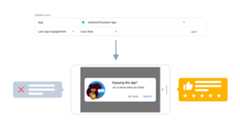
Consider combining aCard message with a deep linking solution, configuringthe targeting of the message to:
- Target users with aLast app engagement between one to seven days tomake sure they are active. Ask your engaged users if they are enjoying yourapp. Depending on their answer, use a smart link to direct them to GooglePlay for a review or to a feedback survey.
- Let users explore your social media app without pressures to register for anaccount. Target your authentication message at users thatFirst Openyour app at least two days ago, and use an in-app linking system to guidethem to the relevant screen.
Schedule messages with contextual triggers
Messages only appear while users are in your app and are triggered by certainevents, ensuring that the messages stay relevant and contextual for your users.You don't want to distract users who might be in the middle of a high-score-setting game or an important purchase.
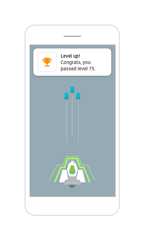
For instance, you can configure the scheduling of yourBanner message to:
- Congratulate users whenever they level up in your game app by setting a
level_upevent as a trigger.
Avoid spamming your users by setting a per-device frequency limit for yourBanner message to:
- Gently remind users to update your app by setting the number of messages tono more than one message every 15 days. Users can easily click to engage ordismiss with a swipe up.
Track your app's performance
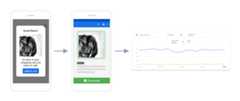
You can combineFirebase In-App Messaging withGoogle Analytics to revealimportant details about your users' preferences and satisfaction with your app.
Enable Analytics events as conversions and track users' interactions with yourmessages. For example:
- Offer a promotional message with theModal template's action button todiscounted items. Firebase lets you know how many users received themessage, how many clicked on it, and how many completed conversion eventsuch as an e-commerce purchase.
Utilize callbacks to create a personalized experience for your users.
- Tackle important, text-heavy messages such as a terms of service update withtheModal template's flexible dialog orientation. Track which usersconsented to your terms of service and use callbacks to add users to anAnalytics audience for better targeting.
Except as otherwise noted, the content of this page is licensed under theCreative Commons Attribution 4.0 License, and code samples are licensed under theApache 2.0 License. For details, see theGoogle Developers Site Policies. Java is a registered trademark of Oracle and/or its affiliates.
Last updated 2025-12-17 UTC.