
Map Cloud Firestore data with Swift Codable
Swift's Codable API, introduced in Swift 4, enables us to leverage the power ofthe compiler to make it easier to map data from serialized formats to Swifttypes.
You might have been using Codable to map data from a web API to your app's datamodel (and vice versa), but it is much more flexible than that.
In this guide, we're going to look at how Codable can be used to map data fromCloud Firestore to Swift types and vice versa.
When fetching a document fromCloud Firestore, your app will receive adictionary of key/value pairs (or an array of dictionaries, if you use one ofthe operations returning multiple documents).
Now, you can certainly continue to directly use dictionaries in Swift, and theyoffer some great flexibility that might be exactly what your use case calls for.However, this approach isn't type safe and it's easy to introducehard-to-track-down bugs by misspelling attribute names, or forgetting to mapthe new attribute your team added when they shipped that exciting new featurelast week.
In the past, many developers have worked around these shortcomings byimplementing a simple mapping layer that allowed them to map dictionaries toSwift types. But again, most of these implementations are based on manuallyspecifying the mapping betweenCloud Firestore documents and thecorresponding types of your app's data model.
WithCloud Firestore's support for Swift's Codable API, this becomes a loteasier:
- You will no longer have to manually implement any mapping code.
- It's easy to define how to map attributes with different names.
- It has built-in support for many of Swift's types.
- And it's easy to add support for mapping custom types.
- Best of all: for simple data models, you won't have to write anymapping code at all.
Mapping data
Cloud Firestore stores data in documents which map keys to values. To fetchdata from an individual document, we can callDocumentSnapshot.data(), whichreturns a dictionary mapping the field names to anAny:func data() -> [String : Any]?.
This means we can use Swift's subscript syntax to access each individual field.
Note: The following snippet is here for illustration. It shows one basic,somewhat inefficient way to access document fields. We'll cover the Codable wayto access data in the rest of this guide.importFirebaseFirestore#warning("DO NOT MAP YOUR DOCUMENTS MANUALLY. USE CODABLE INSTEAD.")funcfetchBook(documentId:String){letdocRef=db.collection("books").document(documentId)docRef.getDocument{document,errorinifleterror=errorasNSError?{self.errorMessage="Error getting document:\(error.localizedDescription)"}else{ifletdocument=document{letid=document.documentIDletdata=document.data()lettitle=data?["title"]as?String??""letnumberOfPages=data?["numberOfPages"]as?Int??0letauthor=data?["author"]as?String??""self.book=Book(id:id,title:title,numberOfPages:numberOfPages,author:author)}}}}While it might seem straightforward and easy to implement, this code is fragile,hard to maintain, and error-prone.
As you can see, we're making assumptions about the data types of the documentfields. These might or might not be correct.
Remember, since there is no schema, you can easily add a new documentto the collection and choose a different type for a field. You mightaccidentally choose string for thenumberOfPages field, which would resultin a difficult-to-find mapping issue. Also, you'll have to update your mappingcode whenever a new field is added, which is rather cumbersome.
And let's not forget that we're not taking advantage of Swift's strong typesystem, which knows exactly the correct type for each of the properties ofBook.
What is Codable, anyway?
According to Apple's documentation, Codable is "a type that can convert itselfinto and out of an external representation." In fact, Codable is a type aliasfor the Encodable and Decodable protocols. By conforming a Swift type to thisprotocol, the compiler will synthesize the code needed to encode/decode aninstance of this type from a serialized format, such as JSON.
A simple type for storing data about a book might look like this:
structBook:Codable{vartitle:StringvarnumberOfPages:Intvarauthor:String}As you can see, conforming the type to Codable is minimally invasive. We onlyhad to add the conformance to the protocol; no other changes were required.
With this in place, we can now easily encode a book to a JSON object:
do{letbook=Book(title:"The Hitchhiker's Guide to the Galaxy",numberOfPages:816,author:"Douglas Adams")letencoder=JSONEncoder()letdata=tryencoder.encode(book)}catch{print("Error when trying to encode book:\(error)")}Decoding a JSON object to aBook instance works as follows:
letdecoder=JSONDecoder()letdata=/* fetch data from the network */letdecodedBook=trydecoder.decode(Book.self,from:data)Mapping to and from simple types inCloud Firestore documents using Codable
Cloud Firestore supports a broad set of data types, ranging from simplestrings to nested maps. Most of these correspond directly to Swift's built-intypes. Let's take a look at mapping some simple data types first before we diveinto the more complex ones.
To mapCloud Firestore documents to Swift types, follow these steps:
- Make sure you've added the
FirebaseFirestoreframework to your project.You can useeither the Swift Package Manager or CocoaPodsto do so. - Import
FirebaseFirestoreinto your Swift file. - Conform your type to
Codable. - (Optional, if you want to use the type in a
Listview) Add anidproperty to your type, and use@DocumentIDto tellCloud Firestore tomap this to the document ID. We'll discuss this in more detail below. - Use
documentReference.data(as: )to map a document reference to a Swifttype. - Use
documentReference.setData(from: )to map data from Swift types to aCloud Firestore document. - (Optional, but highly recommended) Implement proper error handling.
Let's update ourBook type accordingly:
structBook:Codable{@DocumentIDvarid:String?vartitle:StringvarnumberOfPages:Intvarauthor:String}Since this type was already codable, we only had to add theid property andannotate it with the@DocumentID property wrapper.
Taking the previous code snippet for fetching and mapping a document, we canreplace all the manual mapping code with a single line:
funcfetchBook(documentId:String){letdocRef=db.collection("books").document(documentId)docRef.getDocument{document,errorinifleterror=errorasNSError?{self.errorMessage="Error getting document:\(error.localizedDescription)"}else{ifletdocument=document{do{self.book=trydocument.data(as:Book.self)}catch{print(error)}}}}}You can write this even more concisely by specifying the type of the documentwhen callinggetDocument(as:). This will perform the mapping for you, andreturn aResult type containing the mapped document, or an error in casedecoding failed:
privatefuncfetchBook(documentId:String){letdocRef=db.collection("books").document(documentId)docRef.getDocument(as:Book.self){resultinswitchresult{case.success(letbook):// A Book value was successfully initialized from the DocumentSnapshot.self.book=bookself.errorMessage=nilcase.failure(leterror):// A Book value could not be initialized from the DocumentSnapshot.self.errorMessage="Error decoding document:\(error.localizedDescription)"}}}Updating an existing document is as simple as callingdocumentReference.setData(from: ). Including some basic error handling, hereis the code to save aBook instance:
funcupdateBook(book:Book){ifletid=book.id{letdocRef=db.collection("books").document(id)do{trydocRef.setData(from:book)}catch{print(error)}}}When adding a new document,Cloud Firestore will automatically take care ofassigning a new document ID to the document. This even works when the app iscurrently offline.
funcaddBook(book:Book){letcollectionRef=db.collection("books")do{letnewDocReference=trycollectionRef.addDocument(from:self.book)print("Book stored with new document reference:\(newDocReference)")}catch{print(error)}}In addition to mapping simple data types,Cloud Firestore supports a numberof other datatypes, some of which are structured types that you can use tocreate nested objects inside a document.
Nested custom types
Most attributes we want to map in our documents are simple values, such as thebook's title or the author's name. But what about those cases when we need tostore a more complex object? For example, we might want to store the URLs to thebook's cover in different resolutions.
The easiest way to do this inCloud Firestore is to use a map:

When writing the corresponding Swift struct, we can make use of the fact thatCloud Firestore supports URLs — when storing a field that contains a URL, itwill be converted to a string and vice versa:
structCoverImages:Codable{varsmall:URLvarmedium:URLvarlarge:URL}structBookWithCoverImages:Codable{@DocumentIDvarid:String?vartitle:StringvarnumberOfPages:Intvarauthor:Stringvarcover:CoverImages?}Notice how we defined a struct,CoverImages, for the cover map in theCloud Firestore document. By marking the cover property onBookWithCoverImages as optional, we're able to handle the fact that somedocuments might not contain a cover attribute.
If you're curious why there is no code snippet for fetching or updating data,you will be pleased to hear that there is no need to adjust the code for readingor writing from/toCloud Firestore: all of this works with the code we'vewritten in the initial section.
Arrays
Sometimes, we want to store a collection of values in a document. The genres ofa book are a good example: a book likeThe Hitchhiker's Guide to the Galaxymight fall into several categories — in this case "Sci-Fi" and "Comedy":

InCloud Firestore, we can model this using an array of values. This issupported for any codable type (such asString,Int, etc.). The followingshows how to add an array of genres to ourBook model:
publicstructBookWithGenre:Codable{@DocumentIDvarid:String?vartitle:StringvarnumberOfPages:Intvarauthor:Stringvargenres:[String]}Since this works for any codable type, we can use custom types as well. Imaginewe want to store a list of tags for each book. Along with the name of thetag, we'd like to store the color of the tag as well, like this:

To store tags in this way, all we need to do is implement aTag struct torepresent a tag and make it codable:
structTag:Codable,Hashable{vartitle:Stringvarcolor:String}And just like that, we can store an array ofTags in ourBook documents!
structBookWithTags:Codable{@DocumentIDvarid:String?vartitle:StringvarnumberOfPages:Intvarauthor:Stringvartags:[Tag]}A quick word about mapping document IDs
Before we move on to mapping more types, let's talk about mapping document IDsfor a moment.
We used the@DocumentID property wrapper in some of the previous examplesto map the document ID of ourCloud Firestore documents to theid propertyof our Swift types. This is important for a number of reasons:
- It helps us to know which document to update in case the user makes localchanges.
- SwiftUI's
Listrequires its elements to beIdentifiablein order toprevent elements from jumping around when they get inserted.
It's worth pointing out that an attribute marked as@DocumentID will not beencoded byCloud Firestore's encoder when writing the document back. This isbecause the document ID is not an attribute of the document itself — sowriting it to the document would be a mistake.
When working with nested types (such as the array of tags on theBook in anearlier example in this guide), it is not required to add a@DocumentIDproperty: nested properties are a part of theCloud Firestore document, anddo not constitute a separate document. Hence, they do not need a document ID.
Dates and times
Cloud Firestore has a built-in data type for handling dates and times, andthanks toCloud Firestore's support for Codable, it's straightforward touse them.
Let's take a look at this document which represents the mother of allprogramming languages, Ada, invented in 1843:
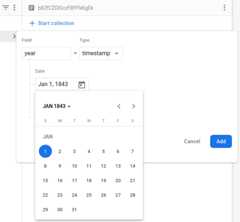
A Swift type for mapping this document might look like this:
structProgrammingLanguage:Codable{@DocumentIDvarid:String?varname:Stringvaryear:Date}We cannot leave this section about dates and times without having a conversationabout@ServerTimestamp. This property wrapper is a powerhouse when it comes todealing with timestamps in your app.
In any distributed system, chances are that the clocks on the individual systemsare not completely in sync all of the time. You might think this is not a bigdeal, but imagine the implications of a clock running slightly out of sync for astock trade system: even a millisecond deviation might result in a difference ofmillions of dollars when executing a trade.
Cloud Firestore handles attributes marked with@ServerTimestamp asfollows: if the attribute isnil when you store it (usingaddDocument(), forexample),Cloud Firestore will populate the field with the current servertimestamp at the time of writing it into the database. If the field is notnilwhen you calladdDocument() orupdateData(),Cloud Firestore will leavethe attribute value untouched. This way, it is easy to implement fields likecreatedAt andlastUpdatedAt.
Geopoints
Geolocations are ubiquitous in our apps. Many exciting features become possibleby storing them. For example, it might be useful to store a location for a taskso your app can remind you about a task when you reach a destination.
Cloud Firestore has a built-in data type,GeoPoint, which can store thelongitude and latitude of any location. To map locations from/to aCloud Firestore document, we can use theGeoPoint type:
structOffice:Codable{@DocumentIDvarid:String?varname:Stringvarlocation:GeoPoint}The corresponding type in Swift isCLLocationCoordinate2D, and we can mapbetween those two types with the following operation:
CLLocationCoordinate2D(latitude:office.location.latitude,longitude:office.location.longitude)To learn more about querying documents by physical location, check outthis solution guide.
Enums
Enums are probably one of the most underrated language features in Swift;there's much more to them than meets the eye. A common use case for enums is tomodel the discrete states of something. For example, we might be writing an appfor managing articles. To track the status of an article, we might want to usean enumStatus:
enumStatus:String,Codable{casedraftcaseinReviewcaseapprovedcasepublished}Cloud Firestore doesn't support enums natively (i.e., it cannot enforce theset of values), but we can still make use of the fact that enums can be typed,and choose a codable type. In this example, we've chosenString, which meansall enum values will be mapped to/from string when stored in aCloud Firestore document.
And, since Swift supports custom raw values, we can even customize which valuesrefer to which enum case. So for example, if we decided to store theStatus.inReview case as "in review", we could just update the above enum asfollows:
enumStatus:String,Codable{casedraftcaseinReview="in review"caseapprovedcasepublished}Customizing the mapping
Sometimes, the attribute names of theCloud Firestore documents we want tomap don't match up with the names of the properties in our data model in Swift.For example, one of our coworkers might be a Python developer, and decided tochoose snake_case for all their attribute names.
Not to worry: Codable has us covered!
For cases like these, we can make use ofCodingKeys. This is an enum we canadd to a codable struct to specify how certain attributes will be mapped.
Consider this document:

To map this document to a struct that has a name property of typeString, weneed to add aCodingKeys enum to theProgrammingLanguage struct, and specifythe name of the attribute in the document:
structProgrammingLanguage:Codable{@DocumentIDvarid:String?varname:Stringvaryear:DateenumCodingKeys:String,CodingKey{caseidcasename="language_name"caseyear}}By default, the Codable API will use the property names of our Swift types todetermine the attribute names on theCloud Firestore documents we're tryingto map. So as long as the attribute names match, there is no need to addCodingKeys to our codable types. However, once we useCodingKeys for aspecific type, we need to add all property names we want to map.
In the code snippet above, we've defined anid property which we might want touse as the identifier in a SwiftUIList view. If we didn't specify it inCodingKeys, it wouldn't be mapped when fetching data, and thus becomenil.This would result in theList view being filled with the first document.
Any property that is not listed as a case on the respectiveCodingKeys enumwill be ignored during the mapping process. This can actually be convenient ifwe specifically want to exclude some of the properties from being mapped.
So for example, if we want to exclude thereasonWhyILoveThis property frombeing mapped, all we need to do is to remove it from theCodingKeys enum:
structProgrammingLanguage:Identifiable,Codable{@DocumentIDvarid:String?varname:Stringvaryear:DatevarreasonWhyILoveThis:String=""enumCodingKeys:String,CodingKey{caseidcasename="language_name"caseyear}}Occasionally we might want to write an empty attribute back into theCloud Firestore document. Swift has the notion of optionals to denote theabsence of a value, andCloud Firestore supportsnull values as well.However, the default behavior for encoding optionals that have anil value isto just omit them.@ExplicitNull gives us some control over how Swiftoptionals are handled when encoding them: by flagging an optional property as@ExplicitNull, we can tellCloud Firestore to write this property to thedocument with a null value if it contains a value ofnil.
Using a custom encoder and decoder for mapping colors
As a last topic in our coverage of mapping data with Codable, let's introducecustom encoders and decoders. This section doesn't cover a nativeCloud Firestore datatype, but custom encoders and decoders are widely usefulin yourCloud Firestore apps.
"How can I map colors" is one of the most frequently asked developer questions,not only forCloud Firestore, but for mapping between Swift and JSON aswell. There are plenty of solutions out there, but most of them focus on JSON,and almost all of them map colors as a nested dictionary composed of its RGBcomponents.
It seems there should be a better, simpler solution. Why don't we use web colors(or, to be more specific, CSS hex color notation) — they're easy to use(essentially just a string), and they even support transparency!
To be able to map a SwiftColor to its hex value, we need to create a Swiftextension that adds Codable toColor.
extensionColor{init(hex:String){letrgba=hex.toRGBA()self.init(.sRGB,red:Double(rgba.r),green:Double(rgba.g),blue:Double(rgba.b),opacity:Double(rgba.alpha))}//... (code for translating between hex and RGBA omitted for brevity)}extensionColor:Codable{publicinit(fromdecoder:Decoder)throws{letcontainer=trydecoder.singleValueContainer()lethex=trycontainer.decode(String.self)self.init(hex:hex)}publicfuncencode(toencoder:Encoder)throws{varcontainer=encoder.singleValueContainer()trycontainer.encode(toHex)}}By usingdecoder.singleValueContainer(), we can decode aString to itsColor equivalent, without having to nest the RGBA components. Plus, you canuse these values in the web UI of your app, without having to convert themfirst!
With this, we can update code for mapping tags, making it easier to handle thetag colors directly instead of having to map them manually in our app's UI code:
structTag:Codable,Hashable{vartitle:Stringvarcolor:Color}structBookWithTags:Codable{@DocumentIDvarid:String?vartitle:StringvarnumberOfPages:Intvarauthor:Stringvartags:[Tag]}Handling errors
In the above code snippets we intentionally kept error handling at a minimum,but in a production app, you'll want to make sure to gracefully handle anyerrors.
Here is a code snippet that shows how to use handle any error situations youmight run into:
classMappingSimpleTypesViewModel:ObservableObject{@Publishedvarbook:Book=.empty@PublishedvarerrorMessage:String?privatevardb=Firestore.firestore()funcfetchAndMap(){fetchBook(documentId:"hitchhiker")}funcfetchAndMapNonExisting(){fetchBook(documentId:"does-not-exist")}funcfetchAndTryMappingInvalidData(){fetchBook(documentId:"invalid-data")}privatefuncfetchBook(documentId:String){letdocRef=db.collection("books").document(documentId)docRef.getDocument(as:Book.self){resultinswitchresult{case.success(letbook):// A Book value was successfully initialized from the DocumentSnapshot.self.book=bookself.errorMessage=nilcase.failure(leterror):// A Book value could not be initialized from the DocumentSnapshot.switcherror{caseDecodingError.typeMismatch(_,letcontext):self.errorMessage="\(error.localizedDescription):\(context.debugDescription)"caseDecodingError.valueNotFound(_,letcontext):self.errorMessage="\(error.localizedDescription):\(context.debugDescription)"caseDecodingError.keyNotFound(_,letcontext):self.errorMessage="\(error.localizedDescription):\(context.debugDescription)"caseDecodingError.dataCorrupted(letkey):self.errorMessage="\(error.localizedDescription):\(key)"default:self.errorMessage="Error decoding document:\(error.localizedDescription)"}}}}}Handling errors in live updates
The previous code snippet demonstrates how to handle errors when fetching asingle document. In addition to fetching data once,Cloud Firestore alsosupports delivering updates to your app as they happen, using so-called snapshotlisteners: we can register a snapshot listener on a collection (or query), andCloud Firestore will call our listener whenever there is an update.
Here is a code snippet that shows how to register a snapshot listener, map datausing Codable, and handle any errors that might occur. It also shows how to adda new document to the collection. As you will see, there is no need to updatethe local array holding the mapped documents ourselves, as this is taken careof by the code in the snapshot listener.
classMappingColorsViewModel:ObservableObject{@PublishedvarcolorEntries=[ColorEntry]()@PublishedvarnewColor=ColorEntry.empty@PublishedvarerrorMessage:String?privatevardb=Firestore.firestore()privatevarlistenerRegistration:ListenerRegistration?publicfuncunsubscribe(){iflistenerRegistration!=nil{listenerRegistration?.remove()listenerRegistration=nil}}funcsubscribe(){iflistenerRegistration==nil{listenerRegistration=db.collection("colors").addSnapshotListener{[weakself](querySnapshot,error)inguardletdocuments=querySnapshot?.documentselse{self?.errorMessage="No documents in 'colors' collection"return}self?.colorEntries=documents.compactMap{queryDocumentSnapshotinletresult=Result{tryqueryDocumentSnapshot.data(as:ColorEntry.self)}switchresult{case.success(letcolorEntry):ifletcolorEntry=colorEntry{// A ColorEntry value was successfully initialized from the DocumentSnapshot.self?.errorMessage=nilreturncolorEntry}else{// A nil value was successfully initialized from the DocumentSnapshot,// or the DocumentSnapshot was nil.self?.errorMessage="Document doesn't exist."returnnil}case.failure(leterror):// A ColorEntry value could not be initialized from the DocumentSnapshot.switcherror{caseDecodingError.typeMismatch(_,letcontext):self?.errorMessage="\(error.localizedDescription):\(context.debugDescription)"caseDecodingError.valueNotFound(_,letcontext):self?.errorMessage="\(error.localizedDescription):\(context.debugDescription)"caseDecodingError.keyNotFound(_,letcontext):self?.errorMessage="\(error.localizedDescription):\(context.debugDescription)"caseDecodingError.dataCorrupted(letkey):self?.errorMessage="\(error.localizedDescription):\(key)"default:self?.errorMessage="Error decoding document:\(error.localizedDescription)"}returnnil}}}}}funcaddColorEntry(){letcollectionRef=db.collection("colors")do{letnewDocReference=trycollectionRef.addDocument(from:newColor)print("ColorEntry stored with new document reference:\(newDocReference)")}catch{print(error)}}}All code snippets used in this post are part of a sample application that youcan download fromthis GitHub repository.
Go forth and use Codable!
Swift's Codable API provides a powerful and flexible way to map data fromserialized formats to and from your applications data model. In this guide,you saw how easy it is to use in apps that useCloud Firestore as theirdatastore.
Starting from a basic example with simple data types, we progressivelyincreased the complexity of the data model, all the while being able to rely onCodable and Firebase's implementation to perform the mapping for us.
For more details about Codable, I recommend the following resources:
- John Sundell has a nice article about theBasics of Codable.
- If books are more your thing, check out Mattt'sFlight School Guide to Swift Codable.
- And finally, Donny Wals has an entireseries about Codable.
Although we did our best to compile a comprehensive guide for mappingCloud Firestore documents, this is not exhaustive, and you might be usingother strategies to map your types. Using theSend feedback button below,let us know what strategies you use for mapping other types ofCloud Firestore data or representing data in Swift.
There really is no reason for not usingCloud Firestore's Codable support.
Except as otherwise noted, the content of this page is licensed under theCreative Commons Attribution 4.0 License, and code samples are licensed under theApache 2.0 License. For details, see theGoogle Developers Site Policies. Java is a registered trademark of Oracle and/or its affiliates.
Last updated 2026-02-18 UTC.