
Use App Check with the debug provider with Flutter
After you have registered your app for App Check, your app normally won't runin an emulator or from a continuous integration (CI) environment, since thoseenvironments don't qualify as valid devices. If you want to run your app in suchan environment during development and testing, you can create a debug build ofyour app that uses the App Check debug provider instead of a real attestationprovider.
Warning: The debug provider allows access to your Firebase resources fromunverified devices. Don't use the debug provider in production builds of yourapp, and don't share your debug builds with untrusted parties.Apple platforms
To use the debug provider while running your app in a simulator interactively(during development, for example), do the following:
Activate App Check with the debug provider right after you have initializedyour Firebase app:
import'package:flutter/material.dart';import'package:firebase_core/firebase_core.dart';// Import the firebase_app_check pluginimport'package:firebase_app_check/firebase_app_check.dart';Future<void>main()async{WidgetsFlutterBinding.ensureInitialized();awaitFirebase.initializeApp();awaitFirebaseAppCheck.instance.activate(// Set appleProvider to `AppleProvider.debug`appleProvider:AppleProvider.debug,);runApp(App());}Enable debug logging in your Xcode project (v11.0 or newer):
- OpenProduct > Scheme > Edit scheme.
- SelectRun from the left menu, then select theArguments tab.
- In theArguments Passed on Launch section, add
-FIRDebugEnabled.
Open
ios/Runner.xcworkspacewith Xcode and run your app in the Simulator.Your app will print a local debug token to the debug output when Firebasetries to send a request to the backend. For example:Firebase App Check Debug Token:123a4567-b89c-12d3-e456-789012345678
In theApp Check sectionof theFirebase console, chooseManage debug tokens from your app'soverflow menu. Then, register the debug token you logged in the previousstep.
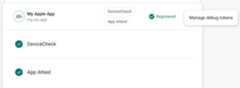
After you register the token, Firebase backend services will accept it as valid.
Because this token allows access to your Firebase resources without avalid device, it is crucial that you keep it private. Don't commit it to apublic repository, and if a registered token is ever compromised, revoke itimmediately in the Firebase console.
Android
To use the debug provider while running your Flutter app in an Android environment,implement the following code in your Flutter application:
import'package:flutter/material.dart';import'package:firebase_core/firebase_core.dart';// Import the firebase_app_check pluginimport'package:firebase_app_check/firebase_app_check.dart';Future<void>main()async{WidgetsFlutterBinding.ensureInitialized();awaitFirebase.initializeApp();awaitFirebaseAppCheck.instance.activate(webRecaptchaSiteKey:'recaptcha-v3-site-key',// Set androidProvider to `AndroidProvider.debug`androidProvider:AndroidProvider.debug,);runApp(App());}Your app will print a local debug token to the debug output when Firebase triesto send a request to the backend. For example:
D DebugAppCheckProvider: Enter this debug secret into the allow list inthe Firebase Console for your project: 123a4567-b89c-12d3-e456-789012345678
In theApp Check sectionof theFirebase console, chooseManage debug tokens from your app'soverflow menu. Then, register the debug token you logged in the previousstep.
After you register the token, Firebase backend services will accept it as valid.
Web
To use the debug provider while running your app fromlocalhost (duringdevelopment, for example), do the following:
localhost debugging by addinglocalhost toreCAPTCHA’s allowed domains. Doing so would allow anyone to run your app fromtheir local machines!In the file
web/index.html, enable debug mode by settingself.FIREBASE_APPCHECK_DEBUG_TOKENtotrue:<body> <script> self.FIREBASE_APPCHECK_DEBUG_TOKEN = true; </script> ...</body>Run your web app locally and open the browser’s developer tool. In thedebug console, you’ll see a debug token:
AppCheck debug token: "123a4567-b89c-12d3-e456-789012345678". You willneed to safelist it in the Firebase console for it to work.
This token is stored locally in your browser and will be used whenever youuse your app in the same browser on the same machine. If you want to use thetoken in another browser or on another machine, set
self.FIREBASE_APPCHECK_DEBUG_TOKENto the token string instead oftrue.In theApp Check sectionof theFirebase console, chooseManage debug tokens from your app'soverflow menu. Then, register the debug token you logged in the previousstep.
After you register the token, Firebase backend services will accept it as valid.
Because this token allows access to your Firebase resources without avalid device, it is crucial that you keep it private. Don't commit it to apublic repository, and if a registered token is ever compromised, revoke itimmediately in the Firebase console.
Except as otherwise noted, the content of this page is licensed under theCreative Commons Attribution 4.0 License, and code samples are licensed under theApache 2.0 License. For details, see theGoogle Developers Site Policies. Java is a registered trademark of Oracle and/or its affiliates.
Last updated 2026-02-04 UTC.