FILE) approach, well known from theC programming language,C++ offers aninput/output (I/O)library based onclass concepts.AllC++ I/O facilities are defined in the namespacestd. Thestd::prefix is omitted below, except for situations where this would result inambiguities.
Earlier (in chapter3) we've seen several examples of theuse of theC++ I/O library, in particular showing insertionoperator (<<) and the extraction operator (>>).In this chapter we'll cover I/O in more detail.
The discussion of input and output facilities provided by theC++programming language heavily uses theclass concept and the notion ofmember functions. Although class construction has not yet been covered (forthat see chapter7) and althoughinheritance is not coveredformally before chapter13, it is quite possible to discuss I/Ofacilities long before the technical background of class construction has beencovered.
MostC++ I/O classes have names starting withbasic_ (likebasic_ios). However, thesebasic_ names are not regularly found inC++ programs, as most classes are also defined throughusingdeclarations like:
using ios = basic_ios<char>;
SinceC++ supports various kinds of character types (e.g.,char,wchar_t), I/O facilities were developed using thetemplate mechanismallowing for easy conversions to character types other than the traditionalchar type. As elaborated in chapter21, this also allows theconstruction ofgeneric software, that could thereupon be used for anyparticular type representing characters. So, analogously to the aboveusing declaration there exists a
using wios = basic_ios<wchar_t>;
This way,wios can be used for thewchar_t type. Because of theexistence of these type definitions, thebasic_ prefix was omitted fromtheC++ Annotations without loss of continuity. TheC++ Annotations primarilyfocus on the standard 8-bitschar type.
Iostream objects cannot be declared using standardforward declarations, like:
class std::ostream; // now erroneous
Instead, todeclare iostream classes the<iosfwd> header fileshould be included:
#include <iosfwd> // correct way to declare iostream classes
UsingC++ I/O offers the additional advantage oftype safety. Objects (or plain values) are inserted intostreams. Compare this to the situation commonly encountered inC where thefprintf function is used to indicate by a format string what kind ofvalue to expect where. Compared to this latter situationC++'siostream approach immediately uses the objects where their values shouldappear, as in
cout << "There were " << nMaidens << " virgins present\n";
The compiler notices the type of thenMaidens variable, insertingits proper value at the appropriate place in the sentence inserted intothecout iostream.
Compare this to the situation encountered inC. AlthoughC compilersare getting smarter and smarter, and although a well-designedC compiler may warn you for a mismatch between a format specifier and thetype of a variable encountered in the corresponding position of the argumentlist of aprintf statement, it can't do much more thanwarn you.Thetype safety seen inC++prevents you from making typemismatches, as there are no types to match.
Apart from this,iostreams offer more or less the same set ofpossibilities as the standardFILE-based I/O used inC: files can beopened, closed, positioned, read, written, etc.. InC++ the basicFILEstructure, as used inC, is still available. ButC++ adds to this I/Obased on classes, resulting in type safety, extensibility, and a clean design.
TheANSI/ISO standard specifies architecture independent I/O. Not all ofthe standard's specifications are covered in this chapter, as they often relyon inheritance and polymorphism, which topics are formally covered by chapters13 and14. Some examples areoffered in chapter26, and in this chapter references tospecific sections in other chapters are given where appropriate.
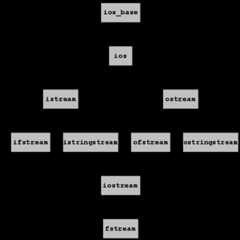
This chapter is organized as follows (see also Figure4):ios_base is the foundation upon which theiostream I/O library was built. It defines the core of all I/O operations andoffers, among other things, facilities for inspecting thestate of I/O streams and facilities foroutput formatting.ios is directlyderived fromios_base. Every class of the I/O library doing input or output is itselfderived from thisios class, and thereforeinherits its (and, byimplication:ios_base's) capabilities. The reader is urged to keep this inmind while reading this chapter. The concept of inheritance is not discussedhere, but rather in chapter13.ios is important because it implements communication with abuffer which is used by streams. This buffer is astreambuf objectwhich is responsible for the actual I/O to/from the actually useddevice,which might be a file, a keyboard, a screen, an Internet connection, etc.,etc.. Consequentlyiostream objects do not perform I/O operationsthemselves, but leave these operations to the (stream)buffer objects withwhich they are associated.ostream, defining theinsertion operator as well as other facilities writing information tostreams. Apart from inserting information into files it is possible to insertinformation intomemory buffers, for which theostringstream class isavailable. Formatting output is to a great extent possible using thefacilities defined in theios class, but it is also possible toinsertformatting commands directly into streams usingmanipulators. This aspect ofC++ output isdiscussed as well.istreamclass. This class defines theextraction operator and related inputfacilities. Comparably to inserting information into memory buffers (usingostringstream) a classistringstream is available to extractinformation from memory buffers.iostream combines the facilities offered byistream andostream. Thus,iostream objects can be used to readand write from the same object.fstream is a frequently encountered example of aniostream class:fstream objects are used to read and write from thesame file, which is often used in programs processing data bases. In thischapter topics likereading and writing from the same stream andmixingC andC++ I/O usingfilebuf objects are alsocovered. Other I/O related topics are covered elsewhere in theC++ Annotations(cf. section20.15 and chapter26).Stream objects have a limited but important role: they are the interfacebetween, on the one hand, the objects to be input or output and, on the otherhand, thestreambuf, which is responsible for the actual input and outputto thedevice accessed by astreambuf object.
This approach allows us to construct a new kind ofstreambuf for a newkind of device, and use that streambuf in combination with the `good old'istream- andostream-class facilities. It is important to understandthe distinction between the formatting roles of iostream objects and thebuffering interface to an external device as implemented in astreambufobject. Interfacing to new devices (likesockets orfile descriptors) requires the construction of a newkind ofstreambuf, rather than a new kind ofistream orostreamobject. Awrapper class may be constructed around theistream orostream classes, though, to ease the access to a special device. This ishow the stringstream classes were constructed.
iosfwd: sources should include this header file if only a declarationof the stream classes is required. For example, if a function defines areference parameter to anostream then the compiler does not need to knowexactly what anostream is. When declaring such a functiontheostream class merely needs to be be declared. One cannot useclass std::ostream; // erroneous declarationvoid someFunction(std::ostream &str);
but, instead, one should use:
#include <iosfwd> // correctly declares class ostreamvoid someFunction(std::ostream &str);
<ios>: sources should include this header file when usingtypes and facilites (likeios::off_type, see below) defined in theios class.<streambuf>: sources should include this header file when usingstreambuf orfilebuf classes. See sections14.8 and14.8.3.<istream>: sources should include this preprocessor directive whenusing the classistream or when using classes that do both input andoutput. See section6.5.1.<ostream>: sources should include this header file when using the classostream class or when using classes that do both input and output. Seesection6.4.1.<iostream>: sources should include this header file when using theglobal stream objects (likecin andcout) and also when defining astream capable of reading and writing from the same device (see also section14.8.2).<fstream>: sources should include this header file when using the filestream classes. See sections6.4.2,6.5.2, and6.6.3.<sstream>: sources should include this header file when using thestring stream classes. See sections6.4.3 and6.5.3.<iomanip>: sources should include this header file when usingparameterized manipulators. See section6.3.2.std::ios_base forms the foundation of all I/Ooperations, and defines, among other things, facilities for inspecting thestate of I/O streams and mostoutput formatting facilities. Everystream class of the I/O library is, through the classios,derivedfrom this class, andinherits its capabilities. Asios_base is thefoundation on which allC++ I/O was built, we introduce it here as thefirst class of theC++ I/O library.Note that, as inC, I/O inC++ isnot part of the language(although itis part of theANSI/ISO standard onC++). Although itis technically possible to ignore all predefined I/O facilities, nobody doesso, and the I/O library therefore represents ade facto I/O standard forC++. Also note that, as mentioned before, the iostream classes themselvesare not responsible for the eventual I/O, but delegate this to an auxiliaryclass: the classstreambuf or its derivatives.
It is neither possible nor required to construct anios_base objectdirectly. Its construction is always a side-effect of constructing an objectfurther down the class hierarchy, likestd::ios.Ios is the nextclass down the iostream hierarchy (see Figure4). Since allstream classes in turn inherit fromios, and thus also fromios_base,the distinction betweenios_base andios is in practice notimportant. Therefore, facilities actually provided byios_base will bediscussed as facilities provided byios. The reader who is interested inthe true class in which a particular facility is defined should consult therelevant header files (e.g.,ios_base.h andbasic_ios.h).
std::ios class is derived directly fromios_base, and itdefinesde facto the foundation for all stream classes of theC++ I/Olibrary.Although itis possible to construct anios objectdirectly, this is seldom done. The purpose of the classios is toprovide the facilities of the classbasic_ios, and to add several newfacilites, all related to thestreambuf object which is managedby objects of the classios.
All other stream classes are either directly or indirectly derived fromios. This implies, as explained in chapter13, that allfacilities of the classesios andios_base are also availableto other stream classes. Before discussing these additional stream classes,the features offered by the classios (and by implication: byios_base) are now introduced.
In some cases it may be required to includeios explicitly. An exampleis the situations where the formatting flags themselves (cf. section6.3.2.2) are referred to in source code.
The classios offers several member functions, most of which are relatedtoformatting. Other frequently used member functions are:
std::streambuf *ios::rdbuf():streambuf object forming the interface betweentheios object and the device with which theios object communicatesis returned. See sections14.8 and26.1.2 for more informationabout theclass streambuf.std::streambuf *ios::rdbuf(std::streambuf *new):The currentiosobject is associated with anotherstreambufobject. A pointer to theiosobject's originalstreambufobject is returned. The object to which this pointer points is not destroyedwhen thestreamobject goes out of scope, but is owned by the caller ofrdbuf.
std::ostream *ios::tie():ostream object that is currently tied to theios object is returned (see the next member). The return value 0indicates that currently noostream object is tied to theiosobject. See section6.5.5 for details.std::ostream *ios::tie(std::ostream *outs):The ostream object is tied to currentiosobject. This meansthat theostreamobject isflushed every time before an input oroutput action is performed by the currentiosobject. A pointer to theiosobject's originalostreamobject is returned. To break the tie,pass the argument 0. See section6.5.5 for an example.
Conditions are represented by the followingcondition flags:
ios::badbit:streambuf object to which the streaminterfaces. See the member functions below for some examples.ios::eofbit:ios object has sensedend of file.ios::failbit:int when nonumeric characters are available on input). In this case the stream itselfcould not perform the operation that was requested of it.ios::goodbit:Severalcondition member functions are available to manipulate ordetermine the states ofios objects. Originally they returnedintvalues, but their current return type isbool:
bool ios::bad():the valuetrueis returned when the stream'sbadbithas been set andfalseotherwise. Iftrueisreturned it indicates that an illegal operation has been requested at thelevel of thestreambufobject to which the stream interfaces. What doesthis mean? It indicates that thestreambufitself is behavingunexpectedly. Consider the following example:std::ostream error(0);Here an
ostreamobject is constructedwithout providing it with aworkingstreambufobject. Since this `streambuf' will never operateproperly, itsbadbitflag is raised from the very beginning:error.bad()returnstrue.
bool ios::eof():the valuetrueis returned when end of file(EOF) has been sensed (i.e., theeofbitflag has been set) andfalseotherwise. Assume we're reading lines line-by-line fromcin, butthe last line is not terminated by a final\ncharacter. In that casestd::getlineattempting to read the\ndelimiter hitsend-of-file first. This raises theeofbitflag andcin.eof()returnstrue. For example, assumestd::string strandmainexecuting thestatements:getline(cin, str);cout << cin.eof();Then
echo "hello world" | programprints the value 0 (no EOF sensed). But after
echo -n "hello world" | programthe value 1 (EOF sensed) is printed.
bool ios::fail():the valuetrueis returned whenbadreturnstrueor when thefailbitflag was set. The valuefalseis returnedotherwise. In the above example,cin.fail()returnsfalse,whether we terminate the final line with a delimiter or not (as we've reada line). However, executinganothergetlineresults inraising thefailbitflag, causingcin::fail()to returntrue. In general:failreturnstrueif the requested streamoperation failed. A simple example showing this consists of an attempt toextract anintwhen the input stream contains the texthelloworld. The valuenot fail()is returned by theboolinterpretation of a stream object (see below).
bool ios::good():the value of thegoodbitflag is returned. It equalstruewhen none of the othercondition flags (badbit, eofbit, failbit) was raised. Consider the following little program:#include <iostream>#include <string>using namespace std;void state(){ cout << "\n" "Bad: " << cin.bad() << " " "Fail: " << cin.fail() << " " "Eof: " << cin.eof() << " " "Good: " << cin.good() << '\n';}int main(){ string line; int x; cin >> x; state(); cin.clear(); getline(cin, line); state(); getline(cin, line); state();}When this program processes a file having two lines, containing,respectively,
helloandworld, while the secondline is not terminated by a\ncharacter the following is shown:Bad: 0 Fail: 1 Eof: 0 Good: 0 Bad: 0 Fail: 0 Eof: 0 Good: 1 Bad: 0 Fail: 0 Eof: 1 Good: 0Thus, extracting
xfails (goodreturningfalse). Then,the error state is cleared, and the first line is successfully read(goodreturningtrue). Finally the second line is read(incompletely):goodreturningfalse, andeofreturningtrue.
bool values:streams may be used in expressions expecting logicalvalues. Some examples are:if (cin) // cin itself interpreted as boolif (cin >> x) // cin interpreted as bool after an extractionif (getline(cin, str)) // getline returning cinWhen interpreting a stream as a logical value, it is actually `
notfail()' that is interpreted. The above examples may therefore be rewrittenas:if (not cin.fail())if (not (cin >> x).fail())if (not getline(cin, str).fail())The former incantation, however, is used almost exclusively.
The following members are available to manage error states:
void ios::clear():When an error condition has occurred, and the condition can berepaired, thenclearcan be used to clear the error state of the file. Anoverloaded version exists accepting state flags, that are set after firstclearing the current set of flags:clear(int state). Its returntype isvoid
ios::iostate ios::rdstate():The current set of flags that are set for aniosobject are returned(as anint). To test for a particular flag, use thebitwise andoperator:if (!(iosObject.rdstate() & ios::failbit)){ // last operation didn't fail}Note that this test cannot be performed for the
goodbitflag as itsvalue equals zero. To test for `good' use a constructionlike:if (iosObject.rdstate() == ios::goodbit){ // state is `good'}
void ios::setstate(ios::iostate state):A stream may be assigned a certain set of states usingThe membersetstate. Its return type isvoid. E.g.,cin.setstate(ios::failbit); // set state to `fail'To set multiple flags in one
setstate()call use thebitoroperator:cin.setstate(ios::failbit | ios::eofbit)
clear is a shortcut to clear all errorflags. Of course, clearing the flags doesn't automatically mean theerror condition has been cleared too. The strategy should be:clear is called.Formatting is used when it is necessary to, e.g., set the width of an outputfield or input buffer and to determine the form (e.g., theradix) inwhich values are displayed. Most formatting features belong to the realm oftheios class. Formatting is controlled by flags, defined by theiosclass. These flags may be manipulated in two ways: using specializedmember functions or usingmanipulators, which are directly inserted intoor extracted from streams. There is no special reason for using eithermethod; usually both methods are possible. In the following overviewthe various member functions are first introduced. Following this the flagsand manipulators themselves are covered. Examples are provided showing howthe flags can be manipulated and what their effects are.
Many manipulators are parameterless and are available once a stream headerfile (e.g.,iostream) has been included. Some manipulators requirearguments. To use the latter manipulators the header fileiomanip must beincluded.
ios &ios::copyfmt(ios &obj):obj are copied to the currentiosobject. The currentios object is returned.ios::fill() const:ios::fill(char padding):the padding character is redefined, the padding character thatwas used before the redefinition is returned. Instead of using this memberfunction thesetfillmanipulator may be inserted directly into anostream. Example:cout.fill('0'); // use '0' as padding charcout << setfill('+'); // use '+' as padding char
ios::fmtflags ios::flags() const:bit_and operator. Example:if (cout.flags() & ios::hex) cout << "Integral values are printed as hex numbers\n"
ios::fmtflags ios::flags(ios::fmtflags flagset):theprevious set of flags are returned and the new set offlags are defined byflagset. Multiple flags are specified using thebitoroperator. Example:// change the representation to hexadecimalcout.flags(ios::hex | cout.flags() & ~ios::dec);
int ios::precision() const:int ios::precision(int signif):the number of significant digits to use when outputting realvalues is set tosignif. The previously used number of significant digitsis returned. If the number of required digits exceedssignifthen thenumber is displayed in `scientific' notation (cf. section6.3.2.2). Manipulator:setprecision. Example:cout.precision(3); // 3 digits precisioncout << setprecision(3); // same, using the manipulatorcout << 1.23 << " " << 12.3 << " " << 123.12 << " " << 1234.3 << '\n';// displays: 1.23 12.3 123 1.23e+03
ios::fmtflags ios::setf(ios::fmtflagsflags):sets one or more formatting flags (use thebitoroperator to combine multiple flags). Already set flags are not affected. Theprevious set of flags is returned. Instead of using this member functionthe manipulatorsetiosflagsmay be used. Examples are provided in the nextsection (6.3.2.2).
ios::fmtflags ios::setf(ios::fmtflags flags, ios::fmtflags mask):clears all flags mentioned inmaskand sets the flagsspecified inflags. Theprevious set of flags is returned. Someexamples are (but see the next section (6.3.2.2) for a more thoroughdiscussion):// left-adjust information in wide fields:cout.setf(ios::left, ios::adjustfield); // display integral values as hexadecimal numbers:cout.setf(ios::hex, ios::basefield); // display floating point values in scientific notation:cout.setf(ios::scientific, ios::floatfield);
ios::fmtflags ios::unsetf(fmtflags flags):the specified formatting flags are cleared (leaving theremaining flags unaltered) and returns theprevious set of flags. Arequest to unset an active default flag (e.g.,cout.unsetf(ios::dec))is ignored. Instead of this member function the manipulatorresetiosflagsmay also be used. Example:cout << 12.24; // displays 12.24cout.setf(ios::fixed);cout << 12.24; // displays 12.240000cout.unsetf(ios::fixed); // undo a previous ios::fixed setting.cout << 12.24; // displays 12.24cout << resetiosflags(ios::fixed); // using manipulator rather // than unsetf
int ios::width() const:the currently active output field width to use on the nextinsertion is returned. The default value is 0, meaning `as many characters asneeded to write the value'.
int ios::width(int nchars):the field width of the next insertion operation is set tonchars, returning the previously used field width. This setting is notpersistent. It is reset to 0 after every insertion operation. Manipulator:std::setw(int). Example:cout.width(5);cout << 12; // using 5 chars field widthcout << setw(12) << "hello"; // using 12 chars field width
To display information in wide fields:
ios::internal:to addfill characters (blanks by default) between the minussign of negative numbers and the value itself. Other values and data types areright-adjusted. Manipulator:std::internal. Example:cout.setf(ios::internal, ios::adjustfield);cout << internal; // same, using the manipulatorcout << '\'' << setw(5) << -5 << "'\n"; // displays '- 5'
ios::left:std::left. Example:cout.setf(ios::left, ios::adjustfield);cout << left; // same, using the manipulatorcout << '\'' << setw(5) << "hi" << "'\n"; // displays 'hi '
ios::right:std::right. This is the default.Example:cout.setf(ios::right, ios::adjustfield);cout << right; // same, using the manipulatorcout << '\'' << setw(5) << "hi" << "'\n"; // displays ' hi'
Using various number representations:
ios::dec:std::dec. This is the default. Example:cout.setf(ios::dec, ios::basefield);cout << dec; // same, using the manipulatorcout << 0x10; // displays 16
ios::hex:std::hex. Example:cout.setf(ios::hex, ios::basefield);cout << hex; // same, using the manipulatorcout << 16; // displays 10
ios::oct:std::oct. Example:cout.setf(ios::oct, ios::basefield);cout << oct; // same, using the manipulatorcout << 16; // displays 20
std::setbase(int radix):cout << setbase(8); // octal numbers, use 10 for // decimal, 16 for hexadecimalcout << 16; // displays 20
Fine-tuning displaying values:
ios::boolalpha:true' forthetrue logical value, and `false' for thefalse logical valueusingboolalpha. By default this flag is not set. Complementary flag:ios::noboolalpha. Manipulators:std::boolalpha andstd::noboolalpha. Example:cout.setf(ios::boolalpha);cout << boolalpha; // same, using the manipulatorcout << (1 == 1); // displays true
ios::showbase:0x prefix is used, with octal values the prefix0. For the(default) decimal value no particular prefix is used. Complementary flag:ios::noshowbase. Manipulators:std::showbase andstd::noshowbase. Example:cout.setf(ios::showbase);cout << showbase; // same, using the manipulatorcout << hex << 16; // displays 0x10
ios::showpos:+ sign with positive decimal (only)values. Complementary flag:ios::noshowpos. Manipulators:std::showpos andstd::noshowpos. Example:cout.setf(ios::showpos);cout << showpos; // same, using the manipulatorcout << 16; // displays +16cout.unsetf(ios::showpos); // Undo showposcout << 16; // displays 16
ios::uppercase:ios::nouppercase. Manipulators:std::uppercase andstd::nouppercase. By default lowercase letters are used. Example:cout.setf(ios::uppercase);cout << uppercase; // same, using the manipulatorcout << hex << showbase << 3735928559; // displays 0XDEADBEEF
Displaying floating point numbers
ios::fixed:to display real values using a fixed decimal point (e.g., 12.25rather than 1.225e+01), thefixedformatting flag is used. It can be usedto set a fixed number of digits behind the decimal point. Manipulator:fixed. Example:cout.setf(ios::fixed, ios::floatfield);cout.precision(3); // 3 digits behind the . // Alternatively:cout << setiosflags(ios::fixed) << setprecision(3);cout << 3.0 << " " << 3.01 << " " << 3.001 << '\n'; << 3.0004 << " " << 3.0005 << " " << 3.0006 << '\n' // Results in: // 3.000 3.010 3.001 // 3.000 3.001 3.001The example shows that 3.0005 is rounded away from zero, becoming3.001 (likewise -3.0005 becomes -3.001). First setting precision and then
fixedhas the same effect.
ios::scientific:std::scientific. Example:cout.setf(ios::scientific, ios::floatfield);cout << scientific; // same, using the manipulatorcout << 12.25; // displays 1.22500e+01
ios::showpoint:ios::noshowpoint. Manipulators:std::showpoint,std::noshowpoint. Example:cout << fixed << setprecision(3); // 3 digits behind .cout.setf(ios::showpoint); // set the flagcout << showpoint; // same, using the manipulatorcout << 16.0 << ", " << 16.1 << ", " << 16;// displays: 16.000, 16.100, 16
Note that the final 16 is an integral rather than a floating point number,so it has no decimal point. Soshowpoint has no effect. Ifios::showpoint is not active trailing zeros are discarded. Ifthe fraction is zero the decimal point is discarded as well. Example:
cout.unsetf(ios::fixed, ios::showpoint); // unset the flagscout << 16.0 << ", " << 16.1;// displays: 16, 16.1
Handling whitespace and flushing streams
std::endl:endl should beavoided (in favor of inserting'\n') unless flushing the stream isexplicitly intended. Note that streams are automatically flushed when theprogram terminates or when a stream is `tied' to another stream (cf.tiein section6.3). Example:cout << "hello" << endl; // prefer: << '\n';
std::ends:std::flush:flush should be avoided unless it isexplicitly required to do so. Note that streams are automatically flushed whenthe program terminates or when a stream is `tied' to another stream(cf.tie in section6.3). Example:cout << "hello" << flush; // avoid if possible.
ios::skipws:std::skipws. Example:cin.setf(ios::skipws); // to unset, use // cin.unsetf(ios::skipws)cin >> skipws; // same, using the manipulatorint value;cin >> value; // skips initial blanks
ios::unitbuf:unitbufshould be avoided unless flushing the stream is explicitly intended. Note thatstreams are automatically flushed when the program terminates or when a streamis `tied' to another stream (cf.tie in section6.3). Complementaryflag:ios::nounitbuf. Manipulators:std::unitbuf,std::nounitbuf. Example:cout.setf(ios::unitbuf);cout << unitbuf; // same, using the manipulatorcout.write("xyz", 3); // flush follows write.std::ws:ios::noskipws has been set. Example(assume the input contains 4 blank characters followed by the characterX):cin >> ws; // skip whitespacecin.get(); // returns 'X'
std::ostreamclass. Theostream class defines the basic operators and members insertinginformation into streams: theinsertion operator (<<), and specialmembers likewrite writing unformatted information to streams.The classostream acts asbase class for several other classes, alloffering the functionality of theostream class, but adding their ownspecialties. In the upcoming sections the following classes are discussed:
ostream, offering the basic output facilities;ofstream, allowing us to write files(comparable toC'sfopen(filename, "w"));ostringstream, allowing us to write information tomemory (comparable toC'ssprintf function).ostream defines basic output facilities. Thecout,clogandcerr objects are allostream objects. All facilities related tooutput as defined by theios class are also available in theostreamclass.We may defineostream objects using the followingostream constructor:
std::ostream object(std::streambuf *sb):this constructor creates anostreamobject which is awrapper around an existingstd::streambufobject. It isn't possible todefine a plainostreamobject (e.g., usingstd::ostream out;) thatcan thereupon be used for insertions. Whencoutor its friends are used,we are actually using a predefinedostreamobject that has already beendefined for us and interfaces to the standard output stream using a(also predefined)streambufobject handling the actual interfacing.Itis, however, possible to define an
ostreamobject passing it a 0-pointer. Such an object cannot beused for insertions (i.e., it raises itsios::badflag when somethingis inserted into it), but it may be given astreambuflater. Thus it maybe preliminary constructed, suspending its use until an appropriatestreambufbecomes available (see also section14.8).
ostream class inC++ sources, the<ostream> header file must be included. To use the predefinedostream objects (std::cerr, std::cout etc.) the<iostream> headerfile must be included.ostream supports both formatted andbinary output.Theinsertion operator (<<) is used to insert values ina type safe way intoostream objects. This is calledformatted output, as binary values which are stored in the computer'smemory are converted to human-readableASCII characters according tocertain formatting rules.
The insertion operator points to theostream object toreceive the information. The normal associativity of <<remains unaltered, so when a statement like
cout << "hello " << "world";
is encountered, the leftmost two operands are evaluated first (cout<<"hello "), and anostream & object, which is actually thesamecout object, is returned. Now, the statement is reduced to
cout << "world";
and the second string is inserted intocout.
The << operator has a lot of (overloaded) variants, so many types ofvariables can be inserted intoostream objects. There is an overloaded<<-operator expecting anint, adouble, a pointer, etc. etc..Each operator returns theostream object into which the information so farhas been inserted, and can thus immediately be followed by the next insertion.
In addition to insertion operatorsostreams also supportstd::print. It is called as
std::ostream& os, std::format_string<Args...> fmt, Args&&... argswhere
... indicates that any number of arguments can be specified.However, since aprint-like functionality is hardly ever required inC++ programs it's not covered in detail in theC++ Annotations. Refer tocppreference.com for details aboutstd::print.When binary files must be written, normally notext-formatting is used or required: anint value should be written as aseries of raw bytes, not as a series ofASCII numeric characters 0 to9. The following member functions ofostream objects may be used towrite `binary files':
ostream& put(char c):ostream& write(char const *buffer, int length):length bytes, stored in thechar const*buffer to theostream object. Bytes are written as they are storedin the buffer, no formatting is done whatsoever. Note that the first argumentis achar const *: atype cast is required to write any othertype. For example, to write anint as an unformatted series ofbyte-values use:int x;out.write(reinterpret_cast<char const *>(&x), sizeof(int));
The bytes written by the abovewrite call are written to theostream in an order depending on theendian-ness of theunderlying hardware. Big-endian computers write the most significant byte(s)of multi-byte values first, little-endian computers first write the leastsignificant byte(s).
ostream object supportsrepositioning, they usuallydo. This means that it is possible to rewrite a section of the stream whichwas written earlier. Repositioning is frequently used in database applicationswhere it must be possible to access the information in the database at random.The current position can be obtained and modified using the following members:
ios::pos_type tellp():ostream &seekp(ios::off_type step, ios::seekdir org):off_typestep representing the number of bytes the current streamposition is moved with respect toorg. Thestep valuemay be negative, zero or positive.The origin of the step,org is a value in theios::seekdir enumeration. Its values are:
ios::beg:ios::cur:tellp).ios::end:EOF will pad the intermediate bytes with 0-valued bytes:null-bytes. Seeking beforeios::beg raises theios::fail flag.Different fromseekg (cf. section6.5.1.2)seekp does notclear the stream'sios::eofbit. To reset anostream's state to `good',itsclear member should be called.
ios::unitbuf flag has been set, information written to anostream object is not immediately written to the physical stream. Rather,an internal buffer is filled during the write-operations, and when full itis flushed.The stream'sinternal buffer can be flushed under program control:
ostream& flush():ostream objectis flushed to the device to which theostream object interfaces. A streamis flushed automatically when:std::ofstream class is derived from theostream class:it has the same capabilities as theostream class, but can be used toaccess files orcreate files for writing.In order to use theofstream class inC++ sources, the<fstream> header file must be included. Includingfstream does notautomatically make available the standard streamscin,cout andcerr. Includeiostream to declare these standard streams.
The following constructors are available forofstream objects:
ofstream object:this is the basic constructor. It defines anofstreamobjectwhich may be associated with an actual file later, using itsopen()member(see below).
ofstream object(char const *name, ios::openmode mode = ios::out):this constructor defines anofstreamobject and associatesit immediately with the file namednameusing output modemode. Section6.4.2.1 provides an overview of available outputmodes. Example:ofstream out("/tmp/scratch");
ofstream using afile descriptor. The reason for this is (apparently) that filedescriptors are not universally available over different operating systems.Fortunately, file descriptors can be used (indirectly) with astd::streambuf object (and in some implementations: with astd::filebuf object, which is also astreambuf).Streambuf objectsare discussed in section14.8,filebuf objects are discussed insection14.8.3.Instead of directly associating anofstream object with a file, theobject can be constructed first, and opened later.
void open(char const *name, ios::openmode mode = ios::out):ofstream object with an actual file. If theios::fail flag was set before callingopen and opening succeeds theflag is cleared. Opening an already open stream fails. To reassociate a streamwith another file it must first be closed:ofstream out("/tmp/out");out << "hello\n";out.close(); // flushes and closes outout.open("/tmp/out2");out << "world\n";void close():ofstream object. The function sets theios::failflag of the closed object. Closing the file flushes any buffered informationto the associated file. A file is automatically closed when the associatedofstream object ceases to exist.bool is_open() const:ofstream ostr was executed. Whenwe now check its status throughgood(), a non-zero (i.e.,OK) value isreturned. The `good' status here indicates that the stream object has beenconstructed properly. It doesn't mean the file is also open. To test whether astream is actually open,is_open should be called. If it returnstrue,the stream is open. Example: #include <fstream> #include <iostream> using namespace std; int main() { ofstream of; cout << "of's open state: " << boolalpha << of.is_open() << '\n'; of.open("/dev/null"); // on Unix systems cout << "of's open state: " << of.is_open() << '\n'; } /* Generated output: of's open state: false of's open state: true */ofstream (oristream, see section6.5.2)objects. The values are of typeios::openmode. Flags may becombined using thebitor operator.ios::app:ios::ate below). Thefile is created if it doesn't yet exist. When opening a stream in this modeany existing content of the file is kept.ios::ate:ofstream out("gone", ios::ate)rewrites the filegone,because the impliedios::out causes the rewriting. If rewriting of anexisting file should be prevented, theios::in mode should be specified too. However, whenios::in is specified thefile must already exist. Theate mode only initially positions the file atthe end of file position. After that information may be written in the middleof the file usingseekp. When theapp mode is used information isonly written at end of file (effectively ignoringseekp operations).ios::binary:ios::in:ios::out:ios::trunc:in | out: The stream may be read and written. However, the file must exist.in | out | trunc: The stream may be read and written. It is (re)created empty first.
An interesting subtlety is that theopen members of theifstream,ofstream andfstream classes have a second parameter of typeios::openmode. In contrast to this, thebitor operator returns anint when applied to two enum-values. The question why thebitoroperator may nevertheless be used here is answered in a later chapter(cf. section11.13).
streamfacilities,std::ostringstream objects should be used.As the classostringstream is derived from the classostream allostream's facilities are available toostringstream objects aswell. To use and defineostringstream objects the header file<sstream> must be included. In addition the classostringstream offersthe following constructors and members:ostringstream ostr(string const &init, ios::openmode mode = ios::out):openmode asios::ate, theostringstream object is initialized by thestring init and remaininginsertions are appended to the content of theostringstream object.ostringstream ostr(ios::openmode mode = ios::out):ios::app). Example:std::ostringstream out;
std::string str() const:ostringstream object is returned.void str(std::string const &str):ostringstream class:several values are inserted into the object. Then, the text contained by theostringstream object is stored in astd::string, whose length andcontent are thereupon printed. Suchostringstream objects are most oftenused for doing `type to string' conversions,like convertingint values to text. Formatting flags can be used withostringstreams as well, as they are part of theostream class.Here is an example showing anostringstream object being used:
#include <iostream> #include <sstream> using namespace std; int main() { ostringstream ostr("hello ", ios::ate); cout << ostr.str() << '\n'; ostr.setf(ios::showbase); ostr.setf(ios::hex, ios::basefield); ostr << 12345; cout << ostr.str() << '\n'; ostr << " -- "; ostr.unsetf(ios::hex); ostr << 12; cout << ostr.str() << '\n'; ostr.str("new text"); cout << ostr.str() << '\n'; ostr.seekp(4, ios::beg); ostr << "world"; cout << ostr.str() << '\n'; } /* Output from this program: hello hello 0x3039 hello 0x3039 -- 12 new text new world */std::put_time(std::tm const *specs, char const*fmt) can be used to insert time specifications intostd::ostreamobjects.Time specifications are provided instd::tm objects, and the way the timeshould be displayed is defined by theformat stringfmt.
Starting with achrono::time_point the following steps must be performedto insert the time point's time into astd::ostream:
time_point (e.g.:system_clock{}.now());to_time_t function, saving thereturnedtime_t value:time_t secs = system_clock::to_time_t( system_clock{}.now() );sec's address to eitherstd::localtime orstd::gmtime. These functions returnstd::tm structscontaining the required time components expressed in, respectively, thecomputer's local time or GMT;localtime orgmtime togetherwith a format string (e.g.,"%c") toput_time, inserting it into anstd::ostream: // displays, e.g., Mon Nov 4 21:34:59 2019time_t secs = system_clock::to_time_t( system_clock{}.now() );std::cout << std::put_time(std::localtime(&secs), "%c") << '\n';A simple function returningput_time's return value and expecting atime_point and format string can be defined which handles the above twostatements. E.g., (omitting thestd:: andstd::chrono:: specificationsfor brevity):
auto localTime(time_point<system_clock> const &tp, char const *fmt) { time_t secs = system_clock::to_time_t( tp ); return put_time(localtime(&secs), fmt); } // used as: cout << localTime(system_clock{}.now(), "%c") << '\n';Many more format specifiers are recognized byput_time. Specifiers startwith%. To display a percent character as part of the format string writeit twice:%%. In addition to the standard escape sequences,%n can beused instead of\n, and%t can be used instead of\t.
| Year specifiers | ||||
| Specifier | Meaning | |||
| Month specifiers | ||||
| Specifier | Meaning | |||
| Week specifiers | ||||
| Specifier | Meaning | |||
| Day of the year/month specifiers | ||||
| Specifier | Meaning | |||
| Day of the week specifiers | ||||
| Specifier | Meaning | |||
| Hour, minute, second specifiers | ||||
| Specifier | Meaning | |||
| Additional specifiers | ||||
| Specifier | Meaning | |||
std::istreamclass. Theistream class defines the basic operators and membersextracting information from streams: theextraction operator (>>),and special members likeistream::read reading unformattedinformation from streams.The classistream acts asbase class for several other classes, alloffering the functionality of theistream class, but adding their ownspecialties. In the upcoming sections the following classes are discussed:
istream, offering the basic facilities for doing input;ifstream, allowing us to read files(comparable toC'sfopen(filename, "r"));istringstream, allowing us to extract information frommemory rather than from file (comparable toC'ssscanf function).istream defines basic input facilities. Thecin object, isanistream object. All facilities related to input as defined by theios class are also available in theistream class.We may defineistream objects using the followingistream constructor:
istream object(streambuf *sb):this constructor can be used to construct a wrapper aroundan existingstd::streambufobject. Similarly toostreamobjects,istreamobjects may be defined by passing it initially a 0-pointer. See section6.4.1 fora discussion, see also section14.8, and see chapter26for examples.
istream class inC++ sources, the<istream> header file must be included. To use the predefinedistream objectcin, the<iostream> header file must be included.istream supports both formatted and unformatted (binary) input. Theextraction operator (operator>>) isused to extract values in atype safe way fromistream objects. Thisis calledformatted input, whereby human-readableASCII characters areconverted, according to certain formatting rules, to binary values.The extraction operator points to the objects or variables to receive newvalues. The normal associativity of >> remains unaltered, so when astatement like
cin >> x >> y;
is encountered, the leftmost two operands are evaluated first (cin>>x), and anistream & object, which is actually the samecin object, is returned. Now, the statement is reduced to
cin >> y
and they variable is extracted fromcin.
The >> operator has many (overloaded) variants and thus many types ofvariables can be extracted fromistream objects. There is an overloaded>> available for the extraction of anint, of adouble, of astring, of an array of characters, possibly to the location pointed at by apointer, etc., etc.. String or character array extraction by default first skips all whitespace characters, and then extractsall consecutive non-whitespace characters. Once an extraction operator hasbeen processed theistream object from which the information was extractedis returned and it can immediately be used for additionalistreamoperations that appear in the same expression.
Streams do not support facilities for formatted input as offered byC'sscanf andvscanf functions. Although it is not difficult toadd such facilities to the world of streams,scanf-like functionality isin practice never needed inC++ programs. Furthermore, as it ispotentially type-unsafe, it is better to avoid usingC-type formattedinput.
When binary files must be read, the information shouldnormally not be formatted: anint value should be read as a series ofunaltered bytes, not as a series ofASCII numeric characters 0 to 9. Thefollowing member functions for reading information fromistream objectsare available:
int gcount() const:int get():char value using anint return type.EOF is returned if no more character are available.istream &get(char &ch):ch. The member function returns the stream itself which may beinspected to determine whether a character was obtained or not.istream &get(char *buffer, int len, char delim = '\n'):len - 1 characters are read from the inputstream into the array starting atbuffer, which should be at leastlenbytes long. Reading also stops when the delimiterdelim isencountered. However, the delimiter itself isnot removed from the inputstream.Having stored the characters intobuffer, a 0-valued character iswritten beyond the last character stored into thebuffer. The functionseof andfail (see section6.3.1) return 0 (false) if thedelimiter was encountered before readinglen - 1 characters or if thedelimiter was not encountered after readinglen - 1 characters. It is OKto specifiy a 0-valued character delimiter: this way NTBSs may be read from a(binary) file.
istream &getline(char *buffer, int len, char delim = '\n'):get memberfunction, butgetline removesdelim from the stream if it is actuallyencountered. The delimiter itself, if encountered, isnot stored in thebuffer. Ifdelim wasnot found (before readinglen - 1characters) thefail member function, and possibly alsoeof returnstrue. Realize that thestd::string class also offers a functionstd::getline which is generally preferred over thisgetline memberfunction that is described here (see section5.2.4).istream &ignore():istream &ignore(int n):n characters are skipped from the input stream.istream &ignore(int n, int delim):n characters are skipped but skipping charactersstops after having removeddelim from the input stream.int peek():EOFis returned if no more characters are available.istream &putback(char ch):ch is `pushed back' into the input stream, tobe read again as the next available character.EOF is returned if thisis not allowed. Normally, it is OK to put back one character. Example:string value;cin >> value;cin.putback('X'); // displays: Xcout << static_cast<char>(cin.get());istream &read(char *buffer, int len):len bytes are read from the input stream into thebuffer. IfEOF is encountered first, fewer bytes are read, with themember functioneof returningtrue. This function is commonly usedwhen readingbinary files. Section6.5.2 contains an example inwhich this member function is used. The member functiongcount() may beused to determine the number of characters that were retrieved byread.istream &readsome(char *buffer, int len):len bytes are read from the input stream into thebuffer. All available characters are read into the buffer, but ifEOFis encountered, fewer bytes are read, without setting theios::eofbitorios::failbit.istream &unget():istream object supportsrepositioning, some do. Thismeans that it is possible to read the same section of a streamrepeatedly. Repositioning is frequently used indatabase applicationswhere it must be possible to access the information in the database randomly.The current position can be obtained and modified using the following members:
ios::pos_type tellg():istream &seekg(ios::off_type step, ios::seekdir org):off_typestep representing the number of bytes the current streamposition is moved with respect toorg. Thestep value may be negative,zero or positive.The origin of the step,org is a value in theios::seekdir enumeration. Its values are:
ios::beg:ios::cur:tellp).ios::end:ios::beg raises theios::failbitflag.Callingseekg clears theistream's ios::failbit, but not itsios::badbit orios::badbit. To ensure that the stream's state is resetto `good' its memberclear should be called.
To illustrate: in the following examplecin's ios::eofbit isset. Followingseekg that bit is cleared, but itsios::goodbit stilisn't set. Since itsgoodbit isn't set, extraction fails followingseekg:
int main() // in 'src.cc' { cin.setstate(ios::eofbit | ios::failbit); cerr << cin.good() << ' ' << cin.eof() << '\n'; cin.seekg(0); cerr << cin.good() << ' ' << cin.eof() << '\n' << (cin.get() == EOF ? "failed" : "OK") << '\n'; cin.clear(); cerr << cin.good() << ' ' << cin.eof() << '\n' << (cin.get() == EOF ? "failed" : "OK") << '\n'; } outputs when called as 'a.out < src.cc': 0 1 0 0 failed 1 0 OKstd::ifstream class is derived from theistream class:it has the same capabilities as theistream class, but can be used toaccess files for reading.In order to use theifstream class inC++ sources, the<fstream> header file must be included. Includingfstream does notautomatically make available the standard streamscin,cout andcerr. Includeiostream to declare these standard streams.
The following constructors are available forifstream objects:
ifstream object:this is the basic constructor. It defines anifstreamobjectwhich may be associated with an actual file later, using itsopen()member(see below).
ifstream object(char const *name, ios::openmode mode = ios::in):this constructor can be used to define anifstreamobjectand associate it immediately with the file namednameusing input modemode. Section6.4.2.1 provides an overview of available inputmodes. Example:ifstream in("/tmp/input");
Instead of directly associating anifstream object with a file, theobject can be constructed first, and opened later.
void open(char const *name, ios::openmode mode = ios::in):ifstream object with an actual file. If theios::fail flag was set before callingopen and opening succeeds theflag is cleared. Opening an already open stream fails. To reassociate a streamwith another file it must first be closed:ifstream in("/tmp/in");in >> variable;in.close(); // closes inin.open("/tmp/in2");in >> anotherVariable;void close():ifstream object. The function sets theios::failflag of the closed object. Closing the file flushes any buffered informationto the associated file. A file is automatically closed when the associatedifstream object ceases to exist.bool is_open() const:ifstream ostr was executed. Whenwe now check its status throughgood(), a non-zero (i.e.,OK) value isreturned. The `good' status here indicates that the stream object has beenconstructed properly. It doesn't mean the file is also open. To test whether astream is actually open,is_open should be called. If it returnstrue,the stream is open. Also see the example in section6.4.2. Thefollowing example illustrates reading from a binary file (see also section6.5.1.1): #include <fstream> using namespace std; int main(int argc, char **argv) { ifstream in(argv[1]); double value; // reads double in raw, binary form from file. in.read(reinterpret_cast<char *>(&value), sizeof(double)); }stream facilities,std::istringstream objects shouldbe used. As the classistringstream is derived from the classistreamallistream's facilities are available toistringstream objects aswell. To use and defineistringstream objects the header file<sstream> must be included. In addition the classistringstream offersthe following constructors and members:istringstream istr(string const &init, ios::openmode mode = ios::in):init's contentistringstream istr(ios::openmode mode = ios::in):std::istringstream in;
void str(std::string const &str):istringstream class:several values are extracted from the object. Suchistringstream objectsare most often used for doing `string to type'conversions, like converting text toint values (cf.C'satoifunction). Formatting flags can be used withistringstreams as well, asthey are part of theistream class. In the example note especially theuse of the memberseekg: #include <iostream> #include <sstream> using namespace std; int main() { istringstream istr("123 345"); // store some text. int x; istr.seekg(2); // skip "12" istr >> x; // extract int cout << x << '\n'; // write it out istr.seekg(0); // retry from the beginning istr >> x; // extract int cout << x << '\n'; // write it out istr.str("666"); // store another text istr >> x; // extract it cout << x << '\n'; // write it out } /* output of this program: 3 123 666 */fail returnstrue),break from the loopgetline(istream &, string &) (see section6.5.1.1) returns anistream &, so here reading and testing may be contracted using oneexpression. Nevertheless, the above mold represents the general case. So,the following program may be used to copycin tocout:#include <iostream>using namespace::std;int main(){ while (true) { char c; cin.get(c); if (cin.fail()) break; cout << c; }}Contraction is possible here by combiningget with theif-statement, resulting in:
if (!cin.get(c)) break;
Even so, this would still follow the basic rule: `read first, test later'.
Simply copying a file isn't required very often. More often a situation isencountered where a file is processed up to a certain point, followed by plaincopying the file's remaining information. The next program illustratesthis. Usingignore to skip the first line (for the sake of the example itis assumed that the first line is at most 80 characters long), the secondstatement uses yet another overloaded version of the <<-operator, inwhich astreambuf pointer is inserted intoa stream. As the memberrdbuf returns a stream'sstreambuf *, we havea simple means of inserting a stream's content into anostream:
#include <iostream> using namespace std; int main() { cin.ignore(80, '\n'); // skip the first line and... cout << cin.rdbuf(); // copy the rest through the streambuf * } This way of copying streams only assumes the existence of astreambufobject. Consequently it can be used with all specializations of thestreambuf class.ios objectsusing thetie member function. Tying results in flushing theostream'sbuffer whenever aninput oroutput operation is performed on theiosobject to which theostream object is tied. By defaultcout is tiedtocin (usingcin.tie(cout)). This tie means that whenever anoperation oncin is requested,cout is flushed first. To break thetie,ios::tie(0) can be called. In the example:cin.tie(0).Another useful coupling of streams is shown by the tie betweencerr andcout. Because of the tie standard output and error messages written to thescreen are shown in sync with the time at which they were generated:
#include <iostream> using namespace std; int main() { cerr.tie(0); // untie cout << "first (buffered) line to cout "; cerr << "first (unbuffered) line to cerr\n"; cout << "\n"; cerr.tie(&cout); // tie cout to cerr cout << "second (buffered) line to cout "; cerr << "second (unbuffered) line to cerr\n"; cout << "\n"; } /* Generated output: first (unbuffered) line to cerr first (buffered) line to cout second (buffered) line to cout second (unbuffered) line to cerr */An alternative way to couple streams is to make streams use a commonstreambuf object. This can be implemented using theios::rdbuf(streambuf *) member function. This way two streams can use,e.g. their own formatting, one stream can be used for input, the other foroutput, and redirection using the stream library rather than operatingsystem calls can be implemented. See the next sections for examples.
ofstream out(string const &name) { ofstream ret(name); // construct ofstream return ret; // return value optimization, but } // OK as moving is supported int main() { ofstream mine(out("out")); // return value optimizations, but // OK as moving is supported ofstream base("base"); ofstream other; base.swap(other); // swapping streams is OK other = std::move(base); // moving streams is OK // other = base; // this would fail: copy assignment // is not available for streams }ios::rdbuf streams can be forced to share theirstreambuf objects. Thus information written to onestream is actually written to another stream; a phenomenon normallycalledredirection. Redirection is commonly implemented at theoperating system level, and sometimes that is still necessary (seesection26.2.3).A common situation where redirection is useful is when error messages shouldbe written to file rather than to the standard error stream, usually indicatedby itsfile descriptor number 2. In theUnix operating system using thebash shell, this can be realized as follows:
program 2>/tmp/error.log
Following this command any error messages written byprogram arewritten to/tmp/error.log, instead of appearing on the screen.
Here is an example showing how this can be implemented usingstreambufobjects. Assumeprogram expects an argument defining the nameof the file to write the error messages to. It could be called as follows:
program /tmp/error.log
The program looks like this, an explanation is provided below theprogram's source text:
#include <iostream> #include <fstream> using namespace std; int main(int argc, char **argv) { ofstream errlog; // 1 streambuf *cerr_buffer = 0; // 2 if (argc == 2) { errlog.open(argv[1]); // 3 cerr_buffer = cerr.rdbuf(errlog.rdbuf()); // 4 } else { cerr << "Missing log filename\n"; return 1; } cerr << "Several messages to stderr, msg 1\n"; cerr << "Several messages to stderr, msg 2\n"; cout << "Now inspect the contents of " << argv[1] << "... [Enter] "; cin.get(); // 5 cerr << "Several messages to stderr, msg 3\n"; cerr.rdbuf(cerr_buffer); // 6 cerr << "Done\n"; // 7 } /* Generated output on file argv[1] at cin.get(): Several messages to stderr, msg 1 Several messages to stderr, msg 2 at the end of the program: Several messages to stderr, msg 1 Several messages to stderr, msg 2 Several messages to stderr, msg 3 */errlog is theofstream to write the error messages to, andcerr_buffer is a pointerto astreambuf, to point to the originalcerr buffer.cerr now writes tothestreambuf defined byerrlog. It is important thatthe original buffer used bycerr is saved, as explained below.errlog object is destroyed at the end ofmain. Ifcerr'sbuffer would not have been restored, then at that pointcerr would refer to a non-existingstreambuf object, which mightproduce unexpected results. It is the responsibility of the programmer tomake sure that an originalstreambuf is saved before redirection, and isrestored when the redirection ends.Done is again written to the screen, asthe redirection has been terminated.std::iostreamobjects. Commonly encountered arestd::fstream objects andsometimesstd::stringstream objects. Other types ofreadable and writable streams can be defined, by deriving such streams fromthestd::iostream class (cf. chapter14, in particular itssection14.8.2).In this section we concentrate on thestd::fstream class. As withifstream andofstream objects, thefstream constructor expects thename of the file to be opened:
fstream inout("iofile", ios::in | ios::out);Note the use of the constantsios::in andios::out,indicating that the file must be opened for both reading and writing. Multiplemode indicators may be used, concatenated by thebitor operator.Alternatively, instead ofios::out,ios::app could have beenused and mere writing would become appending (at the end of the file).
Reading and writing to the same stream is always a bit awkward: what to dowhen the stream may not yet exist, but if it already exists it should notbe rewritten? To realize this the following approach can be used:
#include <fstream> #include <iostream> #include <string> using namespace std; int main() { fstream rw("fname", ios::out | ios::in); if (!rw) // file didn't exist yet { rw.clear(); // try again, creating it using ios::trunc rw.open("fname", ios::out | ios::trunc | ios::in); } if (!rw) // can't even create it: bail out { cerr << "Opening `fname' failed miserably" << '\n'; return 1; } cerr << "We're at: " << rw.tellp() << '\n'; // write something rw << "Hello world" << '\n'; rw.seekg(0); // go back and read what's written string s; getline(rw, s); cout << "Read: " << s << '\n'; } Under this approach if the construction failsfname didn't yetexist. But then, after clearing the failure flag,open is used alsospecifying theios::trunc flag: this creates an empty file, butbecause ofios::in the file is also readable. In additionios::ate could be specified, ensuring that the initial read/writeaction would by default occur atEOF.UnderDOS-like operating systems that use themultiple character sequence\r\n to separate lines intext files theflagios::binary is required to processbinary files ensuringthat\r\n combinations are processed as two characters. In general,ios::binary should be specified when binary (non-text) files are to beprocessed. By default files are opened as text files.Unix operatingsystems do not distinguish text files from binary files.
Withfstream (in general:iostream) objects, combinations of fileflags are used to make sure that a stream is or is not (re)created empty whenopened. See section6.4.2.1 for details.
Once a file has been opened in read and write mode, the << operatorcan be used to insert information into the file, while the >> operatormay be used to extract information from the file. These operations may beperformed in any order, but aseekg orseekp operation is requiredwhen switching between insertions and extractions. The seek operation is usedto activate the stream's data used for reading or those used for writing (andvice versa). Theistream andostream parts offstream objectsshare the stream's data buffer and by performing the seek operation the streameither activates itsistream or itsostream part. If the seek isomitted, reading after writing and writing after reading simply fails. Theexample shows a whitespace-delimited word being read from a file, writinganother string to the file, just beyond the point where the just read wordterminated. Finally yet another string is read which is found just beyond thelocation where the just written strings ended:
fstream f("filename", ios::in | ios::out); string str; f >> str; // read the first word // write a well-known text f.seekp(0, ios::cur); f << "hello world"; f.seekg(0, ios::cur); f >> str; // and read againSince aseek orclear operation is required when alternatingbetween read and write (extraction and insertion) operations on the same fileit is not possible to execute a series of << and >> operations inone expression statement.
Of course, random insertions and extractions are hardly ever used. Generally,insertions and extractions occur at well-known locations in a file. In thosecases, the position where insertions or extractions are required can becontrolled and monitored by theseekg,seekp, tellg andtellpmembers (see sections6.4.1.2 and6.5.1.2).
Error conditions (see section6.3.1) occurring due to, e.g., readingbeyond end of file, reaching end of file, or positioning before begin of file,can be cleared by theclear member function. Followingclearprocessing may continue. E.g.,
fstream f("filename", ios::in | ios::out); string str; f.seekg(-10); // this fails, but... f.clear(); // processing f continues f >> str; // read the first wordA situation where files are both read and written is seen indatabase applications, using files consisting of records having fixedsizes, and where locations and sizes of pieces of information are known. Forexample, the following program adds text lines to a (possibly existing)file. It can also be used to retrieve a particular line, given itsorder-number in the file. Abinary fileindex allows for the quickretrieval of the location of lines.
#include <iostream> #include <fstream> #include <string> #include <climits> using namespace std; void err(char const *msg) { cout << msg << '\n'; } void err(char const *msg, long value) { cout << msg << value << '\n'; } void read(fstream &index, fstream &strings) { int idx; if (!(cin >> idx)) // read index { cin.clear(); // allow reading again cin.ignore(INT_MAX, '\n'); // skip the line return err("line number expected"); } index.seekg(idx * sizeof(long)); // go to index-offset long offset; if ( !index.read // read the line-offset ( reinterpret_cast<char *>(&offset), sizeof(long) ) ) return err("no offset for line", idx); if (!strings.seekg(offset)) // go to the line's offset return err("can't get string offset ", offset); string line; if (!getline(strings, line)) // read the line return err("no line at ", offset); cout << "Got line: " << line << '\n'; // show the line } void write(fstream &index, fstream &strings) { string line; if (!getline(cin, line)) // read the line return err("line missing"); strings.seekp(0, ios::end); // to strings index.seekp(0, ios::end); // to index long offset = strings.tellp(); if ( !index.write // write the offset to index ( reinterpret_cast<char *>(&offset), sizeof(long) ) ) return err("Writing failed to index: ", offset); if (!(strings << line << '\n')) // write the line itself return err("Writing to `strings' failed"); // confirm writing the line cout << "Write at offset " << offset << " line: " << line << '\n'; } int main() { fstream index("index", ios::trunc | ios::in | ios::out); fstream strings("strings", ios::trunc | ios::in | ios::out); cout << "enter `r <number>' to read line <number> or " "w <line>' to write a line\n" "or enter `q' to quit.\n"; while (true) { cout << "r <nr>, w <line>, q ? "; // show prompt index.clear(); strings.clear(); string cmd; cin >> cmd; // read cmd if (cmd == "q") // process the cmd. return 0; if (cmd == "r") read(index, strings); else if (cmd == "w") write(index, strings); else if (cin.eof()) { cout << "\n" "Unexpected end-of-file\n"; return 1; } else cout << "Unknown command: " << cmd << '\n'; } } Another example showing readingand writing of files is provided bythe next program. It also illustrates the processing of NTBSs: #include <iostream> #include <fstream> using namespace std; int main() { // r/w the file fstream f("hello", ios::in | ios::out | ios::trunc); f.write("hello", 6); // write 2 NTB strings f.write("hello", 6); f.seekg(0, ios::beg); // reset to begin of file char buffer[100]; // or: char *buffer = new char[100] char c; // read the first `hello' cout << f.get(buffer, sizeof(buffer), 0).tellg() << '\n'; f >> c; // read the NTB delim // and read the second `hello' cout << f.get(buffer + 6, sizeof(buffer) - 6, 0).tellg() << '\n'; buffer[5] = ' '; // change asciiz to ' ' cout << buffer << '\n'; // show 2 times `hello' } /* Generated output: 5 11 hello hello */A completely different way to read and write streams may be implementedusingstreambuf members. All considerations mentioned so far remain valid(e.g., before a read operation following a write operationseekg must beused). Whenstreambuf objects are used, either anistream is associated with thestreambuf object of anotherostreamobject, or anostream object is associated with thestreambuf object of anotheristream object. Here is the previousprogram again, now usingassociated streams:
#include <iostream> #include <fstream> #include <string> using namespace std; void err(char const *msg); // see earlier example void err(char const *msg, long value); void read(istream &index, istream &strings) { index.clear(); strings.clear(); // insert the body of the read() function of the earlier example } void write(ostream &index, ostream &strings) { index.clear(); strings.clear(); // insert the body of the write() function of the earlier example } int main() { ifstream index_in("index", ios::trunc | ios::in | ios::out); ifstream strings_in("strings", ios::trunc | ios::in | ios::out); ostream index_out(index_in.rdbuf()); ostream strings_out(strings_in.rdbuf()); cout << "enter `r <number>' to read line <number> or " "w <line>' to write a line\n" "or enter `q' to quit.\n"; while (true) { cout << "r <nr>, w <line>, q ? "; // show prompt string cmd; cin >> cmd; // read cmd if (cmd == "q") // process the cmd. return 0; if (cmd == "r") read(index_in, strings_in); else if (cmd == "w") write(index_out, strings_out); else cout << "Unknown command: " << cmd << '\n'; } } In this examplestreambuf objects of existingstreams are notifstream orofstream objects but basicistream andostream objects.streambuf object is not defined by anifstream orofstream object. Instead it is defined outside of the streams, usingafilebuf (cf. section14.8.3) and constructions like:filebuf fb("index", ios::in | ios::out | ios::trunc);istream index_in(&fb);ostream index_out(&fb);ifstream object can be constructed using stream modes normallyused withofstream objects. Conversely, anofstream objects can beconstructed using stream modes normally used withifstream objects.istream andostreams share astreambuf, then theirread and write pointers (should) point to the shared buffer: they are tightlycoupled. However, instead of using two objects, defining/using aiostreamobject receiving thestreambuf automatically ensures that positioning forreading and writing is synchronized (see also section14.8.2).streambuf used byaniostream object over using a predefinedfstream object is that thestream doesn't have to be a named file (see also section14.8).Likefstream objects string-stream objects can also be used for readingand writing. After including the<sstream> header file astd::stringstream can be defined which supports bothreading and writing. After inserting information into astringstreamobjectseekg(0) can be called to read its info from the beginning of itscontent. When astringstream must repeatedly be used for reading andwriting call itsclear andstr members before starting a new writingcycle. Alternatively, astringstream str can be reinitialized usingstr= stringstream{}. Here is an example:
#include <iostream> #include <sstream> using namespace std; int main(int argc, char **argv) { stringstream io; for (size_t redo = 0; redo != 2; ++redo) { io.clear(); // clears the not-good flags io.str(""); io << argv[0] << '\n'; io.seekg(0); string line; while (getline(io, line)) // results in io.eof() cout << line << '\n'; } }