








FastAPI in Containers - Docker
When deploying FastAPI applications a common approach is to build aLinux container image. It's normally done usingDocker. You can then deploy that container image in one of a few possible ways.
Using Linux containers has several advantages includingsecurity,replicability,simplicity, and others.
Tip
In a hurry and already know this stuff? Jump to theDockerfile below 👇.
Dockerfile Preview 👀
FROMpython:3.14WORKDIR/codeCOPY./requirements.txt/code/requirements.txtRUNpipinstall--no-cache-dir--upgrade-r/code/requirements.txtCOPY./app/code/appCMD["fastapi","run","app/main.py","--port","80"]# If running behind a proxy like Nginx or Traefik add --proxy-headers# CMD ["fastapi", "run", "app/main.py", "--port", "80", "--proxy-headers"]What is a Container
Containers (mainly Linux containers) are a verylightweight way to package applications including all their dependencies and necessary files while keeping them isolated from other containers (other applications or components) in the same system.
Linux containers run using the same Linux kernel of the host (machine, virtual machine, cloud server, etc). This just means that they are very lightweight (compared to full virtual machines emulating an entire operating system).
This way, containers consumelittle resources, an amount comparable to running the processes directly (a virtual machine would consume much more).
Containers also have their ownisolated running processes (commonly just one process), file system, and network, simplifying deployment, security, development, etc.
What is a Container Image
Acontainer is run from acontainer image.
A container image is astatic version of all the files, environment variables, and the default command/program that should be present in a container.Static here means that the containerimage is not running, it's not being executed, it's only the packaged files and metadata.
In contrast to a "container image" that is the stored static contents, a "container" normally refers to the running instance, the thing that is beingexecuted.
When thecontainer is started and running (started from acontainer image) it could create or change files, environment variables, etc. Those changes will exist only in that container, but would not persist in the underlying container image (would not be saved to disk).
A container image is comparable to theprogram file and contents, e.g.python and some filemain.py.
And thecontainer itself (in contrast to thecontainer image) is the actual running instance of the image, comparable to aprocess. In fact, a container is running only when it has aprocess running (and normally it's only a single process). The container stops when there's no process running in it.
Container Images
Docker has been one of the main tools to create and managecontainer images andcontainers.
And there's a publicDocker Hub with pre-madeofficial container images for many tools, environments, databases, and applications.
For example, there's an officialPython Image.
And there are many other images for different things like databases, for example for:
By using a pre-made container image it's very easy tocombine and use different tools. For example, to try out a new database. In most cases, you can use theofficial images, and just configure them with environment variables.
That way, in many cases you can learn about containers and Docker and reuse that knowledge with many different tools and components.
So, you would runmultiple containers with different things, like a database, a Python application, a web server with a React frontend application, and connect them together via their internal network.
All the container management systems (like Docker or Kubernetes) have these networking features integrated into them.
Containers and Processes
Acontainer image normally includes in its metadata the default program or command that should be run when thecontainer is started and the parameters to be passed to that program. Very similar to what would be if it was in the command line.
When acontainer is started, it will run that command/program (although you can override it and make it run a different command/program).
A container is running as long as themain process (command or program) is running.
A container normally has asingle process, but it's also possible to start subprocesses from the main process, and that way you will havemultiple processes in the same container.
But it's not possible to have a running container withoutat least one running process. If the main process stops, the container stops.
Build a Docker Image for FastAPI
Okay, let's build something now! 🚀
I'll show you how to build aDocker image for FastAPIfrom scratch, based on theofficial Python image.
This is what you would want to do inmost cases, for example:
- UsingKubernetes or similar tools
- When running on aRaspberry Pi
- Using a cloud service that would run a container image for you, etc.
Package Requirements
You would normally have thepackage requirements for your application in some file.
It would depend mainly on the tool you use toinstall those requirements.
The most common way to do it is to have a filerequirements.txt with the package names and their versions, one per line.
You would of course use the same ideas you read inAbout FastAPI versions to set the ranges of versions.
For example, yourrequirements.txt could look like:
fastapi[standard]>=0.113.0,<0.114.0pydantic>=2.7.0,<3.0.0And you would normally install those package dependencies withpip, for example:
$pipinstall-rrequirements.txt---> 100%Successfully installed fastapi pydanticInfo
There are other formats and tools to define and install package dependencies.
Create theFastAPI Code
- Create an
appdirectory and enter it. - Create an empty file
__init__.py. - Create a
main.pyfile with:
fromfastapiimportFastAPIapp=FastAPI()@app.get("/")defread_root():return{"Hello":"World"}@app.get("/items/{item_id}")defread_item(item_id:int,q:str|None=None):return{"item_id":item_id,"q":q}Dockerfile
Now in the same project directory create a fileDockerfile with:
# (1)!FROMpython:3.14# (2)!WORKDIR/code# (3)!COPY./requirements.txt/code/requirements.txt# (4)!RUNpipinstall--no-cache-dir--upgrade-r/code/requirements.txt# (5)!COPY./app/code/app# (6)!CMD["fastapi","run","app/main.py","--port","80"]Start from the official Python base image.
Set the current working directory to
/code.This is where we'll put the
requirements.txtfile and theappdirectory.Copy the file with the requirements to the
/codedirectory.Copyonly the file with the requirements first, not the rest of the code.
As this filedoesn't change often, Docker will detect it and use thecache for this step, enabling the cache for the next step too.
Install the package dependencies in the requirements file.
The
--no-cache-diroption tellspipto not save the downloaded packages locally, as that is only ifpipwas going to be run again to install the same packages, but that's not the case when working with containers.Note
The
--no-cache-diris only related topip, it has nothing to do with Docker or containers.The
--upgradeoption tellspipto upgrade the packages if they are already installed.Because the previous step copying the file could be detected by theDocker cache, this step will alsouse the Docker cache when available.
Using the cache in this step willsave you a lot oftime when building the image again and again during development, instead ofdownloading and installing all the dependenciesevery time.
Copy the
./appdirectory inside the/codedirectory.As this has all the code which is whatchanges most frequently the Dockercache won't be used for this or anyfollowing steps easily.
So, it's important to put thisnear the end of the
Dockerfile, to optimize the container image build times.Set thecommand to use
fastapi run, which uses Uvicorn underneath.CMDtakes a list of strings, each of these strings is what you would type in the command line separated by spaces.This command will be run from thecurrent working directory, the same
/codedirectory you set above withWORKDIR /code.
Tip
Review what each line does by clicking each number bubble in the code. 👆
Warning
Make sure toalways use theexec form of theCMD instruction, as explained below.
UseCMD - Exec Form
TheCMD Docker instruction can be written using two forms:
✅Exec form:
# ✅ Do thisCMD["fastapi","run","app/main.py","--port","80"]⛔️Shell form:
# ⛔️ Don't do thisCMDfastapirunapp/main.py--port80Make sure to always use theexec form to ensure that FastAPI can shutdown gracefully andlifespan events are triggered.
You can read more about it in theDocker docs for shell and exec form.
This can be quite noticeable when usingdocker compose. See this Docker Compose FAQ section for more technical details:Why do my services take 10 seconds to recreate or stop?.
Directory Structure
You should now have a directory structure like:
.├── app│ ├── __init__.py│ └── main.py├── Dockerfile└── requirements.txtBehind a TLS Termination Proxy
If you are running your container behind a TLS Termination Proxy (load balancer) like Nginx or Traefik, add the option--proxy-headers, this will tell Uvicorn (through the FastAPI CLI) to trust the headers sent by that proxy telling it that the application is running behind HTTPS, etc.
CMD["fastapi","run","app/main.py","--proxy-headers","--port","80"]Docker Cache
There's an important trick in thisDockerfile, we first copy thefile with the dependencies alone, not the rest of the code. Let me tell you why is that.
COPY./requirements.txt/code/requirements.txtDocker and other toolsbuild these container imagesincrementally, addingone layer on top of the other, starting from the top of theDockerfile and adding any files created by each of the instructions of theDockerfile.
Docker and similar tools also use aninternal cache when building the image, if a file hasn't changed since the last time building the container image, then it willreuse the same layer created the last time, instead of copying the file again and creating a new layer from scratch.
Just avoiding the copy of files doesn't necessarily improve things too much, but because it used the cache for that step, it canuse the cache for the next step. For example, it could use the cache for the instruction that installs dependencies with:
RUNpipinstall--no-cache-dir--upgrade-r/code/requirements.txtThe file with the package requirementswon't change frequently. So, by copying only that file, Docker will be able touse the cache for that step.
And then, Docker will be able touse the cache for the next step that downloads and install those dependencies. And here's where wesave a lot of time. ✨ ...and avoid boredom waiting. 😪😆
Downloading and installing the package dependenciescould take minutes, but using thecache wouldtake seconds at most.
And as you would be building the container image again and again during development to check that your code changes are working, there's a lot of accumulated time this would save.
Then, near the end of theDockerfile, we copy all the code. As this is whatchanges most frequently, we put it near the end, because almost always, anything after this step will not be able to use the cache.
COPY./app/code/appBuild the Docker Image
Now that all the files are in place, let's build the container image.
- Go to the project directory (in where your
Dockerfileis, containing yourappdirectory). - Build your FastAPI image:
$dockerbuild-tmyimage.---> 100%Tip
Notice the. at the end, it's equivalent to./, it tells Docker the directory to use to build the container image.
In this case, it's the same current directory (.).
Start the Docker Container
- Run a container based on your image:
$dockerrun-d--namemycontainer-p80:80myimageCheck it
You should be able to check it in your Docker container's URL, for example:http://192.168.99.100/items/5?q=somequery orhttp://127.0.0.1/items/5?q=somequery (or equivalent, using your Docker host).
You will see something like:
{"item_id":5,"q":"somequery"}Interactive API docs
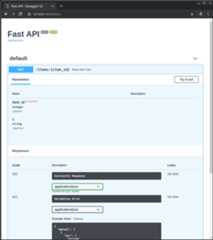
Now you can go tohttp://192.168.99.100/docs orhttp://127.0.0.1/docs (or equivalent, using your Docker host).
You will see the automatic interactive API documentation (provided bySwagger UI):
Alternative API docs
And you can also go tohttp://192.168.99.100/redoc orhttp://127.0.0.1/redoc (or equivalent, using your Docker host).
You will see the alternative automatic documentation (provided byReDoc):

Build a Docker Image with a Single-File FastAPI
If your FastAPI is a single file, for example,main.py without an./app directory, your file structure could look like this:
.├── Dockerfile├── main.py└── requirements.txtThen you would just have to change the corresponding paths to copy the file inside theDockerfile:
FROMpython:3.14WORKDIR/codeCOPY./requirements.txt/code/requirements.txtRUNpipinstall--no-cache-dir--upgrade-r/code/requirements.txt# (1)!COPY./main.py/code/# (2)!CMD["fastapi","run","main.py","--port","80"]Copy the
main.pyfile to the/codedirectory directly (without any./appdirectory).Use
fastapi runto serve your application in the single filemain.py.
When you pass the file tofastapi run it will detect automatically that it is a single file and not part of a package and will know how to import it and serve your FastAPI app. 😎
Deployment Concepts
Let's talk again about some of the sameDeployment Concepts in terms of containers.
Containers are mainly a tool to simplify the process ofbuilding and deploying an application, but they don't enforce a particular approach to handle thesedeployment concepts, and there are several possible strategies.
Thegood news is that with each different strategy there's a way to cover all of the deployment concepts. 🎉
Let's review thesedeployment concepts in terms of containers:
- HTTPS
- Running on startup
- Restarts
- Replication (the number of processes running)
- Memory
- Previous steps before starting
HTTPS
If we focus just on thecontainer image for a FastAPI application (and later the runningcontainer), HTTPS normally would be handledexternally by another tool.
It could be another container, for example withTraefik, handlingHTTPS andautomatic acquisition ofcertificates.
Tip
Traefik has integrations with Docker, Kubernetes, and others, so it's very easy to set up and configure HTTPS for your containers with it.
Alternatively, HTTPS could be handled by a cloud provider as one of their services (while still running the application in a container).
Running on Startup and Restarts
There is normally another tool in charge ofstarting and running your container.
It could beDocker directly,Docker Compose,Kubernetes, acloud service, etc.
In most (or all) cases, there's a simple option to enable running the container on startup and enabling restarts on failures. For example, in Docker, it's the command line option--restart.
Without using containers, making applications run on startup and with restarts can be cumbersome and difficult. But whenworking with containers in most cases that functionality is included by default. ✨
Replication - Number of Processes
If you have acluster of machines withKubernetes, Docker Swarm Mode, Nomad, or another similar complex system to manage distributed containers on multiple machines, then you will probably want tohandle replication at thecluster level instead of using aprocess manager (like Uvicorn with workers) in each container.
One of those distributed container management systems like Kubernetes normally has some integrated way of handlingreplication of containers while still supportingload balancing for the incoming requests. All at thecluster level.
In those cases, you would probably want to build aDocker image from scratch asexplained above, installing your dependencies, and runninga single Uvicorn process instead of using multiple Uvicorn workers.
Load Balancer
When using containers, you would normally have some componentlistening on the main port. It could possibly be another container that is also aTLS Termination Proxy to handleHTTPS or some similar tool.
As this component would take theload of requests and distribute that among the workers in a (hopefully)balanced way, it is also commonly called aLoad Balancer.
Tip
The sameTLS Termination Proxy component used for HTTPS would probably also be aLoad Balancer.
And when working with containers, the same system you use to start and manage them would already have internal tools to transmit thenetwork communication (e.g. HTTP requests) from thatload balancer (that could also be aTLS Termination Proxy) to the container(s) with your app.
One Load Balancer - Multiple Worker Containers
When working withKubernetes or similar distributed container management systems, using their internal networking mechanisms would allow the singleload balancer that is listening on the mainport to transmit communication (requests) to possiblymultiple containers running your app.
Each of these containers running your app would normally havejust one process (e.g. a Uvicorn process running your FastAPI application). They would all beidentical containers, running the same thing, but each with its own process, memory, etc. That way you would take advantage ofparallelization indifferent cores of the CPU, or even indifferent machines.
And the distributed container system with theload balancer woulddistribute the requests to each one of the containers with your appin turns. So, each request could be handled by one of the multiplereplicated containers running your app.
And normally thisload balancer would be able to handle requests that go toother apps in your cluster (e.g. to a different domain, or under a different URL path prefix), and would transmit that communication to the right containers forthat other application running in your cluster.
One Process per Container
In this type of scenario, you probably would want to havea single (Uvicorn) process per container, as you would already be handling replication at the cluster level.
So, in this case, youwould not want to have a multiple workers in the container, for example with the--workers command line option. You would want to have just asingle Uvicorn process per container (but probably multiple containers).
Having another process manager inside the container (as would be with multiple workers) would only addunnecessary complexity that you are most probably already taking care of with your cluster system.
Containers with Multiple Processes and Special Cases
Of course, there arespecial cases where you could want to havea container with severalUvicorn worker processes inside.
In those cases, you can use the--workers command line option to set the number of workers that you want to run:
FROMpython:3.14WORKDIR/codeCOPY./requirements.txt/code/requirements.txtRUNpipinstall--no-cache-dir--upgrade-r/code/requirements.txtCOPY./app/code/app# (1)!CMD["fastapi","run","app/main.py","--port","80","--workers","4"]- Here we use the
--workerscommand line option to set the number of workers to 4.
Here are some examples of when that could make sense:
A Simple App
You could want a process manager in the container if your application issimple enough that can run it on asingle server, not a cluster.
Docker Compose
You could be deploying to asingle server (not a cluster) withDocker Compose, so you wouldn't have an easy way to manage replication of containers (with Docker Compose) while preserving the shared network andload balancing.
Then you could want to havea single container with aprocess manager startingseveral worker processes inside.
The main point is,none of these arerules written in stone that you have to blindly follow. You can use these ideas toevaluate your own use case and decide what is the best approach for your system, checking out how to manage the concepts of:
- Security - HTTPS
- Running on startup
- Restarts
- Replication (the number of processes running)
- Memory
- Previous steps before starting
Memory
If you runa single process per container you will have a more or less well-defined, stable, and limited amount of memory consumed by each of those containers (more than one if they are replicated).
And then you can set those same memory limits and requirements in your configurations for your container management system (for example inKubernetes). That way it will be able toreplicate the containers in theavailable machines taking into account the amount of memory needed by them, and the amount available in the machines in the cluster.
If your application issimple, this will probablynot be a problem, and you might not need to specify hard memory limits. But if you areusing a lot of memory (for example withmachine learning models), you should check how much memory you are consuming and adjust thenumber of containers that runs ineach machine (and maybe add more machines to your cluster).
If you runmultiple processes per container you will have to make sure that the number of processes started doesn'tconsume more memory than what is available.
Previous Steps Before Starting and Containers
If you are using containers (e.g. Docker, Kubernetes), then there are two main approaches you can use.
Multiple Containers
If you havemultiple containers, probably each one running asingle process (for example, in aKubernetes cluster), then you would probably want to have aseparate container doing the work of theprevious steps in a single container, running a single process,before running the replicated worker containers.
Info
If you are using Kubernetes, this would probably be anInit Container.
If in your use case there's no problem in running those previous stepsmultiple times in parallel (for example if you are not running database migrations, but just checking if the database is ready yet), then you could also just put them in each container right before starting the main process.
Single Container
If you have a simple setup, with asingle container that then starts multipleworker processes (or also just one process), then you could run those previous steps in the same container, right before starting the process with the app.
Base Docker Image
There used to be an official FastAPI Docker image:tiangolo/uvicorn-gunicorn-fastapi. But it is now deprecated. ⛔️
You should probablynot use this base Docker image (or any other similar one).
If you are usingKubernetes (or others) and you are already settingreplication at the cluster level, with multiplecontainers. In those cases, you are better offbuilding an image from scratch as described above:Build a Docker Image for FastAPI.
And if you need to have multiple workers, you can simply use the--workers command line option.
Technical Details
The Docker image was created when Uvicorn didn't support managing and restarting dead workers, so it was needed to use Gunicorn with Uvicorn, which added quite some complexity, just to have Gunicorn manage and restart the Uvicorn worker processes.
But now that Uvicorn (and thefastapi command) support using--workers, there's no reason to use a base Docker image instead of building your own (it's pretty much the same amount of code 😅).
Deploy the Container Image
After having a Container (Docker) Image there are several ways to deploy it.
For example:
- WithDocker Compose in a single server
- With aKubernetes cluster
- With a Docker Swarm Mode cluster
- With another tool like Nomad
- With a cloud service that takes your container image and deploys it
Docker Image withuv
If you are usinguv to install and manage your project, you can follow theiruv Docker guide.
Recap
Using container systems (e.g. withDocker andKubernetes) it becomes fairly straightforward to handle all thedeployment concepts:
- HTTPS
- Running on startup
- Restarts
- Replication (the number of processes running)
- Memory
- Previous steps before starting
In most cases, you probably won't want to use any base image, and insteadbuild a container image from scratch based on the official Python Docker image.
Taking care of theorder of instructions in theDockerfile and theDocker cache you canminimize build times, to maximize your productivity (and avoid boredom). 😎