Mnist dataset
In this example we will load the mnist dataset and cluster the images.
Load dataset
# Load libraryimportmatplotlib.pyplotaspltfromclustimageimportClustimage# initcl=Clustimage()# Load example digit dataX,y=cl.import_example(data='mnist')print(X)# Each row is an image that can be plotted after reshaping:plt.imshow(X[0,:].reshape(8,8),cmap='binary')# array([[ 0., 0., 5., ..., 0., 0., 0.],# [ 0., 0., 0., ..., 10., 0., 0.],# [ 0., 0., 0., ..., 16., 9., 0.],# ...,# [ 0., 0., 0., ..., 9., 0., 0.],# [ 0., 0., 0., ..., 4., 0., 0.],# [ 0., 0., 6., ..., 6., 0., 0.]])#
Cluster the images
# Preprocessing and feature extractionresults=cl.fit_transform(X)# Lets examine the results.print(results.keys())# ['feat', 'xycoord', 'pathnames', 'filenames', 'labels']## feat : Extracted features# xycoord : Coordinates of samples in the embedded space.# filenames : Name of the files# pathnames : Absolute location of the files# labels : Cluster labels in the same order as the input
Detect unique images
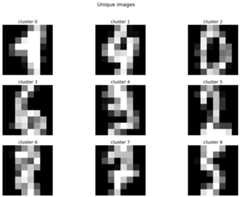
# Get the unique imagesunique_samples=cl.unique()#print(unique_samples.keys())# ['labels', 'idx', 'xycoord_center', 'pathnames']## Collect the unique images from the inputX[unique_samples['idx'],:]# Plot unique images.cl.plot_unique()
|
Cluster evaluation
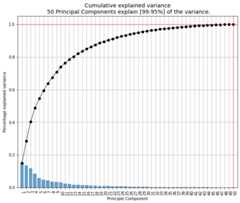
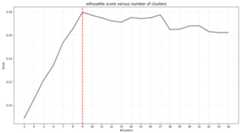
# Plot the explained variancecl.pca.plot()# Make scatter plot of PC1 vs PC2cl.pca.scatter(legend=False,label=False)# Plot the evaluation of the number of clusterscl.clusteval.plot()
|
|
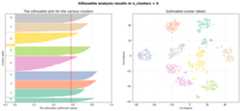
# Make silhouette plotcl.clusteval.scatter(cl.results['xycoord'])
|
Scatter plot
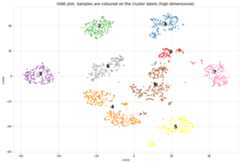
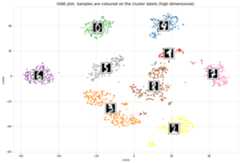
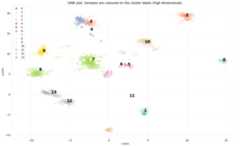
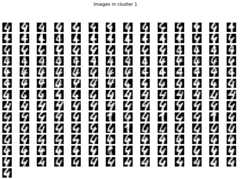
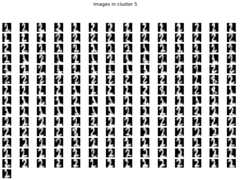
The scatterplot that is coloured on the clusterlabels. The clusterlabels should match the unique labels.Cluster 1 contains digit 4, and Cluster 5 contains digit 2, etc.
# Make scatterplotcl.scatter(zoom=None)# Plot the image that is in the center of the clustercl.scatter(zoom=4)# Lets change some more arguments to make a pretty scatterplotcl.scatter(zoom=None,dotsize=200,figsize=(25,15),args_scatter={'fontsize':24,'gradient':'#FFFFFF','cmap':'Set2','legend':True})
|
|
| |
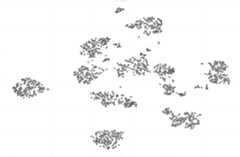
High resolution images where all mnist samples are shown.
cl.scatter(zoom=8,plt_all=True,figsize=(150,100))
|
Plot images detected in a cluster
# Plot all images per clustercl.plot(cmap='binary')# Plot the images in a specific clustercl.plot(cmap='binary',labels=[1,5])
|
|
Dendrogram
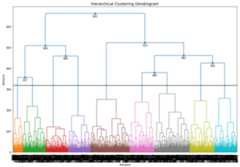
# The dendrogram is based on the high-dimensional feature space.cl.dendrogram()
|
Caltech101 dataset
The documentation and docstrings readily contains various examples but lets make another one with many samples.In this example, theCaltech101 dataset will be clustered!The pictures of objects belonging to 101 categories. About 40 to 800 images per category. Most categories have about 50 images. The size of each image is roughly 300 x 200 pixels.Download the dataset over here:http://www.vision.caltech.edu/Image_Datasets/Caltech101/#Download
Cluster the images
fromclustimageimportClustimage# initcl=Clustimage(method='pca',params_pca={'n_components':250})# Collect samples# Preprocessing, feature extraction and cluster evaluationresults=cl.fit_transform('C://101_ObjectCategories//',min_clust=30,max_clust=60)# Try some other clustering (evaluation) approaches# cl.cluster(evaluate='silhouette', min_clust=30, max_clust=60)
Cluster evaluation
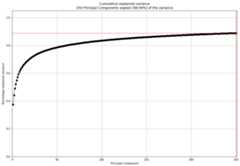
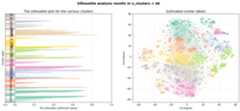
Withclustimage we extracted the features that explained 89% of the variance. The optimal number of clusters of 49 (right figure).
# Evaluate the number of clusters.cl.clusteval.plot()cl.clusteval.scatter(cl.results['xycoord'])
|
|
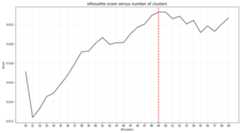
Silhouette Plot
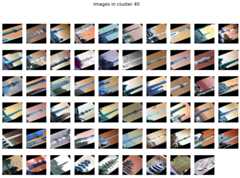
# Plot one of the clusterscl.plot(labels=40)# Plottingcl.dendrogram()
|
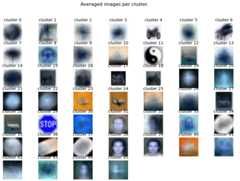
Average image per cluster
For each of the detected clusters, we can collect the images and plot the image in the center (left figure), or we can average all images to a single image (right figure).
# Plot unique images.cl.plot_unique()cl.plot_unique(img_mean=False)
|
|
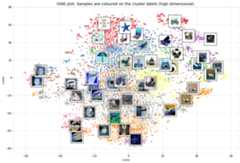
Scatter plot
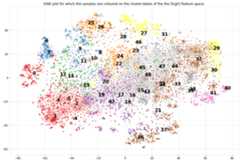
A scatter plot demonstrates the samples with its cluster labels (colors), and the average images per cluster.
# Scattercl.scatter(dotsize=10,img_mean=False,zoom=None)cl.scatter(dotsize=10,img_mean=False)cl.scatter(dotsize=10)
|
|
Plot images detected in a particular cluster
|
|
Flower dataset
In this example we will load the flower dataset and cluster the images for which the path locations are on disk.
Load dataset
# Load libraryfromclustimageimportClustimage# initcl=Clustimage(method='pca')# load example with flowerspathnames=cl.import_example(data='flowers')# The pathnames are stored in a listprint(pathnames[0:2])# ['C:\\temp\\flower_images\\0001.png', 'C:\\temp\\flower_images\\0002.png']
Cluster the images
# Preprocessing, feature extraction and clustering.results=cl.fit_transform(pathnames)
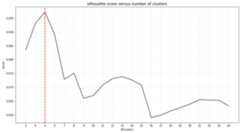
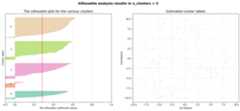
The number of detected clusters looks pretty good because there is a high distinction between the peak for 5 clusters and the number of clusters that subsequently follow.
cl.clusteval.plot()cl.clusteval.scatter(cl.results['xycoord'])
|
|
Detect unique images
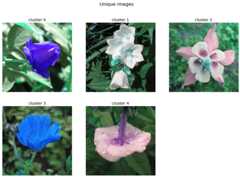
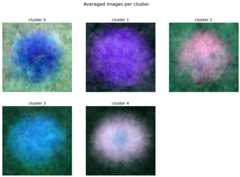
# Plot unique imagescl.plot_unique()cl.plot_unique(img_mean=False)# Plot all images per clustercl.plot()
|
|
Scatter plot
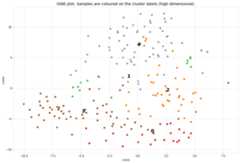
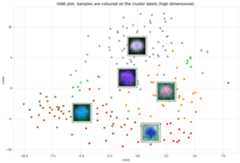
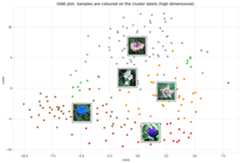
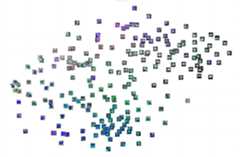
A scatter plot demonstrates the samples with its cluster labels (colors), and the average images per cluster.
# Scattercl.scatter(dotsize=50,zoom=None)cl.scatter(dotsize=50,zoom=0.5)cl.scatter(dotsize=50,zoom=0.5,img_mean=False)cl.scatter(dotsize=50,zoom=0.5,img_mean=False)cl.scatter(zoom=1.2,plt_all=True,figsize=(150,100))
|
|
|
|
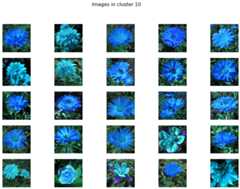
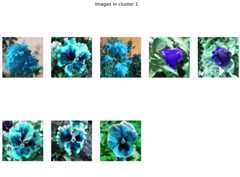
Plot images detected in a particular cluster
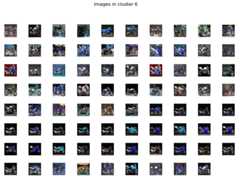
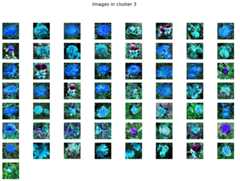
# Plot the images in a specific clustercl.plot(labels=3)
|
|
|
|
Predict unseen sample
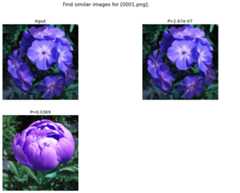
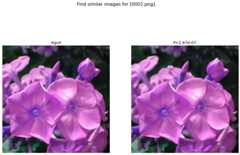
Find images that are significanly similar as the unseen input image.
results_find=cl.find(path_to_imgs[0:2],alpha=0.05)cl.plot_find()# Map the unseen images in existing feature-space.cl.scatter()
|
|
|
Clustering of faces
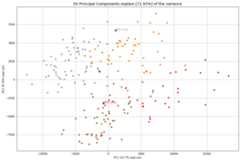
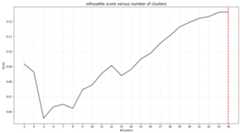
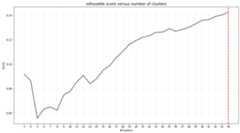
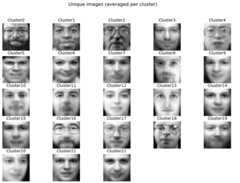
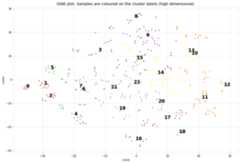
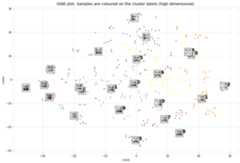
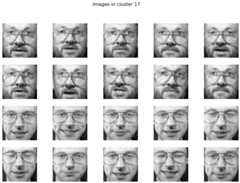
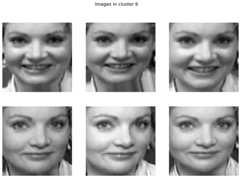
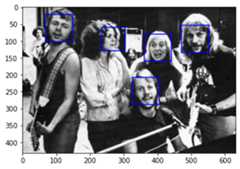
fromclustimageimportClustimage# Initialize with PCAcl=Clustimage(method='pca',grayscale=True)# Load example with facesX,y=cl.import_example(data='faces')# Initialize and runresults=cl.fit_transform(X)# In case you need to extract the faces from the images# face_results = cl.extract_faces(pathnames)# The detected faces are extracted and stored in face_resuls. We can now easily provide the pathnames of the faces that are stored in pathnames_face.# results = cl.fit_transform(face_results['pathnames_face'])# Plot the evaluation of the number of clusters. As you can see, the maximum number of cluster evaluated is 24 can perhaps be too small.cl.clusteval.plot()# Lets increase the maximum number and clusters and run solely the clustering. Note that you do not need to fit_transform() anymore. You can only do the clustering now.cl.cluster(max_clust=35)# And plot again. As you can see, it keeps increasing which means that it may not found any local maximum anymore.# When looking at the graph, we see a local maximum at 12 clusters. Lets go for thatcl.cluster(min_clust=4,max_clust=20)# Lets plot the 12 unique clusters that contain the facescl.plot_unique()# Scattercl.scatter(zoom=None)cl.scatter(zoom=0.2)# Make plotcl.plot(show_hog=True,labels=[1,7])# Plot facescl.plot_faces()# Dendrogram depicts the clustering of the facescl.dendrogram()
|
|
|
|
|
|
|
|
Extract images belonging to clusters
# Import libraryfromclustimageimportClustimage# Initializecl=Clustimage(method='pca')# Import datapathnames=cl.import_example(data='flowers')# Cluster flowersresults=cl.fit_transform(pathnames)# All results are stored in a dict:print(cl.results.keys())# Which is the same as:print(results.keys())dict_keys(['img','feat','xycoord','pathnames','labels','filenames'])# Extracting images that belong to cluster label=0:Iloc=cl.results['labels']==0cl.results['pathnames'][Iloc]# Extracting xy-coordinates for the scatterplot for cluster 0:importmatplotlib.pyplotaspltxycoord=cl.results['xycoord'][Iloc]plt.scatter(xycoord[:,0],xycoord[:,1])# Plot the images for cluster 0:# Images in cluster 0imgs=np.where(cl.results['img'][Iloc])[0]# Make sure you get the right dimensiondim=cl.get_dim(cl.results['img'][Iloc][0,:])# Plotforimginimgs:plt.figure()plt.imshow(img.reshape(dim))plt.title()
Set image filenames using pandas dataframes
In case a datamatrix is provided as an input to the model, the default setting is that random filenames are generated and stored in the tempdirectory. However, with a pandas dataframe as input you can provide the desired filenames by changing the index names!
fromclustimageimportClustimageimportpandasaspdimportnumpyasnp# Initializecl=Clustimage()# Import dataXraw,y=cl.import_example(data='mnist')# The Xraw datamatrix is numpy array for which the rows are the different images.print(Xraw)# array([[ 0., 0., 5., ..., 0., 0., 0.],# [ 0., 0., 0., ..., 10., 0., 0.],# [ 0., 0., 0., ..., 16., 9., 0.],# ...,# [ 0., 0., 1., ..., 6., 0., 0.],# [ 0., 0., 2., ..., 12., 0., 0.],# [ 0., 0., 10., ..., 12., 1., 0.]])# Create some filenamesfilenames=list(map(lambdax:str(x)+'.png',np.arange(0,Xraw.shape[0])))# Store in a pandas dataframeXraw=pd.DataFrame(Xraw,index=filenames)print(Xraw)# 0 1 2 3 4 5 ... 58 59 60 61 62 63# 0.png 0.0 0.0 5.0 13.0 9.0 1.0 ... 6.0 13.0 10.0 0.0 0.0 0.0# 1.png 0.0 0.0 0.0 12.0 13.0 5.0 ... 0.0 11.0 16.0 10.0 0.0 0.0# 2.png 0.0 0.0 0.0 4.0 15.0 12.0 ... 0.0 3.0 11.0 16.0 9.0 0.0# 3.png 0.0 0.0 7.0 15.0 13.0 1.0 ... 7.0 13.0 13.0 9.0 0.0 0.0# 4.png 0.0 0.0 0.0 1.0 11.0 0.0 ... 0.0 2.0 16.0 4.0 0.0 0.0# ... ... ... ... ... ... ... ... ... ... ... ... ...# 1792.png 0.0 0.0 4.0 10.0 13.0 6.0 ... 2.0 14.0 15.0 9.0 0.0 0.0# 1793.png 0.0 0.0 6.0 16.0 13.0 11.0 ... 6.0 16.0 14.0 6.0 0.0 0.0# 1794.png 0.0 0.0 1.0 11.0 15.0 1.0 ... 2.0 9.0 13.0 6.0 0.0 0.0# 1795.png 0.0 0.0 2.0 10.0 7.0 0.0 ... 5.0 12.0 16.0 12.0 0.0 0.0# 1796.png 0.0 0.0 10.0 14.0 8.0 1.0 ... 8.0 12.0 14.0 12.0 1.0 0.0# Fit and transform the dataresults=cl.fit_transform(Xraw)# The index filenames are now used to store the images on disk.print(results['filenames'])# array(['0.png', '1.png', '2.png', ..., '1794.png', '1795.png', '1796.png'],
Import images from url location
Write url locations to disk.
Images can also be imported from url locations.Each image is first downloaded and stored on a (specified) temp directory.In this example we will download 5 images from url locations. Note that url images and path locations can be combined.
- param urls:
list of url locations with image path.
- type urls:
list
- param save_dir:
location to disk.
- type save_dir:
str
- returns:
urls – list to url locations that are now stored on disk.
- rtype:
list of str.
Examples
>>># Init with default settings>>>importclustimageascl>>>>>># Importing the files files from disk, cleaning and pre-processing>>>url_to_images=['https://erdogant.github.io/datasets/images/flower_images/flower_orange.png',>>>'https://erdogant.github.io/datasets/images/flower_images/flower_white_1.png',>>>'https://erdogant.github.io/datasets/images/flower_images/flower_white_2.png',>>>'https://erdogant.github.io/datasets/images/flower_images/flower_yellow_1.png',>>>'https://erdogant.github.io/datasets/images/flower_images/flower_yellow_2.png']>>>>>># Import into model>>>results=cl.url2disk(url_to_images,r'c:/temp/out/')>>>
Breaking up the steps
Instead of using the all-in-one functionality: fit_transform(), it is also possible to break-up the steps.
fromclustimageimportClustimage# Initializecl=Clustimage(method='pca')# Import dataXraw=cl.import_example(data='flowers')Xraw,y=cl.import_example(data='mnist')Xraw,y=cl.import_example(data='faces')# Check whether in is dir, list of files or array-likeX=cl.import_data(Xraw)# Extract features using methodXfeat=cl.extract_feat(X)# Embedding using tSNExycoord=cl.embedding(Xfeat)# Clusterlabels=cl.cluster()# Returnresults=cl.results# Or all in one run# results = cl.fit_transform(X)# Plotscl.clusteval.plot()cl.scatter()cl.plot_unique()cl.plot()cl.dendrogram()# Findresults_find=cl.find(Xraw[0],k=0,alpha=0.05)cl.plot_find()