lsim#
- scipy.signal.lsim(system,U,T,X0=None,interp=True)[source]#
Simulate output of a continuous-time linear system.
- Parameters:
- systeman instance of the LTI class or a tuple describing the system.
The following gives the number of elements in the tuple andthe interpretation:
1: (instance of
lti)2: (num, den)
3: (zeros, poles, gain)
4: (A, B, C, D)
- Uarray_like
An input array describing the input at each timeT(interpolation is assumed between given times). If there aremultiple inputs, then each column of the rank-2 arrayrepresents an input. If U = 0 or None, a zero input is used.
- Tarray_like
The time steps at which the input is defined and at which theoutput is desired. Must be nonnegative, increasing, and equally spaced.
- X0array_like, optional
The initial conditions on the state vector (zero by default).
- interpbool, optional
Whether to use linear (True, the default) or zero-order-hold (False)interpolation for the input array.
- Returns:
- T1D ndarray
Time values for the output.
- yout1D ndarray
System response.
- xoutndarray
Time evolution of the state vector.
Notes
If (num, den) is passed in for
system, coefficients for both thenumerator and denominator should be specified in descending exponentorder (e.g.s^2+3s+5would be represented as[1,3,5]).Examples
We’ll use
lsimto simulate an analog Bessel filter applied toa signal.>>>importnumpyasnp>>>fromscipy.signalimportbessel,lsim>>>importmatplotlib.pyplotasplt
Create a low-pass Bessel filter with a cutoff of 12 Hz.
>>>b,a=bessel(N=5,Wn=2*np.pi*12,btype='lowpass',analog=True)
Generate data to which the filter is applied.
>>>t=np.linspace(0,1.25,500,endpoint=False)
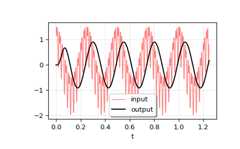
The input signal is the sum of three sinusoidal curves, withfrequencies 4 Hz, 40 Hz, and 80 Hz. The filter should mostlyeliminate the 40 Hz and 80 Hz components, leaving just the 4 Hz signal.
>>>u=(np.cos(2*np.pi*4*t)+0.6*np.sin(2*np.pi*40*t)+...0.5*np.cos(2*np.pi*80*t))
Simulate the filter with
lsim.>>>tout,yout,xout=lsim((b,a),U=u,T=t)
Plot the result.
>>>plt.plot(t,u,'r',alpha=0.5,linewidth=1,label='input')>>>plt.plot(tout,yout,'k',linewidth=1.5,label='output')>>>plt.legend(loc='best',shadow=True,framealpha=1)>>>plt.grid(alpha=0.3)>>>plt.xlabel('t')>>>plt.show()
In a second example, we simulate a double integrator
y''=u, witha constant inputu=1. We’ll use the state space representationof the integrator.>>>fromscipy.signalimportlti>>>A=np.array([[0.0,1.0],[0.0,0.0]])>>>B=np.array([[0.0],[1.0]])>>>C=np.array([[1.0,0.0]])>>>D=0.0>>>system=lti(A,B,C,D)
t andu define the time and input signal for the system tobe simulated.
>>>t=np.linspace(0,5,num=50)>>>u=np.ones_like(t)
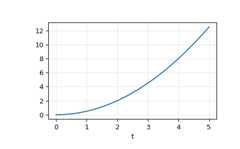
Compute the simulation, and then ploty. As expected, the plot showsthe curve
y=0.5*t**2.>>>tout,y,x=lsim(system,u,t)>>>plt.plot(t,y)>>>plt.grid(alpha=0.3)>>>plt.xlabel('t')>>>plt.show()