iircomb#
- scipy.signal.iircomb(w0,Q,ftype='notch',fs=2.0,*,pass_zero=False)[source]#
Design IIR notching or peaking digital comb filter.
A notching comb filter consists of regularly-spaced band-stop filters witha narrow bandwidth (high quality factor). Each rejects a narrow frequencyband and leaves the rest of the spectrum little changed.
A peaking comb filter consists of regularly-spaced band-pass filters witha narrow bandwidth (high quality factor). Each rejects components outsidea narrow frequency band.
- Parameters:
- w0float
The fundamental frequency of the comb filter (the spacing between itspeaks). This must evenly divide the sampling frequency. Iffs isspecified, this is in the same units asfs. By default, it isa normalized scalar that must satisfy
0<w0<1, withw0=1corresponding to half of the sampling frequency.- Qfloat
Quality factor. Dimensionless parameter that characterizesnotch filter -3 dB bandwidth
bwrelative to its centerfrequency,Q=w0/bw.- ftype{‘notch’, ‘peak’}
The type of comb filter generated by the function. If ‘notch’, thenthe Q factor applies to the notches. If ‘peak’, then the Q factorapplies to the peaks. Default is ‘notch’.
- fsfloat, optional
The sampling frequency of the signal. Default is 2.0.
- pass_zerobool, optional
If False (default), the notches (nulls) of the filter are centered onfrequencies [0, w0, 2*w0, …], and the peaks are centered on themidpoints [w0/2, 3*w0/2, 5*w0/2, …]. If True, the peaks are centeredon [0, w0, 2*w0, …] (passing zero frequency) and vice versa.
Added in version 1.9.0.
- Returns:
- b, andarray, ndarray
Numerator (
b) and denominator (a) polynomialsof the IIR filter.
- Raises:
- ValueError
Ifw0 is less than or equal to 0 or greater than or equal to
fs/2, iffs is not divisible byw0, ifftypeis not ‘notch’ or ‘peak’
Notes
For implementation details, see[1]. The TF implementation of thecomb filter is numerically stable even at higher orders due to theuse of a single repeated pole, which won’t suffer from precision loss.
References
[1]Sophocles J. Orfanidis, “Introduction To Signal Processing”,Prentice-Hall, 1996, ch. 11, “Digital Filter Design”
Examples
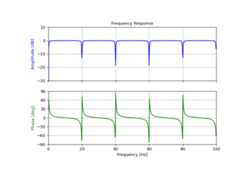
Design and plot notching comb filter at 20 Hz for asignal sampled at 200 Hz, using quality factor Q = 30
>>>fromscipyimportsignal>>>importmatplotlib.pyplotasplt>>>importnumpyasnp
>>>fs=200.0# Sample frequency (Hz)>>>f0=20.0# Frequency to be removed from signal (Hz)>>>Q=30.0# Quality factor>>># Design notching comb filter>>>b,a=signal.iircomb(f0,Q,ftype='notch',fs=fs)
>>># Frequency response>>>freq,h=signal.freqz(b,a,fs=fs)>>>response=abs(h)>>># To avoid divide by zero when graphing>>>response[response==0]=1e-20>>># Plot>>>fig,ax=plt.subplots(2,1,figsize=(8,6),sharex=True)>>>ax[0].plot(freq,20*np.log10(abs(response)),color='blue')>>>ax[0].set_title("Frequency Response")>>>ax[0].set_ylabel("Amplitude [dB]",color='blue')>>>ax[0].set_xlim([0,100])>>>ax[0].set_ylim([-30,10])>>>ax[0].grid(True)>>>ax[1].plot(freq,(np.angle(h)*180/np.pi+180)%360-180,color='green')>>>ax[1].set_ylabel("Phase [deg]",color='green')>>>ax[1].set_xlabel("Frequency [Hz]")>>>ax[1].set_xlim([0,100])>>>ax[1].set_yticks([-90,-60,-30,0,30,60,90])>>>ax[1].set_ylim([-90,90])>>>ax[1].grid(True)>>>plt.show()
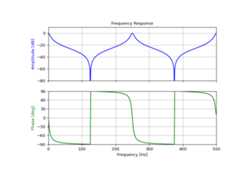
Design and plot peaking comb filter at 250 Hz for asignal sampled at 1000 Hz, using quality factor Q = 30
>>>fs=1000.0# Sample frequency (Hz)>>>f0=250.0# Frequency to be retained (Hz)>>>Q=30.0# Quality factor>>># Design peaking filter>>>b,a=signal.iircomb(f0,Q,ftype='peak',fs=fs,pass_zero=True)
>>># Frequency response>>>freq,h=signal.freqz(b,a,fs=fs)>>>response=abs(h)>>># To avoid divide by zero when graphing>>>response[response==0]=1e-20>>># Plot>>>fig,ax=plt.subplots(2,1,figsize=(8,6),sharex=True)>>>ax[0].plot(freq,20*np.log10(np.maximum(abs(h),1e-5)),color='blue')>>>ax[0].set_title("Frequency Response")>>>ax[0].set_ylabel("Amplitude [dB]",color='blue')>>>ax[0].set_xlim([0,500])>>>ax[0].set_ylim([-80,10])>>>ax[0].grid(True)>>>ax[1].plot(freq,(np.angle(h)*180/np.pi+180)%360-180,color='green')>>>ax[1].set_ylabel("Phase [deg]",color='green')>>>ax[1].set_xlabel("Frequency [Hz]")>>>ax[1].set_xlim([0,500])>>>ax[1].set_yticks([-90,-60,-30,0,30,60,90])>>>ax[1].set_ylim([-90,90])>>>ax[1].grid(True)>>>plt.show()