
opentripplanner: getting started
Marcus Young,modified by Malcolm Morgan and Robin Lovelace
2025-12-16
Source:vignettes/opentripplanner.Rmdopentripplanner.RmdIntroduction
This vignette is an introduction to OpenTripPlanner (OTP) - anopen-source and cross-platform multi-modal route planner written inJava. It uses imported OpenStreetMap (OSM) data for routing on thestreet and path network and supports multi-agency public transportrouting through importedGeneral Transit FeedSpecification (GTFS) feeds. It can also apply a digital elevationmodel to the OSM street network, allowing, for example, cycle-friendlyroutes to be requested. OTP has a web front-end that can be used byend-users and a sophisticated routing API.
OTP works worldwide as long as there is OSM map coverage in the area.Support for transit timetables and elevation calculations are dependanton the available data. For more information on getting data see thegettingdata for OTP section.
A significant advantage of running your own multi-modal route planneris the ability to carry out analysis using amended transport data.Services such as Google Maps or TransportAPI are based on current publictransport schedules and the existing road network. OTP enables you tomodify transit schedules and/or make changes to the underlying streetnetwork. By editing a local copy of OSM, you can model the effects ofopening new roads, closing roads or imposing other restrictions. You canalso look back in time. For example, you might want to examine theeffect of reductions in rural bus services on the accessibility ofhealth facilities. To do this, you would need a network with busschedules as they were in previous years.
Prerequisites
You will need to have installed R, RStudio, and Java 8. For moredetails on the required software, see theprerequisitesvignette included with this package.
Installation
Install the stable version of the package from CRAN as follows:
install.packages("opentripplanner")# Install Packagelibrary(opentripplanner)# Load PackageOr you can install the development version from GitHub using theremotes package:
remotes::install_github("ropensci/opentripplanner")# Install Packagelibrary(opentripplanner)# Load PackageDownloading OTP and the demonstration data
We will build an example graph for the Isle of Wight using someexample data provided for the package. A graph is what OTP uses to findroutes, and must be built out of the raw data provided. Please note thedemo data has been modified for teaching purposes and should not be usedfor analysis.
Creating a folder to store OTP and its data
OTP expects its data to be stored in a specific structure, seebuildingyour own otp graph for more details. We will make a folder calledOTP in the temporary directory.
path_data<-file.path(tempdir(),"OTP")dir.create(path_data)You may wish to change this to keep your files afterclosing R. Otherwise you will need to download your files and build yourgraph every time. For example:
path_data<-file.path("C:/Users/Public","OTP")dir.create(path_data)Downloading OTP
As of version 0.3 theotp_dl_jar function will downloadand cache the OTP jar file. So you can simply get the path to the OTPJAR file like this:
path_otp<-otp_dl_jar()otp_dl_jar will first check its internal cache for theJAR file and only download it if it is unavailable.
If you wish to specify the location the JAR file is saved (as inversion 0.2) use:
path_otp<-otp_dl_jar(path_data, cache=FALSE)Downloading Example Data
Theotp_dl_demo function downloads the demonstrationdata and puts it in the correct structure.
otp_dl_demo(path_data)Building an OTP Graph
Now we can build the graph. This code will create a new fileGraph.obj that will be saved in the location defined bypath_data.
log1<-otp_build_graph(otp=path_otp, dir=path_data)By default, R will assign OTP 2GB of memory to build the graph. Forlarger areas, you may need more memory. You can use thememory argument to set the memory allocation in MB. Forexample, to allocate 10GB, you would use:
log1<-otp_build_graph(otp=path_otp, dir=path_data, memory=10240)Note that you cannot allocate more memory than you have RAM, and ifyou use 32 Bit Java you cannot allocate more than 3GB. It is possible torun OTP in just 1GB of memory for very small areas (including the demodataset).
Launch OTP and load the graph
The next step is to start up your OTP server, running the routercalled ‘default’. OTP will load the graph you created into memory, andyou will then be able to plan multi-modal routes using the webinterface. Run the following command:
log2<-otp_setup(otp=path_otp, dir=path_data)OTP has a built-in web server called Grizzly which runs on port 8080(http) and 8081 (https). If you have another application running on yourcomputer that uses these ports then you will need to specify alternativeports using theport andsecurePort options,for example:
log2<-otp_setup(otp=path_otp, dir=path_data, port=8801, securePort=8802)It should only take a minute or two for OTP to load the graph andstart the Grizzly server. If it has worked, you should see the message:OTP is ready to use, and R will open your web browser atthe OTP.
You can also access the web interface using the URL:http://localhost:8080. You can now zoom into the Isle ofWight area and request a route by setting an origin and a destinationdirectly on the map (by right-clicking your mouse). You can specifytravel dates, times and modes using the ‘Trip Options’ window (seeFigure). You can change the background map from the layer stack icon atthe top right.
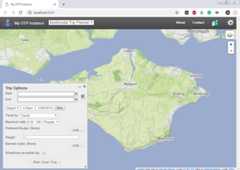
OTP Web Interface
Note: The web interface does not work correctly inInternet Explorer - use Firefox or Chrome.
Connecting to the OTP from R
Now you have the OTP running on your computer you can let R connectto the OTP.otp_connect() creates an OTP connection objectwhich will allow R to connect to the OTP. By default, your localtimezone is used, but if you are not in the UK, you need to specify theUK timezone to get the correct results with the demo data.
otpcon<-otp_connect(timezone="Europe/London")The connection is created and tested, and a message will be returned,saying if the connection exists or not. If you have not used the defaultsettings, such as a differentport you can specify thosesettings inotp_connect().
otpcon<-otp_connect(hostname="localhost", router="default", port=8801)You can also use theotp_connect() function to make aconnection to OTP on a remote server. If the server uses a non-standardstructure for the API, you can provide the full URL directly tootp_connect(). See theotp_connect() help formore details.
otpcon<-otp_connect(url="https://api.digitransit.fi/routing/v1/routers/hsl")Getting a route from the OTP
Now we can use R to get a route from the OTP. OTP accepts pairs oflongitude/latitude coordinates for afromPlace (start ofthe journey) andtoPlace (end of the journey).
If you have thetmap package installed, you can view theroute using.
Stopping the OTP
As the OTP is running in Java, it will continue to run after youclose R.
You can stop the OTP running using the command.NOTE: Thiswill stop all running JAVA applications!
otp_stop()Congratulations, you now have your own multi-modal routerplanner!
Building your own OTP Graph
If you want to build your own graph for a different location, followthese steps, and change yourpath_data variable to thefolder with your data.
An OTP graph specifies every location in the region covered and howto travel between them, and is compiled by OTP using OSM data for thestreet and path network (used for walking, bicycle, and drive modes) andGTFS data for transit scheduling.
Our first task is to create the folder and file structure expected byOTP. This is a base directory calledotp which contains asub-directory calledgraphs. Directories created undergraphs are known as OTP routers and contain all the filesrequired to build a graph. A single OTP instance can host severalrouters, for example, covering different regions.
The basic file structure is shown below.
/ otp# Your top folder for storing all OTP data/graphs/default# Subfolder with the name of the routerosm.pbf# Required OSM road maprouter-config.json# Optional config filebuild-config.json# Optional config filegtfs.zip# Optional GTFS datadem.tif# Optional Elevation datarouter-config.json is read when the OTP server isstarted, whilebuild-config.json is read during the graphbuilding stage. For more information on the config files, see theadvancedfeatures vignette.
Multiple Routers
OTP supports multiple routes by having them in separate folders. Forexample:
/ otp# Your top folder for storing all OTP data/graphs/london# router called londonosm.pbf# map of London/manchester# router called manchesterosm.pbf# map of ManchesterHaving multiple routers may be useful to support different regions,or different scenarios, e.g. past, present, future.
Each router requires its own graph viaotp_build_graph()but only one version of the OTP jar files is needed(i.e. otp_dl_jar()) Each route must be started viaotp_setup() before use. While it is technically possible torun multiple routers simultaneously, it is not recommended forperformance reasons.
Getting Data for OTP
To use OTP on your local computer, you will need data about yourlocation of interest, such as where the roads are, what is the publictransport timetable etc.
Road Map Data
OTP uses road maps from theOpen Street Map (OSM) in the.osm or .pbfformat. OSM is a free map that anybody can edit. You can downloadall or part of the OSM fromGeofabrik.
Note that OTP only really needs the road network from the OSM, butthe Geofabrik downloads include non-road data such as buildings, parks,water etc. So for large areas, you may wish to remove unneeded data fromthe file before building the graph. You can do this usingosmconvert andosmfilter.These are command-line utilities for editing large OSM files and aredocumented on the OSM Wiki. For small areas (e.g. city scale) this isnot necessary.
Public Transport Timetables
OTP can use public transport timetable data in theGTFS format. Youcan find GTFS data for many regions attransitland. For users in the UKseeUK2GTFS
Elevation Data
You can add terrain information to your routes, especially useful forwalking and cycling, usingGeoTIFF images. You can findworldwide elevation data fromOpenTopography.
Warning It is common for GeoTIFF to have a no datavalue often the maximum possible value. OTP can misinterpret this as anelevation value. So set your no data values in your elevation data tosomething more plausible like 0.
Note that OTP does not support all types of GeoTIFFcompression so you may have to change the compression type of the imageif you are experiencing problems.