
PyMC and PyTensor#
Authors:Ricardo Vieira andJuan Orduz
In this notebook we want to give an introduction of how PyMC models translate to PyTensor graphs. The purpose is not to give a detailed description of allpytensor’s capabilities but rather focus on the main concepts to understand its connection with PyMC. For a more detailed description of the project please refer to the official documentation.
Prepare Notebook#
First import the required libraries.
importmatplotlib.pyplotaspltimportnumpyasnpimportpytensorimportpytensor.tensorasptimportscipy.statsimportpymcaspm
Introduction to PyTensor#
We start by looking intopytensor. According to their documentation
PyTensor is a Python library that allows one to define, optimize, and efficiently evaluate mathematical expressions involving multi-dimensional arrays.

A simple example#
To begin, we define some pytensor tensors and show how to perform some basic operations.
x=pt.scalar(name="x")y=pt.vector(name="y")print(f"""x type:{x.type}x name ={x.name}---y type:{y.type}y name ={y.name}""")
x type: Scalar(float64, shape=())x name = x---y type: Vector(float64, shape=(?,))y name = y
Now that we have defined thex andy tensors, we can create a new one by adding them together.
z=x+yz.name="x + y"
To make the computation a bit more complex let us take the logarithm of the resulting tensor.
w=pt.log(z)w.name="log(x + y)"
We can use thedprint() function to print the computational graph of any given tensor.
pytensor.dprint(w)
Log [id A] 'log(x + y)' └─ Add [id B] 'x + y' ├─ ExpandDims{axis=0} [id C] │ └─ x [id D] └─ y [id E]<ipykernel.iostream.OutStream at 0x7fc6cd274a90>
Note that this graph does not do any computation (yet!). It is simply defining the sequence of steps to be done. We can usefunction() to define a callable object so that we can push values trough the graph.
f=pytensor.function(inputs=[x,y],outputs=w)
Now that the graph is compiled, we can push some concrete values:
f(x=0,y=[1,np.e])
array([0., 1.])
Tip
Sometimes we just want to debug, we can useeval() for that:
w.eval({x:0,y:[1,np.e]})
array([0., 1.])
You can set intermediate values as well
w.eval({z:[1,np.e]})
array([0., 1.])
PyTensor is clever!#
One of the most important features ofpytensor is that it can automatically optimize the mathematical operations inside a graph. Let’s consider a simple example:
a=pt.scalar(name="a")b=pt.scalar(name="b")c=a/bc.name="a / b"pytensor.dprint(c)
True_div [id A] 'a / b' ├─ a [id B] └─ b [id C]
<ipykernel.iostream.OutStream at 0x7fc6cd274a90>
Now let us multiplyb timesc. This should result in simplya.
d=b*cd.name="b * c"pytensor.dprint(d)
Mul [id A] 'b * c' ├─ b [id B] └─ True_div [id C] 'a / b' ├─ a [id D] └─ b [id B]
<ipykernel.iostream.OutStream at 0x7fc6cd274a90>
The graph shows the full computation, but once we compile it the operation becomes the identity ona as expected.
g=pytensor.function(inputs=[a,b],outputs=d)pytensor.dprint(g)
DeepCopyOp [id A] 0 └─ a [id B]
<ipykernel.iostream.OutStream at 0x7fc6cd274a90>
What is in a PyTensor graph?#
The following diagram shows the basic structure of anpytensor graph.
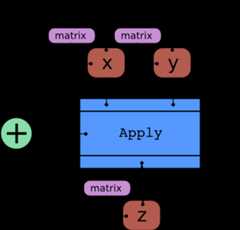
We can can make these concepts more tangible by explicitly indicating them in the first example from the section above. Let us compute the graph components for the tensorz.
print(f"""z type:{z.type}z name ={z.name}z owner ={z.owner}z owner inputs ={z.owner.inputs}z owner op ={z.owner.op}z owner output ={z.owner.outputs}""")
z type: Vector(float64, shape=(?,))z name = x + yz owner = Add(ExpandDims{axis=0}.0, y)z owner inputs = [ExpandDims{axis=0}.0, y]z owner op = Addz owner output = [x + y]The following code snippet helps us understand these concepts by going through the computational graph ofw. The actual code is not as important here, the focus is on the outputs.
# start from the topstack=[w]whilestack:print("---")var=stack.pop(0)print(f"Checking variable{var} of type{var.type}")# check variable is not a root variableifvar.ownerisnotNone:print(f" > Op is{var.owner.op}")# loop over the inputsfori,inputinenumerate(var.owner.inputs):print(f" > Input{i} is{input}")stack.append(input)else:print(f" >{var} is a root variable")
---Checking variable log(x + y) of type Vector(float64, shape=(?,)) > Op is Log > Input 0 is x + y---Checking variable x + y of type Vector(float64, shape=(?,)) > Op is Add > Input 0 is ExpandDims{axis=0}.0 > Input 1 is y---Checking variable ExpandDims{axis=0}.0 of type Vector(float64, shape=(1,)) > Op is ExpandDims{axis=0} > Input 0 is x---Checking variable y of type Vector(float64, shape=(?,)) > y is a root variable---Checking variable x of type Scalar(float64, shape=()) > x is a root variableNote that this is very similar to the output ofdprint() function introduced above.
pytensor.dprint(w)
Log [id A] 'log(x + y)' └─ Add [id B] 'x + y' ├─ ExpandDims{axis=0} [id C] │ └─ x [id D] └─ y [id E]<ipykernel.iostream.OutStream at 0x7fc6cd274a90>
Graph manipulation 101#
Another interesting feature of PyTensor is the ability to manipulate the computational graph, something that is not possible with TensorFlow or PyTorch. Here we continue with the example above in order to illustrate the main idea around this technique.
# get input tensorslist(pytensor.graph.graph_inputs(graphs=[w]))
[x, y]
As a simple example, let’s add anexp() before thelog() (to get the identity function).
parent_of_w=w.owner.inputs[0]# get z tensornew_parent_of_w=pt.exp(parent_of_w)# modify the parent of wnew_parent_of_w.name="exp(x + y)"
Note that the graph ofw has actually not changed:
pytensor.dprint(w)
Log [id A] 'log(x + y)' └─ Add [id B] 'x + y' ├─ ExpandDims{axis=0} [id C] │ └─ x [id D] └─ y [id E]<ipykernel.iostream.OutStream at 0x7fc6cd274a90>
To modify the graph we need to use theclone_replace() function, whichreturns a copy of the initial subgraph with the corresponding substitutions.
new_w=pytensor.clone_replace(output=[w],replace={parent_of_w:new_parent_of_w})[0]new_w.name="log(exp(x + y))"pytensor.dprint(new_w)
Log [id A] 'log(exp(x + y))' └─ Exp [id B] 'exp(x + y)' └─ Add [id C] 'x + y' ├─ ExpandDims{axis=0} [id D] │ └─ x [id E] └─ y [id F]<ipykernel.iostream.OutStream at 0x7fc6cd274a90>
Finally, we can test the modified graph by passing some input to the new graph.
new_w.eval({x:0,y:[1,np.e]})
array([1. , 2.71828183])
As expected, the new graph is just the identity function.
Note
Again, note thatpytensor is clever enough to omit theexp andlog once we compile the function.
f=pytensor.function(inputs=[x,y],outputs=new_w)pytensor.dprint(f)
Add [id A] 'x + y' 1 ├─ ExpandDims{axis=0} [id B] 0 │ └─ x [id C] └─ y [id D]<ipykernel.iostream.OutStream at 0x7fc6cd274a90>
f(x=0,y=[1,np.e])
array([1. , 2.71828183])
PyTensor RandomVariables#
Now that we have seen pytensor’s basics we want to move in the direction of random variables.
How do we generate random numbers innumpy? To illustrate it we can sample from a normal distribution:
a=np.random.normal(loc=0,scale=1,size=1_000)fig,ax=plt.subplots(figsize=(8,6))ax.hist(a,color="C0",bins=15)ax.set(title="Samples from a normal distribution using numpy",ylabel="count");

Now let’s try to do it in PyTensor.
y=pt.random.normal(loc=0,scale=1,name="y")y.type
TensorType(float64, shape=())
Next, we show the graph usingdprint().
pytensor.dprint(y)
normal_rv{"(),()->()"}.1 [id A] 'y' ├─ RNG(<Generator(PCG64) at 0x7FC6504CC740>) [id B] ├─ NoneConst{None} [id C] ├─ 0 [id D] └─ 1 [id E]<ipykernel.iostream.OutStream at 0x7fc6cd274a90>
The inputs are always in the following order:
rngshared variablesizearg1arg2argn
Wecould sample by callingeval(). on the random variable.
y.eval()
array(0.67492335)
Note however that these samples are always the same!
foriinrange(10):print(f"Sample{i}:{y.eval()}")
Sample 0: 0.6749233482557402Sample 1: 0.6749233482557402Sample 2: 0.6749233482557402Sample 3: 0.6749233482557402Sample 4: 0.6749233482557402Sample 5: 0.6749233482557402Sample 6: 0.6749233482557402Sample 7: 0.6749233482557402Sample 8: 0.6749233482557402Sample 9: 0.6749233482557402
We always get the same samples! This has to do with the random seed step in the graph, i.e.RandomGeneratorSharedVariable (we will not go deeper into this subject here). We will show how to generate different samples withpymc below.
PyMC#

To do so, we start by defining apymc normal distribution.
x=pm.Normal.dist(mu=0,sigma=1)pytensor.dprint(x)
normal_rv{"(),()->()"}.1 [id A] ├─ RNG(<Generator(PCG64) at 0x7FC650553D80>) [id B] ├─ NoneConst{None} [id C] ├─ 0 [id D] └─ 1 [id E]<ipykernel.iostream.OutStream at 0x7fc6cd274a90>
Observe thatx is just a normalRandomVariable and which is the same asy except for therng.
We can try to generate samples by callingeval() as above.
foriinrange(10):print(f"Sample{i}:{x.eval()}")
Sample 0: 0.3880069666747013Sample 1: 0.3880069666747013Sample 2: 0.3880069666747013Sample 3: 0.3880069666747013Sample 4: 0.3880069666747013Sample 5: 0.3880069666747013Sample 6: 0.3880069666747013Sample 7: 0.3880069666747013Sample 8: 0.3880069666747013Sample 9: 0.3880069666747013
As before we get the same value for all iterations. The correct way to generate random samples is usingdraw().
fig,ax=plt.subplots(figsize=(8,6))ax.hist(pm.draw(x,draws=1_000),color="C1",bins=15)ax.set(title="Samples from a normal distribution using pymc",ylabel="count");
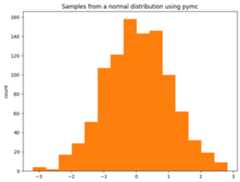
Yay! We learned how to sample from apymc distribution!
What is going on behind the scenes?#
We can now look into how this is done inside aModel.
withpm.Model()asmodel:z=pm.Normal(name="z",mu=np.array([0,0]),sigma=np.array([1,2]))pytensor.dprint(z)
normal_rv{"(),()->()"}.1 [id A] 'z' ├─ RNG(<Generator(PCG64) at 0x7FC6482D1FC0>) [id B] ├─ NoneConst{None} [id C] ├─ [0 0] [id D] └─ [1 2] [id E]<ipykernel.iostream.OutStream at 0x7fc6cd274a90>
We are just creating random variables like we saw before, but now registering them in apymc model. To extract the list of random variables we can simply do:
model.basic_RVs
[z ~ Normal(<constant>, <constant>)]
pytensor.dprint(model.basic_RVs[0])
normal_rv{"(),()->()"}.1 [id A] 'z' ├─ RNG(<Generator(PCG64) at 0x7FC6482D1FC0>) [id B] ├─ NoneConst{None} [id C] ├─ [0 0] [id D] └─ [1 2] [id E]<ipykernel.iostream.OutStream at 0x7fc6cd274a90>
We can try to sample viaeval() as above and it is no surprise that we are getting the same samples at each iteration.
foriinrange(10):print(f"Sample{i}:{z.eval()}")
Sample 0: [-0.78480847 2.20329511]Sample 1: [-0.78480847 2.20329511]Sample 2: [-0.78480847 2.20329511]Sample 3: [-0.78480847 2.20329511]Sample 4: [-0.78480847 2.20329511]Sample 5: [-0.78480847 2.20329511]Sample 6: [-0.78480847 2.20329511]Sample 7: [-0.78480847 2.20329511]Sample 8: [-0.78480847 2.20329511]Sample 9: [-0.78480847 2.20329511]
Again, the correct way of sampling is viadraw().
foriinrange(10):print(f"Sample{i}:{pm.draw(z)}")
Sample 0: [-1.10363734 -4.33735303]Sample 1: [ 0.69639479 -0.81137315]Sample 2: [ 1.25238284 -0.0119145 ]Sample 3: [ 1.21683809 -3.08878544]Sample 4: [1.63496743 2.58329782]Sample 5: [0.4128748 3.29810689]Sample 6: [1.76074607 3.33727713]Sample 7: [ 0.92855273 -0.14005723]Sample 8: [ 2.04166261 -1.25987621]Sample 9: [-0.24230627 -2.91013171]
fig,ax=plt.subplots(figsize=(8,8))z_draws=pm.draw(vars=z,draws=10_000)ax.hist2d(x=z_draws[:,0],y=z_draws[:,1],bins=25)ax.set(title="Samples Histogram");

Enough with Random Variables, I want to see some (log)probabilities!#
Recall we have defined the following model above:
modelpymc is able to convertRandomVariables to their respective probability functions. One simple way is to uselogp(), which takes as first input a RandomVariable, and as second input the value at which the logp is evaluated (we will discuss this in more detail later).
z_value=pt.vector(name="z")z_logp=pm.logp(rv=z,value=z_value)
z_logp contains the PyTensor graph that represents the log-probability of the normal random variablez, evaluated atz_value.
pytensor.dprint(z_logp)
Check{sigma > 0} [id A] 'z_logprob' ├─ Sub [id B] │ ├─ Sub [id C] │ │ ├─ Mul [id D] │ │ │ ├─ ExpandDims{axis=0} [id E] │ │ │ │ └─ -0.5 [id F] │ │ │ └─ Pow [id G] │ │ │ ├─ True_div [id H] │ │ │ │ ├─ Sub [id I] │ │ │ │ │ ├─ z [id J] │ │ │ │ │ └─ [0 0] [id K] │ │ │ │ └─ [1 2] [id L] │ │ │ └─ ExpandDims{axis=0} [id M] │ │ │ └─ 2 [id N] │ │ └─ ExpandDims{axis=0} [id O] │ │ └─ Log [id P] │ │ └─ Sqrt [id Q] │ │ └─ 6.283185307179586 [id R] │ └─ Log [id S] │ └─ [1 2] [id L] └─ All{axes=None} [id T] └─ MakeVector{dtype='bool'} [id U] └─ All{axes=None} [id V] └─ Gt [id W] ├─ [1 2] [id L] └─ ExpandDims{axis=0} [id X] └─ 0 [id Y]<ipykernel.iostream.OutStream at 0x7fc6cd274a90>
Tip
There is also a handypymc function to compute the log cumulative probability of a random variablelogcdf().
Observe that, as explained at the beginning, there has been no computation yet. The actual computation is performed after compiling and passing the input. For illustration purposes alone, we will again use the handyeval() method.
z_logp.eval({z_value:[0,0]})
array([-0.91893853, -1.61208571])
This is nothing else than evaluating the log probability of a normal distribution.
scipy.stats.norm.logpdf(x=np.array([0,0]),loc=np.array([0,0]),scale=np.array([1,2]))
array([-0.91893853, -1.61208571])
pymc models provide some helpful routines to facilitating the conversion ofRandomVariables to probability functions.logp(), for instance can be used to extract the joint probability of all variables in the model:
pytensor.dprint(model.logp(sum=False))
Check{sigma > 0} [id A] 'z_logprob' ├─ Sub [id B] │ ├─ Sub [id C] │ │ ├─ Mul [id D] │ │ │ ├─ ExpandDims{axis=0} [id E] │ │ │ │ └─ -0.5 [id F] │ │ │ └─ Pow [id G] │ │ │ ├─ True_div [id H] │ │ │ │ ├─ Sub [id I] │ │ │ │ │ ├─ z [id J] │ │ │ │ │ └─ [0 0] [id K] │ │ │ │ └─ [1 2] [id L] │ │ │ └─ ExpandDims{axis=0} [id M] │ │ │ └─ 2 [id N] │ │ └─ ExpandDims{axis=0} [id O] │ │ └─ Log [id P] │ │ └─ Sqrt [id Q] │ │ └─ 6.283185307179586 [id R] │ └─ Log [id S] │ └─ [1 2] [id L] └─ All{axes=None} [id T] └─ MakeVector{dtype='bool'} [id U] └─ All{axes=None} [id V] └─ Gt [id W] ├─ [1 2] [id L] └─ ExpandDims{axis=0} [id X] └─ 0 [id Y]<ipykernel.iostream.OutStream at 0x7fc6cd274a90>
Because we only have one variable, this function is equivalent to what we obtained by manually callingpm.logp before. We can also use a helpercompile_logp() to return an already compiled PyTensor function of the model logp.
logp_function=model.compile_logp(sum=False)
This function expects a “point” dictionary as input. We could create it ourselves, but just to illustrate another usefulModel method, let’s callinitial_point(), which returns the point that most samplers use when deciding where to start sampling.
point=model.initial_point()point
{'z': array([0., 0.])}logp_function(point)
[array([-0.91893853, -1.61208571])]
What are value variables and why are they important?#
As we have seen above, a logp graph does not have random variables. Instead it’s defined in terms of input (value) variables. When we want to sample, each random variable (RV) is replaced by a logp function evaluated at the respective input (value) variable. Let’s see how this works through some examples. RV and value variables can be observed in thesescipy operations:
rv=scipy.stats.norm(0,1)# Equivalent to rv = pm.Normal("rv", 0, 1)scipy.stats.norm(0,1)
<scipy.stats._distn_infrastructure.rv_continuous_frozen at 0x7fc64808be10>
# Equivalent to rv_draw = pm.draw(rv, 3)rv.rvs(3)
array([-1.00721939, -0.60656542, -0.28202337])
# Equivalent to rv_logp = pm.logp(rv, 1.25)rv.logpdf(1.25)
-1.7001885332046727
Next, let’s look at how these value variables behave in a slightly more complex model.
withpm.Model()asmodel_2:mu=pm.Normal(name="mu",mu=0,sigma=2)sigma=pm.HalfNormal(name="sigma",sigma=3)x=pm.Normal(name="x",mu=mu,sigma=sigma)
Each model RV is related to a “value variable”:
model_2.rvs_to_values
{mu ~ Normal(0, 2): mu, sigma ~ HalfNormal(0, 3): sigma_log__, x ~ Normal(mu, sigma): x}Observe that for sigma the associated value is in thelog scale as in practice we require unbounded values for NUTS sampling.
model_2.value_vars
[mu, sigma_log__, x]
Now that we know how to extract the model variables, we can compute the element-wise log-probability of the model for specific values.
# extract values as pytensor.tensor.var.TensorVariablemu_value=model_2.rvs_to_values[mu]sigma_log_value=model_2.rvs_to_values[sigma]x_value=model_2.rvs_to_values[x]# element-wise log-probability of the model (we do not take te sum)logp_graph=pt.stack(model_2.logp(sum=False))# evaluate by passing concrete valueslogp_graph.eval({mu_value:0,sigma_log_value:-10,x_value:0})
array([ -1.61208572, -11.32440366, 9.08106147])
This equivalent to:
print(f"""mu_value ->{scipy.stats.norm.logpdf(x=0,loc=0,scale=2)}sigma_log_value ->{-10+scipy.stats.halfnorm.logpdf(x=np.exp(-10),loc=0,scale=3)}x_value ->{scipy.stats.norm.logpdf(x=0,loc=0,scale=np.exp(-10))}""")
mu_value -> -1.612085713764618sigma_log_value -> -11.324403641427345x_value -> 9.081061466795328
Note
Forsigma_log_value we add the\(-10\) term for thescipy andpytensor to match because of the jacobian.
As we already saw, we can also use the methodcompile_logp() to obtain a compiled pytensor function of the model logp, which takes a dictionary of{valuevariablename:value} as inputs:
model_2.compile_logp(sum=False)({"mu":0,"sigma_log__":-10,"x":0})
[array(-1.61208572), array(-11.32440366), array(9.08106147)]
TheModel class also has methods to extract the gradient (dlogp()) and the hessian (d2logp()) of the logp.
If you want to go deeper into the internals ofpytensor RandomVariables andpymc distributions please take a look into thedistribution developer guide.
%load_ext watermark%watermark -n -u -v -iv -w -p pytensor
Last updated: Tue Jun 25 2024Python implementation: CPythonPython version : 3.11.8IPython version : 8.22.2pytensor: 2.20.0+3.g66439d283.dirtypytensor : 2.20.0+3.g66439d283.dirtypymc : 5.15.0+1.g58927d608scipy : 1.12.0numpy : 1.26.4matplotlib: 3.8.3Watermark: 2.4.3