- PMD 7.19.0
- About
- User Documentation
- Rule Reference
- Language-Specific Documentation
- Developer Documentation
- Project documentation
Your first rule
Table of Contents
This page is a gentle introduction to rule writing, and the Rule Designer.
Using the designer is useful both to write Javarules and XPath rules, but it’s more specifically geared towards XPath rules.This page uses asimple XPath rule to illustrate the common workflow. We assumehere that you already know what XPath is and how to read basic XPath queries. W3Chas a good tutorialhere ifyou don’t (in the context of XML only), andthe Saxon documentationfeatures a comprehensive but approachable description of the syntax of XPathexpressions.
The Rule Designer
The rule designer is a tool that packs a lot of features to help you develop XPathrules quickly and painlessly. Basically, it allows you to examine the AST of a codesnippet and evaluate an XPath expression against it. You can launch it from Command Line as follows:
~ $pmd designerC:\>pmd.bat designerThe interface looks like the following:
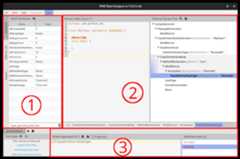
The zone (2) is themain editor. When you write a code snippet in thecode area to the left, you’ll see that the tree to the right will be updatedautomatically: it’s the AST of the code.Note that the code snippet must be a syntactically valid compilation unit for thelanguage you’ve chosen, e.g. for Java, a compilation unit necessarily has a top-leveltype declaration.
If you select a node in the AST, its specific properties will also be displayedin the panel (1): they’re the XPath attributes of the node. More on that later.
The zone (3) is theXPath editor. If you enter an XPath query in that area,it will be evaluated on the current AST and the results will be displayed in thelist to the bottom right.
Rule development process
The basic development process is straightforward:
- Write a code snippet in the main editor that features the offending code you’re looking for
- Examine the AST and determine what node the violation should be reported on
- Write an XPath expression matching that node in the XPath editor
- Refine the XPath expression iteratively using different code snippets, so thatit matches violation cases, but no other nodes
- Export your XPath expression to an XML rule element, and place it in your ruleset
Each time you test your rule against a different snippet, it’s a good idea tosave it tomake test cases.
In the following sections, we walk through several examples to refine your rule.
A simple rule
Let’s say you want to prevent your coding team from naming variables of typeshort after your boss, whose name is Bill. You try the designer on the following offending code snippet:
publicclassKeepingItSerious{publicvoidmethod(){shortbill;// LocalVariableDeclaration}}Examining the AST, you find out that the LocalVariableDeclaration has a VariableIddescendant, whoseName XPath attribute is exactlybill. You thus write your first attemptin the XPath editor:
//VariableId[@Name="bill"]You can see the XPath result list is updated with the variable declarator.If you try the query against the following updated snippet though, you cansee that the field declaration id is matched even though it’s not of typeshort.
publicclassKeepingItSerious{Delegatorbill;// FieldDeclarationpublicvoidmethod(){shortbill;// LocalVariableDeclaration}}You thus refine your XPath expression with an additional predicate,based on your examination of the Type node of the field and local variabledeclaration nodes.
//VariableId[@Name="bill"and../../Type[@TypeImage="short"]]Exporting to XML
You estimate that your rule is now production ready, and you’d like to use it in your ruleset.The second button in the toolbar above the XPath editor (Tooltip:Export XPath to rule...)allows you to do that in a few clicks: just enter someadditional metadata for your rule, and the popup will generate an XML element that you cancopy-paste into your ruleset XML. The resulting element looks like so:
<rulename="DontCallBossShort"language="java"message="Boss wants to talk to you."class="net.sourceforge.pmd.lang.rule.xpath.XPathRule"><description> TODO</description><priority>3</priority><properties><propertyname="xpath"><value><![CDATA[//VariableId[@Name = "bill"][../../Type[@TypeImage="short"]]]]></value></property></properties></rule>You can notice that your XPath expression ends up inside apropertyof a rule of type XPathRule, which is how XPath rules are implemented.