Lesson: Packaging Programs in JAR Files
Section: Using JAR Files: The Basics
The Java Tutorials have been written for JDK 8. Examples and practices described in this page don't take advantage of improvements introduced in later releases and might use technology no longer available.
SeeDev.java for updated tutorials taking advantage of the latest releases.
SeeJava Language Changes for a summary of updated language features in Java SE 9 and subsequent releases.
SeeJDK Release Notes for information about new features, enhancements, and removed or deprecated options for all JDK releases.
Creating a JAR File
The basic format of the command for creating a JAR file is:
jar cfjar-file input-file(s)
The options and arguments used in this command are:
- Thec option indicates that you want tocreate a JAR file.
- Thef option indicates that you want the output to go to afile rather than tostdout.
- jar-file is the name that you want the resulting JAR file to have. You can use any filename for a JAR file. By convention, JAR filenames are given a.jar extension, though this is not required.
- Theinput-file(s) argument is a space-separated list of one or more files that you want to include in your JAR file. Theinput-file(s) argument can contain the wildcard* symbol. If any of the "input-files" are directories, the contents of those directories are added to the JAR archive recursively.
Thec andf options can appear in either order, but there must not be any space between them.
This command will generate a compressed JAR file and place it in the current directory. The command will also generate adefault manifest file for the JAR archive.
Note:
The metadata in the JAR file, such as the entry names, comments, and contents of the manifest, must be encoded in UTF8.
You can add any of these additional options to thecf options of the basic command:
| Option | Description |
|---|---|
| v | Producesverbose output onstdout while the JAR file is being built. The verbose output tells you the name of each file as it's added to the JAR file. |
| 0 (zero) | Indicates that you don't want the JAR file to be compressed. |
| M | Indicates that the default manifest file should not be produced. |
| m | Used to include manifest information from an existing manifest file. The format for using this option is:jar cmfjar-fileexisting-manifestinput-file(s) Warning: The manifest must end with a new line or carriage return. The last line will not be parsed properly if it does not end with a new line or carriage return. |
| -C | To change directories during execution of the command. See below for an example. |
Note:
When you create a JAR file, the time of creation is stored in the JAR file. Therefore, even if the contents of the JAR file do not change, when you create a JAR file multiple times, the resulting files are not exactly identical. You should be aware of this when you are using JAR files in a build environment. It is recommended that you use versioning information in the manifest file, rather than creation time, to control versions of a JAR file. See theSetting Package Version Information section.
An Example
Let us look at an example. A simpleTicTacToe applet. You can see the source code of this applet by downloading the JDK Demos and Samples bundle fromJava SE Downloads. This demo contains class files, audio files, and images having this structure:
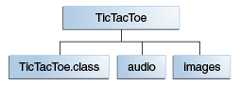
Theaudio andimages subdirectories contain sound files and GIF images used by the applet.
You can obtain all these files fromjar/examples directory when you download the entire Tutorial online. To package this demo into a single JAR file namedTicTacToe.jar, you would run this command from inside theTicTacToe directory:
jar cvf TicTacToe.jar TicTacToe.class audio images
Theaudio andimages arguments represent directories, so the Jar tool will recursively place them and their contents in the JAR file. The generated JAR fileTicTacToe.jar will be placed in the current directory. Because the command used thev option for verbose output, you would see something similar to this output when you run the command:
adding: TicTacToe.class (in=3825) (out=2222) (deflated 41%)adding: audio/ (in=0) (out=0) (stored 0%)adding: audio/beep.au (in=4032) (out=3572) (deflated 11%)adding: audio/ding.au (in=2566) (out=2055) (deflated 19%)adding: audio/return.au (in=6558) (out=4401) (deflated 32%)adding: audio/yahoo1.au (in=7834) (out=6985) (deflated 10%)adding: audio/yahoo2.au (in=7463) (out=4607) (deflated 38%)adding: images/ (in=0) (out=0) (stored 0%)adding: images/cross.gif (in=157) (out=160) (deflated -1%)adding: images/not.gif (in=158) (out=161) (deflated -1%)
You can see from this output that the JAR fileTicTacToe.jar is compressed. The Jar tool compresses files by default. You can turn off the compression feature by using the0 (zero) option, so that the command would look like:
jar cvf0 TicTacToe.jar TicTacToe.class audio images
You might want to avoid compression, for example, to increase the speed with which a JAR file could be loaded by a browser. Uncompressed JAR files can generally be loaded more quickly than compressed files because the need to decompress the files during loading is eliminated. However, there is a tradeoff in that download time over a network may be longer for larger, uncompressed files.
The Jar tool will accept arguments that use the wildcard* symbol. As long as there weren't any unwanted files in theTicTacToe directory, you could have used this alternative command to construct the JAR file:
jar cvf TicTacToe.jar *
Though the verbose output doesn't indicate it, the Jar tool automatically adds a manifest file to the JAR archive with path nameMETA-INF/MANIFEST.MF. See theWorking with Manifest Files: The Basics section for information about manifest files.
In the above example, the files in the archive retained their relative path names and directory structure. The Jar tool provides the-C option that you can use to create a JAR file in which the relative paths of the archived files are not preserved. It's modeled after TAR's-C option.
As an example, suppose you wanted to put audio files and gif images used by the TicTacToe demo into a JAR file, and that you wanted all the files to be on the top level, with no directory hierarchy. You could accomplish that by issuing this command from the parent directory of theimages andaudio directories:
jar cf ImageAudio.jar -C images . -C audio .
The-C images part of this command directs the Jar tool to go to theimages directory, and the. following-C images directs the Jar tool to archive all the contents of that directory. The-C audio . part of the command then does the same with theaudio directory. The resulting JAR file would have this table of contents:
META-INF/MANIFEST.MFcross.gifnot.gifbeep.auding.aureturn.auyahoo1.auyahoo2.au
By contrast, suppose that you used a command that did not employ the-C option:
jar cf ImageAudio.jar images audio
The resulting JAR file would have this table of contents:
META-INF/MANIFEST.MFimages/cross.gifimages/not.gifaudio/beep.auaudio/ding.auaudio/return.auaudio/yahoo1.auaudio/yahoo2.au