Syntax
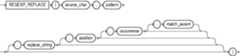
Purpose
REGEXP_REPLACE extends the functionality of theREPLACE function by letting you search a string for a regular expression pattern. By default, the function returnssource_char with every occurrence of the regular expression pattern replaced withreplace_string. The string returned is in the same character set assource_char. The function returnsVARCHAR2 if the first argument is not a LOB and returnsCLOB if the first argument is a LOB.
This function complies with the POSIX regular expression standard and the Unicode Regular Expression Guidelines. For more information, refer toOracle Regular Expression Support.
source_charis a character expression that serves as the search value. It is commonly a character column and can be of any of the data typesCHAR,VARCHAR2,NCHAR,NVARCHAR2,CLOBorNCLOB.patternis the regular expression. It is usually a text literal and can be of any of the data typesCHAR,VARCHAR2,NCHAR, orNVARCHAR2. It can contain up to 512 bytes. If the data type ofpatternis different from the data type ofsource_char, then Oracle Database convertspatternto the data type ofsource_char. For a listing of the operators you can specify inpattern, refer toOracle Regular Expression Support.replace_stringcan be of any of the data typesCHAR,VARCHAR2,NCHAR,NVARCHAR2,CLOB, orNCLOB. Ifreplace_stringis aCLOBorNCLOB, then Oracle truncatesreplace_stringto 32K. Thereplace_stringcan contain up to 500 backreferences to subexpressions in the form\n, wherenis a number from 1 to 9. If you want to include a backslash (\) inreplace_string, then you must precede it with the escape character, which is also a backslash. For example, to replace\2you would enter\\2. For more information on backreference expressions, refer to the notes to"Oracle Regular Expression Support",Table D-1.positionis a positive integer indicating the character ofsource_charwhere Oracle should begin the search. The default is 1, meaning that Oracle begins the search at the first character ofsource_char.occurrenceis a nonnegative integer indicating the occurrence of the replace operation:If you specify 0, then Oracle replaces all occurrences of the match.
If you specify a positive integer
n, then Oracle replaces thenth occurrence.
If
occurrenceis greater than 1, then the database searches for the second occurrence beginning with the first character following the first occurrence ofpattern, and so forth. This behavior is different from theINSTRfunction, which begins its search for the second occurrence at the second character of the first occurrence.match_paramis a character expression of the data typeVARCHAR2orCHARthat lets you change the default matching behavior of the function. The behavior of this parameter is the same for this function as forREGEXP_COUNT. Refer toREGEXP_COUNT for detailed information.
See Also:
Appendix C inOracle Database Globalization Support Guide for the collation determination rules, which define the collation
REGEXP_REPLACEuses to compare characters fromsource_charwith characters frompattern, and for the collation derivation rules, which define the collation assigned to the character return value of this function
Examples
The following example examinesphone_number, looking for the patternxxx.xxx.xxxx. Oracle reformats this pattern with (xxx)xxx-xxxx.
SELECT REGEXP_REPLACE(phone_number, '([[:digit:]]{3})\.([[:digit:]]{3})\.([[:digit:]]{4})', '(\1) \2-\3') "REGEXP_REPLACE" FROM employees ORDER BY "REGEXP_REPLACE";REGEXP_REPLACE--------------------------------------------------------------------------------(515) 123-4444(515) 123-4567(515) 123-4568(515) 123-4569(515) 123-5555. . .The following example examinescountry_name. Oracle puts a space after each non-null character in the string.
SELECT REGEXP_REPLACE(country_name, '(.)', '\1 ') "REGEXP_REPLACE" FROM countries;REGEXP_REPLACE--------------------------------------------------------------------------------A r g e n t i n aA u s t r a l i aB e l g i u mB r a z i lC a n a d a. . .
The following example examines the string, looking for two or more spaces. Oracle replaces each occurrence of two or more spaces with a single space.
SELECT REGEXP_REPLACE('500 Oracle Parkway, Redwood Shores, CA', '( ){2,}', ' ') "REGEXP_REPLACE" FROM DUAL;REGEXP_REPLACE--------------------------------------500 Oracle Parkway, Redwood Shores, CAREGEXP_REPLACE pattern matching: Examples
The following statements create a table regexp_temp and insert values into it:
CREATE TABLE regexp_temp(empName varchar2(20), emailID varchar2(20));INSERT INTO regexp_temp (empName, emailID) VALUES ('John Doe', 'johndoe@example.com');INSERT INTO regexp_temp (empName, emailID) VALUES ('Jane Doe', 'janedoe@example.com');The following statement replaces the string ‘Jane’ with ‘John’:
SELECT empName, REGEXP_REPLACE (empName, 'Jane', 'John') "STRING_REPLACE" FROM regexp_temp;EMPNAMESTRING_REPLACE----------------------John DoeJohn DoeJane DoeJohn Doe
The following statement replaces the string ‘John’ with ‘Jane’:
SELECT empName, REGEXP_REPLACE (empName, 'John', 'Jane' ) "STRING_REPLACE" FROM regexp_temp;EMPNAMESTRING_REPLACE----------------------John DoeJane DoeJane DoeJane Doe
REGEXP_REPLACE: Examples
The following statement replaces all the numbers in a string:
WITH strings AS ( SELECT 'abc123' s FROM dual union all SELECT '123abc' s FROM dual union all SELECT 'a1b2c3' s FROM dual ) SELECT s "STRING", regexp_replace(s, '[0-9]', '') "MODIFIED_STRING" FROM strings; STRING MODIFIED_STRING-------------------- --------------------abc123 abc123abc abca1b2c3 abcThe following statement replaces the first numeric occurrence in a string:
WITH strings AS ( SELECT 'abc123' s from DUAL union all SELECT '123abc' s from DUAL union all SELECT 'a1b2c3' s from DUAL ) SELECT s "STRING", REGEXP_REPLACE(s, '[0-9]', '', 1, 1) "MODIFIED_STRING" FROM strings; STRING MODIFIED_STRING-------------------- --------------------abc123 abc23123abc 23abca1b2c3 ab2c3The following statement replaces the second numeric occurrence in a string:
WITH strings AS ( SELECT 'abc123' s from DUAL union all SELECT '123abc' s from DUAL union all SELECT 'a1b2c3' s from DUAL ) SELECT s "STRING", REGEXP_REPLACE(s, '[0-9]', '', 1, 2) "MODIFIED_STRING" FROM strings;STRING MODIFIED_STRING-------------------- --------------------abc123 abc13123abc 13abca1b2c3 a1bc3The following statement replaces multiple spaces in a string with a single space:
WITH strings AS ( SELECT 'Hello World' s FROM dual union all SELECT 'Hello World' s FROM dual union all SELECT 'Hello, World !' s FROM dual ) SELECT s "STRING", regexp_replace(s, ' {2,}', ' ') "MODIFIED_STRING" FROM strings; STRING MODIFIED_STRING-------------------- --------------------Hello World Hello WorldHello World Hello WorldHello, World ! Hello, World !The following statement converts camel case strings to a string containing lower case words separated by an underscore:
WITH strings as ( SELECT 'AddressLine1' s FROM dual union all SELECT 'ZipCode' s FROM dual union all SELECT 'Country' s FROM dual ) SELECT s "STRING", lower(regexp_replace(s, '([A-Z0-9])', '_\1', 2)) "MODIFIED_STRING" FROM strings; STRING MODIFIED_STRING-------------------- --------------------AddressLine1 address_line_1ZipCode zip_codeCountry countryThe following statement converts the format of a date:
WITH date_strings AS ( SELECT '2015-01-01' d from dual union all SELECT '2000-12-31' d from dual union all SELECT '900-01-01' d from dual ) SELECT d "STRING", regexp_replace(d, '([[:digit:]]+)-([[:digit:]]{2})-([[:digit:]]{2})', '\3.\2.\1') "MODIFIED_STRING" FROM date_strings; STRING MODIFIED_STRING-------------------- --------------------2015-01-01 01.01.20152000-12-31 31.12.2000900-01-01 01.01.900The following statement replaces all the letters in a string with ‘1’:
WITH strings as ( SELECT 'NEW YORK' s FROM dual union all SELECT 'New York' s FROM dual union all SELECT 'new york' s FROM dual ) SELECT s "STRING", regexp_replace(s, '[a-z]', '1', 1, 0, 'i') "CASE_INSENSITIVE", regexp_replace(s, '[a-z]', '1', 1, 0, 'c') "CASE_SENSITIVE", regexp_replace(s, '[a-zA-Z]', '1', 1, 0, 'c') "CASE_SENSITIVE_MATCHING" FROM strings; STRING CASE_INSEN CASE_SENSI CASE_SENSI---------- ---------- ---------- ----------NEW YORK 111 1111 NEW YORK 111 1111New York 111 1111 N11 Y111 111 1111new york 111 1111 111 1111 111 1111