

Project Jupyter Documentation#
Welcome to the Project Jupyter documentation site. Jupyter is a large umbrellaproject that covers many different software offerings and tools, including thepopularJupyter NotebookandJupyterLab web-basednotebook authoring and editing applications. The Jupyter project and itssubprojects all center around providing tools (andstandards)for interactive computing withcomputational notebooks.
What is a Notebook?#
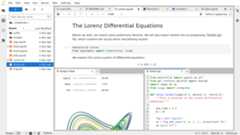
Pictured:A computational notebook document, shown inside JupyterLab
📘Note: ReadWhat is Jupyter? for a detailed look at Jupyter and notebooks.
A notebook is a shareable document that combines computer code, plain languagedescriptions, data, rich visualizations like 3D models, charts, graphs andfigures, and interactive controls. A notebook, along with an editor (likeJupyterLab), provides a fast interactive environment for prototyping andexplaining code, exploring and visualizing data, and sharing ideas withothers.
Where do I start?#
Most people begin with Jupyter by installing an editing application that fitstheir preferences, likeJupyterLaborJupyter Notebook,and making their first notebook document:
Jupyter Notebook offers a simplified, lightweight notebook authoring experience
JupyterLab offers a feature-rich, tabbed multi-notebook editing environmentwith additional tools like a customizable interface layout and system console
And more… read about additional notebook interfaceshere!
You can also develop your own extensions or applications on top of existing Jupytersoftware. Check out the subproject sites below for more information.
More information#
These are a few high-level topics to help you learn more about the Jupyter community and ecosystem.
Get started with Jupyter Notebook Try the notebook | Sustainability and growth |
What is Jupyter? | How to contribute to the projects |
Narratives of common deployment scenarios | New features, upgrades, deprecation notes, and bug fixes |
An interactive Python kernel and REPL | APIs |
Installation, Configuration, and Usage Documentation for users | Documentation for advanced use-cases |
Sub-project documentation#
Individual sub-projects are typically organized around a key feature of theJupyter ecosystem, and have their own community, documentation and governance.Below is a list of documentation for major parts of the Jupyter ecosystem.
JupyterHub
Spawners:sudo,Docker,Kubernetes
Architecture and Specification
nbformat - Jupyter Notebook Format
jupyter-client - Jupyter Messaging Protocol
Table of Contents#
The rest of the documentation on this site covers major use-cases of the Jupyter ecosystem, as well as topics that will help you navigate the various parts of the Jupyter community.For more in-depth documentation about a specific tool, we recommend checking out that tool’s documentation (see the list above).
Resources#
Site | Description |
|---|---|
Keep up to date on Jupyter | |
Learn more about IPython | |
Start here for help and support questions | |
Accessibility sub-project documentation | |
General discussion of Jupyter’s use | |
Discussion of Jupyter’s use in education | |
Promotes world-class, innovative, open source scientific software | |
Please contribute to open science collaboration and sustainability |