Gradle Wrapper
Therecommended way to execute any Gradle build is with the help of the Gradle Wrapper (referred to as "Wrapper").
The Wrapper is a script (calledgradlew orgradlew.bat) that invokes a declared version of Gradle, downloading it beforehand if necessary.Instead of runninggradle build using the installed Gradle, you use the Gradle Wrapper by calling./gradlew build.
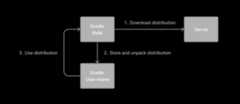
The Gradle Wrapper isn’t distributed as a standalone download—it’s created using thegradle wrapper task.
There are three ways to use the Wrapper:
Adding the Wrapper - You set up a new Gradle project andadd the Wrapper to it.
Using the Wrapper - Yourun a project with the Wrapper that already provides it.
Upgrading the Wrapper - Youupgrade the Wrapper to a new version of Gradle.
When using the Wrapper instead of the installed Gradle, you gain the following benefits:
Standardizes a project on a given Gradle version for more reliable and robust builds.
Provisioning the Gradle version for different users is done with a simple Wrapper definition change.
Provisioning the Gradle version for different execution environments (e.g., IDEs or Continuous Integration servers) is done with a simple Wrapper definition change.
The following sections explain each of these use cases in more detail.
1. Adding the Gradle Wrapper
The Gradle Wrapper isnot something you download.
Generating the Wrapper files requires an installed version of the Gradle runtime on your machine as described inInstallation.Thankfully, generating the initial Wrapper files is a one-time process.
Every vanilla Gradle build comes with a built-in task calledwrapper.The task is listed under the group "Build Setup tasks" whenlisting the tasks.
Executing thewrapper task generates the necessary Wrapper files in the project directory:
$ gradle wrapper> Task :wrapperBUILD SUCCESSFUL in 0s1 actionable task: 1 executed
To make the Wrapper files available to other developers and execution environments, you need to check them into version control. Wrapper files, including the JAR file, are small.Adding the JAR file to version control is expected.Some organizations do not allow projects to submit binary files to version control, and there is no workaround available. |
The generated Wrapper properties file,gradle/wrapper/gradle-wrapper.properties, stores the information about the Gradle distribution:
Theserver hosting the Gradle distribution.
Thetype of Gradle distribution. By default, the
-bindistribution contains only the runtime but no sample code and documentation.TheGradle version used for executing the build. By default, the
wrappertask picks the same Gradle version used to generate the Wrapper files.Optionally, atimeout in ms used when downloading the Gradle distribution.
Optionally, aboolean to set thevalidation of the distribution URL.
The following is an example of the generated distribution URL ingradle/wrapper/gradle-wrapper.properties:
distributionUrl=https\://services.gradle.org/distributions/gradle-9.2.1-bin.zipUse the The |
All of those aspects are configurable at the time of generating the Wrapper files with the help of the following command line options:
--gradle-versionThe Gradle version used for downloading and executing the Wrapper.The resulting distribution URL is validated before it is written to the properties file.
For Gradle versions starting with major version 9, the version can be specified using only the major or minor version number.In such cases, the latest normal release matching that major or minor version will be used.For example,
9resolves to the latest9.x.yrelease, and9.1resolves to the latest9.1.xrelease.The following labels are allowed:
--distribution-typeThe Gradle distribution type used for the Wrapper.Available options are
binandall.The default value isbin.--gradle-distribution-urlThe full URL pointing to the Gradle distribution ZIP file.This option makes
--gradle-versionand--distribution-typeobsolete, as the URL already contains this information.This option is valuable if you want to host the Gradle distribution inside your company’s network.The URL is validated before it is written to the properties file.--gradle-distribution-sha256-sumThe SHA256 hash sum used forverifying the downloaded Gradle distribution.
--network-timeoutThe network timeout to use when downloading the Gradle distribution, in ms. The default value is
10000.--no-validate-urlDisables the validation of the configured distribution URL.
--validate-urlEnables the validation of the configured distribution URL. Enabled by default.
If the distribution URL is configured with--gradle-version or--gradle-distribution-url, the URL is validated by sending a HEAD request in the case of thehttps scheme or by checking the existence of the file in the case of thefile scheme.
Let’s assume the following use-case to illustrate the use of the command line options.You would like to generate the Wrapper with version 9.2.1 and use the-all distribution to enable your IDE to enable code-completion and being able to navigate to the Gradle source code.
The following command-line execution captures those requirements:
$ gradle wrapper --gradle-version 9.2.1 --distribution-type all> Task :wrapperBUILD SUCCESSFUL in 0s1 actionable task: 1 executed
As a result, you can find the desired information (the generated distribution URL) in the Wrapper properties file:
distributionUrl=https\://services.gradle.org/distributions/gradle-9.2.1-all.zipLet’s have a look at the following project layout to illustrate the expected Wrapper files:
.├── a-subproject│ └── build.gradle.kts├── settings.gradle.kts├── gradle│ └── wrapper│ ├── gradle-wrapper.jar│ └── gradle-wrapper.properties├── gradlew└── gradlew.bat.├── a-subproject│ └── build.gradle├── settings.gradle├── gradle│ └── wrapper│ ├── gradle-wrapper.jar│ └── gradle-wrapper.properties├── gradlew└── gradlew.batA Gradle project typically provides asettings.gradle(.kts) file and onebuild.gradle(.kts) file for each subproject.The Wrapper files live alongside in thegradle directory and the root directory of the project.
The following list explains their purpose:
gradle-wrapper.jarThe Wrapper JAR file containing code for downloading the Gradle distribution.
gradle-wrapper.propertiesA properties file responsible for configuring the Wrapper runtime behavior e.g. the Gradle version compatible with this version. Note that more generic settings, likeconfiguring the Wrapper to use a proxy, need to go into adifferent file.
gradlew,gradlew.batA shell script and a Windows batch script for executing the build with the Wrapper.
You can go ahead andexecute the build with the Wrapper without installing the Gradle runtime.If the project you are working on does not contain those Wrapper files, you will need togenerate them.
2. Using the Gradle Wrapper
It is always recommended to execute a build with the Wrapper to ensure a reliable, controlled, and standardized execution of the build.Using the Wrapper looks like running the build with a Gradle installation.Depending on the operating system you either rungradlew orgradlew.bat instead of thegradle command.
The following console output demonstrates the use of the Wrapper on a Windows machine for a Java-based project:
$ gradlew.bat buildDownloading https://services.gradle.org/distributions/gradle-5.0-all.zip.....................................................................................Unzipping C:\Documents and Settings\Claudia\.gradle\wrapper\dists\gradle-5.0-all\ac27o8rbd0ic8ih41or9l32mv\gradle-5.0-all.zip to C:\Documents and Settings\Claudia\.gradle\wrapper\dists\gradle-5.0-al\ac27o8rbd0ic8ih41or9l32mvSet executable permissions for: C:\Documents and Settings\Claudia\.gradle\wrapper\dists\gradle-5.0-all\ac27o8rbd0ic8ih41or9l32mv\gradle-5.0\bin\gradleBUILD SUCCESSFUL in 12s1 actionable task: 1 executed
If the Gradle distribution was not provisioned toGRADLE_USER_HOME before, the Wrapper will download it and store it inGRADLE_USER_HOME.Any subsequent build invocation will reuse the existing local distribution as long as the distribution URL in the Gradle properties doesn’t change.
The Wrapper shell script and batch file reside in the root directory of a single or multi-project Gradle build. You will need to reference the correct path to those files in case you want to execute the build from a subproject directory e.g.../../gradlew tasks. |
3. Upgrading the Gradle Wrapper
Projects typically want to keep up with the times and upgrade their Gradle version to benefit from new features and improvements.
The recommended option is to run thewrapper task and provide the target Gradle version as described inAdding the Gradle Wrapper.Using thewrapper task ensures that any optimizations made to the Wrapper shell script or batch file with that specific Gradle version are applied to the project.
As usual, you should commit the changes to the Wrapper files to version control.
Note that running the wrapper task once will updategradle-wrapper.properties only, but leave the wrapper itself ingradle-wrapper.jar untouched.This is usually fine as new versions of Gradle can be run even with older wrapper files.
If you wantall the wrapper files to be completely up-to-date, you will need to run thewrapper task a second time. |
The following command upgrades the Wrapper to thelatest version:
$ ./gradlew wrapper --gradle-version latest // MacOs, Linux$ gradlew.bat wrapper --gradle-version latest // WindowsBUILD SUCCESSFUL in 4s1 actionable task: 1 executed
The following command upgrades the Wrapper to a specific version:
$ ./gradlew wrapper --gradle-version 9.2.1 // MacOs, Linux$ gradlew.bat wrapper --gradle-version 9.2.1 // WindowsBUILD SUCCESSFUL in 4s1 actionable task: 1 executed
Once you have upgraded the wrapper, you can check that it’s the version you expected by executing./gradlew --version.
Don’t forget to run thewrapper task again to download the Gradle distribution binaries (if needed) and update thegradlew andgradlew.bat files. |
Another way to upgrade the Gradle version is by manually changing thedistributionUrl property in the Wrapper’sgradle-wrapper.properties file.The tip above also applies in this case.
Since Gradle 9.0.0, the versionalways uses theX.Y.Z format.Using only the major or minor version is not supported ingradle-wrapper.properties. |
Customizing the Gradle Wrapper
Most users of Gradle are happy with the default runtime behavior of the Wrapper.However, organizational policies, security constraints or personal preferences might require you to dive deeper into customizing the Wrapper.
Thankfully, the built-inwrapper task exposes numerous options to bend the runtime behavior to your needs.Most configuration options are exposed by the underlying task typeWrapper.
Let’s assume you grew tired of defining the-all distribution type on the command line every time you upgrade the Wrapper.You can save yourself some keyboard strokes by re-configuring thewrapper task.
tasks.wrapper { distributionType = Wrapper.DistributionType.ALL}tasks.named('wrapper') { distributionType = Wrapper.DistributionType.ALL}With the configuration in place, running./gradlew wrapper --gradle-version 9.2.1 is enough to produce adistributionUrl value in the Wrapper properties file that will request the-all distribution:
distributionUrl=https\://services.gradle.org/distributions/gradle-9.2.1-all.zipCheck out theAPI documentation for a more detailed description of the available configuration options. You can also find various samples for configuring the Wrapper in the Gradle distribution.
Authenticated Gradle distribution download
The GradleWrapper can download Gradle distributions from servers using HTTP Basic Authentication.This enables you to host the Gradle distribution on a private protected server.
You can specify a username and password in two different ways depending on your use case: as system properties or directly embedded in thedistributionUrl.Credentials in system properties take precedence over the ones embedded indistributionUrl.
HTTP Basic Authentication should only be used with |
System properties can be specified in the.gradle/gradle.properties file in the user’s home directory or by othermeans.
To specify the HTTP Basic Authentication credentials, add the following lines to the system properties file:
systemProp.gradle.wrapperUser=usernamesystemProp.gradle.wrapperPassword=passwordEmbedding credentials in thedistributionUrl in thegradle/wrapper/gradle-wrapper.properties file also works.Please note that this file is to be committed into your source control system.
Shared credentials embedded indistributionUrl should only be used in a controlled environment. |
To specify the HTTP Basic Authentication credentials indistributionUrl, add the following line:
distributionUrl=https://username:password@somehost/path/to/gradle-distribution.zipThis can be used in conjunction with a proxy, authenticated or not.SeeAccessing the web via a proxy for more information on how to configure theWrapper to use a proxy.
Verification of downloaded Gradle distributions
The Gradle Wrapper allows for verification of the downloaded Gradle distribution via SHA-256 hash sum comparison.This increases security against targeted attacks by preventing a man-in-the-middle attacker from tampering with the downloaded Gradle distribution.
To enable this feature, download the.sha256 file associated with the Gradle distribution you want to verify.
Downloading the SHA-256 file
You can download the.sha256 file from thestable releases orrelease candidate and nightly releases.The format of the file is a single line of text that is the SHA-256 hash of the corresponding zip file.
You can also reference thelist of Gradle distribution checksums.
Configuring checksum verification
Add the downloaded (SHA-256 checksum) hash sum togradle-wrapper.properties using thedistributionSha256Sum property or use--gradle-distribution-sha256-sum on the command-line:
distributionSha256Sum=371cb9fbebbe9880d147f59bab36d61eee122854ef8c9ee1ecf12b82368bcf10Gradle will report a build failure if the configured checksum does not match the checksum found on the server hosting the distribution.Checksum verification is only performed if the configured Wrapper distribution hasn’t been downloaded yet.
TheWrapper task fails ifgradle-wrapper.properties containsdistributionSha256Sum, but the task configuration does not define a sum.Executing theWrapper task preserves thedistributionSha256Sum configuration when the Gradle version does not change. |
Verifying the integrity of the Gradle Wrapper JAR
The Wrapper JAR is a binary file that will be executed on the computers of developers and build servers.As with all such files, you should ensure it’s trustworthy before executing it.
Since the Wrapper JAR is usually checked into a project’s version control system, there is the potential for a malicious actor to replace the original JAR with a modified one by submitting a pull request that only upgrades the Gradle version.
To verify the integrity of the Wrapper JAR, Gradle has created aGitHub Action that automatically checks Wrapper JARs in pull requests against a list of known good checksums.
Gradle also publishes thechecksums of all releases (except for version 3.3 to 4.0.2, which did not generate reproducible JARs), so you can manually verify the integrity of the Wrapper JAR.
Automatically verifying the Gradle Wrapper JAR on GitHub
TheGitHub Action is released separately from Gradle, so please check its documentation for how to apply it to your project.
Manually verifying the Gradle Wrapper JAR
You can manually verify the checksum of the Wrapper JAR to ensure that it has not been tampered with by running the following commands on one of the major operating systems.
Manually verifying the checksum of the Wrapper JAR on Linux:
$ cd gradle/wrapper$ curl --location --output gradle-wrapper.jar.sha256 \ https://services.gradle.org/distributions/gradle-9.2.1-wrapper.jar.sha256$ echo " gradle-wrapper.jar" >> gradle-wrapper.jar.sha256$ sha256sum --check gradle-wrapper.jar.sha256gradle-wrapper.jar: OKManually verifying the checksum of the Wrapper JAR on macOS:
$ cd gradle/wrapper$ curl --location --output gradle-wrapper.jar.sha256 \ https://services.gradle.org/distributions/gradle-9.2.1-wrapper.jar.sha256$ echo " gradle-wrapper.jar" >> gradle-wrapper.jar.sha256
$ shasum --check gradle-wrapper.jar.sha256
gradle-wrapper.jar: OK
Manually verifying the checksum of the Wrapper JAR on Windows (using PowerShell):
> $expected = Invoke-RestMethod -Uri https://services.gradle.org/distributions/gradle-9.2.1-wrapper.jar.sha256> $actual = (Get-FileHash gradle\wrapper\gradle-wrapper.jar -Algorithm SHA256).Hash.ToLower()
> @{$true = 'OK: Checksum match'; $false = "ERROR: Checksum mismatch!`nExpected: $expected`nActual: $actual"}[$actual -eq $expected]OK: Checksum match
Troubleshooting a checksum mismatch
If the checksum does not match the one you expected, chances are thewrapper task wasn’t executed with the upgraded Gradle distribution.
You should first check whether the actual checksum matches a different Gradle version.
Here are the commands you can run on the major operating systems to generate the actual checksum of the Wrapper JAR.
Generating the checksum of the Wrapper JAR on Linux:
$ sha256sum gradle/wrapper/gradle-wrapper.jard81e0f23ade952b35e55333dd5f1821585e887c6d24305aeea2fbc8dad564b95 gradle/wrapper/gradle-wrapper.jarGenerating the actual checksum of the Wrapper JAR on macOS:
$ shasum --algorithm=256 gradle/wrapper/gradle-wrapper.jard81e0f23ade952b35e55333dd5f1821585e887c6d24305aeea2fbc8dad564b95 gradle/wrapper/gradle-wrapper.jarGenerating the actual checksum of the Wrapper JAR on Windows (using PowerShell):
> (Get-FileHash gradle\wrapper\gradle-wrapper.jar -Algorithm SHA256).Hash.ToLower()d81e0f23ade952b35e55333dd5f1821585e887c6d24305aeea2fbc8dad564b95Once you know the actual checksum, check whether it’s listed onhttps://gradle.org/release-checksums/.If it is listed, you have verified the integrity of the Wrapper JAR.If the version of Gradle that generated the Wrapper JAR doesn’t match the version ingradle/wrapper/gradle-wrapper.properties, it’s safe to run thewrapper task again to update the Wrapper JAR.
If the checksum is not listed on the page, the Wrapper JAR might be from a milestone, release candidate, or nightly build or may have been generated by Gradle 3.3 to 4.0.2.Try to find out how it was generated but treat it as untrustworthy until proven otherwise.If you think the Wrapper JAR was compromised, please let the Gradle team know by sending an email tosecurity@gradle.com.