Adding a code of conduct to your project
Adopt a code of conduct to define community standards, signal a welcoming and inclusive project, and outline procedures for handling abuse.
In this article
Acode of conduct defines standards for how to engage in a community. It signals an inclusive environment that respects all contributions. It also outlines procedures for addressing problems between members of your project's community. For more information on why a code of conduct defines standards and expectations for how to engage in a community, see theOpen Source Guide.
Before adopting a code of conduct for your project:
- Research different codes of conduct designed for open source projects. Choose one that reflects your community's standards.
- Consider carefully whether you are willing and able to enforce it.
You can add a code of conduct to your project by using a template or manually creating a custom code of conduct. Your code of conduct will be available either way, but "Code of conduct" will only be marked as complete in your repository's community profile if you use a template. If you use a code of conduct written by another person or organization, be sure to follow any attribution guidelines from the source. For more information about community profiles, seeAbout community profiles for public repositories.
You can create a default code of conduct for your organization or personal account. For more information, seeCreating a default community health file.
Adding a code of conduct using a template
GitHub provides templates for common codes of conduct to help you quickly add a code of conduct to your project.
On GitHub, navigate to the main page of the repository.
Above the list of files, select theAdd file dropdown menu, then click Create new file.
Alternatively, you can click in the file tree view on the left.

In the file name field, typeCODE_OF_CONDUCT.md.
SelectChoose a code of conduct template.

On the left side of the page, select a code of conduct to preview and add to your project.
On the right side of the page, complete the fields to populate the selected code of conduct with the appropriate information.
ClickReview and submit.
Review the contents of the code of conduct that's in the text area.
ClickCommit changes...
In the "Commit message" field, type a short, meaningful commit message that describes the change you made to the file. You can attribute the commit to more than one author in the commit message. For more information, seeCreating a commit with multiple authors.
Below the commit message fields, decide whether to add your commit to the current branch or to a new branch. If your current branch is the default branch, you should choose to create a new branch for your commit and then create a pull request. For more information, seeCreating a pull request.
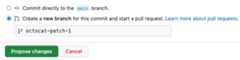
ClickCommit changes orPropose changes.


Adding a code of conduct manually
If the code of conduct you want to use isn't available in the provided templates, you can manually add a code of conduct.
On GitHub, navigate to the main page of the repository.
Above the list of files, select theAdd file dropdown menu, then click Create new file.
Alternatively, you can click in the file tree view on the left.
In the file name field, type the name and extension for the file.
- To make your code of conduct visible in the repository's root directory, typeCODE_OF_CONDUCT in the file name field.
- To make your code of conduct visible in the repository's
docsdirectory, typedocs/CODE_OF_CONDUCT. - To make your code of conduct visible in the repository's
.githubdirectory, type.github/CODE_OF_CONDUCT.
In the new file, add your custom code of conduct.
ClickCommit changes...
In the "Commit message" field, type a short, meaningful commit message that describes the change you made to the file. You can attribute the commit to more than one author in the commit message. For more information, seeCreating a commit with multiple authors.
Below the commit message fields, decide whether to add your commit to the current branch or to a new branch. If your current branch is the default branch, you should choose to create a new branch for your commit and then create a pull request. For more information, seeCreating a pull request.
ClickCommit changes orPropose changes.