Flutter 3.41 is live! Check out theFlutter 3.41 blog post!
Measuring your app's size
How to measure app size for iOS and Android.
Many developers are concerned with the size of their compiled app. As the APK, app bundle, or IPA version of a Flutter app is self-contained and holds all the code and assets needed to run the app, its size can be a concern. The larger an app, the more space it requires on a device, the longer it takes to download, and it might break the limit of useful features like Android instant apps.
Debug builds are not representative
# By default, launching your app withflutter run, or by clicking thePlay button in your IDE (as used inWrite your first Flutter app), generates adebug build of the Flutter app. The app size of a debug build is large due to the debugging overhead that allows for hot reload and source-level debugging. As such, it is not representative of a production app end users download.
Checking the total size
# A default release build, such as one created byflutter build apk orflutter build ios, is built to conveniently assemble your upload package to the Play Store and App Store. As such, they're also not representative of your end-users' download size. The stores generally reprocess and split your upload package to target the specific downloader and the downloader's hardware, such as filtering for assets targeting the phone's DPI, filtering native libraries targeting the phone's CPU architecture.
Estimating total size
#To get the closest approximate size on each platform, use the following instructions.
Android
#Follow the GooglePlay Console's instructions for checking app download and install sizes.
Produce an upload package for your application:
flutter build appbundleLog into yourGoogle Play Console. Upload your application binary by drag dropping the .aab file.
View the application's download and install size in theAndroid vitals ->App size tab.

The download size is calculated based on an XXXHDPI (~640dpi) device on an arm64-v8a architecture. Your end users' download sizes might vary depending on their hardware.
The top tab has a toggle for download size and install size. The page also contains optimization tips further below.
iOS
#Create anXcode App Size Report.
First, by configuring the app version and build as described in theiOS create build archive instructions.
Then:
- Run
flutter build ipa --export-method development. - Run
open build/ios/archive/*.xcarchiveto open the archive in Xcode. - ClickDistribute App.
- Select a method of distribution.Development is the simplest if you don't intend to distribute the application.
- InApp Thinning, select 'all compatible device variants'.
- SelectStrip Swift symbols.
Sign and export the IPA. The exported directory containsApp Thinning Size Report.txt with details about your projected application size on different devices and versions of iOS.
The App Size Report for the default demo app in Flutter 1.17 shows:
Variant: Runner-7433FC8E-1DF4-4299-A7E8-E00768671BEB.ipaSupported variant descriptors: [device: iPhone12,1, os-version: 13.0] and [device: iPhone11,8, os-version: 13.0]App + On Demand Resources size: 5.4 MB compressed, 13.7 MB uncompressedApp size: 5.4 MB compressed, 13.7 MB uncompressedOn Demand Resources size: Zero KB compressed, Zero KB uncompressedIn this example, the app has an approximate download size of 5.4 MB and an approximate installation size of 13.7 MB on an iPhone12,1 (Model ID / Hardware number for iPhone 11) and iPhone11,8 (iPhone XR) running iOS 13.0.
To measure an iOS app exactly, you have to upload a release IPA to Apple's App Store Connect (instructions) and obtain the size report from there. IPAs are commonly larger than APKs as explained inHow big is the Flutter engine?, a section in the FlutterFAQ.
Breaking down the size
#Starting in Flutter version 1.22 and DevTools version 0.9.1, a size analysis tool is included to help developers understand the breakdown of the release build of their application.
As stated in thechecking total size section above, an upload package is not representative of your end users' download size. Be aware that redundant native library architectures and asset densities seen in the breakdown tool can be filtered by the Play Store and App Store.
The size analysis tool is invoked by passing the--analyze-size flag when building:
flutter build apk --analyze-sizeflutter build appbundle --analyze-sizeflutter build ios --analyze-sizeflutter build linux --analyze-sizeflutter build macos --analyze-sizeflutter build windows --analyze-size
This build is different from a standard release build in two ways.
- The tool compiles Dart in a way that records code size usage of Dart packages.
- The tool displays a high level summary of the size breakdown in the terminal, and leaves a
*-code-size-analysis_*.jsonfile for more detailed analysis in DevTools.
In addition to analyzing a single build, two builds can also be diffed by loading two*-code-size-analysis_*.json files into DevTools. Check out theDevTools documentation for details.

Through the summary, you can get a quick idea of the size usage per category (such as asset, native code, Flutter libraries, etc). The compiled Dart native library is further broken down by package for quick analysis.
This tool on iOS creates a .app rather than an IPA. Use this tool to evaluate the relative size of the .app's content. To get a closer estimate of the download size, reference theEstimating total size section above.
Deeper analysis in DevTools
# The*-code-size-analysis_*.json file produced above can be further analyzed in deeper detail in DevTools where a tree or a treemap view can break down the contents of the application into the individual file level and up to function level for the Dart AOT artifact.
This can be done bydart devtools, selectingOpen app size tool and uploading the JSON file.
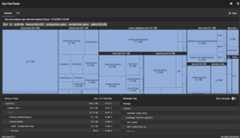
For further information on using the DevTools app size tool, check out theDevTools documentation.
Reducing app size
# When building a release version of your app, consider using the--split-debug-info tag. This tag can dramatically reduce code size. For an example of using this tag, seeObfuscating Dart code.
Some other things you can do to make your app smaller are:
- Remove unused resources
- Minimize resource imported from libraries
- Compress PNG and JPEG files
Another way to reduce app size is by using platform-specific code. The Dart compiler removes code that is unreachable on the target platform. For example, if you have code that is specific to Windows, you can wrap it in a check using thePlatform class fromdart:io, likeif (Platform.isWindows). When you build the app for Android, the compiler sees that this check is always false and removes the Windows-specific code from the release build.
Unless stated otherwise, the documentation on this site reflects Flutter 3.38.6. Page last updated on 2026-01-14.View source orreport an issue.