
3 - Customizing Codecov
Identify untested code
Now that we have coverage on ourmain branch, let’s see how to improve our coverage. Go back toCodecov and click into your demo repository.
🚧
Not seeing coverage information?If you are not seeing any coverage information, navigate to
Configuration->Generaland ensure your default branch ismain.
On the demo repositoryCoverage dashboard, you will see some data relating to the recent commit:
- The coverage chart will show you coverage change over time
- The sunburst graph highlights parts of the codebase that have low coverage
We will use the bottom section, the Fileviewer, to identify lines of code that haven’t been tested.

Click onapi andcalculator.py to see what hasn’t been covered.

Note that we haven’t added a test for line 13, dividing by 0.
Set coverage standards
Before we add the test, let’s set some configurations for this project.Pull the latest frommain andcreate a new branchstep3
git checkout maingit pullgit checkout -b 'step3'Add acodecov.yml in theroot directory of the git repository with these values:
ignore: - "api/app.py"coverage: status: project: default: target: 100% threshold: 1%This configuration tells Codecov to ignore the code inapp.py when calculating coverage, and to fail a status check if 100% of the (non-ignored) codebase is not covered with tests. However, it also allows for a 1% threshold, meaning the true minimum is 99%.
To see how this behaves on your project, commit the new file and open a merge request
When opening merge requests, be sure to select your own repository as the target branch, orset your project's default target branch
git add .git commit -m 'step3: add project status check target'git push origin step3You will notice that after CI finishes, we have two status checks, and the pipeline has failed.
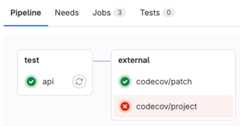
The configuration we set (coverage at 100%) runs against thepatch(the code in this merge request) and the wholeproject. Since none of the lines in this merge request needed coverage, ourpatch is fully covered. However, the coverage for the project is below the threshold we set.

The detail from the pipeline tells us that if we merge this code, project coverage will be 97.22%, which is a 36.88% increase over the main branch, but is still below the threshold we set.
If your settings includePipelines must succeed, you will seeMerge blocked, otherwise when you clickMerge you will get a warning that you haveunverified changes.
Since our project still has an uncovered line, we will need to add a test to cover it before we can pass all status checks.
Add a test for uncovered code
At the end ofapi/tests/test_calculator.py add a test for the divide by 0 case.
def test_divide_by_0(): assert Calculator.divide(2.0, 0) == 'Cannot divide by 0'Let’s commit and push our code to see if our project is fully covered.
git add .git commit -m 'step3: cover divide by 0 case'git push origin step3You will see the following status checks passing.

Once your changes are merged into main, take another look at your demo repositoryCoverage dashboard on Codecov!
Add the Codecov badge
Finally, let’s add a Codecov badge to yourREADME.md file. You can copy the Markdown code from theConfiguration tab in Codecov, underBadges & Graphs.
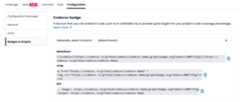
YourREADME.md file will look something like
[](https://codecov.io/gh/{{REPOSITORY}})As before, commit the changes and merge the merge request
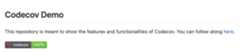
git add .git commit -m 'step3: add Codecov badge'git push origin step3You should see the badge appear on the repository screen in GitLab
Updated about 1 month ago