
6 - Test what you change with Carryforward Flags
Although Flags can help separate out different test suites, not every project will run the entire test suite for every commit. Carryforward Flags can be used here to maintain consistent coverage values.
Update CI workflows to run on applicable changes
Pull the latest frommain and create a new branchstep6
git checkout maingit pullgit checkout -b 'step6'Let’s set up our demo repository to only run workflows if the affected code is changed.
GitHub Actions
Edit theon: section of both workflows
...on: push: paths: - 'api/**'...on: push: paths: - 'web/**'CircleCI
Running jobs based on files changed in a directory requires CircleCI'spath-filtering orb anddynamic config.
Due tothis issue, be sure to replace<<pipeline.parameters.test-api-job>> and<<pipeline.parameters.test-frontend-job>> with <<pipeline.parameters.test-api-job>> and <<pipeline.parameters.test-frontend-job>> , respectively.
You will need toenable dynamic config.
version: 2.1setup: trueorbs: path-filtering: circleci/[email protected]workflows: jobs: - path-filtering/filter: mapping: | api/.* test-api-job true web/.* test-frontend-job trueversion: 2.1orbs: codecov: codecov/[email protected]parameters: test-api-job: type: boolean default: false test-frontend-job: type: boolean default: falsejobs: test-api: docker: - image: cimg/python:3.10.2 name: Install requirements command: pip install -r api/requirements.txt - run: name: Run tests and collect coverage command: pytest --cov --cov-report xml . - codecov/upload: flags: backend test-frontend: docker: - image: cimg/node:17.6.0 steps: - checkout - run: name: Install requirements command: cd web && npm install - run: name: Run tests and collect coverage command: cd web && npm run test - codecov/upload: flags: frontendworkflows: test-api-workflow: when: << pipeline.parameters.test-api-job >> jobs: - test-api test-frontend-workflow: when: << pipeline.parameters.test-frontend-job >> jobs: - test-frontendNow, if we make a change to only code in theweb directory, thefrontend workflow will run.
Add coverage to the frontend
Let’s add a test to our calculator.
... test('test operation', () => { const calculator = new calc.Calculator(); calculator.chooseOperation('+'); expect(calculator.operation).toBeUndefined(); calculator.appendNumber(1); calculator.appendNumber(2); calculator.chooseOperation('+'); expect(calculator.currentOperand).toBe(''); expect(calculator.operation).toBe('+'); expect(calculator.previousOperand).toBe('12'); calculator.appendNumber(3); calculator.appendNumber(4); expect(calculator.currentOperand).toBe('34'); expect(calculator.operation).toBe('+'); expect(calculator.previousOperand).toBe('12'); })...Runcd web && npm run test to ensure that the test has been added in correctly.
Turn Flags into Carryforward Flags
Finally, we will need to make a change to ourcodecov.yml file to ensure that Flags are marked as Carryforward.
...flag_management: default_rules: carryforward: true...Commit and push your changes to GitHub.
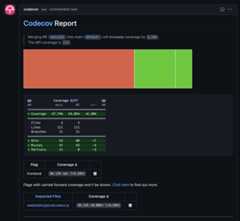
git add .git commit -m 'step6: add Carryforward Flags'git push origin step6Notice that only thefrontend workflow runs. In theFlag section of the Codecov comment, you will only see thefrontend Flag.
Conclusion
At this point, you have worked through the major features of Codecov. From here, you can explore other advanced aspects of the product.
Updated about 1 month ago