
4b - Setting coverage standards with Flags
Codecov’sFlags helps this situation by grouping coverage reports by function. Let’s set up flags in our example so that we can simulate an instance where the backend is well-tested and wants to maintain high code coverage, while the frontend is new and only expected to increase with each new commit.
Add flags to the Codecov configuration
Add the following code tocodecov.yml.
codecov: ...ignore: ...coverage: status: project: off patch: offflag_management: individual_flags: - name: backend paths: - api/ statuses: - type: project target: 100% threshold: 1% - name: frontend paths: - web/ statuses: - type: project target: auto threshold: 1%Notice that we are creating two flagsbackend andfrontend that encompass theapi andweb directories, respectively. Thebackend flag will target 100% overall coverage, while thefrontend flag is set toauto. This means that every new commit must maintain or raise the overall code coverage of the project.
Update the uploader call with flags
Update the workflows to send the proper flag with each coverage report
Bitbucket Pipelines
pipelines: default: - parallel: - step: ... name: api script: ... - ./codecov -F backend - step: ... name: frontend script: ... - ./codecov -F frontendCommit your changes and push them to GitHub
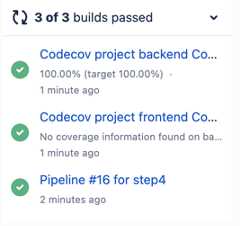
git add .git commit -m 'step4: add Codecov Flags'git push origin step4Now you see 4 status checks from Codecov that are passing.
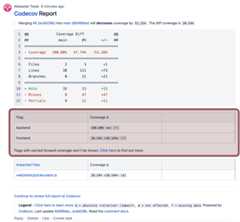
And the newflag section in the Codecov comment
When ready, merge the request.
Updated about 1 month ago