

Thought signatures
To see examples of how to use thought signatures, run the following notebooks in the environment of your choice:
"Intro to thought signatures":
Open in Colab |Open in Colab Enterprise |Openin Vertex AI Workbench |View on GitHub
"Intro to thought signatures with REST API":
Open in Colab |Open in Colab Enterprise |Openin Vertex AI Workbench |View on GitHub
"Using OpenAI libraries with Gemini on Vertex AI":
Open in Colab |Open in Colab Enterprise |Openin Vertex AI Workbench |View on GitHub
 Open in Colab
 Open in Colab Enterprise
 Openin Vertex AI Workbench
 View on GitHub
Thought signatures are encrypted representations of the model's internal thoughtprocess. Thought signatures preserve the Gemini reasoning state duringmulti-turn and multi-step conversations, which can be useful when usingfunction calling. Responses can include athought_signature field within any content part (e.g.,text,functionCall).
Gemini 3 models enforce stricter validation on thought signaturesthan previous Gemini versions because they improve model performancefor function calling. To ensure the model maintains full context across multipleturns of a conversation, you must return the thought signatures from previousresponses in your subsequent requests, even when usingMINIMAL thinkinglevels. If a required thought signature is not returned when usingGemini 3 models, the model will return a400 error.
While Gemini 3 Pro Image doesn't enforce this validation, to ensure themodel maintains full context across multiple turns of a conversation, you muststill return the thought signatures from previous responses in your subsequentrequests. Gemini 3 Pro Image doesn't return a400 error if a thoughtsignature isn't returned. For code samples related to multi-turn image editingusing Gemini 3 Pro Image, seeExample of multi-turn image editing using thought signatures.
If you are using the official Google Gen AI SDK (Python, Node.js,Go, or Java) and using the standard chat history features or appending the fullmodel response to the history, thought signatures are handled automatically.
Why are they important?
When a Thinking model calls an external tool, it pauses its internalreasoning process. The thought signature acts as a "save state," allowing themodel to resume its chain of thought seamlessly once you provide the function'sresult. Without thought signatures, the model "forgets" its specific reasoningsteps during the tool execution phase. Passing the signature back ensures:
- Context continuity: The model preserves and can check the reasoning stepsthat justified calling the tool.
- Complex reasoning: Enables multi-step tasks where the output of one toolinforms the reasoning for the next.
Turns and steps
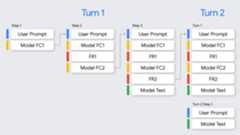
In the context of function calling, it's important to understand the difference betweenturns andsteps:
- Aturn represents a complete conversation exchange, starting with a user's prompt and ending when the model provides a final, non-function-call response to that prompt.
- Astep occurs within a single turn when the model invokes a function and requires a function response to continue its reasoning process. As shown in the diagram, a single turn can involve multiple steps if the model needs to call several functions sequentially to fulfill the user's request.
How to use thought signatures
The simplest way to handle thought signatures is to include allParts from all previous messages in the conversation history when sending anew request, exactly as they were returned by the model.
If you are not using one of the Google Gen AI SDKs, or you need tomodify or trim conversation history, you must ensure that thought signaturesare preserved and sent back to the model.
When using the Google Gen AI SDK (recommended)
When using the chat history features of the SDKs or appending the model'scontent object from the previous response to thecontents of the nextrequest, signatures are handled automatically.
The following Python example shows automatic handling:
fromgoogleimportgenaifromgoogle.genai.typesimportContent,FunctionDeclaration,GenerateContentConfig,Part,ThinkingConfig,Toolclient=genai.Client()# 1. Define your toolget_weather_declaration=FunctionDeclaration(name="get_weather",description="Gets the current weather temperature for a given location.",parameters={"type":"object","properties":{"location":{"type":"string"}},"required":["location"],},)get_weather_tool=Tool(function_declarations=[get_weather_declaration])# 2. Send a message that triggers the toolprompt="What's the weather like in London?"response=client.models.generate_content(model="gemini-2.5-flash",contents=prompt,config=GenerateContentConfig(tools=[get_weather_tool],thinking_config=ThinkingConfig(include_thoughts=True)),)# 3. Handle the function callfunction_call=response.function_calls[0]location=function_call.args["location"]print(f"Model wants to call:{function_call.name}")# Execute your tool (for example, call an API)# (This is a mock response for the example)print(f"Calling external tool for:{location}")function_response_data={"location":location,"temperature":"30C",}# 4. Send the tool's result back# Append this turn's messages to history for a final response.# The `content` object automatically attaches the required thought_signature behind the scenes.history=[Content(role="user",parts=[Part(text=prompt)]),response.candidates[0].content,# Signature preserved hereContent(role="tool",parts=[Part.from_function_response(name=function_call.name,response=function_response_data,)],)]response_2=client.models.generate_content(model="gemini-2.5-flash",contents=history,config=GenerateContentConfig(tools=[get_weather_tool],thinking_config=ThinkingConfig(include_thoughts=True)),)# 5. Get the final, natural-language answerprint(f"\nFinal model response:{response_2.text}")When using REST or manual handling
If you are interacting with the API directly, you must implement signaturehandling based on the following rules for Gemini 3 Pro:
- Function calling:
- If the model response contains one or more
functionCallparts, athought_signatureis required for correct processing. - In cases ofparallel function calls in a single response, only thefirst
functionCallpart will contain thethought_signature. - In cases ofsequential function calls across multiple steps in a turn,each
functionCallpart will contain athought_signature. - Rule: When constructing the next request, you must include the
partcontaining thefunctionCalland itsthought_signatureexactly as it was returned by the model. For sequential (multi-step)function calling, validation is performed on all steps in the currentturn, and omitting a requiredthought_signaturefor the firstfunctionCallpart in any step of the current turn results in a400error. A turn begins with the most recent user message that is not afunctionResponse. - If the model returns parallel function calls (for example,
FC1+signature,FC2), your response must contain all function calls followed by allfunction responses (FC1+signature,FC2,FR1,FR2). Interleavingresponses (FC1+signature,FR1,FC2,FR2) results in a400error. - There are rare cases where you need to provide
functionCallparts thatwere not generated by the API and therefore don't have an associatedthought signature (for example, when transferring history from a modelthat does not include thought signatures). You can setthought_signaturetoskip_thought_signature_validator, but, thisshould be a last resort as it will negatively impact model performance.
- If the model response contains one or more
- Non-function calling:
- If the model response does not contain a
functionCall, it mightinclude athought_signaturein thelastpartof the response(for example, the lasttextpart). - Rule: Including this signature in the next request isrecommended for best performance, but omitting it won't cause anerror. When streaming, this signature might be returned in apart with empty text content, so be sure to parse all parts until
finish_reasonis returned by the model.
- If the model response does not contain a
Follow these rules to ensure the model's context is preserved:
- Always send the
thought_signatureback to the model inside its originalPart. - Don't merge a
Partcontaining a signature with one that does not. Thisbreaks the positional context of the thought. - Don't combine two
Parts that both contain signatures, because the signaturestrings cannot be merged.
Sequential function calling example
The following example shows a multi-step function calling example where the userasks "Check flight status for AA100 and book a taxi if delayed", which requiresmultiple tasks.
REST
The following example demonstrates how to handle thought signatures across multiple steps in a sequential function calling workflow using the REST API.
Turn 1, Step 1 (user request)
{"contents":[{"role":"user","parts":[{"text":"Check flight status for AA100 and book a taxi 2 hours before if delayed."}]}],"tools":[{"functionDeclarations":[{"name":"check_flight","description":"Gets the current status of a flight","parameters":{"type":"object","properties":{"flight":{"type":"string","description":"The flight number to check"}},"required":["flight"]}},{"name":"book_taxi","description":"Book a taxi","parameters":{"type":"object","properties":{"time":{"type":"string","description":"time to book the taxi"}},"required":["time"]}}]}]}
Turn 1, Step 1 (model response)
{"content":{"role":"model","parts":[{"functionCall":{"name":"check_flight","args":{"flight":"AA100"}},"thoughtSignature":"<SIGNATURE_A>"}]}}
Turn 1, Step 2 (user response - sending tool outputs)
Since this user turn only contains afunctionResponse (no fresh text), we arestill in Turn 1. You must preserve<SIGNATURE_A>.
{"role":"user","parts":[{"text":"Check flight status for AA100 and book a taxi 2 hours before if delayed."}]},{"role":"model","parts":[{"functionCall":{"name":"check_flight","args":{"flight":"AA100"}},"thoughtSignature":"<SIGNATURE_A>"}]},{"role":"user","parts":[{"functionResponse":{"name":"check_flight","response":{"status":"delayed","departure_time":"12 PM"}}}]}
Turn 1, Step 2 (model response)
The model now decides to book a taxi based on the previous tool output.
{"content":{"role":"model","parts":[{"functionCall":{"name":"book_taxi","args":{"time":"10 AM"}},"thoughtSignature":"<SIGNATURE_B>"}]}}
Turn 1, Step 3 (user response - sending tool output)
To send the taxi booking confirmation, you must include signatures forallfunction calls in this loop (<SIGNATURE_A> and<SIGNATURE_B>).
{"role":"user","parts":[{"text":"Check flight status for AA100 and book a taxi 2 hours before if delayed."}]},{"role":"model","parts":[{"functionCall":{"name":"check_flight","args":{"flight":"AA100"}},"thoughtSignature":"<SIGNATURE_A>"}]},{"role":"user","parts":[{"functionResponse":{"name":"check_flight","response":{"status":"delayed","departure_time":"12 PM"}}}]},{"role":"model","parts":[{"functionCall":{"name":"book_taxi","args":{"time":"10 AM"}},"thoughtSignature":"<SIGNATURE_B>"}]},{"role":"user","parts":[{"functionResponse":{"name":"book_taxi","response":{"booking_status":"success"}}}]}}
Chat Completions
The following example demonstrates how to handle thought signatures across multiple steps in a sequential function calling workflow using the Chat Completions API.
Turn 1, Step 1 (user request)
{"model":"google/gemini-3-pro-preview","messages":[{"role":"user","content":"Check flight status for AA100 and book a taxi 2 hours before if delayed."}],"tools":[{"type":"function","function":{"name":"check_flight","description":"Gets the current status of a flight","parameters":{"type":"object","properties":{"flight":{"type":"string","description":"The flight number to check."}},"required":["flight"]}}},{"type":"function","function":{"name":"book_taxi","description":"Book a taxi","parameters":{"type":"object","properties":{"time":{"type":"string","description":"time to book the taxi"}},"required":["time"]}}}]}
Turn 1, Step 1 (model response)
{"role":"model","tool_calls":[{"extra_content":{"google":{"thought_signature":"<SIGNATURE_A>"}},"function":{"arguments":"{\"flight\":\"AA100\"}","name":"check_flight"},"id":"function-call-1","type":"function"}]}
Turn 1, Step 2 (user response - sending tool outputs)
Since this user turn only contains afunctionResponse (no fresh text), we arestill in Turn 1. You must preserve<SIGNATURE_A>.
"messages":[{"role":"user","content":"Check flight status for AA100 and book a taxi 2 hours before if delayed."},{"role":"model","tool_calls":[{"extra_content":{"google":{"thought_signature":"<SIGNATURE_A>"}},"function":{"arguments":"{\"flight\":\"AA100\"}","name":"check_flight"},"id":"function-call-1","type":"function"}]},{"role":"tool","name":"check_flight","tool_call_id":"function-call-1","content":"{\"status\":\"delayed\",\"departure_time\":\"12 PM\"}"}]
Turn 1, Step 2 (model response)
The model now decides to book a taxi based on the previous tool output.
{"role":"model","tool_calls":[{"extra_content":{"google":{"thought_signature":"<SIGNATURE_B>"}},"function":{"arguments":"{\"time\":\"10 AM\"}","name":"book_taxi"},"id":"function-call-2","type":"function"}]}
Turn 1, Step 3 (user response - sending tool output)
To send the taxi booking confirmation, you must include signatures forallfunction calls in this loop (<SIGNATURE_A> and<SIGNATURE_B>).
"messages":[{"role":"user","content":"Check flight status for AA100 and book a taxi 2 hours before if delayed."},{"role":"model","tool_calls":[{"extra_content":{"google":{"thought_signature":"<SIGNATURE_A>"}},"function":{"arguments":"{\"flight\":\"AA100\"}","name":"check_flight"},"id":"function-call-1d6a1a61-6f4f-4029-80ce-61586bd86da5","type":"function"}]},{"role":"tool","name":"check_flight","tool_call_id":"function-call-1d6a1a61-6f4f-4029-80ce-61586bd86da5","content":"{\"status\":\"delayed\",\"departure_time\":\"12 PM\"}"},{"role":"model","tool_calls":[{"extra_content":{"google":{"thought_signature":"<SIGNATURE_B>"}},"function":{"arguments":"{\"time\":\"10 AM\"}","name":"book_taxi"},"id":"function-call-65b325ba-9b40-4003-9535-8c7137b35634","type":"function"}]},{"role":"tool","name":"book_taxi","tool_call_id":"function-call-65b325ba-9b40-4003-9535-8c7137b35634","content":"{\"booking_status\":\"success\"}"}]
Parallel function calling example
The following example shows a parallel function calling example where the user asks"Check weather in Paris and London".
REST
The following example demonstrates how to handle thought signatures in a parallel function calling workflow using the REST API.
Turn 1, Step 1 (user request)
{"contents":[{"role":"user","parts":[{"text":"Check the weather in Paris and London."}]}],"tools":[{"functionDeclarations":[{"name":"get_current_temperature","description":"Gets the current temperature for a given location.","parameters":{"type":"object","properties":{"location":{"type":"string","description":"The city name, e.g. San Francisco"}},"required":["location"]}}]}]}
Turn 1, Step 1 (model response)
{"content":{"parts":[{"functionCall":{"name":"get_current_temperature","args":{"location":"Paris"}},"thoughtSignature":"<SIGNATURE_A>"},{"functionCall":{"name":"get_current_temperature","args":{"location":"London"}}}]}}
Turn 1, Step 2 (user response - sending tool outputs)
You must preserve<SIGNATURE_A> on the first part exactly as received.
[{"role":"user","parts":[{"text":"Check the weather in Paris and London."}]},{"role":"model","parts":[{"functionCall":{"name":"get_current_temperature","args":{"city":"Paris"}},"thought_signature":"<SIGNATURE_A>"},{"functionCall":{"name":"get_current_temperature","args":{"city":"London"}}}]},{"role":"user","parts":[{"functionResponse":{"name":"get_current_temperature","response":{"temp":"15C"}}},{"functionResponse":{"name":"get_current_temperature","response":{"temp":"12C"}}}]}]
Chat Completions
The following example demonstrates how to handle thought signatures in a parallel function calling workflow using the Chat Completions API.
Turn 1, Step 1 (user request)
{"contents":[{"role":"user","parts":[{"text":"Check the weather in Paris and London."}]}],"tools":[{"functionDeclarations":[{"name":"get_current_temperature","description":"Gets the current temperature for a given location.","parameters":{"type":"object","properties":{"location":{"type":"string","description":"The city name, e.g. San Francisco"}},"required":["location"]}}]}]}
Turn 1, Step 1 (model response)
{"role":"assistant","tool_calls":[{"extra_content":{"google":{"thought_signature":"<SIGNATURE_A>"}},"function":{"arguments":"{\"location\":\"Paris\"}","name":"get_current_temperature"},"id":"function-call-f3b9ecb3-d55f-4076-98c8-b13e9d1c0e01","type":"function"},{"function":{"arguments":"{\"location\":\"London\"}","name":"get_current_temperature"},"id":"function-call-335673ad-913e-42d1-bbf5-387c8ab80f44","type":"function"}]}
Turn 1, Step 2 (user response - sending tool outputs)
You must preserve<SIGNATURE_A> on the first part exactly as received.
"messages":[{"role":"user","content":"Check the weather in Paris and London."},{"role":"assistant","tool_calls":[{"extra_content":{"google":{"thought_signature":"<SIGNATURE_A>"}},"function":{"arguments":"{\"location\":\"Paris\"}","name":"get_current_temperature"},"id":"function-call-f3b9ecb3-d55f-4076-98c8-b13e9d1c0e01","type":"function"},{"function":{"arguments":"{\"location\":\"London\"}","name":"get_current_temperature"},"id":"function-call-335673ad-913e-42d1-bbf5-387c8ab80f44","type":"function"}]},{"role":"tool","name":"get_current_temperature","tool_call_id":"function-call-f3b9ecb3-d55f-4076-98c8-b13e9d1c0e01","content":"{\"temp\":\"15C\"}"},{"role":"tool","name":"get_current_temperature","tool_call_id":"function-call-335673ad-913e-42d1-bbf5-387c8ab80f44","content":"{\"temp\":\"12C\"}"}]
Signatures in non-functionCallParts
Gemini may also return athought_signature in the finalPart of aresponse, even if no function call is present.
- Behavior: The final content
Part(text,inlineData, etc.) returnedby the model may contain athought_signature. - Requirement: Returning this signature isrecommended to ensurethe model maintains high-quality reasoning, especially for complex instructionfollowing or simulated agentic workflows.
- Validation: The API doesnot strictly enforce validation forsignatures in non-
functionCallparts. You won't receive a blocking errorif you omit them, though performance may degrade.
Example model response with signature in text part:
The following examples show a model response where athought_signature isincluded in a non-functionCallPart and how to handle it in a subsequentrequest.
Turn 1, Step 1 (model response)
{"role":"model","parts":[{"text":"I need to calculate the risk. Let me think step-by-step...","thought_signature":"<SIGNATURE_C>"// OPTIONAL (Recommended)}]}
Turn 2, Step 1 (user)
[{"role":"user","parts":[{"text":"What is the risk?"}]},{"role":"model","parts":[{"text":"I need to calculate the risk. Let me think step-by-step...",// If you omit <SIGNATURE_C> here, no error will occur.}]},{"role":"user","parts":[{"text":"Summarize it."}]}]
Example of multi-turn image editing using thought signatures
The following samples illustrate how to retrieve and pass thought signaturesduring multi-turn image creation and editing with Gemini 3 Pro Image.
Turn 1: Get the response and save data that includes thought signatures
chat=client.chats.create(model="gemini-3-pro-image-preview",config=types.GenerateContentConfig(response_modalities=['TEXT','IMAGE']))message="Create an image of a clear perfume bottle sitting on a vanity."response=chat.send_message(message)data=b''forpartinresponse.candidates[0].content.parts:ifpart.text:display(Markdown(part.text))ifpart.inline_data:data=part.inline_data.datadisplay(Image(data=data,width=500))
Turn 2: pass the data which includes thought signatures
response=chat.send_message(message=[types.Part.from_bytes(data=data,mime_type="image/png",),"Make the perfume bottle purple and add a vase of hydrangeas next to the bottle.",],)forpartinresponse.candidates[0].content.parts:ifpart.text:display(Markdown(part.text))ifpart.inline_data:display(Image(data=part.inline_data.data,width=500))
What's next
- Learn more aboutThinking.
- Learn more aboutFunction calling.
- Learn how toDesign multimodal prompts.
Except as otherwise noted, the content of this page is licensed under theCreative Commons Attribution 4.0 License, and code samples are licensed under theApache 2.0 License. For details, see theGoogle Developers Site Policies. Java is a registered trademark of Oracle and/or its affiliates.
Last updated 2025-12-16 UTC.