

Filter vector matches
To see an example of filtering vector matches in Vertex AI Vector Search, run the "Create Vertex AI Vector Search index" notebook in one of the following environments:
Open in Colab |Open in Colab Enterprise |Openin Vertex AI Workbench |View on GitHub
 Open in Colab
 Open in Colab Enterprise
 Openin Vertex AI Workbench
 View on GitHub
In Vector Search, you can restrict vector matching searchesto a subset of the index by using Boolean rules. Boolean predicates tellVector Search which vectors in the index to ignore. On this page you'lllearn about how filtering works, see examples, and ways to efficiently queryyour data based on vector similarity.
With Vector Search you can restrict results by categorical and numericrestrictions.Adding restrictions, or "filtering" your index results are useful for multiplereasons, like the following examples:
Improved result relevance: Vector Search is apowerful tool for finding semantically similar items. Filtering can be used to removeirrelevant results from the search results, such as items that are not in thecorrect language, category, price, or date range.
Reduced number of results: Vector Search can returna large number of results, especially for large datasets. Filtering can be usedto reduce the number of results to a more manageable number, while still returningthe most relevant results.
Segmented results: Filtering can be used to personalize the search resultsto the user's individual needs and preferences. For example, a user might wantto filter the results to only include items that they have rated highly in thepast or that fall into a specific price range.
Vector attributes
In a vector similarity search over a database of vectors, each vector isdescribed by zero-or-more attributes. These attribute are known astokens fortoken restricts andvalues for numeric restricts. These restricts can applyfrom each of several attribute categories, also known asnamespaces.
In the following example application, vectors are tagged with acolor, aprice, and ashape:
color,price, andshapearenamespaces.redandbluearetokens from thecolornamespace.squareandcirclearetokens from theshapenamespace.100and50arevalues from thepricenamespace.
Specify vector attributes
- To specify a "red circle":
{color: red}, {shape: circle}. - To specify a "red or blue square":
{color: red, blue}, {shape:square}. - To specify an object with no color, omit the "color"namespace in the
restrictsfield. - To specify numeric restricts for an object, note the namespace and the value inthe appropriate field for the type. Int value should be specified in
value_int,float value should be specified invalue_float, and double value should bespecified invalue_double. Only one number type should be used for a givennamespace.
For information about the schema used to specify this data, seeSpecify namespaces and tokens in the input data.
Queries
- Queries express an AND logical operator across namespaces and an OR logicaloperator within each namespace. A query that specifies
{color: red, blue}, {shape: square, circle}, matches all database pointsthat satisfy(red || blue) && (square || circle). - A query that specifies
{color: red}, matches allredobjects of anykind, with no restriction onshape. - Numeric restricts in queries require
namespace, one of number values fromvalue_int,value_float, andvalue_double, and operatorop. - Operator
opis one ofLESS,LESS_EQUAL,EQUAL,GREATER_EQUAL, andGREATER. For example, if theLESS_EQUALoperator is used, datapoints areeligible if their value is smaller or equal to the value used in the query.
The following code examples identify vector attributes in the sampleapplication:
[{"namespace":"price","value_int":20,"op":"LESS"},{"namespace":"length","value_float":0.3,"op":"GREATER_EQUAL"},{"namespace":"width","value_double":0.5,"op":"EQUAL"}]Denylist
To enable more advanced scenarios, Google supports a form of negation known asdenylist tokens. When a query denylists a token, matches are excluded for anydatapoint that has the denylisted token. If a query namespace has onlydenylisted tokens, all points not explicitly denylisted, match, in exactly thesame way that an empty namespace matches with all points.
Datapoints can also denylist a token, excluding matches with any queryspecifying that token.
For example, define the following data points with the specified tokens:
A: {} // empty set matches everythingB: {red} // only a 'red' tokenC: {blue} // only a 'blue' tokenD: {orange} // only an 'orange' tokenE: {red, blue} // multiple tokensF: {red, !blue} // deny the 'blue' tokenG: {red, blue, !blue} // An unlikely edge-caseH: {!blue} // deny-only (similar to empty-set)The system behaves as follows:
- Empty query namespaces are match-all wildcards. For example,Q:
{}matches DB:{color:red}. Empty datapoint namespaces are not match-all wildcards. For example,Q:
{color:red}doesn't match DB:{}.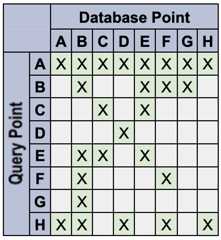
Specify namespaces and tokens or values in the input data
For information about how to structure your input data overall, seeInput dataformat and structure.
The following tabs show how to specify the namespaces and tokensassociated with each input vector.
JSON
For each vector's record, add a field called
restricts, tocontain an array of objects, each of which is a namespace.- Each object must have a field named
namespace. This fieldis theTokenNamespace.namespace, namespace. - The value of the field
allow, if present, is an arrayof strings. This array of strings is theTokenNamespace.string_tokenslist. - The value of the field
deny, if present, is an arrayof strings. This array of strings is theTokenNamespace.string_denylist_tokenslist.
- Each object must have a field named
The following are two example records in JSON format:
[{"id":"42","embedding":[0.5,1],"restricts":[{"namespace":"class","allow":["cat","pet"]},{"namespace":"category","allow":["feline"]}]},{"id":"43","embedding":[0.6,1],"sparse_embedding":{"values":[0.1,0.2],"dimensions":[1,4]},"restricts":[{"namespace":"class","allow":["dog","pet"]},{"namespace":"category","allow":["canine"]}]}]For each vector's record, add a field called
numeric_restricts, tocontain an array of objects, each of which is a numeric restrict.- Each object must have a field named
namespace. This fieldis theNumericRestrictNamespace.namespace, namespace. - Each object must have one of
value_int,value_float, andvalue_double. - Each object must not have a field named
op. This field is only for query.
- Each object must have a field named
The following are two example records in JSON format:
[{"id":"42","embedding":[0.5,1],"numeric_restricts":[{"namespace":"size","value_int":3},{"namespace":"ratio","value_float":0.1}]},{"id":"43","embedding":[0.6,1],"sparse_embedding":{"values":[0.1,0.2],"numeric_restricts":[{"namespace":"weight","value_double":0.3}]}}]Avro
Avro records use the following schema:
{"type":"record","name":"FeatureVector","fields":[{"name":"id","type":"string"},{"name":"embedding","type":{"type":"array","items":"float"}},{"name":"sparse_embedding","type":["null",{"type":"record","name":"sparse_embedding","fields":[{"name":"values","type":{"type":"array","items":"float"}},{"name":"dimensions","type":{"type":"array","items":"long"}}]}]},{"name":"restricts","type":["null",{"type":"array","items":{"type":"record","name":"Restrict","fields":[{"name":"namespace","type":"string"},{"name":"allow","type":["null",{"type":"array","items":"string"}]},{"name":"deny","type":["null",{"type":"array","items":"string"}]}]}}]},{"name":"numeric_restricts","type":["null",{"type":"array","items":{"name":"NumericRestrict","type":"record","fields":[{"name":"namespace","type":"string"},{"name":"value_int","type":["null","int"],"default":null},{"name":"value_float","type":["null","float"],"default":null},{"name":"value_double","type":["null","double"],"default":null}]}}],"default":null},{"name":"crowding_tag","type":["null","string"]}]}CSV
Token restricts
For each vector's record, add comma separated pairs of format
name=valueto specify token namespace restricts. The same name may berepeated if there are multiple values in a namespace.For example,
color=red,color=bluerepresents thisTokenNamespace:{ "namespace": "color" "string_tokens": ["red", "blue"]}For each vector's record, add comma separated pairs of format
name=!valueto specify excluded value for token namespace restricts.For example,
color=!redrepresents thisTokenNamespace:{ "namespace": "color" "string_blacklist_tokens": ["red"]}
Numeric restricts
For each vector's record, add comma separated pairs of format
#name=numericValuewith number type suffix to specify numericnamespace restricts.Number type suffix is
ifor int,ffor float,anddfor double. The same name shouldn't be repeated as there shouldbe a single value associated per namespace.For example,
#size=3irepresents thisNumericRestrictNamespace:{ "namespace": "size" "value_int": 3}#ratio=0.1frepresents thisNumericRestrictNamespace:{ "namespace": "ratio" "value_float": 0.1}#weight=0.3drepresents thisNumericRestriction:{ "namespace": "weight" "value_double": 0.3}Here is an example data point with
id: "6",embedding: [7, -8.1],sparse_embedding:{values: [0.1, -0.2, 0.5],dimensions: [40, 901, 1111]}}, crowding tag oftest, token allowlist ofcolor: red, blue, token denylist ofcolor: purple, and numeric restrict ofratiowith float0.1:6,7,-8.1,40:0.1,901:-0.2,1111:0.5,crowding_tag=test,color=red,color=blue,color=!purple,ratio=0.1f
What's next
Except as otherwise noted, the content of this page is licensed under theCreative Commons Attribution 4.0 License, and code samples are licensed under theApache 2.0 License. For details, see theGoogle Developers Site Policies. Java is a registered trademark of Oracle and/or its affiliates.
Last updated 2025-12-17 UTC.