

Prerequisites
Create a Google Cloud account
If you don't have a Google Cloud account, go tohttps://console.cloud.google.com/ to create one.
Create a Google Cloud project
If you have a Google Cloud project that you want to use for this tutorial, you canskip this step and continue withFind your project ID.Otherwise, follow the steps inSet up aproject. For moreinformation, seeCreating and managingprojects.
Find your Google Cloud project ID
A Google Cloud project ID is a unique string used to differentiate yourproject from all others in Google Cloud. You use your Google Cloud projectID in this tutorial to initialize the Vertex AI SDK for Python. If you know yourGoogle Cloud project ID, you can skip this step.
To locate your Google Cloud project ID:
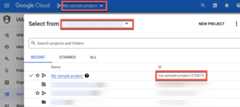
In the Google Cloud console, click the list of projects in the top menu.
In the dialog that appears, locate your project. If you don't see yourproject, you might need to choose a differentorganization. SelectNo organization to view projects that aren't associated with anorganization or that are associated with an organization that you don't haveaccess to view.
To find a Google Cloud project that you haven't accessed recently, youmight need to clickAll instead ofRecent orStarred.
After you locate your project, make a note of its Google Cloud project IDin theID column.
Except as otherwise noted, the content of this page is licensed under theCreative Commons Attribution 4.0 License, and code samples are licensed under theApache 2.0 License. For details, see theGoogle Developers Site Policies. Java is a registered trademark of Oracle and/or its affiliates.
Last updated 2025-12-15 UTC.