

Best practices and suggested workflow
Assuming you have already run the tutorials, this page outlinesthe best practices for Neural Architecture Search. The first sectionsummarizes acomplete workflow, which you can followfor your Neural Architecture Search job.The other sections provide a detailed description for eachstep. We highly recommend going through this entire pagebefore running your first Neural Architecture Search job.
Suggested workflow
Here we summarize asuggested workflow for Neural Architecture Search andprovide links to the correspondingsections for more details:
- Split your training dataset for stage-1 search.
- Ensure that yoursearch space follows our guidelines.
- Run full training with your baseline model and obtain a validation curve.
- Runproxy-task design toolsto find the best proxy task.
- Makefinal checksfor your proxy task.
- Set proper number of total trials and parallel trialsand then start the search.
- Monitor the search plot andstop it when it convergesor shows large number of errors orshows no sign of convergence.
- Run full-training with top ~10 trials chosen from your searchfor the final result. For full-training, you may use more augmentation orpre-trained weights to get the best possible performance.
- Analyze the saved out metrics/data from the search and draw conclusionsfor future search space iterations.
Typical Neural Architecture Search
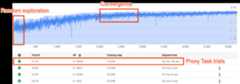
The above figure shows a typical Neural Architecture Search curve.TheY-axis here shows the trial-rewards and theX-axis shows the number of trials launched so far.The first ~100-200 trials are mostlyrandom explorationsof the search space by the controller.During these initial explorations, the rewards showa large variance because many kinds of models inthe search space are being tried out.As the number of trials increase, the controller starts finding bettermodels. Therefore, first the reward starts increasing and then later thereward-variance and the reward-growth starts decreasingthus showingconvergence. The number of trialsat which the convergence happens can vary based on thesearch-space size but typically it is of the order of ~2000 trials.
Two stages of Neural Architecture Search: proxy-task and full training
The Neural Architecture Search works in two stages:
Stage1-search uses a much smallerrepresentation of the full trainingwhich typically finishes within ~1-2 hours. This representation is calledaproxy task and it helps keep thesearch cost down.
Stage2-full-training involves doing full-training for thetop ~10 scoring modelsfrom stage1-search. Due to the stochastic nature of the search, thetopmost model from stage1-search may not be the topmost model during thestage2-full-training and, therefore, it is important to select a poolof models for full-training.
Because the controller gets the reward signal from the smaller proxy taskinstead of the complete training, it is important tofind an optimal proxy-task for your task.
Note: Neural Architecture Search is an experimentation platform rather thana custom solution.Neural Architecture Search cost
The Neural Architecture Search cost is given by:search-cost = num-trials-to-converge * avg-proxy-task-cost.Assuming that theproxy-task compute time is around 1/30th of thefull-training time and the number of trials required to convergeis around ~2000, then thesearch cost becomes ~67 * full-training-cost.
Since the Neural Architecture Search cost is high, it is advisableto spend time tuning your proxy taskand to use a smaller search space for your first search.
Dataset split between two stages of Neural Architecture Search
Assuming that you already have thetraining-dataand thevalidation-data foryour baseline training, the following dataset split is recommendedfor the two stages of NAS Neural Architecture Search:
- Stage1-search training: ~90% of training-data
Stage1-search validation: ~10% of training-data
Stage2-full-training training: 100% of training-data
Stage2-full-training validation: 100% of validation-data
The stage2-full-training data split is the same as the regular training. But, thestage1-search uses a training data split for validation. Using differentvalidation data in stage1 and stage2 helps detect any model-search biasdue to the dataset split. Ensure that the training-data is well shuffledbefore partitioning it further and that thefinal 10% training-data-split has similar distributionas the original validation data.
Small or unbalanced data
Architecture search is not recommended with limited training dataor for highly imbalanced datasets where some classes are very rare.If you are already using heavy augmentations for your baseline trainingdue to lack of data, then the model-search is not recommended.
In this case you may only run theaugmentation-searchto search for the best augmentation policy rather than searchingfor an optimal architecture.
Search space design
The architecture search should not be mixed with augmentation search orhyperparameter search (such as learning rate or optimizer settings). The goalof architecture search is to compare model-A performance with model-Bwhen there are only architecture-based differences. Therefore, theaugmentation and hyperparameter settings should remain the same.
Theaugmentation searchcan be done as different stage after the architecture search is done.
Neural Architecture Search can go up to 10^20 in search space size. Butif your search space is larger, you can divide your search spaceintomutually-exclusive parts. For example, you cansearch for encoder separatelyfrom the decoder or the head first. If you still want todo a joint search over all of them, then you can createa smaller search space around previously found best individual options.
(Optional) You canmodel-scaling fromblock-design whendesigning a search space. The block design searchshould be done first with a scaled-down model. This can keep the costof proxy-task runtime much lower. You can then do a separate searchtoscale the model up. For more information, see
Examples of scaled down models.
Optimizing training and search time
Before running Neural Architecture Search, it is important to optimizethe training time for your baseline model. This will save youcost over the long run. Here are some of the options tooptimize the training:
- Maximize data loading speed:
- Ensure that the bucket where your data resides is in the sameregion as your job.
- If using TensorFlow, see
Best practice summary.You may also try usingTFRecord formatfor your data. - If using PyTorch, followthe guidelinesfor efficient PyTorch training.
- Usedistributed trainingto take advantage of multiple accelerators or multiple machines.
- Usemixed precision trainingto get significant training speedup and reduction in memory usage.For TensorFlow mixed precision training,see
Mixed Precision. - Some accelerators (like A100) are typically more cost efficient.
- Tune the batch-size to ensure that you are maximizing GPU utilization.The following plot shows under-utilization of GPUs (at 50%).
 Increasing the batch-size can help utilize GPUs more. However, batch-sizeshould be increased carefully as it can increaseout-of-memory errors during the search.
 - If certain architecture-blocks areindependentof the search space, then you can try loading pretrained checkpointsfor these blocks for faster training. The pretrained checkpointsshould be thesame over the search space andshould not introduce a bias.For example, if your search space is only for thedecoder, then the encoder can use pretrained checkpoints.
Number of GPUs for each search-trial
Use a smaller number of GPUs per trial to reduce the starting time.For example, 2 GPUs take 5 minutes to start, while 8 GPUs take 20 minutes.It is more efficient to use 2 GPUs per trial to run aNeural Architecture Search job proxy task.
Total trials and parallel trials for search
Total trial setting
Once you havesearched and selected the best proxy task,you are ready to launch a full search. It isn't possible toknow beforehand about how many trials it will take to converge.The number of trials at which the convergence happens can vary based on thesearch-space size, but typically, it is of the order ofapproximately 2,000 trials.
We recommend a very high settingfor the--max_nas_trial: approximately 5,000-10,000 and thencanceling the search-job earlier if thesearch plotshows convergence.You also have an option to resume a previous search job usingthesearch_resume command.However, you can't resume the search from another search resume job.Therefore, you can resume an original search job only once.
Parallel trials setting
The stage1-search job does batch processing by running--max_parallel_nas_trial number of trials in parallelat a time. This is critical in reducing the overall runtimefor the search job. You can calculate the expected number ofdays for search:days-required-for-search = (trials-to-converge / max-parallel-nas-trial) * (avg-trial-duration-in-hours / 24)Note: You can initially use3000 as a roughestimate fortrials-to-converge which is a goodupper bound to begin with. You can initially use2 hoursas a rough estimate for theavg-trial-duration-in-hours whichis a good upper bound for the time taken by each proxy task.It is advisable touse--max_parallel_nas_trial setting of~20-to-50 depending onhow much accelerator quotayour project has anddays-required-for-search.For example, if you set--max_parallel_nas_trial as 20and each proxy task uses two NVIDIA T4 GPUs, then you should havereserved a quota of at least 40 NVIDIA T4 GPUs. The--max_parallel_nas_trial setting does not affect the overall searchresult, but it does impact thedays-required-for-search.A smaller setting formax_parallel_nas_trialsuch as approximately 10 is possible (20 GPUs) as well but then you shouldroughly estimate thedays-required-for-search and, make sure thatit is within thejob timeout limit.
The stage2-full-training job typically trains all the trials inparallel by default. Typically, this is top 10 trials running in parallel.However, if each stage2-full-training trial uses too many GPUs(example, eight GPUs each) for your use case and you don'thave a sufficient quota, then you can manually run stage2jobs in batches such as run a stage2-full-training for just five trials firstand then run another stage2-full-training for next 5 trials.
Default job timeout
The default NAS job timeout is set to 14 days and after that, the job getscanceled. If you anticipate running the job for a longer duration, you can tryresuming the search job only once more for 14 more days. Overall, youcan run a search job for 28 days including resume.
Max failed trials setting
The max failed trials should be set to around 1/3th ofmax_nas_trialsetting. The job will get cancelled when the number offailed trials reach this limit.
When to stop the search
You should stop the search when:
The search-curve starts to converge (the variance decreases):
Note: If no latency constraint is used or the hard latency constraintis used with loose latency limit, then the curve may not show anincrease in reward but should still show convergence. This is becausethe controller may already have seen good accuraciesearly on in the search.More than 20% of your trials are showing invalid rewards (failures):
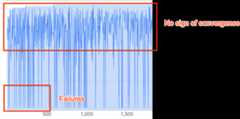
The search curve neither increases nor converges (as shown above)even after ~500 trials. If it shows any of the reward increaseor variance decrease then you can continue.
Except as otherwise noted, the content of this page is licensed under theCreative Commons Attribution 4.0 License, and code samples are licensed under theApache 2.0 License. For details, see theGoogle Developers Site Policies. Java is a registered trademark of Oracle and/or its affiliates.
Last updated 2025-12-15 UTC.