

Train a model with Tabular Workflow for Forecasting
To see an example of how to train a forecasting model, run the "Tabular Workflow for Forecasting" notebook in one of the following environments:
Open in Colab |Open in Colab Enterprise |Openin Vertex AI Workbench |View on GitHub
 Open in Colab
 Open in Colab Enterprise
 Openin Vertex AI Workbench
 View on GitHub
This page shows you how to train a forecasting model from atabular dataset with Tabular Workflow for Forecasting.
To learn about the service accounts this workflow uses, seeService accounts for Tabular Workflows.
If you receive a quota error while running Tabular Workflow forForecasting, you might need to request a higher quota. To learn more, seeManage quotas for Tabular Workflows.
Tabular Workflow for Forecasting doesn't support model export.
Workflow APIs
This workflow uses the following APIs:
- Vertex AI
- Dataflow
- Compute Engine
- Cloud Storage
Get the URI of the previous hyperparameter tuning result
If you previously completed a Tabular Workflow for Forecasting run, youcan use the hyperparameter tuning result from the previous run to save trainingtime and resources. Find the previous hyperparameter tuning result byusing the Google Cloud console or by loading it programmatically with the API.
Google Cloud console
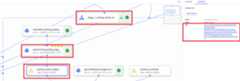
To find the hyperparameter tuning result URI by using the Google Cloud console,perform the following steps:
In the Google Cloud console, in the Vertex AI section, go tothePipelines page.
Select theRuns tab.
Select the pipeline run you want to use.
SelectExpand Artifacts.
Click componentexit-handler-1.
Click componentstage_1_tuning_result_artifact_uri_empty.
Find componentautoml-forecasting-stage-1-tuner.
Click the associated artifacttuning_result_output.
Select theNode Info tab.
Copy the URI for use in theTrain a model step.
API: Python
The following sample code demonstrates how you load the hyperparametertuning result by using the API. The variablejob refers to the previousmodel training pipeline run.
defget_task_detail(task_details:List[Dict[str,Any]],task_name:str)->List[Dict[str,Any]]:fortask_detailintask_details:iftask_detail.task_name==task_name:returntask_detailpipeline_task_details=job.gca_resource.job_detail.task_detailsstage_1_tuner_task=get_task_detail(pipeline_task_details,"automl-forecasting-stage-1-tuner")stage_1_tuning_result_artifact_uri=(stage_1_tuner_task.outputs["tuning_result_output"].artifacts[0].uri)Train a model
The following sample code demonstrates how you run a model training pipeline:
job = aiplatform.PipelineJob( ... template_path=template_path, parameter_values=parameter_values, ...)job.run(service_account=SERVICE_ACCOUNT)The optionalservice_account parameter injob.run() lets you set theVertex AI Pipelines service account to an account of your choice.
Vertex AI supports the following methods for training your model:
Time series Dense Encoder (TiDE). To use this model training method,define your pipeline and parameter values by using the following function:
template_path, parameter_values = automl_forecasting_utils.get_time_series_dense_encoder_forecasting_pipeline_and_parameters(...)Temporal Fusion Transformer (TFT). To use this model training method,define your pipeline and parameter values by using the following function:
template_path, parameter_values = automl_forecasting_utils.get_temporal_fusion_transformer_forecasting_pipeline_and_parameters(...)AutoML (L2L). To use this model training method,define your pipeline and parameter values by using the following function:
template_path, parameter_values = automl_forecasting_utils.get_learn_to_learn_forecasting_pipeline_and_parameters(...)Seq2Seq+. To use this model training method,define your pipeline and parameter values by using the following function:
template_path, parameter_values = automl_forecasting_utils.get_sequence_to_sequence_forecasting_pipeline_and_parameters(...)
To learn more, seeModel training methods.
The training data can be either a CSV file in Cloud Storage or a table inBigQuery.
The following is a subset of model training parameters:
| Parameter name | Type | Definition |
|---|---|---|
optimization_objective | String | By default, Vertex AI minimizes the root-mean-squared error (RMSE). If you want a different optimization objective for your forecast model, choose one of the options inOptimization objectives for forecasting models. If you choose to minimize the quantile loss, you must also specify a value forquantiles. |
enable_probabilistic_inference | Boolean | If set totrue, Vertex AI models the probability distribution of the forecast. Probabilistic inference can improve model quality by handling noisy data and quantifying uncertainty. Ifquantiles are specified, then Vertex AI also returns the quantiles of the distribution. Probabilistic inference is compatible only with the Time series Dense Encoder (TiDE) and the AutoML (L2L) training methods. Probabilistic inference is incompatible with theminimize-quantile-loss optimization objective. |
quantiles | List[float] | Quantiles to use forminimize-quantile-loss optimization objective and probabilistic inference. Provide a list of up to five unique numbers between0 and1, exclusive. |
time_column | String | The time column. To learn more, seeData structure requirements. |
time_series_identifier_columns | List[str] | The time series identifier columns. To learn more, seeData structure requirements. |
weight_column | String | (Optional) The weight column. To learn more, seeAdd weights to your training data. |
time_series_attribute_columns | List[str] | (Optional) The name or names of the columns that are time series attributes. To learn more, seeFeature type and availability at forecast. |
available_at_forecast_columns | List[str] | (Optional) The name or names of the covariate columns whose value is known at forecast time. To learn more, seeFeature type and availability at forecast. |
unavailable_at_forecast_columns | List[str] | (Optional) The name or names of the covariate columns whose value is unknown at forecast time. To learn more, seeFeature type and availability at forecast. |
forecast_horizon | Integer | (Optional) The forecast horizon determines how far into the future the modelforecasts the target value for each row of inference data. To learn more, seeForecast horizon, context window, and forecast window. |
context_window | Integer | (Optional) The context window sets how far back the model looks duringtraining (and for forecasts). In other words, for each training datapoint,the context window determines how far back the model looks for predictivepatterns. To learn more, seeForecast horizon, context window, and forecast window. |
window_max_count | Integer | (Optional) Vertex AI generates forecast windows from the input data using a rolling window strategy. The default strategy isCount. The default value for the maximum number of windows is100,000,000. Set this parameter to provide a custom value for the maximum number of windows. To learn more, seeRolling window strategies. |
window_stride_length | Integer | (Optional) Vertex AI generates forecast windows from the input data using a rolling window strategy. To select theStride strategy, set this parameter to the value of the stride length. To learn more, seeRolling window strategies. |
window_predefined_column | String | (Optional) Vertex AI generates forecast windows from the input data using a rolling window strategy. To select theColumn strategy, set this parameter to the name of the column withTrue orFalse values. To learn more, seeRolling window strategies. |
holiday_regions | List[str] | (Optional) You can select one or more geographical regions to enable holiday effect modeling. During training, Vertex AI creates holiday categorical features within the model based on the date fromtime_column and the specified geographical regions. By default, holiday effect modeling is disabled. To learn more, seeHoliday regions. |
predefined_split_key | String | (Optional) By default, Vertex AI uses a chronological split algorithm to separate your forecasting data into the three data splits. If you want to control which training data rows are used for which split, provide the name of the column containing the data split values (TRAIN,VALIDATION,TEST). To learn more, seeData splits for forecasting. |
training_fraction | Float | (Optional) By default, Vertex AI uses a chronological split algorithm to separate your forecasting data into the three data splits. 80% of the data is assigned to the training set, 10% is assigned to the validation split, and 10% is assigned to the test split. Set this parameter if you want to customize the fraction of the data that is assigned to the training set. To learn more, seeData splits for forecasting. |
validation_fraction | Float | (Optional) By default, Vertex AI uses a chronological split algorithm to separate your forecasting data into the three data splits. 80% of the data is assigned to the training set, 10% is assigned to the validation split, and 10% is assigned to the test split. Set this parameter if you want to customize the fraction of the data that is assigned to the validation set. To learn more, seeData splits for forecasting. |
test_fraction | Float | (Optional) By default, Vertex AI uses a chronological split algorithm to separate your forecasting data into the three data splits. 80% of the data is assigned to the training set, 10% is assigned to the validation split, and 10% is assigned to the test split. Set this parameter if you want to customize the fraction of the data that is assigned to the test set. To learn more, seeData splits for forecasting. |
data_source_csv_filenames | String | A URI for a CSV stored in Cloud Storage. |
data_source_bigquery_table_path | String | A URI for a BigQuery table. |
dataflow_service_account | String | (Optional) Custom service account to run Dataflow jobs. You can configure the Dataflow job to use private IPs and a specific VPC subnet. This parameter acts as an override for the default Dataflow worker service account. |
run_evaluation | Boolean | If set toTrue, Vertex AI evaluates the ensembled model on the test split. |
evaluated_examples_bigquery_path | String | The path of the BigQuery dataset used during model evaluation. The dataset serves as a destination for the predicted examples. You must set the parameter value ifrun_evaluation is set toTrue and must have the following format:bq://[PROJECT].[DATASET]. |
Transformations
You can provide a dictionary mapping of auto- or type-resolutions to featurecolumns. The supported types are: auto, numeric, categorical, text, and timestamp.
| Parameter name | Type | Definition |
|---|---|---|
transformations | Dict[str, List[str]] | Dictionary mapping of auto- or type-resolutions |
The following code provides a helper function for populating thetransformationsparameter. It also demonstrates how you can use this function to apply automatictransformations to a set of columns defined by afeatures variable.
defgenerate_transformation(auto_column_names:Optional[List[str]]=None,numeric_column_names:Optional[List[str]]=None,categorical_column_names:Optional[List[str]]=None,text_column_names:Optional[List[str]]=None,timestamp_column_names:Optional[List[str]]=None,)->List[Dict[str, Any]]:ifauto_column_namesisNone:auto_column_names=[]ifnumeric_column_namesisNone:numeric_column_names=[]ifcategorical_column_namesisNone:categorical_column_names=[]iftext_column_namesisNone:text_column_names=[]iftimestamp_column_namesisNone:timestamp_column_names=[]return{"auto":auto_column_names,"numeric":numeric_column_names,"categorical":categorical_column_names,"text":text_column_names,"timestamp":timestamp_column_names,}transformations=generate_transformation(auto_column_names=features)To learn more about transformations, seeData types and transformations.
Workflow customization options
You can customize the Tabular Workflow for Forecasting by defining argumentvalues that are passed in during pipeline definition. You can customize yourworkflow in the following ways:
- Configure hardware
- Skip architecture search
Configure hardware
The following model training parameter lets you configure the machine types andthe number of machines for training. This option is a good choice if you have alarge dataset and want to optimize the machine hardware accordingly.
| Parameter name | Type | Definition |
|---|---|---|
stage_1_tuner_worker_pool_specs_override | Dict[String, Any] | (Optional) Custom configuration of the machine types and the number of machines for training. This parameter configures theautoml-forecasting-stage-1-tuner component of the pipeline. |
The following code demonstrates how to setn1-standard-8 machine type for theTensorFlow chief node andn1-standard-4 machine type for theTensorFlow evaluator node:
worker_pool_specs_override=[{"machine_spec":{"machine_type":"n1-standard-8"}},#overrideforTFchiefnode{},#overrideforTFworkernode,sinceit'snotused,leaveitempty{},#overrideforTFpsnode,sinceit'snotused,leaveitempty{"machine_spec":{"machine_type":"n1-standard-4"#overrideforTFevaluatornode}}]Skip architecture search
The following model training parameter lets you run the pipeline without thearchitecture search and provide a set ofhyperparameters from a previous pipeline run instead.
| Parameter name | Type | Definition |
|---|---|---|
stage_1_tuning_result_artifact_uri | String | (Optional) URI of the hyperparameter tuning result from a previous pipeline run. |
What's next
- Learn aboutbatch inferences for forecasting models.
- Learn aboutpricing for model training.
Except as otherwise noted, the content of this page is licensed under theCreative Commons Attribution 4.0 License, and code samples are licensed under theApache 2.0 License. For details, see theGoogle Developers Site Policies. Java is a registered trademark of Oracle and/or its affiliates.
Last updated 2026-02-19 UTC.