

Data splits for tabular data
When you use a dataset to train an AutoML model, Vertex AIdivides your data into three splits: a training split, a validation split, and atest split. The key goal when creating data splits is to ensure that your testset accurately represents production data. This ensures that the evaluationmetrics provide an accurate signal on how the model performs on real world data.
This page covers how Vertex AI uses the training, validation, and testsets of your data to train an AutoML model. It also describes the waysyou can control how your data is split among these three sets. The data splitalgorithms for classification and regression differ from the data splitalgorithms for forecasting.
Data splits for classification and regression
How data splits are used
The data splits are used in the training process as follows:
Model trials
The training set is used to train models with different preprocessing, architecture,and hyperparameter option combinations. Vertex AI evaluates thesemodels on the validation set for quality, which guides the exploration ofadditional option combinations. The validation set is also used to select the bestcheckpoint from periodic evaluation during training. Vertex AI uses thebest parameters and architectures determined in the parallel tuning phase totrain two ensemble models as described below.
Model evaluation
Vertex AI trains an evaluation model, using the training andvalidation sets as training data. Vertex AI generates the finalmodel evaluation metricson this model, using the test set. This is the first time in the process thatthe test set is used. This approach ensures that the final evaluation metricsare an unbiased reflection of how well the final trained model will perform inproduction.
Serving model
Vertex AI trains a model with the training, validation, and testsets to maximize the amount of training data. Use this model to requestonline predictionsorbatch predictions.
Default data split
By default, Vertex AI uses arandom splitalgorithm to separate your data into the three data splits. Vertex AIrandomly selects 80% of your data rows for the training set, 10% for thevalidation set, and 10% for the test set. We recommend the default split fordatasets that are:
- Unchanging over time.
- Relatively balanced.
- Distributed like the data used for predictions in production.
To use the default data split, accept the default in the Google Cloud console,or leave thesplit fieldempty for the API.
Options for controlling data splits
You can control which rows are selected for which split using one ofthe following approaches:
- Random split: Set the split percentages and randomly assign the data rows.
- Manual split: Select specific rows to use for training,validation, and testing in the data split column.
- Chronological split: Split your data by time in the Time column.
Choose only one of these options; make the choice when you train your model.Some of these options require changes to the training data (for example, thedata split column or the time column). Including data for data split optionsdoesn't require you to use those options; you can still choose another optionwhen you train your model.
The default split is not the best choice if:
You're not training a forecasting model, but your data is time-sensitive.
In this case, use achronological split, or amanual split that results in the most recent databeing used as the test set.
Your test data includes data from populations that will not be represented inproduction.
For example, suppose you train a model with purchase data from a number ofstores. You know, however, that the model will be used primarily to makepredictions for stores that are not in the training data. To ensure that themodel can generalize to unseen stores, segregate your datasets by stores. Inother words, your test set should include only stores different from thevalidation set, and the validation set should include only stores differentfrom the training set.
Your classes are imbalanced.
If you have many more of one class than another in your training data, youmight need tomanually include more examples of theminority class in your test data. Vertex AI does not performstratified sampling, so the test set could include too few or even zeroexamples of the minority class.
Random split
The random split is also known as "mathematical split" or "fraction split".
By default, the percentages of training data used for the training, validation,and test sets are 80, 10, and 10, respectively. If you use Google Cloud console,you can change the percentages to any values that add up to 100. If you use theVertex AI API, use fractions that add up to 1.0.
To change the percentages (fractions), use theFractionSplit object to defineyour fractions.
Vertex AI selects rows for a data split randomly, butdeterministically. If you're not satisfied with the makeup of your generateddata splits, use a manual split or change the training data. Training a newmodel with the same training data results in the same data split.
Manual split
The manual split is also known as "predefined split".
A data split column enables you to select specific rows to be used fortraining, validation, and testing. When you create your training data, add acolumn that can contain one of the following (case sensitive) values:
TRAINVALIDATETESTUNASSIGNED
The values in this column must be one of the two following combinations:
- All of
TRAIN,VALIDATE, andTEST - Only
TESTandUNASSIGNED
Every row must have a value for this column; it cannot be the empty string.
For example, with all sets specified:
"TRAIN","John","Doe","555-55-5555""TEST","Jane","Doe","444-44-4444""TRAIN","Roger","Rogers","123-45-6789""VALIDATE","Sarah","Smith","333-33-3333"
With only the test set specified:
"UNASSIGNED","John","Doe","555-55-5555""TEST","Jane","Doe","444-44-4444""UNASSIGNED","Roger","Rogers","123-45-6789""UNASSIGNED","Sarah","Smith","333-33-3333"
The data split column can have any valid column name; itstransformation type can be Categorical, Text, or Auto.
If the value of the data split column isUNASSIGNED, Vertex AIautomatically assigns that row to the training or validation set.
Designate a column as a data split column during model training.
Chronological split
The chronological split is also known as "timestamp split".
If your data is time-dependent, you can designate onecolumn as a Time column. Vertex AI uses the Time column to splityour data, with the earliest of the rows used for training, the next rows forvalidation, and the latest rows for testing.
Vertex AI treatseach row as an independent and identically distributed training example; settingthe Time column does not change this. The Time column is used only to split thedataset.
If you specify a Time column, include a value for the Time column forevery row in your dataset. Make sure that the Time column has enough distinctvalues, so that the validation and test sets are non-empty. Usually, at least20 distinct values should be sufficient.
The data in the Time column must conform to one of the formats supported by thetimestamp transformation. However, the Time column can have anysupportedtransformation, because the transformation onlyaffects how that column is used in training; transformations do not affect datasplit.
You can also specify the percentages of the training data that get assigned toeach set.
Designate a column as a Time column during model training.
Data splits for forecasting
By default, Vertex AI uses achronological splitalgorithm to separate your forecasting data into the three data splits. Werecommend using the default split. However, if you want to control which trainingdata rows are used for which split, use amanual split.
How data splits are used
The data splits are used in the training process as follows:
Model trials
The training set is used to train models with different preprocessing, architecture,and hyperparameter option combinations. Vertex AI evaluates thesemodels on the validation set for quality, which guides the exploration ofadditional option combinations. The validation set also is also used to select the bestcheckpoint from periodic evaluation during training. Vertex AI uses thebest parameters and architectures determined in the parallel tuning phase totrain two ensemble models as described below.
Model evaluation
Vertex AI trains an evaluation model, usingthe training and validation sets as training data. Vertex AIgenerates the finalmodel evaluation metricson this model, using the test set. This is the first time in the process thatthe test set is used. This approach ensures that the final evaluation metricsare an unbiased reflection of how well the final trained model will perform inproduction.
Serving model
Vertex AI trains a model with the training and validation set. Themodel is validated (to select best checkpoint) using the test set. The testset is never trained on in the sense that the loss is calculated from it. Youuse this model toget inferences.
Default split
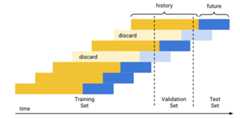
The default (chronological) data split works as follows:
- Vertex AI sorts the training data by date.
- Using the predetermined set percentages (80/10/10), Vertex AI separates the time period covered by the training data into three blocks, one for each training set.
- Vertex AI adds empty rows to the beginning of each time series to enable the model to learn from rows that don't have enough history (context window). The number of added rows is the size of the context window set at training time.
Using the forecast horizon size as set at training time, Vertex AI uses each row whose future data (forecast horizon) falls fully into one of the datasets for that set. (Vertex AI discards rows whose forecast horizon straddles two sets to avoid data leakage.)
Manual split
A data split column enables you to select specific rows to be used fortraining, validation, and testing. When you create your training data, add acolumn that can contain one of the following (case sensitive) values:
TRAINVALIDATETEST
Every row must have a value for this column; it cannot be the empty string.
For example:
"TRAIN","sku_id_1","2020-09-21","10""TEST","sku_id_1","2020-09-22","23""TRAIN","sku_id_2","2020-09-22","3""VALIDATE","sku_id_2","2020-09-23","45"
The data split column can have any valid column name; itstransformation type can be Categorical, Text, or Auto.
Designate a column as a data split column during model training.
Make sure you take care to avoiddata leakage between your time series.
Except as otherwise noted, the content of this page is licensed under theCreative Commons Attribution 4.0 License, and code samples are licensed under theApache 2.0 License. For details, see theGoogle Developers Site Policies. Java is a registered trademark of Oracle and/or its affiliates.
Last updated 2025-12-15 UTC.