

Output HTML and Markdown
Vertex AI Pipelines provides a set of predefined visualization typesfor evaluating the result of a pipeline job (for example,Metrics,ClassificationMetrics). However, there are many cases where customvisualization is needed. Vertex AI Pipelines provides two mainapproaches to output custom visualization artifacts: Markdown and HTML files.
Import required dependencies
In your development environment import the required dependencies.
fromkfpimportdslfromkfp.dslimport(Output,HTML,Markdown)Output HTML
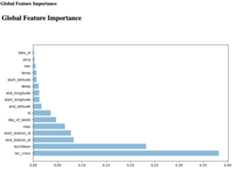
To export an HTML file, define a component with theOutput[HTML] artifact.You also must write HTML content to the artifact's path. In this example youuse a string variable to represent HTML content.
@dsl.componentdefhtml_visualization(html_artifact:Output[HTML]):public_url='https://user-images.githubusercontent.com/37026441/140434086-d9e1099b-82c7-4df8-ae25-83fda2929088.png'html_content= \'<html><head></head><body><h1>Global Feature Importance</h1>\n<img src="{}" width="97%"/></body></html>'.format(public_url)withopen(html_artifact.path,'w')asf:f.write(html_content)HTML artifact in the Google Cloud console:
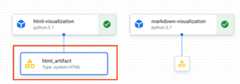
HTML artifact information in the Google Cloud console:
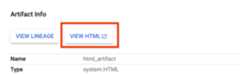
Click "View HTML" to open HTML file on a new tab
Output Markdown
To export a Markdown file, define a component with theOutput[Markdown]artifact. You also must write Markdown content to the artifact's path. In thisexample you use a string variable to represent Markdown content.
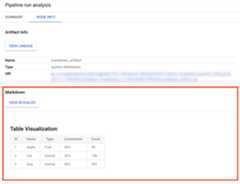
@dsl.componentdefmarkdown_visualization(markdown_artifact:Output[Markdown]):importurllib.requestwithurllib.request.urlopen('https://gist.githubusercontent.com/zijianjoy/a288d582e477f8021a1fcffcfd9a1803/raw/68519f72abb59152d92cf891b4719cd95c40e4b6/table_visualization.md')astable:markdown_content=table.read().decode('utf-8')withopen(markdown_artifact.path,'w')asf:f.write(markdown_content)Markdown artifact in the Google Cloud console:
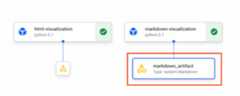
Markdown artifact information in the Google Cloud console:
Create your pipeline
After you have defined your component with the HTML or Markdown artifact createand run a pipeline that use the component.
@dsl.pipeline(name=f'metrics-visualization-pipeline')defmetrics_visualization_pipeline():html_visualization_op=html_visualization()markdown_visualization_op=markdown_visualization()After submitting the pipeline run, you can view the graph for this run inthe Google Cloud console. This graph includes the HTML and Markdown artifactsyou declared in corresponding components. You can select these artifactsto view detailed visualization.
Except as otherwise noted, the content of this page is licensed under theCreative Commons Attribution 4.0 License, and code samples are licensed under theApache 2.0 License. For details, see theGoogle Developers Site Policies. Java is a registered trademark of Oracle and/or its affiliates.
Last updated 2025-12-15 UTC.