

How to use model version aliases
A model alias is a mutable, named reference to a model version unique withina model resource. An alias is "mutable" because aliases can be moved from one model versionto another and "named" because they are user-defined, arbitrary strings. Modelaliases are helpful for fetching or deploying a particular model version byreference without needing to know the specific version's ID. In this way,they operate similarly to Docker Tags or Branch references in Git.
When you create a new model in Model Registry, the first versionautomatically gets assigned thedefault alias. The default alias referencesthe model version that is used if a user runs a command on a model withoutspecifying a particular version. One version of a model is required to carry the defaultalias at all times. Otherwise, the default alias behaves as any other user-defined alias.
From the Google Cloud console the alias marker can help stakeholders understand at a glancewhich model is the stable version ready for deployment. In addition to thedefault alias, you can create and assign your own custom aliases to modelsin the Model Registry.
In Model Registry, you can see at a glance which modelversion has the default alias by looking at the alias column.
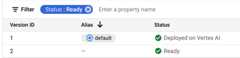
If you decide you want to reassign the alias to a different model version,you can move aliases to a different version.
Note: The required format of the version alias is[a-z][a-z0-9-]{0,126}[a-z0-9] to distinguish fromversion_id.A default version alias will be created for the first version of the model, and theremust be exactly one default version alias for a model.Some considerations for using aliases:
- Your version aliases should be unique; and an alias can only be assignedto a single version, by model, at a time.
- Version aliases must be non-numerical.
- If you don't specify a model version for production, the default model is used.
- An alias is different from a label.Learn more about model labels here.
- If you apply an existing alias that is used in another model version,the alias is removed from that version.
Set a model version as default
In the Google Cloud console, go to the Vertex AIModel Registrypage.
From the Model Registry, select the name of the modelyou want to edit. The model details window opens. All of the modelversions are listed. One of the model versions has thedefault alias.
Select theActions button for the model version you want to assign the default version.
ClickSet as default.
Add an alias to a model version
In the Google Cloud console, go to the Vertex AIModel Registrypage.
From the Model Registry, select the name of the modelyou want to edit. The model details window opens.
From the details page, select the model version you want and clickMore.
ClickEdit alias.SelectAdd New.
Edit alias: ClickAdd alias and enter the name of the alias you wantto add to the model version.
ClickSave.
Upload a new aliased model version
API
Python
fromtypingimportListfromgoogle.cloudimportaiplatformdefupload_new_aliased_model_version_sample(parent_name:str,artifact_uri:str,serving_container_image:str,is_default_version:bool,version_aliases:List[str],version_description:str,project:str,location:str,):""" Uploads a new aliased version of a model with ID 'model_id'. Args: parent_name: The parent resource name of an existing model. artifact_uri: The URI of the model artifact to upload. serving_container_image: The name of the serving container image to use. is_default_version: Whether this version is the default version of the model. version_aliases: The aliases of the model version. version_description: The description of the model version. project: The project ID. location: The region name. Returns: The new version of the model. """# Initialize the client.aiplatform.init(project=project,location=location)# Upload a new aliased version of the Model resource with the ID 'model_id'. The parent_name of Model resource can be also# 'projects/<your-project-id>/locations/<your-region>/models/<your-model-id>'model=aiplatform.Model.upload(artifact_uri=artifact_uri,serving_container_image=serving_container_image,parent_name=parent_name,is_default_version=is_default_version,version_aliases=version_aliases,version_description=version_description,)returnmodelDelete a model alias
When you delete a model version assigned the default alias, the alias is automaticallyassigned to the next most recent version.
Console
In the Google Cloud console, go to the Vertex AIModel Registrypage.
From the Model Registry, select the name of the modelyou want to edit. The model details window opens.
From the details page click theActions button on the model version.
ClickEdit alias.
A list of the aliases attached to the model version displays. Hover your cursorto the right of the Alias field for the label to display the delete icon.
Click the delete icon for the alias you want to delete.
ClickSave.
API
Python
fromtypingimportListfromgoogle.cloudimportaiplatformdefdelete_aliases_model_version_sample(model_id:str,version_aliases:List[str],version_id:str,project:str,location:str,):""" Delete aliases to a model version. Args: model_id: The ID of the model. version_aliases: The version aliases to assign. version_id: The version ID of the model to assign the aliases to. project: The project ID. location: The region name. Returns None. """# Initialize the client.aiplatform.init(project=project,location=location)# Initialize the Model Registry resource with the ID 'model_id'.The parent_name of Model resource can be also# 'projects/<your-project-id>/locations/<your-region>/models/<your-model-id>'model_registry=aiplatform.models.ModelRegistry(model=model_id)# Remove the version aliases to the model version with the version 'version'.model_registry.remove_version_aliases(target_aliases=version_aliases,version=version_id)Except as otherwise noted, the content of this page is licensed under theCreative Commons Attribution 4.0 License, and code samples are licensed under theApache 2.0 License. For details, see theGoogle Developers Site Policies. Java is a registered trademark of Oracle and/or its affiliates.
Last updated 2026-02-19 UTC.