

Monitor feature attribution skew and drift
This page describes how to use Vertex AI Model Monitoring withVertex Explainable AI to detect skew and drift for the featureattributions of categorical and numerical input features.
Overview of feature attribution-based monitoring
Feature attributions indicate how much each feature in your model contributed tothe predictions for each given instance. When you request predictions, you getpredicted values as appropriate for your model. When you requestexplanations,you get the predictions along with feature attribution information.
Attribution scores are proportional to the contribution of the feature to amodel's prediction. They are typically signed, indicating whether a featurehelps push the prediction up or down. Attributions across all features must addup to the model's prediction score.
By monitoring feature attributions, Model Monitoringtracks changes in a feature's contributions to a model's predictions over time.A change in a key feature's attribution score often signals that the feature haschanged in a way that can impact the accuracy of the model's predictions.
For information on how a feature attribution score is calculated, seeFeatureattribution methods.
Feature attribution training-serving skew and prediction drift
When you create a monitoring job for a model with Vertex Explainable AI enabled,Model Monitoring monitors skew or drift for bothfeature distributions and feature attributions. For information on featuredistribution skew and drift, seeIntroduction toVertex AI Model Monitoring.
For feature attributions:
Training-serving skew occurs when a feature's attribution score inproduction deviates from the feature's attribution score in the originaltraining data.
Prediction drift occurs when a feature's attribution score in productionchanges significantly over time.
You can enable skew detection if you provide the original training dataset foryour model; otherwise, you should enable drift detection. You can also enableboth skew and drift detection.
Prerequisites
To use Model Monitoring with Vertex Explainable AI, complete thefollowing:
If you are enabling skew detection, upload your training data or output of abatch explanation job for yourtraining dataset toCloud Storage orBigQuery. Obtain the URI link to the data. Fordrift detection, training data or explanation baseline isn't required.
Have an available model in Vertex AI that is either atabularAutoML or imported tabularcustom training type:
An AutoML tabular model has Vertex Explainable AI automaticallyconfigured, so you can skip toenabling skew or drift detection. Notethat only classification and regression models are supported.
An imported custom-trained model must beconfigured forVertex Explainable AI when youcreate, import, or deploy the model.
Configure your model to use Vertex Explainable AI when you create,import, or deploy the model. The
ExplanationSpec.ExplanationParametersfield must bepopulated for your model.Optional: For custom-trained models, upload theanalysis instanceschema for your model to Cloud Storage.Model Monitoring requires the schema to begin themonitoring process and calculate the baseline distribution for skew detection.If you don't provide the schema during job creation, the job remains in apending state until Model Monitoring can automaticallyparse the schema from the first 1000 prediction requests the model receives.
Enable skew or drift detection
To set up either skew detection or drift detection, create a modeldeployment monitoring job:
Console
To create a model deployment monitoring job using theGoogle Cloud console, create an endpoint:
Note: To enable model monitoring for an existing endpoint,edit the endpoint'ssettings.In the Google Cloud console, go to theVertex AI Endpoints page.
ClickCreate Endpoint.
In theNew endpoint pane, name your endpoint and set a region.
ClickContinue.
In theModel name field, select an imported customtraining or tabular AutoML model.
In theVersion field, select a version for your model.
ClickContinue.
In theModel monitoring pane, make sureEnable model monitoring forthis endpoint is toggled on. Any monitoring settings you configureapply to all models deployed to the endpoint.
Enter aMonitoring job display name.
Enter aMonitoring window length.
ForNotification emails, enter one or more comma-separated emailaddresses to receive alerts when a model exceeds an alerting threshold.
(Optional) ForNotification channels,selectCloud Monitoring channels to receive alerts when amodel exceeds an alerting threshold. You can select existing Cloud Monitoringchannels or create a new one by clickingManage notification channels.The Console supports PagerDuty, Slack, and Pub/Subnotification channels.
Enter aSampling rate.
Optional: Enter thePrediction input schema andAnalysis input schema.
ClickContinue. TheMonitoring objective pane opens, with optionsfor skew or drift detection:
Skew detection
- SelectTraining-serving skew detection.
- UnderTraining data source, provide a trainingdata source.
- UnderTarget column, enter the column name from the training datathat the model is trained to predict. This field is excluded fromthe monitoring analysis.
- Optional: UnderAlert thresholds, specify thresholds at which totrigger alerts. For information about how to format the thresholds,hold the pointer over the Help icon.
- ClickCreate.
Drift detection
- SelectPrediction drift detection.
- Optional: UnderAlert thresholds, specify thresholds at which totrigger alerts. For information about how to format the thresholds,hold the pointer over the Help icon.
- ClickCreate.
gcloud
To create a model deployment monitoring job using the gcloud CLI,firstdeploy your model to an endpoint.
A monitoring job configuration applies to all deployed models under anendpoint.
Run thegcloud ai model-monitoring-jobs create command:
gcloud ai model-monitoring-jobs create \ --project=PROJECT_ID \ --region=REGION \ --display-name=MONITORING_JOB_NAME \ --emails=EMAIL_ADDRESS_1,EMAIL_ADDRESS_2 \ --endpoint=ENDPOINT_ID \ --feature-thresholds=FEATURE_1=THRESHOLD_1,FEATURE_2=THRESHOLD_2 \ --prediction-sampling-rate=SAMPLING_RATE \ --monitoring-frequency=MONITORING_FREQUENCY \ --target-field=TARGET_FIELD \ --bigquery-uri=BIGQUERY_URI
where:
PROJECT_ID is the ID of your Google Cloud project. Forexample,
my-project.REGION is the location for your monitoring job. For example,
us-central1.MONITORING_JOB_NAME is the name of your monitoring job. Forexample,
my-job.EMAIL_ADDRESS is the email address where you want to receivealerts from Model Monitoring. For example,
example@example.com.ENDPOINT_ID is the ID of the endpoint under which yourmodel is deployed. For example,
1234567890987654321.Optional:FEATURE_1=THRESHOLD_1 is the alerting threshold foreach feature you want to monitor. For example, if you specify
Age=0.4,Model Monitoring logs an alert when the [statisticaldistance][stat-distance] between the input and baseline distributions for theAgefeature exceeds 0.4.Optional:SAMPLING_RATE is the fraction of the incomingprediction requests you want to log. For example,
0.5. If not specified,Model Monitoring logs all prediction requests.Optional:MONITORING_FREQUENCY is the frequency at which youwant the monitoring job to run on recently logged inputs. The minimumgranularity is 1 hour. The default is 24 hours. For example,
2.(required only for skew detection)TARGET_FIELD is the field thatis being predicted by the model. This field is excluded from themonitoring analysis. For example,
housing-price.(required only for skew detection)BIGQUERY_URI is the link to thetraining dataset stored in BigQuery, using the followingformat:
bq://\PROJECT.\DATASET.\TABLE
For example,
bq://\my-project.\housing-data.\san-francisco.You can replace the
bigquery-uriflag with alternative links to yourtraining dataset:For a CSV file stored in a Cloud Storage bucket, use
--data-format=csv --gcs-uris=gs://BUCKET_NAME/OBJECT_NAME.For a TFRecord file stored in a Cloud Storage bucket, use
--data-format=tf-record --gcs-uris=gs://BUCKET_NAME/OBJECT_NAME.For a [tabular AutoML managed dataset][dataset-id], use
--dataset=DATASET_ID.
Python SDK
For information about the full end-to-endModel Monitoring API workflow, see theexample notebook.
REST API
If you haven't done so already,deploy your model to an endpoint.
Retrieve the deployed model ID for your model bygetting the endpointinformation. Note theDEPLOYED_MODEL_ID, which is the
deployedModels.idvalue in the response.Create a model monitoring job request. The instructions below show how tocreate a basic monitoring job for drift detection with attributions. For skewdetection, add the
explanationBaselineobject to theexplanationConfigfield in the request JSON body and provide one of thefollowing:The output of abatch explanation job for your training dataset.
A
TrainingDataseton which the service runs aBatchExplainjob to generate a baseline.
For more details, see theMonitoring job reference.
Before using any of the request data, make the following replacements:
- PROJECT_ID: is the ID of your Google Cloud project. For example,
my-project. - LOCATION: is the location for your monitoring job. For example,
us-central1. - MONITORING_JOB_NAME: is the name of your monitoring job. For example,
my-job. - PROJECT_NUMBER: is the number for your Google Cloud project. For example,
1234567890. - ENDPOINT_ID is the ID for the endpoint to which your model is deployed. For example,
1234567890. - DEPLOYED_MODEL_ID: is the ID for the deployed model.
- FEATURE:VALUE is the alerting threshold for each feature you want to monitor. For example,
"housing-latitude": {"value": 0.4}. An alert is logged when thestatistical distance between the input feature distribution and its corresponding baseline exceeds the specified threshold. By default, every categorical and numerical feature is monitored, with threshold values of 0.3. - EMAIL_ADDRESS: is the email address where you want to receive alerts from Model Monitoring. For example,
example@example.com. - NOTIFICATION_CHANNELS: a list ofCloud Monitoring notification channels where you want to receive alerts from Model Monitoring. Use the resource names for the notification channels, which you can retrieve bylisting the notification channels in your project. For example,
"projects/my-project/notificationChannels/1355376463305411567", "projects/my-project/notificationChannels/1355376463305411568".
Request JSON body:
{ "displayName":"MONITORING_JOB_NAME", "endpoint":"projects/PROJECT_NUMBER/locations/LOCATION/endpoints/ENDPOINT_ID", "modelDeploymentMonitoringObjectiveConfigs": { "deployedModelId": "DEPLOYED_MODEL_ID", "objectiveConfig": { "predictionDriftDetectionConfig": { "driftThresholds": { "FEATURE_1": { "value":VALUE_1 }, "FEATURE_2": { "value":VALUE_2 } } }, "explanationConfig": { "enableFeatureAttributes": true } } }, "loggingSamplingStrategy": { "randomSampleConfig": { "sampleRate": 0.5, }, }, "modelDeploymentMonitoringScheduleConfig": { "monitorInterval": { "seconds": 3600, }, }, "modelMonitoringAlertConfig": { "emailAlertConfig": { "userEmails": ["EMAIL_ADDRESS"], }, "notificationChannels": [NOTIFICATION_CHANNELS] }}To send your request, expand one of these options:
curl (Linux, macOS, or Cloud Shell)
Note: The following command assumes that you have logged in to thegcloudCLI with your user account by runninggcloud initorgcloud auth login, or by usingCloud Shell, which automatically logs you into thegcloudCLI . You can check the currently active account by runninggcloud auth list.Save the request body in a file named
request.json. Run the following command in the terminal to create or overwrite this file in the current directory:cat > request.json<< 'EOF'{ "displayName":"MONITORING_JOB_NAME", "endpoint":"projects/PROJECT_NUMBER/locations/LOCATION/endpoints/ENDPOINT_ID", "modelDeploymentMonitoringObjectiveConfigs": { "deployedModelId": "DEPLOYED_MODEL_ID", "objectiveConfig": { "predictionDriftDetectionConfig": { "driftThresholds": { "FEATURE_1": { "value":VALUE_1 }, "FEATURE_2": { "value":VALUE_2 } } }, "explanationConfig": { "enableFeatureAttributes": true } } }, "loggingSamplingStrategy": { "randomSampleConfig": { "sampleRate": 0.5, }, }, "modelDeploymentMonitoringScheduleConfig": { "monitorInterval": { "seconds": 3600, }, }, "modelMonitoringAlertConfig": { "emailAlertConfig": { "userEmails": ["EMAIL_ADDRESS"], }, "notificationChannels": [NOTIFICATION_CHANNELS] }}EOFThen execute the following command to send your REST request:
curl -X POST \
     -H "Authorization: Bearer $(gcloud auth print-access-token)" \
     -H "Content-Type: application/json; charset=utf-8" \
     -d @request.json \
     "https://LOCATION-aiplatform.googleapis.com/v1/projects/PROJECT_ID/locations/LOCATION/modelDeploymentMonitoringJobs"
PowerShell (Windows)
Note: The following command assumes that you have logged in to thegcloudCLI with your user account by runninggcloud initorgcloud auth login. You can check the currently active account by runninggcloud auth list.Save the request body in a file named
request.json. Run the following command in the terminal to create or overwrite this file in the current directory:@'{ "displayName":"MONITORING_JOB_NAME", "endpoint":"projects/PROJECT_NUMBER/locations/LOCATION/endpoints/ENDPOINT_ID", "modelDeploymentMonitoringObjectiveConfigs": { "deployedModelId": "DEPLOYED_MODEL_ID", "objectiveConfig": { "predictionDriftDetectionConfig": { "driftThresholds": { "FEATURE_1": { "value":VALUE_1 }, "FEATURE_2": { "value":VALUE_2 } } }, "explanationConfig": { "enableFeatureAttributes": true } } }, "loggingSamplingStrategy": { "randomSampleConfig": { "sampleRate": 0.5, }, }, "modelDeploymentMonitoringScheduleConfig": { "monitorInterval": { "seconds": 3600, }, }, "modelMonitoringAlertConfig": { "emailAlertConfig": { "userEmails": ["EMAIL_ADDRESS"], }, "notificationChannels": [NOTIFICATION_CHANNELS] }}'@ | Out-File -FilePath request.json -Encoding utf8Then execute the following command to send your REST request:
$cred = gcloud auth print-access-token
$headers = @{ "Authorization" = "Bearer $cred" }

Invoke-WebRequest `
    -Method POST `
    -Headers $headers `
    -ContentType: "application/json; charset=utf-8" `
    -InFile request.json `
    -Uri "https://LOCATION-aiplatform.googleapis.com/v1/projects/PROJECT_ID/locations/LOCATION/modelDeploymentMonitoringJobs" | Select-Object -Expand Content
You should receive a JSON response similar to the following:
{ "name": "projects/PROJECT_NUMBER/locations/LOCATION/modelDeploymentMonitoringJobs/MONITORING_JOB_NUMBER", ... "state": "JOB_STATE_PENDING", "scheduleState": "OFFLINE", ... "bigqueryTables": [ { "logSource": "SERVING", "logType": "PREDICT", "bigqueryTablePath": "bq://PROJECT_ID.model_deployment_monitoring_8451189418714202112.serving_predict" } ], ...}
Once the monitoring job is created, Model Monitoring logsincoming prediction requests in a generated BigQuery table namedPROJECT_ID.model_deployment_monitoring_ENDPOINT_ID.serving_predict.Ifrequest-response logging is enabled,Model Monitoring logs incoming requests in the sameBigQuery table that is used for request-response logging.
SeeUsing Model Monitoring for instructions on how to do thefollowing optional tasks:
Update a Model Monitoring job.
Configure alerts for the Model Monitoring job
Configure alerts for anomalies.
Analyze feature attribution skew and drift data
You can use the Google Cloud console to visualize the feature attributions ofeach monitored feature and learn which changes led to skew or drift. Forinformation about analyzing feature distribution data, seeAnalyze skew anddrift data.
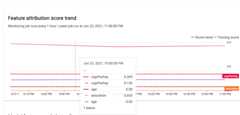
In a stable machine learning system, features' relative importance generallyremains relatively stable over time. If an important feature drops inimportance, it might signal that something about that feature has changed.Common causes of feature importance drift or skew include the following:
- Data source changes.
- Data schema and logging changes.
- Changes in end-user mix or behavior (for example, due to seasonal changes oroutlier events).
- Upstream changes in features generated by another machine learning model.Some examples are:
- Model updates that cause an increase or decrease in coverage(overall or for an individual classification value).
- A change in performance of the model (which changes the meaning of thefeature).
- Updates to the data pipeline, which can cause a decrease in overallcoverage.
In addition, consider the following when analyzing feature attribution skew anddrift data:
Track the most important features. A large change in attribution to afeature means that the feature's contribution to the prediction has changed.Because the prediction score is equal to the sum of the feature contributions, largeattribution drift of the most important features usually indicates large driftin the model predictions.
Monitor all feature representations. Feature attributions are alwaysnumeric, regardless of the underlying feature type. Due to their additivenature, attributions to a multi-dimensional feature such as embeddings can bereduced to a single numeric value by adding up the attributions acrossdimensions. This lets you use standard univariate drift detection methods forall feature types.
Account for feature interactions. Attribution to a feature accounts forthe feature's contribution to the prediction, both individually and by itsinteractions with other features. If a feature's interactions with otherfeatures changes, distributions of attributions to a feature change, even ifthe marginal distribution of the feature remains the same.
Monitor feature groups. Because attributions are additive, you can add upattributions to related features to obtain the attribution of a featuregroup. For example, in a credit lending model, combine theattribution to all features related to the loan type(for example, "grade", "sub_grade", "purpose") to obtain a single loanattribution. This group-level attribution can then be tracked to monitorfor changes in the feature group.
What's next
- Work with Model Monitoring following theAPI docs.
- Work with Model Monitoring following thegcloud CLI docs.
- Try the example notebookin Colab orview it onGitHub.
- Learn how Model Monitoringcalculates training-servingskew and prediction drift.
Except as otherwise noted, the content of this page is licensed under theCreative Commons Attribution 4.0 License, and code samples are licensed under theApache 2.0 License. For details, see theGoogle Developers Site Policies. Java is a registered trademark of Oracle and/or its affiliates.
Last updated 2025-12-15 UTC.