

Introduction to Vertex AI Model Monitoring
This page provides an overview of Vertex AI Model Monitoring.
Monitoring overview
Vertex AI Model Monitoring lets you run monitoring jobs as needed or on aregular schedule to track the quality of your tabular models. If you've setalerts, Vertex AI Model Monitoring informs you when metrics surpass aspecified threshold.
For example, assume that you have a model that predicts customer lifetime value.As customer habits change, the factors that predict customer spending alsochange. Consequently, the features and feature values that you used to trainyour model before might not be relevant for making inferences today. Thisdeviation in the data is known as drift.
Vertex AI Model Monitoring can track and alert you when deviations exceeda specified threshold. You can then re-evaluate or retrain your model to ensurethe model is behaving as intended.
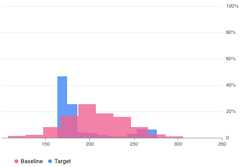
For example, Vertex AI Model Monitoring can provide visualizations like inthe following figure, which overlays two graphs from two datasets. Thisvisualization lets you quickly compare and see deviations between the two setsof data.
Vertex AI Model Monitoring versions
Vertex AI Model Monitoring provides two offerings: v2 and v1.
Model Monitoring v2 is inPreview and is the latest offering that associates allmonitoring tasks with a model version. In contrast, Model Monitoring v1 is GenerallyAvailable and is configured on Vertex AI endpoints.
If you need production-level support and want to monitor a model that's deployedon a Vertex AI endpoint, use Model Monitoring v1. For all other use cases, useModel Monitoring v2, which provides all the capabilities of Model Monitoring v1 and more. For moreinformation, see the overview for each version:
For existing Model Monitoring v1 users, Model Monitoring v1 is maintained as is. You aren't required tomigrate to Model Monitoring v2. If you want to migrate, you can use both versionsconcurrently until you have fully migrated to Model Monitoring v2 to help you avoidmonitoring gaps during your transition.
Model Monitoring v2 overview
Preview
This product or feature is subject to the "Pre-GA Offerings Terms" in the General Service Terms section of theService Specific Terms. Pre-GA products and features are available "as is" and might have limited support. For more information, see thelaunch stage descriptions.
Model Monitoring v2 lets you track metrics over time after you configure a model monitor andrun monitoring jobs. You can run on-demand monitoring jobs or set up scheduledruns. By using scheduled runs, Model Monitoringautomatically runs monitoring jobs based on a schedule that you define.
Monitoring objectives
The metrics and thresholds you monitor are mapped tomonitoring objectives.For each model version, you can specify one or more monitoring objectives. Thefollowing table details each objective:
| Objective | Description | Feature data type | Supported metrics |
|---|---|---|---|
| Input feature data drift | Measures the distribution of input feature values compared to a baseline data distribution. | Categorical: boolean, string, categorical |
|
| Numerical: float, integer | Jensen Shannon Divergence | ||
| Output inference data drift | Measures the model's inferences data distribution compared to a baseline data distribution. | Categorical: boolean, string, categorical |
|
| Numerical: float, integer | Jensen Shannon Divergence | ||
| Feature attribution | Measures the change in contribution of features to a model's inference compared to a baseline. For example, you can track if a highly important feature suddenly drops in importance. | All data types | SHAP value (SHapley Additive exPlanations) |
Input feature and output inference drift
After a model is deployed in production, the input data can deviate from thedata that was used to train the model or the distribution of feature data inproduction could shift significantly over time. Model Monitoring v2 can monitor changes inthe distribution of production data compared to the training data or to trackthe evolution of production data distribution over time.
Similarly, for inference data, Model Monitoring v2 can monitor changes in the distributionof predicted outcomes compared to the training data or production datadistribution over time.
Feature attribution
Feature attributions indicate how much each feature in your model contributed tothe inferences for each given instance. Attribution scores are proportional tothe contribution of the feature to a model's inference. They are typicallysigned, indicating whether a feature helps push the inference up or down.Attributions across all features must add up to the model's inference score.
By monitoring feature attributions, Model Monitoring v2 tracks changes in a feature'scontributions to a model's inferences over time. A change in a key feature'sattribution score often signals that the feature has changed in a way that canimpact the accuracy of the model's inferences.
For more information about feature attributions and metrics, seeFeature-basedexplanations andSampled Shapley method.
How to set up Model Monitoring v2
You must first register your models in Vertex AI Model Registry. If youare serving models outside of Vertex AI, you don't need toupload the model artifact. You then create a model monitor, which you associatewith a model version, and define your model schema. For some models, such asAutoML models, the schema is provided for you.
In the model monitor, you can optionally specify default configurations such asmonitoring objectives, a training dataset, monitoring output location, andnotification settings. For more information, seeSet up modelmonitoring.
After you create a model monitor, you can run a monitoring job on demand orschedule regular jobs for continuous monitoring. When you run a job,Model Monitoring uses the default configuration set in themodel monitor unless you provide a different monitoring configuration. Forexample, if you provide different monitoring objectives or a differentcomparison dataset, Model Monitoring uses the job'sconfigurations instead of the default configuration from the model monitor. Formore information, seeRun a monitoring job.
Pricing
You are not charged for Model Monitoring v2 during thePreview. You are stillcharged for the usage of other services, such as Cloud Storage,BigQuery, Vertex AI batch inferences,Vertex Explainable AI, and Cloud Logging.
Notebook tutorials
The following tutorials demonstrate how to use the Vertex AI SDK forPython to set up Model Monitoring v2 for your model.
Model Monitoring v2: Custom model batch inference job
To learn more, run the "Model Monitoring for Vertex AI Custom Model Batch Prediction Job" notebook in one of the following environments:
Open in Colab |Open in Colab Enterprise |Openin Vertex AI Workbench |View on GitHub
 Open in Colab
 Open in Colab Enterprise
 Openin Vertex AI Workbench
 View on GitHub
Model Monitoring v2: Custom model online inference
To learn more, run the "Model Monitoring for Vertex AI custom model online prediction" notebook in one of the following environments:
Open in Colab |Open in Colab Enterprise |Openin Vertex AI Workbench |View on GitHub
Model Monitoring v2: Models outside Vertex AI
To learn more, run the "Model Monitoring for Models Outside Vertex AI" notebook in one of the following environments:
Open in Colab |Open in Colab Enterprise |Openin Vertex AI Workbench |View on GitHub
Model Monitoring v1 overview
To help you maintain a model's performance, Model Monitoring v1 monitors the model'sinference input data for featureskew anddrift:
Training-serving skew occurs when the feature data distribution inproduction deviates from the feature data distribution used to train the model.If the original training data is available, you can enable skew detection tomonitor your models for training-serving skew.
Inference drift occurs when feature data distribution in production changessignificantly over time. If the original training data isn't available, you canenable drift detection to monitor the input data for changes over time.
You can enable both skew and drift detection.
Model Monitoring v1 supports feature skew and driftdetection forcategorical andnumerical features:
Categorical features are data limited by number of possible values,typically grouped by qualitative properties. For example, categories such asproduct type, country, or customer type.
Numerical features are data that can be any numeric value. For example,weight and height.
Once the skew or drift for a model's feature exceeds an alerting threshold thatyou set, Model Monitoring v1 sends you an email alert. Youcan also view the distributions for each feature over time to evaluate whetheryou need to retrain your model.
Calculate drift
To detect drift for v1, Vertex AI Model Monitoring usesTensorFlowData Validation (TFDV) to calculate the distributionsanddistance scores.
Calculate thebaseline statistical distribution:
For skew detection, the baseline is the statisticaldistribution of the feature's values in the training data.
For drift detection, the baseline is the statistical distributionof the feature's values seen in production in the past.
The distributions for categorical and numerical features are calculated asfollows:
For categorical features, the computed distribution is the number orpercentage of instances of each possible value of the feature.
For numerical features, Vertex AI Model Monitoring divides the rangeof possible feature values into equal intervals and computes the number orpercentage of feature values that falls in each interval.
The baseline is calculated when youcreate a Vertex AI Model Monitoringjob, and is only recalculated if you update the training datasetfor the job.
Calculate the statistical distribution of the latest feature values seen inproduction.
Compare the distribution of the latest feature values in production againstthe baseline distribution by calculating adistance score:
For categorical features, the distance score is calculated using theL-infinity distance.
For numerical features, the distance score is calculated using theJensen-Shannon divergence.
When the distance score between two statistical distributions exceeds thethreshold you specify, Vertex AI Model Monitoringidentifies the anomalyas skew or drift.
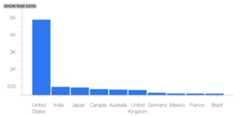
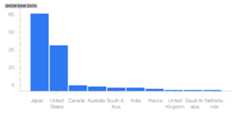
The following example shows skew or drift between the baselineand latest distributions of a categorical feature:
Baseline distribution
Latest distribution
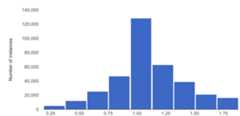
The following example shows skew or drift between the baselineand latest distributions of a numerical feature:
Baseline distribution
Latest distribution

Considerations when using Model Monitoring
For cost efficiency, you can set ainference request sampling rate tomonitor a subset of the production inputs to a model.
You can set a frequency at which a deployed model's recently logged inputs aremonitored for skew or drift. Monitoring frequency determines the timespan, ormonitoring window size, of logged data that is analyzed in each monitoring run.
You can specify alerting thresholds for each feature you want to monitor. Analert is logged when the statistical distance between the input featuredistribution and its corresponding baseline exceeds the specified threshold. Bydefault, every categorical and numerical feature is monitored, with thresholdvalues of 0.3.
An online inference endpoint can host multiple models. When you enable skew ordrift detection on an endpoint, the following configuration parameters areshared across all models hosted in that endpoint:
- Type of detection
- Monitoring frequency
- Fraction of input requests monitored
For the otherconfiguration parameters, you can set differentvalues for each model.
What's next
Except as otherwise noted, the content of this page is licensed under theCreative Commons Attribution 4.0 License, and code samples are licensed under theApache 2.0 License. For details, see theGoogle Developers Site Policies. Java is a registered trademark of Oracle and/or its affiliates.
Last updated 2025-12-15 UTC.