

About accessing Vertex AI services through Private Service Connect interfaces
Some Vertex AIservice producersrequire you to connect to their services throughPrivate Service Connect interfaces.These services are listed in theVertex AI access methodstable.
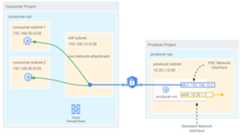
When a Private Service Connect interface is created, a VM instance withat least two network interfaces is also created. The first interface connects toa subnet in a producer VPC network. The second interface requests a connectionto thenetwork attachment subnet in aconsumer network. If accepted, this interface is assigned an internal IP addressfrom the consumer subnet.
On the service producer's side of the private connection, there is aVPC network where your service resources are provisioned. Thisnetwork is created exclusively for you and contains only your resources.Connectivity between the producer and consumer network is established through thePrivate Service Connect interface.
The following diagram shows a Vertex AI Pipelines architecture in whichthe Vertex AI API is enabled and managed in the consumer's network. TheVertex AI Pipelines resources are deployed as a Google-managedinfrastructure as a service (IaaS) in the service producer's VPCnetwork. Since the Private Service Connect interface is deployed withan IP address from the consumer's subnet, the producer's network has access tothe consumer's learned routes that can span VPC networks,multicloud environments, and on-premises networks.
Features and limitations
The following are features and limitations of Private Service Connect(PSC) interfaces:
- The service consumer creates a network attachment in their VPC network, which is aresource that represents their side of the private connection.
- The service producer creates the managed resource with a PSC interface thatreferences the consumer's network attachment.
- Once the consumer accepts the connection, the PSC interface is assigned aninternal IP address from a subnet in the consumer's VPC network, allowing forsecure, private, and bidirectional communication.
- Thesubnet of the network attachmentsupports RFC 1918 and non RFC 1918 addresses with the exception of subnets
100.64.0.0/10and240.0.0.0/4. - Vertex AI can only connect to RFC 1918 IP address ranges that areroutable from the specified network.
- Private Service Connect interfaces don't support external IPaddresses.
Vertex AI can't reach a privately used public IP address or thesenon-RFC 1918 ranges:
100.64.0.0/10192.0.0.0/24192.0.2.0/24198.18.0.0/15198.51.100.0/24203.0.113.0/24240.0.0.0/4
Private Service Connect connection preference
Private Service Connect offers a connection preference when deploying anetwork attachment that determines whether connection requests from a producerare automatically accepted or require manual approval. In Vertex AI,accessing a network attachment with the preference "Automatically acceptconnections for all projects" (ACCEPT_AUTOMATIC) or "Accept connections forselected projects" (ACCEPT_MANUAL) are treated as follows:
- A network attachment configured with the
ACCEPT_MANUALconnection preferenceis supported in Vertex AI without configuring the Vertex AIproject ID in the accepted project. - Vertex AI uses the permissions (
compute.networkAttachments.updateandcompute.regionOperations.get) to authorize the tenant project hostingVertex AI to use the network attachment for PSC Interface deploymentfor bothACCEPT_AUTOMATICandACCEPT_MANUALconnection preferences.
To learn more about IAM and deployment guidelines, seeSet up a Private Service Connect interface for Vertex AI resources.
Private Service Connect interface deployment options
To create a Private Service Connect interface, first deploy a subnetwithin the consumer VPC that shares the same region as your producer service.Check the specific service requirements to make sure there are no subnet rangesthat you should avoid.Then create a network attachment that references the subnet. We recommendthat you dedicate the subnet allocated for the network attachment exclusively toPrivate Service Connect interface deployments.
The following pages discuss specific use cases for Vertex AIPrivate Service Connect interfaces:
- Configure Private Service Connect interface for a pipeline
- Use Private Service Connect interface for Vertex AI Training
- Create a Ray cluster on Vertex AI
- Using Private Service Connect interface with Vertex AI Agent Engine
VPC Service Controls considerations
Vertex AI producers' service ability to access the public internetdepends on your project's security configuration, specifically whether you'areusing VPC Service Controls.
- Without VPC Service Controls: The Google managed tenting hostingVertex AI retains its default internet access. This outbound trafficegresses directly from the secure, Google-managed environment where yourproducer service runs. The exception to this behavior isVertex AI Agent Engine, which doesn't provide internet egress.Instead, you're required to deploy a proxy VM with an RFC 1918 address forinternet egress.
- With VPC Service Controls: When your project is part of a VPC Service Controlsperimeter, the Google-managed tenting hosting Vertex AI defaultinternet access is blocked by the perimeter to prevent data exfiltration. Toallow the to access the public internet in this scenario, you must explicitlyconfigure a secure egress path that routes traffic through yourVPC network. The recommended way to achieve this is by settingup a proxy server inside your VPC perimeter and creating aCloud NAT gateway to allow the proxy VM to access the internet.
To learn more about VPC Service Controls considerations, seeVPC Service Controls with Vertex AI.
Deployment considerations
The following are considerations for communication from your on-premises,multicloud, and VPC workloads to Google-managedVertex AI services.
Vertex AI subnet recommendations
The following table lists the recommended subnet ranges for Vertex AIservices that support Private Service Connect interfaces.
| Vertex AI feature | Recommended subnet range |
|---|---|
| Vertex AI Pipelines | /28 |
| Custom training jobs | /28 |
| Ray on Vertex AI | /28 |
| Vertex AI Agent Engine | /28 |
IP advertisement
- When you use the Private Service Connect interface to connect toservices in the consumer VPC network, you choose an IP addressfrom alist of supported IP ranges in your VPCnetwork.
- By default, the Cloud Router will advertise regular VPCsubnets unless custom advertisement mode is configured. For more information,seeCustom advertisement.
- A connection between a network attachment and aPrivate Service Connect interface istransitive.Workloads in the producer VPC network can communicate withworkloads that are connected to the consumer VPC network.
Firewall rules
Private Service Connect interfaces are created and managed by aproducer organization, but they are located in a consumer VPCnetwork. For consumer-side security, we recommend firewall rules that are basedon IP address ranges from the consumer VPC network. You mustupdate firewall rules to allow the network attachment subnet access to theconsumer's network. For more information, seeLimit producer-to-consumer ingress.
Domain name resolution
Using a Private Service Connect interface alone requires connecting toservices through their internal IP addresses. This isn't a recommended practicefor production systems, because IP addresses can change, leading to brittleconfigurations.
By implementing DNS peering, Vertex AI producers can instead resolveand connect to services in your VPC and on-premises or multicloud networks. Thisis achieved by querying records from a Cloud DNS private zone within yourVPC network, which ensures stable, reliable service access evenif underlying IP addresses are modified.
For more information, seeSet up a private DNS peering.
What's next
- Learn aboutnetwork attachment specifications.
- Try acodelab on using Private Service Connect interfaces with Vertex AI Pipelines.
- Try acodelab on using an explicit proxy to reach non-rfc1918 endpoints with Vertex AI Pipelines.
Except as otherwise noted, the content of this page is licensed under theCreative Commons Attribution 4.0 License, and code samples are licensed under theApache 2.0 License. For details, see theGoogle Developers Site Policies. Java is a registered trademark of Oracle and/or its affiliates.
Last updated 2025-12-17 UTC.