

About accessing the Vertex AI API
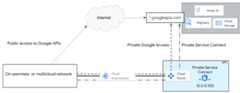
Your applications can connect to APIs in Google's production environment fromwithin Google Cloud or from hybrid (on-premises and multicloud) networks.Google Cloud offers the following public and private access options, which offerglobal reachability and SSL/TLS security:
- Public internet access: Send traffic to
REGION-aiplatform.googleapis.com. - Private Service Connect endpoints for Google APIs: Use auser-defined internal IP address such as
10.0.0.100to accessREGION-aiplatform.googleapis.comor an assigned DNS namesuch asaiplatform-genai1.p.googleapis.com.
The following diagram illustrates these access options.
Some Vertex AI service producers require you to connect to theirservices throughPrivate Service Connect endpointsorPrivate Service Connect interfaces.These services are listed in thePrivate access options for Vertex AItable.
Choosing between regional and global Vertex AI endpoints
The regional Vertex AI endpoint(REGION-aiplatform.googleapis.com) is the standard way toaccess Google APIs. For applications deployed across multiple Google Cloudregions, you should strongly consider using the global endpoint(aiplatform.googleapis.com) for a consistent API call and more robust design,unless your desired model or feature is only available regionally. The benefitsof using the global endpoint include the following:
- Model and Feature Availability: Some of the latest, specialized, orregion-specific models and features within Vertex AI are initially,or permanently, offered only through a regional endpoint(for example,
us-central1-aiplatform.googleapis.com). If your applicationdepends on one of these specific resources, you must use the regionalendpoint corresponding to that resource's location. This is the primaryconstraint when determining your endpoint strategy. - Simplification of multiregion design: If a model supports the globalendpoint, using it eliminates the need for your application to dynamicallyswitch the API endpoint based on its current deployment region. A single,static configuration works for all regions, greatly simplifying deployment,testing, and operations.
- Rate-limiting mitigation (avoiding
429errors): For supported models,routing requests through the global endpoint distributes the trafficinternally across Google's network to the nearest available regional service.This distribution can often help alleviate localized service congestion orregional rate limit (429) errors, leveraging Google's backbone for internalload balancing.
To check the global availability of partner models, refer to theGlobal tabin the Google Cloud model endpoint locations table, which also listsregional locations.
Vertex AI Shared VPC considerations
Using aShared VPCis a Google Cloud best practice for establishingstrong network and organizational governance. This model separatesresponsibilities by designating a central host project, managed by networksecurity administrators, and multiple service projects, consumed by applicationteams.
This separation allows network administrators to centrally manage and enforcenetwork security (including firewall rules, subnets, and routes) whiledelegating resource creation and management (for example, VMs, GKE clusters,and billing) to the service projects.
A Shared VPC unlocks a multilayered approach to segmentation by enablingthe following:
- Administrative and billing segmentation: Each service project (forexample, "Finance-AI-Project" or "Marketing-AI-Project") has its own billing,quotas, and resource ownership. This prevents a single team from consuming theentire organization's quota and provides clear cost attribution.
- IAM and access segmentation: You can apply granularIdentity and Access Management (IAM) permissions at the project level, for example:
- The "Finance Users" Google Group is granted the roles/aiplatform.user role only in the "Finance-AI-Project."
- The "Marketing Users" Google Group is granted the same role only in the "Marketing-AI-Project."
- This configuration ensures that users in the finance group can only access the Vertex AI endpoints, models, and resources associated with their own project. They are completely isolated from the marketing team's AI workloads.
API-level enforcement: The Vertex AI API endpoint itself is designedto enforce this project-based segmentation. As shown in the API callstructure, the project ID is a required part of the URI:
https://aiplatform.googleapis.com/v1/projects/${PROJECT_ID}/locations/global/publishers/google/models/${MODEL_ID}:streamGenerateContent
When a user makes this call, the system validates that the authenticatedidentity has the necessary IAM permissions for the specific${PROJECT_ID} provided in the URL. If the user has permissions only for"Finance-AI-Project" but attempts to call the API using the"Marketing-AI-Project" ID, the request will be denied. This approach provides arobust and scalable framework, ensuring that as your organization adopts AI,you maintain clear separation of duties, costs, and security boundaries.
Public internet access to the Vertex AI API
If your application uses a Google service listed in thetable of supported access methods for Vertex AIas public internet,your application can access the API by performing a DNS lookup against theservice endpoint(REGION-aiplatform.googleapis.com oraiplatform.googleapis.com),which returnspublicly routable virtual IP addresses. You can use the API fromany location in the world as long as you have an internet connection.However, traffic that is sent from Google Cloud resources to those IPaddresses remains within Google's network. To restrict public access to theVertex AI API,VPC Service Controlsare required.
Private Service Connect endpoints for the Vertex AI API
With Private Service Connect, you can create private endpointsusing global internal IP addresses within your VPC network.You can assign DNS names to these internal IP addresses with meaningful nameslikeaiplatform-genai1.p.googleapis.com andbigtable-adsteam.p.googleapis.com. These names and IP addresses areinternal to your VPC network and any on-premises networksthat are connected to it through hybrid networking services.You can control which traffic goes to which endpoint, and can demonstratethat traffic stays within Google Cloud.
- You can create a user-defined globalPrivate Service Connect endpoint IP address (/32). For moreinformation, seeIP address requirements.
- You create the Private Service Connect endpoint in the sameVPC network as the Cloud Router.
- You can assign DNS names to these internal IP addresses with meaningfulnames like
aiplatform-prodpsc.p.googleapis.com. For more information, seeAbout accessing Google APIs through endpoints. - In a Shared VPC, deploy the Private Service Connect endpointin the host project.
Deployment considerations
Following are some important considerations that affect how you usePrivate Google Access and Private Service Connect to accessthe Vertex AI API.
Private Google Access
As a best practice, you shouldenable Private Google Accesson VPC subnets to allow compute resources (such asCompute Engine and GKE VM instances) that don't have externalIP addresses to reach Google Cloud APIs and services (such asVertex AI, Cloud Storage, and BigQuery).
IP advertisement
You must advertise the Private Google Access subnet range or thePrivate Service Connect endpoint IP address to on-premises andmulticloud environments from the Cloud Router as a custom advertised route.For more information, seeAdvertise custom IP ranges.
Firewall rules
You must ensure that the firewall configuration of on-premises andmulticloud environments allows outbound trafficfrom the IP addresses of Private Google Access orPrivate Service Connect subnets.
DNS configuration
- Your on-premises network must have DNS zones and records configured so thata request to
REGION-aiplatform.googleapis.comoraiplatform.googleapis.comresolves to thePrivate Google Access subnetor thePrivate Service Connect endpointIP address. - You can create Cloud DNS managed private zones and use a Cloud DNSinbound server policy, or you can configure on-premises name servers.For example, you can useBIND orMicrosoft Active Directory DNS.
- If your on-premises network is connected to a VPC network,you can use Private Service Connect to access Google APIs andservices from on-premises hosts using the internal IP address of theendpoint. For more information, seeAccess the endpoint from on-premises hosts.
Except as otherwise noted, the content of this page is licensed under theCreative Commons Attribution 4.0 License, and code samples are licensed under theApache 2.0 License. For details, see theGoogle Developers Site Policies. Java is a registered trademark of Oracle and/or its affiliates.
Last updated 2025-12-15 UTC.