

Fetch training data
Vertex AI Feature Store (Legacy) isdeprecated. Beginning on May 17, 2026, no new features will be added and only critical patches will be provided. On February 17, 2027, the service will be fully sunset and APIs will no longer be available. For continued support and faster innovation, migrate toVertex AI Feature Store (V2), our integrated platform for machine learning (ML) feature management introduced on November 17, 2023.
To learn more, run the "Example Feature Store workflow with sample data" notebook in one of the following environments:
Open in Colab |Open in Colab Enterprise |Openin Vertex AI Workbench |View on GitHub
 Open in Colab
 Open in Colab Enterprise
 Openin Vertex AI Workbench
 View on GitHub
To fetch feature data for model training, use batch serving. If you need toexport feature values for archiving or ad hoc analysis,export featurevalues instead.
Fetch feature values for model training
For model training, you need a training dataset that contains examples of yourprediction task. These examples consist ofinstances that include theirfeatures andlabels. The instance is the thing about which you want to make aprediction. For example, an instance might be a home, and you want to determineits market value. Its features might include its location, age, and the averageprice of nearby homes that were recently sold. A label is an answer for theprediction task, such as the home eventually sold for $100K.
Because each label is an observation at a specific point in time, you need tofetch feature values that correspond to that point in time when the observationwas made—for example, the prices of nearby homes when a particular home wassold. As labels and feature values are collected over time, those feature valueschange. Vertex AI Feature Store (Legacy) can perform a point-in-time lookup sothat you can fetch the feature values at a particular time.
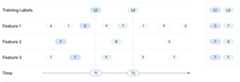
Example point-in-time lookup
The following example involves retrieving feature values for two traininginstances with labelsL1 andL2. The two labels are observed atT1 andT2, respectively. Imagine freezing the state of the feature values at thosetimestamps. Hence, for the point-in-time lookup atT1,Vertex AI Feature Store (Legacy) returns the latest feature values up to timeT1forFeature 1,Feature 2, andFeature 3 and doesn't leak any values pastT1. As time progresses, the feature values change and the label also changes. So, atT2, Feature Store returns different feature values for thatpoint in time.
Batch serving inputs
As part of a batch serving request, the following information is required:
- A list of existing features to get values for.
- Aread-instance list that contains information for each training example.It lists observations at a particular point in time. This can be either a CSVfile or a BigQuery table. The list must include the followinginformation:
- Timestamps: the times at which labels were observed or measured. Thetimestamps are required so that Vertex AI Feature Store (Legacy) canperform a point-in-time lookup.
- Entity IDs: one or more IDs of the entities that correspond to thelabel.
- The destination URI and format where the output is written. In the output,Vertex AI Feature Store (Legacy) essentially joins the table from the readinstances list and the feature values from the featurestore. Specifyone of the following formats and locations for the output:
- BigQuery table in a regional or multi-regional dataset.
- CSV file in a regional or multi-regional Cloud Storage bucket. But ifyour feature values include arrays, you must choose another format.
- Tfrecord file ina Cloud Storage bucket.
Region Requirements
For both read instances and destination, thesource dataset or bucket must be in the same region or in the samemulti-regional location as your featurestore. For example, a featurestore inus-central1 can only read data from or serve data to Cloud Storage bucketsor BigQuery datasets that are inus-central1 or in the USmulti-region location. You can't use data from, for example,us-east1. Also,reading or serving data using dual-region buckets isn't supported.
Read-instance list
The read-instance list specifies the entities and timestamps for thefeature values that you want to retrieve. The CSV file or BigQuerytable must contain the following columns, in any order. Each column requiresa column header.
- You must include a timestamp column, where the header name is
timestampandthe column values are timestamps in the RFC 3339 format. - You must include one or more entity type columns, where the header is theentity type ID and the column values are the entity IDs.
- Optional: You can include pass-through values (additional columns), which are passed as-is to the output. This is useful if you have data that isn't in Vertex AI Feature Store (Legacy) but want to include that data in the output.
Example (CSV)
Imagine a featurestore that contains the entity typesusers andmovies alongwith their features. For example, features forusers might includeage andgender while features formovies might includeratings andgenre.
For this example, you want to gather training data about users' moviepreferences. You retrieve feature values for the two user entitiesalice andbob along with features from the movies they watched. From a separate dataset,you know thatalice watchedmovie_01 and liked it.bob watchedmovie_02and didn't like it. So, the read-instance list might look like the followingexample:
users,movies,timestamp,liked"alice","movie_01",2021-04-15T08:28:14Z,true"bob","movie_02",2021-04-15T08:28:14Z,false
Vertex AI Feature Store (Legacy) retrieves feature values for the listedentities at or before the given timestamps. You specify the specific features toget as part of the batch serving request, not in the read-instance list.
This example also includes a column calledliked, which indicates whether auser liked a movie. This column isn't included in the featurestore, but you canstill pass these values to your batch serving output. In the output, thesepass-through values are joined together with the values from the featurestore.
Null values
If, at a given timestamp, a feature value is null,Vertex AI Feature Store (Legacy) returns the previous non-null feature value.If there are no previous values, Vertex AI Feature Store (Legacy) returnsnull.
Batch serve feature values
Batch serve feature values from a featurestore to get data, as determined byyour read instances list file.
If you want to lower offline storage usage costs by reading recent training data and excluding old data, specify a start time. To learn how to lower the offline storage usage cost by specifying a start time, seeSpecify a start time to optimize offline storage costs during batch serve and batch export.
Web UI
Use another method. You cannot batch serve features from theGoogle Cloud console.
REST
To batch serve feature values, send a POST request by using thefeaturestores.batchReadFeatureValuesmethod.
The following sample outputs a BigQuery table that contains featurevalues for theusers andmovies entity types. Notethat each output destination might have some prerequisites before you can submita request. For example, if you specify a table name for thebigqueryDestination field, you must have an existing dataset. Theserequirements are documented in the API reference.
Before using any of the request data, make the following replacements:
- LOCATION_ID: Region where the featurestore is created. For example,
us-central1. - PROJECT_ID: Yourproject ID.
- FEATURESTORE_ID: ID of the featurestore.
- DATASET_NAME: Name of the destination BigQuery dataset.
- TABLE_NAME: Name of the destination BigQuery table.
- STORAGE_LOCATION: Cloud Storage URI to the read-instances CSV file.
HTTP method and URL:
POST https://LOCATION_ID-aiplatform.googleapis.com/v1/projects/PROJECT_ID/locations/LOCATION_ID/featurestores/FEATURESTORE_ID:batchReadFeatureValues
Request JSON body:
{ "destination": { "bigqueryDestination": { "outputUri": "bq://PROJECT_ID.DATASET_NAME.TABLE_NAME" } }, "csvReadInstances": { "gcsSource": { "uris": ["STORAGE_LOCATION"] } }, "entityTypeSpecs": [ { "entityTypeId": "users", "featureSelector": { "idMatcher": { "ids": ["age", "liked_genres"] } } }, { "entityTypeId": "movies", "featureSelector": { "idMatcher": { "ids": ["title", "average_rating", "genres"] } } } ], "passThroughFields": [ { "fieldName": "liked" } ]}To send your request, choose one of these options:
curl
Note: The following command assumes that you have logged in to thegcloud CLI with your user account by runninggcloud init orgcloud auth login , or by usingCloud Shell, which automatically logs you into thegcloud CLI . You can check the currently active account by runninggcloud auth list. Save the request body in a file namedrequest.json, and execute the following command:
curl -X POST \
     -H "Authorization: Bearer $(gcloud auth print-access-token)" \
     -H "Content-Type: application/json; charset=utf-8" \
     -d @request.json \
     "https://LOCATION_ID-aiplatform.googleapis.com/v1/projects/PROJECT_ID/locations/LOCATION_ID/featurestores/FEATURESTORE_ID:batchReadFeatureValues"
PowerShell
Note: The following command assumes that you have logged in to thegcloud CLI with your user account by runninggcloud init orgcloud auth login . You can check the currently active account by runninggcloud auth list. Save the request body in a file namedrequest.json, and execute the following command:
$cred = gcloud auth print-access-token
$headers = @{ "Authorization" = "Bearer $cred" }

Invoke-WebRequest `
    -Method POST `
    -Headers $headers `
    -ContentType: "application/json; charset=utf-8" `
    -InFile request.json `
    -Uri "https://LOCATION_ID-aiplatform.googleapis.com/v1/projects/PROJECT_ID/locations/LOCATION_ID/featurestores/FEATURESTORE_ID:batchReadFeatureValues" | Select-Object -Expand Content
You should see output similar to the following. You can use theOPERATION_ID in the response toget the status of the operation.
{ "name": "projects/PROJECT_NUMBER/locations/LOCATION_ID/featurestores/FEATURESTORE_ID/operations/OPERATION_ID", "metadata": { "@type": "type.googleapis.com/google.cloud.aiplatform.v1.BatchReadFeatureValuesOperationMetadata", "genericMetadata": { "createTime": "2021-03-02T00:03:41.558337Z", "updateTime": "2021-03-02T00:03:41.558337Z" } }}Python
To learn how to install or update the Vertex AI SDK for Python, seeInstall the Vertex AI SDK for Python. For more information, see thePython API reference documentation.
fromgoogle.cloudimportaiplatformdefbatch_serve_features_to_bq_sample(project:str,location:str,featurestore_name:str,bq_destination_output_uri:str,read_instances_uri:str,sync:bool=True,):aiplatform.init(project=project,location=location)fs=aiplatform.featurestore.Featurestore(featurestore_name=featurestore_name)SERVING_FEATURE_IDS={"users":["age","gender","liked_genres"],"movies":["title","average_rating","genres"],}fs.batch_serve_to_bq(bq_destination_output_uri=bq_destination_output_uri,serving_feature_ids=SERVING_FEATURE_IDS,read_instances_uri=read_instances_uri,sync=sync,)Additional languages
You caninstall and use thefollowing Vertex AI client libraries to call theVertex AI API. Cloud Client Libraries provide an optimized developerexperience by using the natural conventions andstyles of each supported language.
View batch serving jobs
Use the Google Cloud console to view batch serving jobs in aGoogle Cloud project.
Web UI
- In the Vertex AI section of the Google Cloud console, go to theFeatures page.
- Select a region from theRegion drop-down list.
- From the action bar, clickView batch serving jobs to list the batch serving jobs for all featurestores.
- Click the ID of a batch serving job to view its details, such as the read instance source that was used and the output destination.
What's next
- Learn how tobatch ingest feature values.
- Learn how to serve features throughonlineserving.
- View the Vertex AI Feature Store (Legacy)concurrent batch jobquota.
- Troubleshoot commonVertex AI Feature Store (Legacy) issues.
Except as otherwise noted, the content of this page is licensed under theCreative Commons Attribution 4.0 License, and code samples are licensed under theApache 2.0 License. For details, see theGoogle Developers Site Policies. Java is a registered trademark of Oracle and/or its affiliates.
Last updated 2026-02-19 UTC.