

Create an annotation set
Anannotation set is a set of labels that you apply to the data of a datasetfor model training. Annotation sets are associated with a data type and modelobjective (for example,video/classification). You create annotation sets forimage, text, and video data types.
To learn how to apply the labels of your annotation set to your dataset's data,seeLabel using the Google Cloud console.
How to create an annotation set
When you create a dataset in Vertex AI, if the imported CSV orJSON Lines file contains labels, Vertex AI automatically creates an annotation setand assigns it the objective that you selected for the dataset. For example, ifyou selectVideo as the data type andClassification as the objective, theannotation setDATASET_NAME\_vcn is created, where "vcn"stands for "video classification."
If the dataset is already created and you want to add an annotation set oradditional annotation sets, you can create them in the Google Cloud console asdetailed in the following section.
Create a new annotation set
You can create a new annotation set for an existing dataset in theGoogle Cloud console only.
In the Google Cloud console, go to the Vertex AIDatasets page.
Click the dataset that you want to create an annotation set for.
The dataset appears.
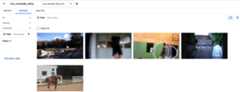
In the selector box next to the name of your dataset, selectCreate annotation set.
In theCreate annotation set pane, enter a name for the annotation set.
Select the model objective.
ClickCreate.
The dataset view appears with your new annotation set displayed. You are nowready to apply the labels of your new annotation set to your data.
What's next
- Edit, or add labels to your datasetusing the Google Cloud console.
Except as otherwise noted, the content of this page is licensed under theCreative Commons Attribution 4.0 License, and code samples are licensed under theApache 2.0 License. For details, see theGoogle Developers Site Policies. Java is a registered trademark of Oracle and/or its affiliates.
Last updated 2025-12-15 UTC.