

Logging agent overview
Instead, we recommend that you use theOps Agentfor new Google Cloud workloads and eventually transition your existingCompute Engine VMs to use the Ops Agent.The Ops Agent, which combines the collection of metrics and logging into asingle agent, is the eventual replacement for the legacy agents.
The Ops Agent is under active development, but there might be someuse cases that it doesn't support. If the Ops Agent doesn't support youruse case, then you can still use theLogging agent.
There will be no new feature development or support for new operating systemsfor the legacy Logging agent.
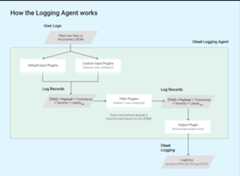
This guide provides basic information about the Logging agent, anapplication based onfluentd thatruns on your virtual machine (VM) instances.
In its default configuration, the Logging agent streams logs fromcommon third-party applications and system software to Logging;review the list ofdefault logs. You canconfigure the agent to stream additional logs; go toConfigure theLogging agent fordetails on agent configuration and operation.
It is a best practice to run the Logging agent on all your VMinstances. The agent runs under both Linux and Windows.
To install the Logging agent, seeInstalling the Logging agent.
Supported operating systems
You can run the Logging agent on the following operating systemson compatible virtual machine (VM) instances:
- Rocky Linux 8
- RHEL 8: rhel-8-6-sap-ha, rhel-8-8-sap-ha
- SLES 12: sles-12-sp5-sap
- SLES 15: sles-15-sp6, sles-15-sp3-sap, sles-15-sp4-sap, sles-15-sp5-sap
- Windows Server 2016, and 2019
- Windows Server Core 2016, and 2019
If you're runningContainer-Optimized OS VMs,then follow theContainer-Optimized OS instructionsfor collecting logs from your VMs.
Supported environments
The Logging agent is compatible with the following environments:
Compute Engine instances. The Logging agentsends the logs to the project associated with each VM instance.
For instances without external IP addresses, you mustenable Private Google Accessto allow the Logging agent to send logs.
For these VM instances, a minimum of 250 MiB of resident (RSS) memory isrequired to run the Logging agent, but 1 GiB is recommended. Forexample, at a rate of 100 1-KB-sized log entries per second, theLogging agent with default configurations consumes 5% CPU on onecore and 150 MiB memory.
The following VM instances support Logging using their ownsoftware, so manually installing the Logging agent on them is notsupported:
App Engine standard environment instances.App Engine includes built-in support for Logging. Formore information, go toWriting application logs.
App Engine flexible environment instances. Appsrunning in the App Engine flexible environment can write logs that arein addition to what is included in the App Engine standardenvironment. For more information, go toWriting application logs.
Google Kubernetes Engine node instances.Log collection with Logging is enabled by default for newcontainer clusters, or you can enable it for your existing clusters. Forinformation, seeConfiguring logging and monitoring for GKE.
For instances running onGoogle Distributed Cloud, theagent collects system logs but doesn't collect application logs.
Cloud Run container instances.Cloud Run includes built-in support for Logging.For more information, go toLogging and viewing logs.
Cloud Run functions HTTP and background functions.Cloud Run functions includes built-in support for Logging.
Support for on-premise and hybrid clouds
Google Cloud partners withBindplane to provide logging services foron-premise and hybrid cloudplatforms in a consistentand predictable way. Using Bindplane, you can collect your own data and sendit to Logging for analysis.Bindplaneintegrates with Cloud Logging to capture data from your infrastructure andis included with your project at no additional cost.
For more information about Bindplane and Bindplane, seeAbout Bindplane and Bindplane.
Agent access requirements
Running the agent requires access to the following DNS names:
OAuth2 token server:
oauth2.googleapis.comOlder versions of the agent may require access to
www.googleapis.com(full URL:https://www.googleapis.com/oauth2/v3/token).If you're using an older version of the agent, it's recommended that youupgrade your agent to the latestversion.
Logging APIs:
logging.googleapis.com
Installing the agent requires access to the following DNS names:
(Linux) Google Cloud package repository:
packages.cloud.google.comGoogle download server:
dl.google.com
Logging agent source code
You don't need the information in this section unless you want to understandthe source code or you have other special needs. The Loggingagent is installed by the script described in theinstallation instructions.
The Logging agent,google-fluentd, is a modified version of thefluentd log data collector.google-fluentd is distributed in two separate packages. The source code isavailable from the associated GitHub repositories:
- The GitHub repository named
google-fluentdwhich includes the corefluentdprogram, the custom packaging scripts, andthe output plugin for the Cloud Logging API.- The output plugin is packaged as a Ruby gem and is included in the
google-fluentdpackage. It is also available separately at the Ruby gemhosting service atfluent-plugin-google-cloud. - The content related to the Windows installer is found in thewindows-installerfolder.
- The output plugin is packaged as a Ruby gem and is included in the
- The GitHub repository named
google-fluentd-catch-all-configwhich includes the configuration files for the Logging agentfor ingesting the logs from various third-party software packages.
Logging agent release notes
The release notes for the
google-fluentdLinux package can be found atgoogle-fluentd/releases,where the release tags follow the[Major].[Minor].[Patch]semanticversioning format.The release notes for the Windows installers can be found at the samelocation:
google-fluentd/releases.But the release tags are prefixed withWindowsinstead.The release notes for the stand-alone gem
fluent-plugin-google-cloudcan be found atfluent-plugin-google-cloud/releases,where the release tags follow the[Major].[Minor].[Patch]semanticversioning format.
Deprecation policy
The Logging agent is subject to theGoogle Cloud Observability agentsdeprecation policy.
Next steps
After installing the agent, view your logs in theLogs Explorer.
Except as otherwise noted, the content of this page is licensed under theCreative Commons Attribution 4.0 License, and code samples are licensed under theApache 2.0 License. For details, see theGoogle Developers Site Policies. Java is a registered trademark of Oracle and/or its affiliates.
Last updated 2025-12-17 UTC.