

Get started with managed collection
This document describes how to set up Google Cloud Managed Service for Prometheuswith managed collection. The setup is a minimal example of working ingestion,using a Prometheus deployment that monitors an example applicationand stores collected metrics in Monarch.
This document shows you how to do the following:
- Set up your environment and command-line tools.
- Set up managed collection for your cluster.
- Configure a resource for target scraping and metric ingestion.
- Migrate existing prometheus-operator custom resources.
We recommend that you use managed collection; it reduces the complexity ofdeploying, scaling, sharding, configuring, and maintaining the collectors.Managed collection is supported for GKE andall other Kubernetes environments.
Managed collection runs Prometheus-based collectors as a Daemonset and ensuresscalability by only scraping targets on colocated nodes. You configure thecollectors with lightweight custom resources to scrape exporters usingpullcollection, then the collectors push the scraped data tothe central datastore Monarch. Google Cloud never directly accessesyour cluster to pull or scrape metric data; your collectors push data toGoogle Cloud. For more information about managed and self-deployed datacollection, seeData collection withManaged Service for Prometheus andIngestion and querying withmanaged and self-deployed collection.
Before you begin
This section describes the configuration needed for the tasks describedin this document.
Set up projects and tools
To use Google Cloud Managed Service for Prometheus, you need the following resources:
A Google Cloud project with the Cloud Monitoring API enabled.
If you don't have a Google Cloud project, then do the following:
In the Google Cloud console, go toNew Project:
In theProject Name field, enter a name for your projectand then clickCreate.
Go toBilling:
Select the project you just created if it isn't alreadyselected at the top of the page.
You are prompted to choose an existing payments profile or tocreate a new one.
The Monitoring API is enabled by default for new projects.
If you already have a Google Cloud project, then ensure that theMonitoring API is enabled:
Go toAPIs & services:
Select your project.
ClickEnable APIs and Services.
Search for "Monitoring".
In the search results, click through to "Cloud Monitoring API".
If "API enabled" is not displayed, then click theEnable button.
A Kubernetes cluster. If you do not have a Kubernetes cluster,then follow the instructions in theQuickstart forGKE.
You also need the following command-line tools:
gcloudkubectl
Thegcloud andkubectl tools are part of theGoogle Cloud CLI. For information about installingthem, seeManaging Google Cloud CLI components. To see thegcloud CLI components you have installed, run the following command:
gcloud components list
Configure your environment
To avoid repeatedly entering your project ID or cluster name,perform the following configuration:
Configure the command-line tools as follows:
Configure the gcloud CLI to refer to the ID of yourGoogle Cloud project:
gcloud config set projectPROJECT_ID
If running on GKE, use gcloud CLI to setyour cluster:
gcloud container clusters get-credentialsCLUSTER_NAME --locationLOCATION --projectPROJECT_ID
Otherwise, use the
kubectlCLI to set your cluster:kubectl config set-clusterCLUSTER_NAME
For more information about these tools, see the following:
Set up a namespace
Create theNAMESPACE_NAME Kubernetes namespace for resources you createas part of the example application:
kubectl create nsNAMESPACE_NAME
Set up managed collection
You can use managed collection on bothGKE and non-GKE Kubernetes clusters.
After managed collection is enabled, the in-cluster components will be runningbut no metrics are generated yet.PodMonitoring or ClusterPodMonitoringresources are needed by these components to correctly scrape the metricsendpoints. You must either deploy these resources with valid metrics endpointsor enable one of the managed metrics packages, for example,Kube state metrics,built into GKE. For troubleshooting information, seeIngestion-side problems.
Enabling managed collection installs the following components in your cluster:
- The
gmp-operatorDeployment, which deploys the Kubernetes operator forManaged Service for Prometheus. - The
rule-evaluatorDeployment, which is used toconfigure and run alertingand recording rules. - The
collectorDaemonSet, which horizontally scales collection by scrapingmetrics only from pods running on the same node as each collector. - The
alertmanagerStatefulSet, which isconfigured to send triggered alertsto your preferred notification channels.
For reference documentation about the Managed Service for Prometheusoperator, see themanifests page.
Enable managed collection: GKE
Managed collection is enabled by default for the following:
GKE Autopilotclustersrunning GKE version 1.25 or greater.
GKE Standardclustersrunning GKE version 1.27 or greater. You canoverride this default when creating the cluster; seeDisable managedcollection.
If you are running in a GKE environment that does not enablemanaged collection by default, then seeEnable managed collection manually.
Managed collection on GKE is automatically upgraded when newin-cluster component versions are released.
Managed collection on GKE uses permissions granted to the defaultCompute Engine service account. If you have a policy that modifies thestandard permissions on the default node service account, you might need to addtheMonitoring Metric Writer roleto continue.
Enable managed collection manually
If you are running in a GKE environment that does not enablemanaged collection by default,then you can enable managed collection by using the following:
- TheManaged Prometheus Bulk Cluster Enablement dashboard in Cloud Monitoring.
- TheKubernetes Engine page in the Google Cloud console.
- The Google Cloud CLI. To use the gcloud CLI, you must berunning GKE version 1.21.4-gke.300 or newer.
Terraform for Google Kubernetes Engine. To use Terraform to enable Managed Service for Prometheus,you must be running GKE version 1.21.4-gke.300 or newer.
Managed Prometheus Bulk Cluster Enablement dashboard
You can do the following by using theManaged Prometheus Bulk Cluster Enablement dashboardin Cloud Monitoring.
- Determine whether Managed Service for Prometheus is enabled on yourclusters and whether you are using managed or self-deployed collection.
- Enable managed collection on clusters in your project.
- View other information about your clusters.
To view theManaged Prometheus Bulk Cluster Enablement dashboard, do the following:
In the Google Cloud console, go to the
 Dashboards page:
If you use the search bar to find this page, then select the result whose subheading isMonitoring.
Use the filter bar to search for theManaged Prometheus Bulk Cluster Enablement entry, then select it.
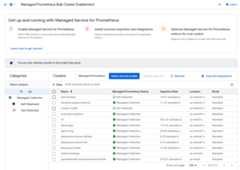
To enable managed collection on one or more GKE clusters byusing theManaged Prometheus Bulk Cluster Enablement dashboard, do the following:
Select the checkbox for each GKE cluster on which you wantto enable managed collection.
SelectEnable Selected.
Kubernetes Engine UI
You can do the following by using the Google Cloud console:
- Enable managed collection on an existing GKE cluster.
- Create a new GKE cluster with managed collection enabled.
To update an existing cluster, do the following:
In the Google Cloud console, go to theKubernetes clusters page:
If you use the search bar to find this page, then select the result whose subheading isKubernetes Engine.
Click on the name of the cluster.
In theFeatures list, locate theManaged Service for Prometheusoption. If it is listed as disabled, clickeditEdit,and then selectEnable Managed Service for Prometheus.
ClickSave changes.
To create a cluster with managed collection enabled, do the following:
In the Google Cloud console, go to theKubernetes clusters page:
If you use the search bar to find this page, then select the result whose subheading isKubernetes Engine.
ClickCreate.
ClickConfigure for theStandard option.
In the navigation panel, clickFeatures.
In theOperations section, selectEnable Managed Service forPrometheus.
ClickSave.
gcloud CLI
You can do the following by using the gcloud CLI:
- Enable managed collection on an existing GKE cluster.
- Create a new GKE cluster with managed collection enabled.
These commands might take up to 5 minutes to complete.
First, set your project:
gcloud config set projectPROJECT_ID
To update an existing cluster, run one of the followingupdate commands based on whether your cluster is zonal or regional:
gcloud container clusters updateCLUSTER_NAME --enable-managed-prometheus --zoneZONE
gcloud container clusters updateCLUSTER_NAME --enable-managed-prometheus --regionREGION
To create a cluster with managed collection enabled, run the following command:
gcloud container clusters createCLUSTER_NAME --zoneZONE --enable-managed-prometheus
GKE Autopilot
Managed collection is on by default inGKE Autopilot clustersrunning GKE version 1.25 or greater. You can't turn off managed collection.
If your cluster fails to enable managed collection automatically when upgradingto 1.25, you can manually enable it by running the update command in thegcloud CLI section.
Terraform
For instructions on configuring managed collection using Terraform, see theTerraform registry forgoogle_container_cluster.
For general information about using Google Cloud with Terraform, seeTerraform with Google Cloud.
Disable managed collection
If you want to disable managed collection on your clusters, then you can useone of the following methods:
Kubernetes Engine UI
You can do the following by using the Google Cloud console:
- Disable managed collection on an existing GKE cluster.
- Override the automatic enabling of managed collection when creatinga new GKE Standard clusterrunning GKE version 1.27 or greater.
To update an existing cluster, do the following:
In the Google Cloud console, go to theKubernetes clusters page:
If you use the search bar to find this page, then select the result whose subheading isKubernetes Engine.
Click on the name of the cluster.
In theFeatures section, locate theManaged Service forPrometheus option. Clickedit Edit,and clearEnable Managed Service for Prometheus.
ClickSave changes.
To override the automatic enabling of managed collection when creatinga new GKE Standard cluster (version1.27 or greater), do the following:
In the Google Cloud console, go to theKubernetes clusters page:
If you use the search bar to find this page, then select the result whose subheading isKubernetes Engine.
ClickCreate.
ClickConfigure for theStandard option.
In the navigation panel, clickFeatures.
In theOperations section, clearEnable Managed Service forPrometheus.
ClickSave.
gcloud CLI
You can do the following by using the gcloud CLI:
- Disable managed collection on an existing GKE cluster.
- Override the automatic enabling of managed collection when creatinga new GKE Standard clusterrunning GKE version 1.27 or greater.
These commands might take up to 5 minutes to complete.
First, set your project:
gcloud config set projectPROJECT_ID
To disable managed collection on an existing cluster, run one of the followingupdate commands based on whether your cluster is zonal or regional:
gcloud container clusters updateCLUSTER_NAME --disable-managed-prometheus --zoneZONE
gcloud container clusters updateCLUSTER_NAME --disable-managed-prometheus --regionREGION
--monitoring option to the commands to disable the managed service:--monitoring=SYSTEM(recommended)--monitoring=NONE
To override the automatic enabling of managed collection when creatinga new GKE Standard cluster (version1.27 or greater), run the following command:
gcloud container clusters createCLUSTER_NAME --zoneZONE --no-enable-managed-prometheus
GKE Autopilot
You can't turn off managed collection inGKE Autopilot clustersrunning GKE version 1.25 or greater.
Terraform
To disable managed collection, set theenabled attribute in themanaged_prometheus configuration block tofalse. For more informationabout this configuration block, see theTerraform registry forgoogle_container_cluster.
For general information about using Google Cloud with Terraform, seeTerraform with Google Cloud.
Enable managed collection: non-GKE Kubernetes
If you are running in a non-GKE environment,then you can enable managed collection using the following:
- The
kubectlCLI. VMware or bare metal on-premises deployments running version1.12 or newer.
kubectl CLI
To install managed collectors when you are using a non-GKEKubernetes cluster, run the following commands to install the setup andoperator manifests:
kubectl apply -f https://raw.githubusercontent.com/GoogleCloudPlatform/prometheus-engine/v0.15.3/manifests/setup.yamlkubectl apply -f https://raw.githubusercontent.com/GoogleCloudPlatform/prometheus-engine/v0.15.3/manifests/operator.yaml
On-premises
For information about configuring managed collection for on-premises clusters,see the documentation for your distribution:
Deploy the example application
Theexample application emitstheexample_requests_total counter metric and theexample_random_numbershistogram metric (among others) on itsmetrics port. The manifest forthe application defines three replicas.
To deploy the example application, run the following command:
kubectl -nNAMESPACE_NAME apply -f https://raw.githubusercontent.com/GoogleCloudPlatform/prometheus-engine/v0.15.3/examples/example-app.yaml
Configure a PodMonitoring resource
To ingest the metric data emitted by the example application, Managed Service for Prometheususes target scraping. Target scraping and metrics ingestion are configured usingKubernetescustom resources. The managed service usesPodMonitoring custom resources (CRs).
A PodMonitoring CR scrapes targets only in the namespace the CR is deployed in.To scrape targets in multiple namespaces, deploy the same PodMonitoring CR ineach namespace. You can verify the PodMonitoring resource is installed in theintended namespace by runningkubectl get podmonitoring -A.
For reference documentation about all the Managed Service for PrometheusCRs, see theprometheus-engine/doc/api reference.
The following manifest defines a PodMonitoring resource,prom-example, in theNAMESPACE_NAME namespace. The resourceuses aKubernetes label selector to find allpods in the namespace that have the labelapp.kubernetes.io/name with the valueprom-example.The matching pods are scraped on a port namedmetrics, every 30 seconds, onthe/metrics HTTP path.
apiVersion: monitoring.googleapis.com/v1kind: PodMonitoringmetadata: name:prom-examplespec: selector: matchLabels: app.kubernetes.io/name: prom-example endpoints: - port: metrics interval: 30s
To apply this resource, run the following command:
kubectl -nNAMESPACE_NAME apply -f https://raw.githubusercontent.com/GoogleCloudPlatform/prometheus-engine/v0.15.3/examples/pod-monitoring.yaml
Your managed collector is now scraping the matching pods. You can view thestatus of your scrape target byenabling the target status feature.
To configure horizontal collection that applies to a range of pods acrossall namespaces, use theClusterPodMonitoring resource. The ClusterPodMonitoring resource provides the same interface as thePodMonitoring resource but does not limit discovered pods to a given namespace.
Note: ThetargetLabels field provides a simplifiedPrometheus-stylerelabel configuration.You can use relabeling to add pod labels as labels on the ingestedtime series. You can't overwrite the mandatory target labels; for a listof these labels, see theprometheus_targetresource.If you are running on GKE, then you can do the following:
- To query the metrics ingested by the example application using PromQL inCloud Monitoring, seeQuery using Cloud Monitoring.
- To query the metrics ingested by the example application using Grafana, seeQuery using Grafana or any Prometheus API consumer.
- To learn about filtering exported metrics and adapting yourprom-operator resources, seeAdditional topics for managedcollection.
If you are running outside of GKE, then you need tocreate a service account and authorize it to write your metric data,as described in the following section.
Provide credentials explicitly
When running on GKE, the collecting Prometheus serverautomatically retrieves credentials from the environment based on thenode's service account.In non-GKE Kubernetes clusters, credentials must be explicitlyprovided through theOperatorConfig resource in thegmp-public namespace.
Set the context to your target project:
gcloud config set projectPROJECT_ID
Create a service account:
gcloud iam service-accounts creategmp-test-sa
Grant the required permissions to the service account:
gcloud projects add-iam-policy-bindingPROJECT_ID\ --member=serviceAccount:gmp-test-sa@PROJECT_ID.iam.gserviceaccount.com \ --role=roles/monitoring.metricWriter
Create and download a key for the service account:
gcloud iam service-accounts keys creategmp-test-sa-key.json \ --iam-account=gmp-test-sa@PROJECT_ID.iam.gserviceaccount.com
Add the key file as a secret to your non-GKE cluster:
kubectl -n gmp-public create secret genericgmp-test-sa \ --from-file=key.json=gmp-test-sa-key.json
Open the OperatorConfig resource for editing:
kubectl -n gmp-public edit operatorconfig config
Add the text shown in bold to the resource:
apiVersion: monitoring.googleapis.com/v1kind: OperatorConfigmetadata: namespace: gmp-public name: configcollection: credentials: name:gmp-test-sa key: key.json
rulessectionso that managed rule evaluation works.Save the file and close the editor. After the change is applied, thepods are re-created and start authenticating to the metricbackend with the given service account.
Additional topics for managed collection
This section describes how to do the following:
- Enable the target status feature for easier debugging.
- Configure target scraping using Terraform.
- Filter the data you export to the managed service.
- Scrape Kubelet and cAdvisor metrics.
- Convert your existing prom-operator resources for use with the managedservice.
- Run managed collection outside of GKE.
Enabling the target status feature
Managed Service for Prometheus provides a way to check whether your targetsare being properly discovered and scraped by the collectors. This target statusreport is meant to be a tool for debugging acute problems.We stronglyrecommend only enabling this feature to investigate immediate issues. Leavingtarget status reporting on in large clusters might cause the operator to runout of memory and crash loop.
You can check the status of your targets in your PodMonitoring orClusterPodMonitoring resources by setting the
features.targetStatus.enabledvalue within the OperatorConfig resource totrue, as shown in the following:apiVersion: monitoring.googleapis.com/v1kind: OperatorConfigmetadata: namespace: gmp-public name: configfeatures: targetStatus: enabled: true
After a few seconds, the
Status.Endpoint Statusesfield appears on everyvalid PodMonitoring or ClusterPodMonitoring resource, when configured.If you have a PodMonitoring resource with the name
prom-examplein theNAMESPACE_NAMEnamespace, then you can check the status by runningthe following command:kubectl -nNAMESPACE_NAME describe podmonitorings/prom-example
The output looks like the following:
APIVersion:monitoring.googleapis.com/v1Kind:PodMonitoring...Status:Conditions:...Status:TrueType:ConfigurationCreateSuccessEndpointStatuses:ActiveTargets:3CollectorsFraction:1LastUpdateTime:2023-08-02T12:24:26ZName:PodMonitoring/custom/prom-example/metricsSampleGroups:Count:3SampleTargets:Health:upLabels:Cluster:CLUSTER_NAMEContainer:prom-exampleInstance:prom-example-589ddf7f7f-hcnpt:metricsJob:prom-exampleLocation:REGIONNamespace:NAMESPACE_NAMEPod:prom-example-589ddf7f7f-hcnptproject_id:PROJECT_IDLastScrapeDurationSeconds:0.020206416Health:upLabels:...LastScrapeDurationSeconds:0.054189485Health:upLabels:...LastScrapeDurationSeconds:0.006224887The output includes the following status fields:
Status.Conditions.Statusis true when Managed Service for Prometheusacknowledges and processes the PodMonitoring or ClusterPodMonitoring.Status.Endpoint Statuses.Active Targetsshows the number of scrape targetsthat Managed Service for Prometheus counts on all collectors for thisPodMonitoring resource. In the example application, theprom-exampledeployment has three replicas with a single metric target, so the value is3.If there are unhealthy targets, theStatus.Endpoint Statuses.UnhealthyTargetsfield appears.Status.Endpoint Statuses.Collectors Fractionshows a value of1(meaning 100%) if all of the managed collectors are reachable byManaged Service for Prometheus.Status.Endpoint Statuses.Last Update Timeshows the last updated time. Whenthe last update time is significantly longer than your desired scrapeinterval time, the difference might indicate issues with your target orcluster.Status.Endpoint Statuses.Sample Groupsfield shows sample targets groupedby common target labels injected by the collector. This value is useful fordebugging situations where your targets are not discovered. If all targetsare healthy and being collected, then the expected value for theHealthfield isupand the value for theLast Scrape Duration Secondsfield isthe usual duration for a typical target.
For more information about these fields, see theManaged Service for Prometheus API document.
Any of the following might indicate a problem wth your configuration:
- There is no
Status.Endpoint Statusesfield in your PodMonitoring resource. - The value of the
Last Scrape Duration Secondsfield is too old. - You see too few targets.
- The value of the
Healthfield indicates that the target isdown.
For more information about debugging target discovery issues,seeIngestion-side problems in the troubleshootingdocumentation.
Configuring an authorized scrape endpoint
If your scrape target requires authorization, you can set up the collector touse the correct authorization type and provide any relevant secrets.
Google Cloud Managed Service for Prometheus supports the following authorization types:
mTLS
mTLS is commonly configured within zero trust environments, such as Istioservice mesh or Cloud Service Mesh.
To enable scraping endpoints secured using mTLS, set the
Spec.Endpoints[].Schemefield in your PodMonitoring resource tohttps. Whilenot recommended, you can set theSpec.Endpoints[].tls.insecureSkipVerifyfieldin your PodMonitoring resource totrueto skip verifying the certificateauthority. Alternatively, you can configure Managed Service for Prometheus toload certificates and keys from secret resources.For example, the following Secret resource contains keys for the client(
cert), private key (key), and certificate authority (ca) certificates:kind: Secretmetadata: name:secret-examplestringData: cert:******** key:******** ca:********
Grant the Managed Service for Prometheus collector permission to access thatSecret resource:
apiVersion: rbac.authorization.k8s.io/v1kind: Rolemetadata: name:secret-example-readrules:- resources: - secrets apiGroups: [""] verbs: ["get", "list", "watch"] resourceNames: ["secret-example"]---apiVersion: rbac.authorization.k8s.io/v1kind: RoleBindingmetadata: name:gmp-system:collector:secret-example-read namespace: defaultroleRef: name:secret-example-read kind: Role apiGroup: rbac.authorization.k8s.iosubjects:- name: collector namespace: gmp-system kind: ServiceAccount
On GKE Autopilot clusters, this looks like:
apiVersion: rbac.authorization.k8s.io/v1kind: Rolemetadata: name:secret-example-readrules:- resources: - secrets apiGroups: [""] verbs: ["get", "list", "watch"] resourceNames: ["secret-example"]---apiVersion: rbac.authorization.k8s.io/v1kind: RoleBindingmetadata: name:gmp-system:collector:secret-example-read namespace: defaultroleRef: name:secret-example-read kind: Role apiGroup: rbac.authorization.k8s.iosubjects:- name: collector namespace: gke-gmp-system kind: ServiceAccount
To configure a PodMonitoring resource that uses the prior Secret resource,modify your resource to add a
schemeandtlssection:apiVersion: monitoring.googleapis.com/v1kind: PodMonitoringmetadata: name:prom-examplespec: selector: matchLabels: app.kubernetes.io/name: prom-example endpoints: - port: metrics interval: 30sscheme: https tls: ca: secret: name:secret-example key: ca cert: secret: name:secret-example key: cert key: secret: name:secret-example key: key
For reference documentation about all the Managed Service for PrometheusmTLS options, see theAPI reference documentation.
BasicAuth
To enable scraping endpoints secured using BasicAuth, set the
Spec.Endpoints[].BasicAuthfield in your PodMonitoring resource with yourusername and password. For other HTTP Authorization Header types, seeHTTP Authorization Header.For example, the following Secret resource contains a key to store the password:
kind: Secretmetadata: name:secret-examplestringData: password:********
Grant the Managed Service for Prometheus collector permission to access thatSecret resource:
apiVersion: rbac.authorization.k8s.io/v1kind: Rolemetadata: name:secret-example-readrules:- resources: - secrets apiGroups: [""] verbs: ["get", "list", "watch"] resourceNames: ["secret-example"]---apiVersion: rbac.authorization.k8s.io/v1kind: RoleBindingmetadata: name:gmp-system:collector:secret-example-read namespace: defaultroleRef: name:secret-example-read kind: Role apiGroup: rbac.authorization.k8s.iosubjects:- name: collector namespace: gmp-system kind: ServiceAccount
On GKE Autopilot clusters, this looks like:
apiVersion: rbac.authorization.k8s.io/v1kind: Rolemetadata: name:secret-example-readrules:- resources: - secrets apiGroups: [""] verbs: ["get", "list", "watch"] resourceNames: ["secret-example"]---apiVersion: rbac.authorization.k8s.io/v1kind: RoleBindingmetadata: name:gmp-system:collector:secret-example-read namespace: defaultroleRef: name:secret-example-read kind: Role apiGroup: rbac.authorization.k8s.iosubjects:- name: collector namespace: gke-gmp-system kind: ServiceAccount
To configure a PodMonitoring resource that uses the prior Secret resource and ausername of
foo, modify your resource to add abasicAuthsection:apiVersion: monitoring.googleapis.com/v1kind: PodMonitoringmetadata: name:prom-examplespec: selector: matchLabels: app.kubernetes.io/name: prom-example endpoints: - port: metrics interval: 30sbasicAuth: username: foo password: secret: name:secret-example key: password
For reference documentation about all the Managed Service for PrometheusBasicAuth options, see theAPI reference documentation.
HTTP Authorization Header
To enable scraping endpoints secured using HTTP Authorization Headers, set the
Spec.Endpoints[].Authorizationfield in your PodMonitoring resource with thetype and credentials. For BasicAuth endpoints, use theBasicAuth configuration instead.For example, the following Secret resource contains a key to store thecredentials:
kind: Secretmetadata: name:secret-examplestringData: credentials:********
Grant the Managed Service for Prometheus collector permission to access thatSecret resource:
apiVersion: rbac.authorization.k8s.io/v1kind: Rolemetadata: name:secret-example-readrules:- resources: - secrets apiGroups: [""] verbs: ["get", "list", "watch"] resourceNames: ["secret-example"]---apiVersion: rbac.authorization.k8s.io/v1kind: RoleBindingmetadata: name:gmp-system:collector:secret-example-read namespace: defaultroleRef: name:secret-example-read kind: Role apiGroup: rbac.authorization.k8s.iosubjects:- name: collector namespace: gmp-system kind: ServiceAccount
On GKE Autopilot clusters, this looks like:
apiVersion: rbac.authorization.k8s.io/v1kind: Rolemetadata: name:secret-example-readrules:- resources: - secrets apiGroups: [""] verbs: ["get", "list", "watch"] resourceNames: ["secret-example"]---apiVersion: rbac.authorization.k8s.io/v1kind: RoleBindingmetadata: name:gmp-system:collector:secret-example-read namespace: defaultroleRef: name:secret-example-read kind: Role apiGroup: rbac.authorization.k8s.iosubjects:- name: collector namespace: gke-gmp-system kind: ServiceAccount
To configure a PodMonitoring resource that uses the prior Secret resource and atype of
Bearer, modify your resource to add anauthorizationsection:apiVersion: monitoring.googleapis.com/v1kind: PodMonitoringmetadata: name:prom-examplespec: selector: matchLabels: app.kubernetes.io/name: prom-example endpoints: - port: metrics interval: 30sauthorization: type: Bearer credentials: secret: name:secret-example key: credentials
For reference documentation about all the Managed Service for PrometheusHTTP Authorization Header options, see theAPI reference documentation.
OAuth 2
To enable scraping endpoints secured using OAuth 2, you must set the
Spec.Endpoints[].OAuth2field in your PodMonitoring resource.For example, the following Secret resource contains a key to store the clientsecret:
kind: Secretmetadata: name:secret-examplestringData: clientSecret:********
Grant the Managed Service for Prometheus collector permission to access thatSecret resource:
apiVersion: rbac.authorization.k8s.io/v1kind: Rolemetadata: name:secret-example-readrules:- resources: - secrets apiGroups: [""] verbs: ["get", "list", "watch"] resourceNames: ["secret-example"]---apiVersion: rbac.authorization.k8s.io/v1kind: RoleBindingmetadata: name:gmp-system:collector:secret-example-read namespace: defaultroleRef: name:secret-example-read kind: Role apiGroup: rbac.authorization.k8s.iosubjects:- name: collector namespace: gmp-system kind: ServiceAccount
On GKE Autopilot clusters, this looks like:
apiVersion: rbac.authorization.k8s.io/v1kind: Rolemetadata: name:secret-example-readrules:- resources: - secrets apiGroups: [""] verbs: ["get", "list", "watch"] resourceNames: ["secret-example"]---apiVersion: rbac.authorization.k8s.io/v1kind: RoleBindingmetadata: name:gmp-system:collector:secret-example-read namespace: defaultroleRef: name:secret-example-read kind: Role apiGroup: rbac.authorization.k8s.iosubjects:- name: collector namespace: gke-gmp-system kind: ServiceAccount
To configure a PodMonitoring resource that uses the prior Secret resource with aclient ID of
fooand token URL ofexample.com/token, modify your resource toadd anoauth2section:apiVersion: monitoring.googleapis.com/v1kind: PodMonitoringmetadata: name:prom-examplespec: selector: matchLabels: app.kubernetes.io/name: prom-example endpoints: - port: metrics interval: 30soauth2: clientID: foo clientSecret: secret: name:secret-example key: password tokenURL: example.com/token
For reference documentation about all the Managed Service for PrometheusOAuth 2 options, see theAPI reference documentation.
Configuring target scraping using Terraform
You can automate the creation and management of PodMonitoring andClusterPodMonitoring resources by using the
kubernetes_manifestTerraformresource type or thekubectl_manifestTerraform resource type, either of whichlets you specify arbitrary custom resources.For general information about using Google Cloud with Terraform, seeTerraformwith Google Cloud.
Filter exported metrics
If you collect a lot of data, you might want to prevent some time series frombeing sent to Managed Service for Prometheus to keep down costs. You can dothis by usingPrometheus relabeling rules with a
keepaction for an allowlist or adropaction for a denylist. Formanaged collection, this rule goes in themetricRelabelingsection of yourPodMonitoring or ClusterPodMonitoring resource.For example, the following metric relabeling rule will filter out any metricthat begins with
foo_bar_,foo_baz_, orfoo_qux_:metricRelabeling: - action: drop regex: foo_(bar|baz|qux)_.+ sourceLabels: [__name__]
The Cloud MonitoringMetrics Management page provides informationthat can help you control the amount you spend on billable metricswithout affecting observability. TheMetrics Management page reports thefollowing information:
- Ingestion volumes for both byte- and sample-based billing, across metric domains and for individual metrics.
- Data about labels and cardinality of metrics.
- Number of reads for each metric.
- Use of metrics in alerting policies and custom dashboards.
- Rate of metric-write errors.
You can also use theMetrics Management page toexclude unneeded metrics,eliminating the cost of ingesting them.For more information about theMetrics Management page, seeView and manage metric usage.
For additional suggestions on how to lower your costs, seeCost controls andattribution.
Scraping Kubelet and cAdvisor metrics
The Kubelet exposes metrics about itself as well as cAdvisor metrics aboutcontainers running on its node. You can configure managed collection toscrape Kubelet and cAdvisor metrics by editing the OperatorConfig resource.For instructions, see the exporter documentation forKubelet and cAdvisor.
Convert existing prometheus-operator resources
You can usually convert your existing prometheus-operator resources toManaged Service for Prometheus managed collection PodMonitoring andClusterPodMonitoring resources.
For example, theServiceMonitor resource defines monitoring for a set ofservices. ThePodMonitoring resource serves a subsetof the fields servedby the ServiceMonitor resource. You can convert a ServiceMonitor CR to aPodMonitoring CR by mapping the fields as described in the following table:
monitoring.coreos.com/v1
ServiceMonitorCompatibility
monitoring.googleapis.com/v1
PodMonitoring.ServiceMonitorSpec.SelectorIdentical .PodMonitoringSpec.Selector.ServiceMonitorSpec.Endpoints[].TargetPortmaps to.Port.Path: compatible.Interval: compatible.Timeout: compatible.PodMonitoringSpec.Endpoints[].ServiceMonitorSpec.TargetLabelsPodMonitor must specify: .FromPod[].Frompod label.FromPod[].Totarget label.PodMonitoringSpec.TargetLabelsThe following is a sample ServiceMonitor CR; the content in bold type isreplaced in the conversion, and the content in italic type maps directly:
apiVersion:monitoring.coreos.com/v1kind:ServiceMonitormetadata: name: example-appspec: selector: matchLabels: app: example-appendpoints: -targetPort: webpath: /stats interval: 30stargetLabels: - foo
The following is the analogous PodMonitoring CR, assuming that your serviceand its pods are labeled with
app=example-app. If this assumptiondoes not apply, then you need to use the label selectors of the underlyingService resource.The content in bold type has been replaced in the conversion:
apiVersion:monitoring.googleapis.com/v1kind:PodMonitoringmetadata: name: example-appspec: selector: matchLabels: app: example-app endpoints: -port: web path: /stats interval: 30s targetLabels:fromPod: - from: foo # pod label from example-app Service pods.to: foo
You can always continue to use your existing prometheus-operator resources anddeployment configs by usingself-deployed collectors instead ofmanaged collectors. You can query metrics sent from both collector types, so youmight want to use self-deployed collectors for your existing Prometheusdeployments while using managed collectors for new Prometheus deployments.
Reserved labels
Managed Service for Prometheus automatically adds the following labelsto all metrics collected. These labels are used to uniquely identify a resourcein Monarch:
project_id: The identifier of the Google Cloud project associated with yourmetric.location: The physical location (Google Cloud region) where thedata is stored. This value is typically the region of yourGKE cluster. If data iscollected from an AWS or on-premises deployment, then the value might bethe closest Google Cloud region.cluster: The name of the Kubernetes cluster associated with your metric.namespace: The name of the Kubernetes namespace associated with your metric.job: The job label of the Prometheus target, if known;might be empty for rule-evaluation results.instance: The instance label of the Prometheus target, if known;might be empty for rule-evaluation results.
While not recommended when running on Google Kubernetes Engine, you can override the
project_id,location, andclusterlabels byaddingthem asargsto the Deployment resource withinoperator.yaml. If you use any reserved labels as metric labels,Managed Service for Prometheus automatically relabels them by adding theprefixexported_. This behavior matches how upstream Prometheus handlesconflicts with reserved labels.Compress configurations
If you have many PodMonitoring resources, you might run out of ConfigMap space.To fix this,enable
gzipcompression in yourOperatorConfig resource:apiVersion: monitoring.googleapis.com/v1 kind: OperatorConfig metadata: namespace: gmp-public name: configfeatures: config: compression: gzip
Enable vertical pod autoscaling (VPA) for managed collection
If you are encountering Out of Memory (OOM) errors for the collector pods inyour cluster or if the default resource requests and limits for the collectorsotherwise don't meet your needs, then you can use vertical pod autoscaling todynamically allocate resources.
When you set the field
scaling.vpa.enabled: trueon theOperatorConfigresource, the operator deploys aVerticalPodAutoscalermanifest in the clusterthat allows theresource requests and limitsof the collector pods to be set automatically, based on usage.To enable VPA for collector pods in Managed Service for Prometheus, run thefollowing command:
kubectl -n gmp-public patch operatorconfig/config -p '{"scaling":{"vpa":{"enabled":true}}}' --type=mergeIf the command completes successfully, then the operator sets up vertical podautoscaling for the collector pods. Out Of Memory errors result in an immediateincrease to the resource limits. If there are no OOM errors, then the firstadjustment to the resource requests and limits of the collector pods typicallyoccurs within 24 hours.
You might receive this error when attempting to enable VPA:
vertical pod autoscaling is not available - install vpa support and restart theoperatorTo resolve this error, you need to first enable vertical pod autoscaling at thecluster level:
Go to theKubernetes Engine - Clusters page in theGoogle Cloud console.
In the Google Cloud console, go to theKubernetes clusters page:
If you use the search bar to find this page, then select the result whose subheading isKubernetes Engine.
Select the cluster you want to modify.
In theAutomation section, edit the value of theVertical PodAutoscaling option.
Select theEnable Vertical Pod Autoscaling checkbox, and then clickSave changes. This change restarts your cluster. The operatorrestarts as a part of this process.
Retry the following command:
kubectl -n gmp-public patchoperatorconfig/config -p '{"scaling":{"vpa":{"enabled":true}}}'--type=mergeto enable VPA for Managed Service for Prometheus.
To confirm that the
OperatorConfigresource is edited successfully, open itusing the commandkubectl -n gmp-public edit operatorconfig config. Ifsuccessful, yourOperatorConfigincludes the following section in bold:apiVersion: monitoring.googleapis.com/v1kind: OperatorConfigmetadata: namespace: gmp-public name: configscaling: vpa: enabled: true
If you have already enabled vertical pod autoscaling at the cluster level andare still seeing the
vertical pod autoscaling is not available - install vpasupport and restart the operatorerror, then thegmp-operatorpod might needto re-evaluate the cluster configuration. Do one of the following:If you are running a Standardcluster, run the following command to recreate the pod:
kubectl -n gmp-system rollout restart deployment/gmp-operator
After the
gmp-operatorpod has restarted, follow the steps above to patch theOperatorConfigonce again.If you are running an Autopilot cluster, then you can't restartthe
gmp-operatorpod manually. When you enable VPA for the managedcollectors in an Autopilot cluster, VPA automatically evictsand recreates the collector pods to apply the new resource requests; nocluster restart is required. If you see thevertical pod autoscaling isnot availableerror after enabling VPA, or encounter other issues withVPA activation for Managed Service for Prometheus, thencontact support.
Vertical pod autoscaling works best when ingesting steady numbers of samples,divided equally across nodes. If the metrics load is irregular or spiky, or ifmetrics load varies greatly between nodes, VPA might not be an efficientsolution.
For more information, seevertical pod autoscaling in GKE.
Configure statsd_exporter and other exporters that report metrics centrally
If you use the statsd_exporter for Prometheus, Envoy for Istio, the SNMPexporter, the Prometheus Pushgateway, kube-state-metrics, or you otherwisehave a similar exporter that intermediates and reports metrics on behalf ofother resources running in your environment, then you need to make some smallchanges for your exporter to work with Managed Service for Prometheus.
For instructions on configuring these exporters, seethis note in theTroubleshooting section.
Teardown
To disable managed collection deployed using
gcloudor the GKEUI, you can do either of the following:Run the following command:
gcloud container clusters updateCLUSTER_NAME --disable-managed-prometheus
Use the GKE UI:
SelectKubernetes Engine in the Google Cloud console, then selectClusters.
Locate the cluster for which you want to disable managed collection andclick its name.
On theDetails tab, scroll down toFeatures and change the state toDisabled by using the edit button.
To disable managed collection deployed by using Terraform, specify
enabled = falsein themanaged_prometheussection of thegoogle_container_clusterresource.To disable managed collection deployed by using
kubectl, run the followingcommand:kubectl delete -f https://raw.githubusercontent.com/GoogleCloudPlatform/prometheus-engine/v0.15.3/manifests/operator.yaml
Disabling managed collection causes your cluster to stop sending new data toManaged Service for Prometheus. Taking this action does not delete anyexisting metrics data already stored in the system.
Disabling managed collection also deletes the
gmp-publicnamespace andany resources within it, including anyexportersinstalled in that namespace.Run managed collection outside of GKE
In GKE environments, you can run managed collection withoutfurther configuration. In other Kubernetes environments,you need to explicitly provide credentials, a
project-idvalue to contain yourmetrics, alocationvalue (Google Cloud region) where your metrics will bestored, and aclustervalue to save the name of the cluster in which thecollector is running.As
gclouddoes not work outside of Google Cloud environments, you need todeploy using kubectl instead. Unlike withgcloud,deploying managed collection usingkubectldoes not automatically upgrade yourcluster when a new version is available. Remember to watch thereleasespage for new versions and manually upgradeby re-running thekubectlcommands with the new version.You can provide a service account key by modifying theOperatorConfig resource within
operator.yamlas described inProvidecredentials explicitly. You can provideproject-id,location, andclustervalues by adding them asargsto theDeployment resource withinoperator.yaml.We recommend choosing
project-idbased on your planned tenancy model forreads. Pick a project to store metrics in based on how you plan to organizereads later withmetrics scopes. If you don't care, youcan put everything into one project.For
location, we recommend choosing the nearest Google Cloud region to yourdeployment. The further the chosen Google Cloud region is from your deployment,the more write latency you'll have and the more you'll be affected by potentialnetworking issues. You might want to consult thislist of regions acrossmultiple clouds. Ifyou don't care, you can put everything into one Google Cloud region. You can'tuseglobalas your location.For
cluster, we recommend choosing the name of the cluster in which theoperator is deployed.When properly configured, your OperatorConfig should look like this:
apiVersion: monitoring.googleapis.com/v1 kind: OperatorConfig metadata: namespace: gmp-public name: config collection: credentials: name:gmp-test-sa key: key.json rules: credentials: name:gmp-test-sa key: key.json
And your Deployment resource should look like this:
apiVersion: apps/v1kind: Deployment...spec: ... template: ... spec: ... containers: - name: operator ... args: - ... - "--project-id=PROJECT_ID" - "--cluster=CLUSTER_NAME" - "--location=REGION"
This example assumes you have set the
REGIONvariable to a value likeus-central1, for example.Running Managed Service for Prometheus outside of Google Cloud incursdata transfer fees. There are fees to transfer data into Google Cloud, andyou might incur fees to transfer data out of another cloud. You can minimizethese costs by enabling gzip compression over the wire through theOperatorConfig. Add the text shown in bold to the resource:
apiVersion: monitoring.googleapis.com/v1 kind: OperatorConfig metadata: namespace: gmp-public name: config collection:compression: gzip ...
Further reading on managed collection custom resources
For reference documentation about all the Managed Service for Prometheuscustom resources, see theprometheus-engine/doc/api reference.
What's next
- Use PromQL in Cloud Monitoring to query Prometheus metrics.
- Use Grafana to query Prometheus metrics.
- UsePromQL alerts in Cloud Monitoring.
- Set upmanaged rule evaluation.
- Set upcommonly used exporters.
Except as otherwise noted, the content of this page is licensed under theCreative Commons Attribution 4.0 License, and code samples are licensed under theApache 2.0 License. For details, see theGoogle Developers Site Policies. Java is a registered trademark of Oracle and/or its affiliates.
Last updated 2025-12-17 UTC.