

Train and manage models
Preview
This feature is subject to the "Pre-GA Offerings Terms" in the General Service Terms section of theService Specific Terms. Pre-GA features are available "as is" and might have limited support. For more information, see thelaunch stage descriptions.
Using the API, without any code, you can create and train aCustom Speech-to-Text model to improve recognition accuracyfrom an existing Cloud Speech-to-Text model. This fully managed serviceautomatically provisions compute resources, executes the training applicationcode, and ensures deletion of compute resources after the training job. You geta fully fine-tuned transcription model useful for any downstream application.
Similar to machine-learning models, training aCustom Speech-to-Text model is typically iterative andinvolves selecting a base model as a starting point, fine-tuning it with yourtext and audio datasets, then testing the recognition quality of the model. Ifthe results are not what you expected, you retrain a new model with a differentmixture of data, test again, or use it directly for transcription in yourdomain.
Before you begin
Ensure you have signed up for a Google Cloud account, created a Google Cloudproject, and enabled the Cloud Speech-to-Text API: Go toSpeech in theGoogle Cloud console, and navigate to the Cloud Speech-to-Text API. Operate in theCustom Models section of the navigation bar on the left.
Create a custom model
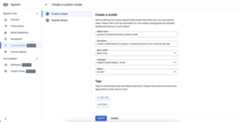
Start by creating a custom Speech-to-Text model and defining its parameters,like base model and transcription language:
- ClickCreate to create a custom model.
- Enter aModel name, which will be used for the display and be referencedin your API requests and Google Cloud Speech console.
- Enter aDescription for the model.
- Select aBase model that is suited best for your use case.
- Select the transcriptionLanguage of the model.
- Select theRegion in which training should take place.
- ClickContinue.
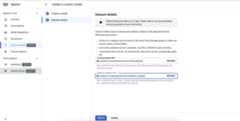
To complete the definition of the Custom Speech-to-Text modeljob and start the training, you will need to define the training and validationdatasets.
- Select atraining dataset, by providing a valid Cloud Storagedirectory URI. Ensure that only audio and text files are present and thatthe total duration of audio follows thetraining dataset requirements.
- Select avalidation dataset, by providing a valid Cloud Storagedirectory URI. Ensure that only audio and text files are present andthat the total duration of audio follows thevalidation datasetrequirements.
- ClickCreate to initiate the training process.
- Select avalidation dataset, by providing a valid Cloud Storagedirectory URI. Ensure that only audio and text files are present andthat the total duration of audio follows thevalidation datasetrequirements.
If not enough audio hours are indexed or the files don't follow the guidelines,the training job will fail.
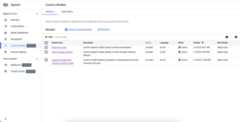
Training jobs can be queued behind other jobs in our system, and training amodel can take anywhere from a couple of hours to a few days depending on thedataset size. After the model training, its state will be flagged asActive.
Delete a custom model
Before you start, make sure that there is no traffic routed to yourCustom Speech-to-Text model through any endpoint, becausedeleting it will stop it from serving any requests.
- Navigate to theModels tab of theCustom Models section.
- Click to expand options and then clickDelete. In a few moments theCustom Speech-to-Text model will be deleted, along withall of its endpoints, and will no longer serve any traffic.
List your custom models
By selecting theModels in theCustom Models section, you can also listall of your Custom Speech-to-Text models, including the ones that aretraining, active, and deleting.
What's next
Follow the resources to take advantage of custom speech models in yourapplication:
Except as otherwise noted, the content of this page is licensed under theCreative Commons Attribution 4.0 License, and code samples are licensed under theApache 2.0 License. For details, see theGoogle Developers Site Policies. Java is a registered trademark of Oracle and/or its affiliates.
Last updated 2025-12-17 UTC.