

Export embeddings from Spanner to Vertex AI Vector Search
Vertex AI Vector Searchallows users to search for semantically similar items using vector embeddings.Using theSpanner To Vertex AI Vector SearchWorkflow,you can integrate your Spanner database withVector Search to perform a vector similarity search on yourSpanner data.
The following diagram shows the end-to-end application workflow of howyou can enable and use Vector Search on your Spannerdata:
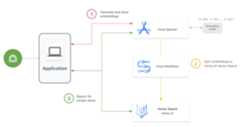
The general workflow is as follows:
Generate and store vector embeddings.
You can generate vector embeddings of your data, then store andmanage them in Spanner with your operational data. You cangenerate embeddings with Spanner's
ML.PREDICTSQLfunction toaccess the Vertex AI text embedding modeloruse other embedding models deployed to Vertex AI.Sync embeddings to Vector Search.
Use theSpanner To Vertex AI Vector Search Workflow,which is deployed usingWorkflows toexport and upload embeddings into a Vector Search index. You can useCloud Scheduler to periodically schedule this workflow to keep yourVector Search index up to date with the latest changes to yourembeddings in Spanner.
Perform vector similarity search using your Vector Search index.
Query the Vector Search index to search and find results forsemantically similar items. You can query using apublic endpointor throughVPC peering.
Example use case
An illustrative use case for Vector Search is an onlineretailer who has an inventory of hundreds of thousands of items. In thisscenario, you are a developer for an online retailer, and you wouldlike to use vector similarity search on your product catalog inSpanner to help your customers find relevant products based ontheir search queries.
Follow step 1 and step 2 presented in the general workflow to generate vectorembeddings for your product catalog, and sync these embeddings toVector Search.
Now imagine a customer browsing your application performs a search such as"best, quick-drying sports shorts that I can wear in the water". When yourapplication receives this query, you need to generate a request embedding forthis search request using the SpannerML.PREDICTSQL function. Make sure to use the same embedding model used to generate theembeddings for your product catalog.
Next, query the Vector Search index for product IDs whosecorresponding embeddings are similar to the request embedding generated fromyour customer's search request. The search index might recommend product IDs forsemantically similar items such as wakeboarding shorts, surfing apparel, andswimming trunks.
After Vector Search returns these similar product IDs, you can querySpanner for the products' descriptions, inventory count, price,and other metadata that are relevant, and display them to your customer.
You can also usegenerative AIto process the returned results from Spanner before displayingthem to your customer. For example, you might use Google's large generative AImodels to generate a concise summary of the recommended products. For moreinformation, see this tutorial on how touse Generative AI to get personalized recommendations in an ecommerce application.
What's next
- Learn how togenerate embeddingsusing Spanner.
- Learn more aboutAI's multitool: Vector embeddings
- Learn more about machine learning and embeddings in ourcrash course on embeddings.
- Learn more about the Spanner To Vertex AIVector Search Workflow, see theGitHub repository.
- Learn more about theopen source spanner-analytics packagethat facilitates common data-analytic operations in Python and includesintegrations with Jupyter Notebooks.
Except as otherwise noted, the content of this page is licensed under theCreative Commons Attribution 4.0 License, and code samples are licensed under theApache 2.0 License. For details, see theGoogle Developers Site Policies. Java is a registered trademark of Oracle and/or its affiliates.
Last updated 2025-12-15 UTC.