

Storage utilization metrics
This page describes the storage utilization metrics that Spannerprovides.
By default, your data is stored on solid-state drives (SSD) storage. You canchoose whether to store your data on SSD or hard disk drives (HDD) by usingtiered storage. For more information, seeTiered storage overview.
Storage metrics
Spanner provides the following storage metrics:
- Total database storage: The amount of data that is stored in thedatabase or the databases in the instance. This is subject to thestoragelimit.
- Total backup storage: The amount of data that is stored by the backupsassociated with the instance or database. Backup storage is stored andbilled separately and there is no limit on the amount you can store.
You can view charts for these metricsin the Google Cloud console orin theCloud Monitoring console.
Also, database storage utilization is shown in theInstances andInstance details pages in the Google Cloud console.
Multi-version storage
If you use the previous storage metrics to check the size of your data frequently,you might occasionally encounter results contrary to your expectations. Forexample, you might see the reported total storage of your database decrease by anoticeable amount, even though you hadn't recently removed any data. Conversely,you might see its size remain relatively unchanged right after performing asignificant deletion.
These effects stem from Spanner's support formulti-version storage.Multi-version storage keeps all deleted or overwritten data in-storage andavailable for a limited time to enable features that let you read previous datavalues, such asstale reads andpoint-in-time recovery.Performing a large data deletion doesn't immediately get reflected in yourdatabase's storage metrics. Similarly, an apparently unprompted drop in adatabase's total size likely means that Spanner's regulardata-compaction process recently cleaned up a large set of data that was deletedor overwritten as far back as several days ago.
Spanner guarantees thecontinued availability of deleted or overwrittendata for the interval defined by theversion_retention_period option (one hour, bydefault). It automatically runs a background process every several days thatpermanently removes all obsolete data older than this version-retentioninterval.
Effects of splitting
During periods of high load or hotspots, Spanner usessplitting as one technique to more evenly distribute your CPU utilization acrossyour provisioned compute resources. One side effect of splitting is a temporary increasein storage utilization. For data being split, over the course of the weeklycompaction cycle, there might be up to two copies of the original split rangeretained at a given time until the cycle has had a chance to shrink down thesplits and discard the extra copies of data.
Storage statistics
All data ingested into Spanner typically shows up in storagestatistics within a matter of minutes. However, in certain cases, even thoughthe data will be both accessible for reading (and durable through techniqueslike write-ahead logging), it will take longer to show up in storage utilizationstatistics, up to several days.
This happens because all ingested data (aside from a copy logged during commitfor durability and recovery purposes) resides temporarily in memory before beingwritten out to physical storage in the background. The amount of data that canand will reside in memory and the amount of time it will live in memory beforebeing written to physical storage depends on the size of your compute and thesize and performance of your workload.
Create storage alerts
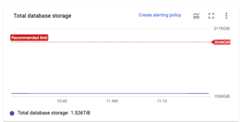
You cancreate storage alerts in theCloud Monitoring console. We also provide a straightforwardway to create a database storage alert directly from theGoogle Cloud console. TheCreate alerting policylink in the chart (see screenshot) takes you to the create alert page inCloud Monitoring console and automatically prefills the relevantfields.
Recommendations for database storage utilization
We recommend keeping your total database storage below thestoragelimit. This ensures that Spannerhas enough headroom to operate normally and perform routine maintenance on thedata.
If you are approaching the limit, Spanner may prevent you fromperforming operations that put you over the limit, such as:
- Restoring a database from a backup.
- Modifying the database's schema (for example, adding an index).
- Reducing thecompute capacity of your instance.
If you are over the storage limit, Spanner will attempt to operatenormally, but you may experience degraded performance or failure due to resourcepressure. If you do approach or exceed the recommended maximum,Google Cloud console displays a warning reading "The instance has reachedits maximum storage capacity and may experience degraded activity" whendisplaying the affected instance.
You can alsocreate alerts in Cloud Monitoring to notifyyou.
Reduce database storage utilization
To reduce an instance's database storage utilization, you can:
- Add more compute capacity.
- Delete unused databases.
- Delete data from a database. Even though datadeletion takes effect immediately from a data-visibility perspective, itmight not affect the storage utilization metric until Spannercompacts the data, which usually happens within 12 hours for significantdata deletions or within a week otherwise. Therefore, you might notice adelay between when data is deleted and when the changes appear in the metric.
In general, we recommend that you addcompute capacity to your instanceas a starting point. After you add compute capacity, you can investigate andaddress the root causes of high storage utilization.
If you want to automate this process, you can create an application thatmonitors database storage utilization, then adds and removes compute capacity asneeded, using theUpdateInstance method.
What's next
- Monitor your instance with theGoogle Cloud consoleor theCloud Monitoring console.
- Create alerts for Spanner.
- Find out how tochange the compute capacity of aSpanner instance.
Except as otherwise noted, the content of this page is licensed under theCreative Commons Attribution 4.0 License, and code samples are licensed under theApache 2.0 License. For details, see theGoogle Developers Site Policies. Java is a registered trademark of Oracle and/or its affiliates.
Last updated 2025-12-15 UTC.