

SQL best practices
As described inQuery execution plans, SQL compilertransforms a SQL statement into a query execution plan, which is used to obtainthe results of the query. This page describes best practices for constructingSQL statements to help Spanner find efficient execution plans.
The example SQL statements shown in this page use the following sample schema:
GoogleSQL
CREATETABLESingers(SingerIdINT64NOTNULL,FirstNameSTRING(1024),LastNameSTRING(1024),SingerInfoBYTES(MAX),BirthDateDATE)PRIMARYKEY(SingerId);CREATETABLEAlbums(SingerIdINT64NOTNULL,AlbumIdINT64NOTNULL,AlbumTitleSTRING(MAX),ReleaseDateDATE)PRIMARYKEY(SingerId,AlbumId),INTERLEAVEINPARENTSingersONDELETECASCADE;For the complete SQL reference, refer toStatement syntax,Functions and operators, andLexical structure and syntax.
PostgreSQL
CREATETABLESingers(SingerIdBIGINTPRIMARYKEY,FirstNameVARCHAR(1024),LastNameVARCHAR(1024),SingerInfoBYTEA,BirthDateTIMESTAMPTZ);CREATETABLEAlbums(SingerIdBIGINTNOTNULL,AlbumIdBIGINTNOTNULL,AlbumTitleVARCHAR(1024),ReleaseDateDATE,PRIMARYKEY(SingerId,AlbumId),FOREIGNKEY(SingerId)REFERENCESSingers(SingerId))INTERLEAVEINPARENTSingersONDELETECASCADE;For more information, refer toThe PostgreSQL language inSpanner.
Use query parameters
Spanner supports query parameters to increase performance andhelp prevent SQL injection when queries are constructed using user input. Youcan use query parameters as substitutes for arbitrary expressions but not assubstitutes for identifiers, column names, table names, or other parts of thequery.
Parameters can appear anywhere that a literal value is expected. The sameparameter name can be used more than once in a single SQL statement.
In summary, query parameters support query execution in the following ways:
- Pre-optimized plans: Queries that use parameters can be executed faster oneach invocation because the parameterization makes it easier forSpanner to cache the execution plan.
- Simplified query composition: You don't need to escape string values whenproviding them in query parameters. Query parameters also reduce the risk ofsyntax errors.
- Security: Query parameters make your queries more secure by protecting youfrom various SQL injection attacks. This protection is especially importantfor queries that you construct from user input.
Understand how Spanner executes queries
Note: Spanner Studio (formerly labeledQuery in the Google Cloud console)supports SQL, DML, and DDL operations in a single editor. For more information,seeManage your data using the Google Cloud console.Spanner lets you query databases using declarative SQL statementsthat specify what data you want to retrieve. If you want to understand howSpanner obtains the results, examine the execution plan for thequery. A query execution plan displays the computational cost associated witheach step of the query. Using those costs, you can debug query performanceissues and optimize your query. To learn more, seeQuery execution plans.
You can retrieve query execution plans through the Google Cloud console or theclient libraries.
To get a query execution plan for a specific query using theGoogle Cloud console, follow these steps:
Open the Spanner instances page.
Select the names of the Spanner instance and the databasethat you want to query.
ClickSpanner Studio in the left navigation panel.
Type the query in the text field, and then clickRun query.
ClickExplanation
. The Google Cloud console displays a visualexecution plan for your query.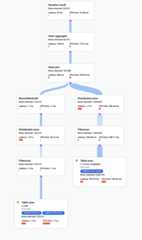
For more information on how to understand visual plans and use them to debugyour queries, seeTune a query using the query plan visualizer.
You can also view samples of historic query plans and compare the performance ofa query over time for certain queries. To learn more, seeSampled queryplans.
Use secondary indexes
Like other relational databases, Spanner offers secondaryindexes, which you can use to retrieve data using either a SQL statement orSpanner's read interface. The more common way to fetch data froman index is to use the Spanner Studio. Using a secondary index in a SQLquery lets you specifyhow you want Spanner to obtain theresults. Specifying a secondary index can speed up query execution.
For example, suppose you wanted to fetch the IDs of all the singers with aspecific last name. One way to write such a SQL query is:
SELECTs.SingerIdFROMSingersASsWHEREs.LastName='Smith';This query would return the results that you expect, but it might take a longtime to return the results. The timing would depend on the number of rows in theSingers table and how many satisfy the predicateWHERE s.LastName = 'Smith'.If there is no secondary index that contains theLastName column to read from,the query plan would read the entireSingers table to find rows that match thepredicate. Reading the entire table is called afull table scan. A full tablescan is an expensive way to obtain the results when the table contains only asmall percentage ofSingers with that last name.
You can improve the performance of this query by defining a secondary index onthe last name column:
CREATEINDEXSingersByLastNameONSingers(LastName);Because the secondary indexSingersByLastName contains the indexed tablecolumnLastName and the primary key columnSingerId, Spannercan fetch all the data from the much smaller index table instead of scanning thefullSingers table.
In this scenario, Spanner automatically uses the secondary indexSingersByLastName when executing the query (as long as three days have passedsince database creation; seeA note about new databases).However, it's best to explicitly tell Spanner to use that indexby specifying anindex directive in theFROM clause:
GoogleSQL
SELECTs.SingerIdFROMSingers@{FORCE_INDEX=SingersByLastName}ASsWHEREs.LastName='Smith';PostgreSQL
SELECTs.SingerIdFROMSingers/*@ FORCE_INDEX=SingersByLastName */ASsWHEREs.LastName='Smith';If you're usingnamed schemas,use the following syntax for theFROM clause:
GoogleSQL
FROMNAMED_SCHEMA_NAME.TABLE_NAME@{FORCE_INDEX="NAMED_SCHEMA_NAME.TABLE_INDEX_NAME"}PostgreSQL
FROMNAMED_SCHEMA_NAME.TABLE_NAME/*@ FORCE_INDEX =TABLE_INDEX_NAME */Now suppose you also wanted to fetch the singer's first name in addition to theID. Even though theFirstName column is not contained in the index, you shouldstill specify the index directive as before:
GoogleSQL
SELECTs.SingerId,s.FirstNameFROMSingers@{FORCE_INDEX=SingersByLastName}ASsWHEREs.LastName='Smith';PostgreSQL
SELECTs.SingerId,s.FirstNameFROMSingers/*@ FORCE_INDEX=SingersByLastName */ASsWHEREs.LastName='Smith';You still get a performance benefit from using the index becauseSpanner doesn't need to do a full table scan when executing thequery plan. Instead, it selects the subset of rows that satisfy the predicatefrom theSingersByLastName index, and then does a lookup from the base tableSingers to fetch the first name for only that subset of rows.
If you want Spanner to not have to fetch any rows from the basetable at all, you can store a copy of theFirstName column in the indexitself:
GoogleSQL
CREATEINDEXSingersByLastNameONSingers(LastName)STORING(FirstName);PostgreSQL
CREATEINDEXSingersByLastNameONSingers(LastName)INCLUDE(FirstName);Using aSTORING clause (for the GoogleSQL dialect) or anINCLUDEclause (for the PostgreSQL dialect) like this costs extra storage butit provides the following advantages:
- SQL queries that use the index and select columns stored in the
STORINGorINCLUDEclause don't require an extra join to the base table. - Read calls that use the index can read columns stored in the
STORINGorINCLUDEclause.
The preceding examples illustrate how secondary indexes can speed up querieswhen the rows chosen by theWHERE clause of a query can be quickly identifiedusing the secondary index.
Another scenario in which secondary indexes can offer performance benefits isfor certain queries that return ordered results. For example, suppose you wantto fetch all album titles and their release dates in ascending order of releasedate and descending order of album title. You could write a SQL query asfollows:
SELECTa.AlbumTitle,a.ReleaseDateFROMAlbumsASaORDERBYa.ReleaseDate,a.AlbumTitleDESC;Without a secondary index, this query requires a potentially expensive sortingstep in the execution plan. You could speed up query execution by defining thissecondary index:
CREATEINDEXAlbumsByReleaseDateTitleDesconAlbums(ReleaseDate,AlbumTitleDESC);Then, rewrite the query to use the secondary index:
GoogleSQL
SELECTa.AlbumTitle,a.ReleaseDateFROMAlbums@{FORCE_INDEX=AlbumsByReleaseDateTitleDesc}ASaORDERBYa.ReleaseDate,a.AlbumTitleDESC;PostgreSQL
SELECTa.AlbumTitle,a.ReleaseDateFROMAlbums/*@ FORCE_INDEX=AlbumsByReleaseDateTitleDesc */ASsORDERBYa.ReleaseDate,a.AlbumTitleDESC;This query and index definition meet both of the following criteria:
- To remove the sorting step, ensure that the column list in the
ORDER BYclause is a prefix of the index key list. - To avoid joining back from the base table to fetch any missing columns,ensure that the index covers all columns in the table that the query uses.
Although secondary indexes can speed up common queries, adding secondary indexescan add latency to your commit operations, because each secondary indextypically requires involving an extra node in each commit. For most workloads,having a few secondary indexes is fine. However, you should consider whether youcare more about read or write latency, and consider which operations are mostcritical for your workload. Benchmark your workload to ensure that it'sperforming as you expect.
For the complete reference on secondary indexes, refer toSecondary indexes.
Optimize scans
Certain Spanner queries might benefit from using a batch-orientedprocessing method when scanning data rather than the more common row-orientedprocessing method. Processing scans in batches is a more efficient way toprocess large volumes of data all at once, and it allows queries to achievelower CPU utilization and latency.
The Spanner scan operation always starts execution in therow-oriented method. During this time, Spanner collects severalruntime metrics. Then, Spanner applies a set of heuristics basedon the result of these metrics to determine the optimal scan method. Whenappropriate, Spanner switches to a batch-oriented processingmethod to help improve scan throughput and performance.
Common uses cases
Queries with the following characteristics generally benefit from the use ofbatch-oriented processing:
- Large scans over infrequently updated data.
- Scans with predicates on fixed width columns.
- Scans with large seek counts. (A seek uses an index to retrieve records.)
Use cases without performance gains
Not all queries benefit from batch-oriented processing. The following querytypes perform better with row-oriented scan processing:
- Point lookup queries: queries that only fetch one row.
- Small scan queries: table scans that only scan a few rows unless they havelarge seek counts.
- Queries that use
LIMIT. - Queries that read high churn data: queries in which more than ~10% of thedata read is frequently updated.
- Queries with rows containing large values: large value rows are thosecontaining values larger than 32,000 bytes (pre-compression) in a singlecolumn.
Check the scan method used by a query
To check if your query uses batch-oriented processing, row-oriented processing,or is automatically switching between the two scan methods:
Go to the SpannerInstances page in theGoogle Cloud console.
Click the name of the instance with the query that you want to investigate.
Under the Databases table, click the database with the query that you wantto investigate.
In the Navigation menu, clickSpanner Studio.
Open a new tab by clickingNew SQL editor tab orNew tab.
When the query editor appears, write your query.
ClickRun.
Spanner runs the query and shows the results.
Click theExplanation tab below the query editor.
Spanner shows aquery execution plan visualizer. Each card on thegraph represents an iterator.
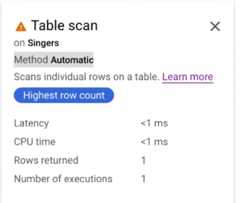
Click theTable scan iterator card to open an information panel.
The information panel shows contextual information about the selected scan.The scan method is shown on this card.Automatic indicates that Spanner determines the scanningmethod. Other possible values includeBatch for batch-orientedprocessing andRow for row-oriented processing.
Enforce the scan method used by a query
To optimize query performance, Spanner chooses the optimal scanmethod for your query. We recommend that you use this default scan method.However, there might be scenarios where you might want to enforce a specifictype of scan method.
Enforce batch-oriented scanning
You can enforce batch-oriented scanning at the table level and statement level.
To enforce the batch-oriented scan method at the table level, use a table hintin your query:
GoogleSQL
SELECT...FROM(t1@{SCAN_METHOD=BATCH}JOINt2ON...)WHERE...PostgreSQL
SELECT...FROM(t1/*@ scan_method=batch */JOINt2on...)WHERE...To enforce the batch-oriented scan method at the statement level, use astatement hint in your query:
GoogleSQL
@{SCAN_METHOD=BATCH}SELECT...FROM...WHERE...PostgreSQL
/*@ scan_method=batch */SELECT...FROM...WHERE...Disable automatic scanning and enforce row-oriented scanning
Although we don't recommend disabling the automatic scanning method set bySpanner, you might decide to disable it and use the row-orientedscanning method for troubleshooting purposes, such as diagnosing latency.
To disable the automatic scan method and enforce row processing at the tablelevel, use a table hint in your query:
GoogleSQL
SELECT...FROM(t1@{SCAN_METHOD=ROW}JOINt2ON...)WHERE...PostgreSQL
SELECT...FROM(t1/*@ scan_method=row */JOINt2on...)WHERE...To disable the automatic scan method and enforce row processing at the statementlevel, use a statement hint in your query:
GoogleSQL
@{SCAN_METHOD=ROW}SELECT...FROM...WHERE...PostgreSQL
/*@ scan_method=row */SELECT...FROM...WHERE...Optimize query execution
In addition tooptimizing scans, you can also optimize queryexecution by enforcing the execution method at the statement level. This onlyworks for some operators, and it is independent from the scan method, which isonly used by the scan operator.
By default, most operators execute in the row-oriented method, which processesdata one row at a time. Vectorized operators execute in the batch-orientedmethod to help improve execution throughput and performance. These operatorsprocess data one block at a time. When an operator needs to process many rows,the batch-oriented execution method is usually more efficient.
Execution method versus scan method
The query execution method is independent from the query scan method. You canset one, both, or neither of these methods in your query hint.
The query execution method refers to the way query operators processintermediate results and how the operators interact with each other, whereas thescan method refers to the way the scan operator interacts withSpanner's storage layer.
Enforce the execution method used by the query
To optimize query performance, Spanner chooses the optimalexecution method for your query based on various heuristics. We recommend thatyou use this default execution method. However, there might be scenarios whereyou might want to enforce a specific type of execution method.
You can enforce your execution method at the statement level. TheEXECUTION_METHOD is a query hint rather than a directive. Ultimately, thequery optimizer decides which method to use for each individual operator.
To enforce the batch-oriented execution method at the statement level, use astatement hint in your query:
GoogleSQL
@{EXECUTION_METHOD=BATCH}SELECT...FROM...WHERE...PostgreSQL
/*@ execution_method=batch */SELECT...FROM...WHERE...Although we don't recommend disabling the automatic execution method set bySpanner, you might decide to disable it and use the row-orientedexecution method for troubleshooting purposes, such as diagnosing latency.
To disable the automatic execution method and enforce the row-oriented executionmethod at the statement level, use a statement hint in your query:
GoogleSQL
@{EXECUTION_METHOD=ROW}SELECT...FROM...WHERE...PostgreSQL
/*@ execution_method=row */SELECT...FROM...WHERE...Check which execution method is enabled
Not all Spanner operators support both batch-oriented androw-oriented execution methods. For each operator, thequery execution planvisualizer shows the execution method in the iteratorcard. If the execution method is batch-oriented, it showsBatch. If it'srow-oriented, it showsRow.
If the operators in your query execute by using different execution methods, theexecution method adaptersDataBlockToRowAdapterandRowToDataBlockAdapterappear between the operators to show the change in execution method.
Optimize range key lookups
A common use of a SQL query is to read multiple rows from Spannerbased on a list of known keys.
The following best practices help you write efficient queries when fetching databy a range of keys:
If the list of keys is sparse and not adjacent, use query parameters and
UNNESTto construct your query.For example, if your key list is
{1, 5, 1000}, write the query like this:GoogleSQL
SELECT*FROMTableAStWHEREt.KeyINUNNEST(@KeyList)
PostgreSQL
SELECT*FROMTableAStWHEREt.KeyINUNNEST($1)
Notes:
The arrayUNNEST operator flattens aninput array into rows of elements.
The query parameter, which is
@KeyListfor GoogleSQL and$1for PostgreSQL, can speed up your query as discussed inthepreceding bestpractice.
If the list of keys is adjacent and within a range, specify the lower andhigher limits of the key range in the
WHEREclause.For example, if your key list is
{1,2,3,4,5}, construct the query asfollows:GoogleSQL
SELECT*FROMTableAStWHEREt.KeyBETWEEN@minAND@max
@minand@maxare query parameters that are bound to thevalues 1 and 5, respectively.PostgreSQL
SELECT*FROMTableAStWHEREt.KeyBETWEEN$1AND$2
$1and$2are query parameters that are bound to thevalues 1 and 5, respectively.This query is only more efficient if the keys in the key range are adjacent.In other words, if your key list is
{1, 5, 1000}, don't specify the lowerand higher limits like in the preceding query because the resulting querywould scan through every value between 1 and 1000.
Optimize joins
Join operations can be expensive because they can significantly increase thenumber of rows that your query needs to scan, which results in slower queries.In addition to the techniques that you're accustomed to using in otherrelational databases to optimize join queries, here are some best practices fora more efficient JOIN when using Spanner SQL:
If possible, join data in interleaved tables by primary key. For example:
SELECTs.FirstName,a.ReleaseDateFROMSingersASsJOINAlbumsASaONs.SingerId=a.SingerId;
The rows in the interleaved table
Albumsare guaranteed to be physicallystored in the same splits as the parent row inSingers, as discussed inSchema and Data Model. Therefore, joins can becompleted locally without sending lots of data across the network.Use the join directive if you want to force the order of the join. Forexample:
GoogleSQL
SELECT*FROMSingersASsJOIN@{FORCE_JOIN_ORDER=TRUE}AlbumsASaONs.SingerId=a.SingeridWHEREs.LastNameLIKE'%x%'ANDa.AlbumTitleLIKE'%love%';
PostgreSQL
SELECT*FROMSingersASsJOIN/*@ FORCE_JOIN_ORDER=TRUE */AlbumsASaONs.SingerId=a.SingeridWHEREs.LastNameLIKE'%x%'ANDa.AlbumTitleLIKE'%love%';
The join directive
FORCE_JOIN_ORDERtells Spanner to usethe join order specified in the query (that is,Singers JOIN Albums,notAlbums JOIN Singers). The returned results are the same,regardless of the order that Spanner chooses. However,you might want to use this join directive if you notice in the queryplan that Spanner has changed the join order and causedundesirable consequences, such as larger intermediate results, or hasmissed opportunities for seeking rows.Use a join directive to choose a join implementation. When you use SQL toquery multiple tables, Spanner automatically uses a joinmethod that is likely to make the query more efficient. However, Googleadvises you to test with different join algorithms. Choosing the right joinalgorithm can improve latency, memory consumption, or both. This querydemonstrates the syntax for using a JOIN directive with the
JOIN_METHODhint to choose aHASH JOIN:GoogleSQL
SELECT*FROMSingerssJOIN@{JOIN_METHOD=HASH_JOIN}AlbumsASaONa.SingerId=a.SingerId
PostgreSQL
SELECT*FROMSingerssJOIN/*@ JOIN_METHOD=HASH_JOIN */AlbumsASaONa.SingerId=a.SingerId
If you're using a
HASH JOINorAPPLY JOINand if you have aWHEREclause that is highly selective on one side of yourJOIN, put the tablethat produces the smallest number of rows as the first table in theFROMclause of the join. This structure helps because inHASH JOIN,Spanner always picks the left-hand side table as build andthe right-hand side table as probe. Similarly, forAPPLY JOIN,Spanner picks the left-hand side table as outer and theright-hand side table as inner. See more about these join types:Hashjoin andApply join.For queries that are critical for your workload, specify the most performantjoin method and join order in your SQL statements for more consistentperformance.
Optimize queries with timestamp predicate pushdown
Timestamp predicate pushdown is a query optimization technique used inSpanner to improve the efficiency of queries that use timestampsand data with anage-based tiered storagepolicy.When you enable this optimization, the filtering operations on timestamp columnsare performed as early as possible in the query execution plan. This cansignificantly reduce the amount of data that is processed and improves overallquery performance.
With timestamp predicate pushdown, the database engine analyzes the query andidentifies the timestamp filter. It then "pushes down" this filter to thestorage layer, so that only the relevant data based on the timestamp criteria isread from SSD. This minimizes the amount of data that is processed andtransferred, resulting in faster query execution.
To optimize queries to only access data stored on SSD, the following must apply:
- The query must have the timestamp predicate pushdown enabled. For moreinformation, seeGoogleSQL statementhintsandPostgreSQL statementhints
The query must use an age-based restriction equal to or less than the agespecified in the data's spill policy (set with the
ssd_to_hdd_spill_timespanoption in theCREATE LOCALITY GROUPorALTERLOCALITY GROUPDDL statement). For more information, seeGoogleSQLLOCALITY GROUPstatementsandPostgreSQLLOCALITY GROUPstatements.The column being filtered in the query must be a timestamp column thatcontains the commit timestamp. For details on how to create a committimestamp column, seeCommit timestamps inGoogleSQL andCommittimestamps inPostgreSQL. Thesecolumns must be updated alongside the timestamp column, and residewithin the same the same locality group, which has an age-based tieredstorage policy.
If, for a given row, some of the columns being queried reside on SSD andsome of the columns reside on HDD (due to columns being updated atdifferent times and aging to HDD at different times), then theperformance of the query might be worse when you use the hint. This isbecause the query has to fill in data from the different storage layers.As a result of using the hint, Spanner ages data at theindividual cell-level (row-and-column granularity level) based on thecommit timestamp of each cell, slowing down the query. To prevent thisissue, make sure to routinely update all columns being queried usingthis optimization technique in the same transaction so all columns sharethe same commit timestamp and benefit from the optimization.
To enable timestamp predicate pushdown at the statement level, use a statementhint in your query. For example:
GoogleSQL
@{allow_timestamp_predicate_pushdown=TRUE}SELECTs.SingerInfoFROMSingerssWHEREs.ModificationTime >TIMESTAMP_SUB(CURRENT_TIMESTAMP(),INTERVAL12HOUR);PostgreSQL
/*@allow_timestamp_predicate_pushdown=TRUE*/SELECTs.SingerInfoFROMSingerssWHEREs.ModificationTime >CURRENT_TIMESTAMP-INTERVAL'12 hours';Avoid large reads inside read-write transactions
Read-write transactions allow a sequence of zero or morereads or SQL queries, and can include a set of mutations, before a call tocommit. To maintain the consistency of your data, Spanneracquires locks when reading and writing rows in your tables and indexes. Formore information about locking, seeLife of Reads andWrites.
Because of the way locking works in Spanner, performing a read orSQL query that reads a large number of rows (for exampleSELECT * FROMSingers) means that no other transactions can write to the rows that you'veread until your transaction is either committed or aborted.
Furthermore, because your transaction is processing a large number of rows, it'slikely to take longer than a transaction that reads a much smaller range of rows(for exampleSELECT LastName FROM Singers WHERE SingerId = 7), which furtherexacerbates the problem and reduces system throughput.
So, try to avoid large reads (for example, full table scans or massive joinoperations) in your transactions, unless you're willing to accept lower writethroughput.
In some cases, the following pattern can yield better results:
- Do your large reads inside aread-only transaction.Read-only transactions allow for higher aggregate throughput because theydon't use locks.
- Optional: Do any processing required on the data you just read.
- Start a read-write transaction.
- Verify that the critical rows have not changed values since you performedthe read-only transaction in step 1.
- If the rows have changed, roll back your transaction and start again atstep 1.
- If everything looks okay, commit your mutations.
One way to ensure that you're avoiding large reads in read-write transactions isto look at the execution plans that your queries generate.
Use ORDER BY to ensure the ordering of your SQL results
If you're expecting a certain ordering for the results of aSELECT query,explicitly include theORDER BY clause. For example, if you want to list allsingers in primary key order, use this query:
SELECT*FROMSingersORDERBYSingerId;Spanner guarantees result ordering only if theORDER BY clauseis present in the query. In other words, consider this query without theORDERBY:
SELECT*FROMSingers;Spanner does not guarantee that the results of this query will bein primary key order. Furthermore, the ordering of results can change at anytime and is not guaranteed to be consistent from invocation to invocation. If aquery has anORDER BY clause, and Spanner uses an index thatprovides the required order, then Spanner doesn't explicitly sortthe data. Therefore, don't worry about the performance impact of including thisclause. You can check whether an explicit sort operation is included in theexecution by looking at the query plan.
Use STARTS_WITH instead of LIKE
Because Spanner does not evaluate parameterizedLIKE patternsuntil execution time, Spanner must read all rows and evaluatethem against theLIKE expression to filter out rows that don't match.
When aLIKE pattern has the formfoo% (for example, it starts with a fixedstring and ends with a single wildcard percent) and the column is indexed, useSTARTS_WITH instead ofLIKE. This option allows Spanner tmore effectively optimize the query execution plan.
Not recommended:
GoogleSQL
SELECTa.AlbumTitleFROMAlbumsaWHEREa.AlbumTitleLIKE@like_clause;
@like_clause is bound to'Love%'.PostgreSQL
SELECTa.AlbumTitleFROMAlbumsaWHEREa.AlbumTitleLIKE$1;
$1 is bound to'Love%'.Recommended:
GoogleSQL
SELECTa.AlbumTitleFROMAlbumsaWHERESTARTS_WITH(a.AlbumTitle,@prefix);
@prefix is bound to'Love'. This query is moreefficient than the previous query. It runs faster if an index is defined onAlbums.AlbumTitle.PostgreSQL
SELECTa.AlbumTitleFROMAlbumsaWHERESTARTS_WITH(a.AlbumTitle,$2);
$2 is bound to'Love'. This query is moreefficient than the previous query. It runs faster if an index is defined onAlbums.AlbumTitle.Use commit timestamps
If your application needs to query data written after a particular time, addcommit timestamp columns to the relevant tables. Commit timestamps enable aSpanner optimization that can reduce the I/O of queries whoseWHERE clauses restrict results to rows written more recently than a specifictime.
Learn more about this optimizationwith GoogleSQL-dialect databases orwith PostgreSQL-dialect databases.
Except as otherwise noted, the content of this page is licensed under theCreative Commons Attribution 4.0 License, and code samples are licensed under theApache 2.0 License. For details, see theGoogle Developers Site Policies. Java is a registered trademark of Oracle and/or its affiliates.
Last updated 2025-12-15 UTC.