

Secondary indexes
In a Spanner database, Spanner automatically creates anindex for each table's primary key. For example, you don't need to do anythingto index the primary key ofSingers, because it's automatically indexed for you.
You can also createsecondary indexes for other columns. Adding a secondaryindex on a column makes it more efficient to look up data in that column. Forexample, if you need to quickly look up an album by title, you shouldcreate a secondary index onAlbumTitle,so that Spanner does not need to scan the entire table.
If the lookup in the previous example is done within a read-write transaction,then the more efficient lookup also avoids holding locks on the entire table,which allows concurrent inserts and updates to the table for rows outside of theAlbumTitle lookup range.
In addition to the benefits they bring to lookups, secondary indexes canalso help Spanner executescans more efficiently, enablingindex scans rather than full table scans.
Spanner stores the following data in each secondary index:
- All key columns from the base table
- All columns that are included in the index
- All columns specified in the optional
STORINGclause (GoogleSQL-dialect databases) orINCLUDEclause (PostgreSQL-dialect databases)of the index definition.
Over time, Spanner analyzes your tables to ensure that your secondaryindexes are used for the appropriate queries.
Add a secondary index
The most efficient time to add a secondary index is when you create the table.To create a table and its indexes at the same time, send the DDL statements forthe new table and the new indexes in a single request to Spanner.
In Spanner, you can also add a new secondary index to an existingtable while the database continues to serve traffic. Like any other schemachanges in Spanner, adding an index to an existing database does notrequire taking the database offline and does not lock entire columns or tables.
Whenever a new index is added to an existing table, Spannerautomaticallybackfills, or populates, the index to reflect an up-to-date viewof the data being indexed. Spanner manages this backfill processfor you, and the process runs in the background using node resources at lowpriority. Index backfill speed adapts to changing node resources during indexcreation, and backfilling doesn't significantly affect the performance of thedatabase.
Index creation can take from several minutes to many hours. Because indexcreation is a schema update, it is bound by the sameperformanceconstraints as any other schema update. The timeneeded to create a secondary index depends on several factors:
- The size of the dataset
- The compute capacity of the instance
- The load on the instance
To view the progress made for an index backfill process, refer to theprogress section.
Be aware that using thecommit timestamp column as the firstpart of the secondary index cancreatehotspots and reduce write performance.
Note: If you are adding many secondary indexes to a database, follow theguidance for large schema updates when you create theindexes.Use theCREATE INDEX statement to define a secondary indexin your schema. Here are some examples:
To index allSingers in the database by their first and last name:
GoogleSQL
CREATEINDEXSingersByFirstLastNameONSingers(FirstName,LastName);PostgreSQL
CREATEINDEXSingersByFirstLastNameONSingers(FirstName,LastName);To create an index of allSongs in the database by the value ofSongName:
GoogleSQL
CREATEINDEXSongsBySongNameONSongs(SongName);PostgreSQL
CREATEINDEXSongsBySongNameONSongs(SongName);To index only the songs for a particular singer, use theINTERLEAVE IN clause to interleave the index inthe tableSingers:
GoogleSQL
CREATEINDEXSongsBySingerSongNameONSongs(SingerId,SongName),INTERLEAVEINSingers;PostgreSQL
CREATEINDEXSongsBySingerSongNameONSongs(SingerId,SongName)INTERLEAVEINSingers;To index only the songs on a particular album:
GoogleSQL
CREATEINDEXSongsBySingerAlbumSongNameONSongs(SingerId,AlbumId,SongName),INTERLEAVEINAlbums;PostgreSQL
CREATEINDEXSongsBySingerAlbumSongNameONSongs(SingerId,AlbumId,SongName)INTERLEAVEINAlbums;To index by descending order ofSongName:
GoogleSQL
CREATEINDEXSongsBySingerAlbumSongNameDescONSongs(SingerId,AlbumId,SongNameDESC),INTERLEAVEINAlbums;PostgreSQL
CREATEINDEXSongsBySingerAlbumSongNameDescONSongs(SingerId,AlbumId,SongNameDESC)INTERLEAVEINAlbums;Note that the previousDESC annotation applies only toSongName. To index bydescending order of other index keys, annotate them withDESC as well:SingerId DESC, AlbumId DESC.
Also note thatPRIMARY_KEY is a reserved word and cannot be used as the nameof an index. It is the name given to thepseudo-indexthat is created when a table with PRIMARY KEY specification is created
For more details and best practices for choosing non-interleaved indexes andinterleaved indexes, seeIndex optionsandUse an interleaved index on a column whose value monotonically increases ordecreases.
Indexes and Interleaving
Spanner indexes can be interleaved with other tables in order tocolocate index rows with those of another table. Similar toSpanner table interleaving, the primary key columns of theindex's parent must be a prefix of the indexed columns, matching in type and sort order. Unlike interleavedtables, column name matching is not required. Each row of an interleaved indexis physically stored together with the associated parent row.
For example, consider the following schema:
CREATETABLESingers(SingerIdINT64NOTNULL,FirstNameSTRING(1024),LastNameSTRING(1024),SingerInfoPROTO<Singer>(MAX))PRIMARYKEY(SingerId);CREATETABLEAlbums(SingerIdINT64NOTNULL,AlbumIdINT64NOTNULL,AlbumTitleSTRING(MAX),PublisherIdINT64NOTNULL)PRIMARYKEY(SingerId,AlbumId),INTERLEAVEINPARENTSingersONDELETECASCADE;CREATETABLESongs(SingerIdINT64NOTNULL,AlbumIdINT64NOTNULL,TrackIdINT64NOTNULL,PublisherIdINT64NOTNULL,SongNameSTRING(MAX))PRIMARYKEY(SingerId,AlbumId,TrackId),INTERLEAVEINPARENTAlbumsONDELETECASCADE;CREATETABLEPublishers(IdINT64NOTNULL,PublisherNameSTRING(MAX))PRIMARYKEY(Id);To index allSingers in the database by their first and last name, you mustcreate an index. Here's how to define the indexSingersByFirstLastName:
CREATEINDEXSingersByFirstLastNameONSingers(FirstName,LastName);If you want to create an index ofSongs on(SingerId, AlbumId, SongName),you could do the following:
CREATEINDEXSongsBySingerAlbumSongNameONSongs(SingerId,AlbumId,SongName);Or you could create an index that is interleaved with an ancestor ofSongs,such as the following:
CREATEINDEXSongsBySingerAlbumSongNameONSongs(SingerId,AlbumId,SongName),INTERLEAVEINAlbums;Further, you could also create an index ofSongs on(PublisherId, SingerId, AlbumId, SongName) that's interleaved with a tablethat isn't an ancestor ofSongs, likePublishers. Note that the primary keyfor thePublishers table (id), is not a prefix of the indexed columns in thefollowing example. This is still allowed becausePublishers.Id andSongs.PublisherId share the same type, sort order, and nullability.
CREATEINDEXSongsByPublisherSingerAlbumSongNameONSongs(PublisherId,SingerId,AlbumId,SongName),INTERLEAVEINPublishers;Check index backfill progress
Console
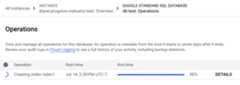
In the Spanner navigation menu, click theOperations tab. TheOperations page shows a list of running operations.
Find the backfill operation in the list. If it's still running, theprogress indicator in theEnd time column shows the percentage of theoperation that is complete, as shown in the following image:
gcloud
Usegcloud spanner operations describeto check the progress of an operation.
Get the operation ID:
gcloudspanneroperationslist--instance=INSTANCE-NAME\--database=DATABASE-NAME--type=DATABASE_UPDATE_DDL
Replace the following:
- INSTANCE-NAME with the Spanner instancename.
- DATABASE-NAME with the name of the database.
Usage notes:
To limit the list, specify the
--filterflag. For example:--filter="metadata.name:example-db"only lists the operationson a specific database.--filter="error:*"only lists the backup operations that failed.
For information on filter syntax, seegcloud topic filters.For information on filtering backup operations, see the
filterfield inListBackupOperationsRequest.The
--typeflag is not case sensitive.
The output looks similar to the following:
OPERATION_IDSTATEMENTSDONE@TYPE_auto_op_123456CREATEINDEXSingersByFirstLastNameONSingers(FirstName,LastName)FalseUpdateDatabaseDdlMetadataCREATEINDEXSongsBySingerAlbumSongNameONSongs(SingerId,AlbumId,SongName),INTERLEAVEINAlbums_auto_op_234567TrueCreateDatabaseMetadataRun
gcloud spanner operations describe:gcloudspanneroperationsdescribe\--instance=INSTANCE-NAME\--database=DATABASE-NAME\projects/PROJECT-NAME/instances/INSTANCE-NAME/databases/DATABASE-NAME/operations/OPERATION_ID
Replace the following:
- INSTANCE-NAME: The Spanner instance name.
- DATABASE-NAME: The Spanner database name.
- PROJECT-NAME: The project name.
- OPERATION-ID: The operation ID of the operation that you want tocheck.
The
progresssection in the output shows the percentage of the operationthat's complete. The output looks similar to the following::done:true...progress:-endTime:'2021-01-22T21:58:42.912540Z'progressPercent:100startTime:'2021-01-22T21:58:11.053996Z'-progressPercent:67startTime:'2021-01-22T21:58:11.053996Z'...
REST v1
Get the operation ID:
gcloudspanneroperationslist--instance=INSTANCE-NAME
--database=DATABASE-NAME--type=DATABASE_UPDATE_DDL
Replace the following:
- INSTANCE-NAME with the Spanner instancename.
- DATABASE-NAME with the name of the database.
Before using any of the request data, make the following replacements:
- PROJECT-ID: the project ID.
- INSTANCE-ID: the instance ID.
- DATABASE-ID: the database ID.
- OPERATION-ID: the operation ID.
HTTP method and URL:
GET https://spanner.googleapis.com/v1/projects/PROJECT-ID/instances/INSTANCE-ID/databases/DATABASE-ID/operations/OPERATION-ID
To send your request, expand one of these options:
curl (Linux, macOS, or Cloud Shell)
Note: The following command assumes that you have logged in to thegcloud CLI with your user account by runninggcloud init orgcloud auth login , or by usingCloud Shell, which automatically logs you into thegcloud CLI . You can check the currently active account by runninggcloud auth list.Execute the following command:
curl -X GET \
     -H "Authorization: Bearer $(gcloud auth print-access-token)" \
     "https://spanner.googleapis.com/v1/projects/PROJECT-ID/instances/INSTANCE-ID/databases/DATABASE-ID/operations/OPERATION-ID"
PowerShell (Windows)
Note: The following command assumes that you have logged in to thegcloud CLI with your user account by runninggcloud init orgcloud auth login . You can check the currently active account by runninggcloud auth list.Execute the following command:
$cred = gcloud auth print-access-token
$headers = @{ "Authorization" = "Bearer $cred" }

Invoke-WebRequest `
    -Method GET `
    -Headers $headers `
    -Uri "https://spanner.googleapis.com/v1/projects/PROJECT-ID/instances/INSTANCE-ID/databases/DATABASE-ID/operations/OPERATION-ID" | Select-Object -Expand Content
You should receive a JSON response similar to the following:
{... "progress": [ { "progressPercent": 100, "startTime": "2023-05-27T00:52:27.366688Z", "endTime": "2023-05-27T00:52:30.184845Z" }, { "progressPercent": 100, "startTime": "2023-05-27T00:52:30.184845Z", "endTime": "2023-05-27T00:52:40.750959Z" } ],... "done": true, "response": { "@type": "type.googleapis.com/google.protobuf.Empty" }}Forgcloud and REST, you can find the progress of each index backfillstatement in theprogress section. For each statement in the statement array,there is a corresponding field in the progress array. This progress array ordercorresponds to the order of the statements array. Once available, thestartTime,progressPercent, andendTime fields are populated accordingly.Note that the output doesn't show an estimated time for when the backfillprogress will complete.
If the operation takes too long, you can cancel it. For more information, seeCancel index creation.
Scenarios when viewing index backfill progress
There are different scenarios that you can encounter when trying to check theprogress of an index backfill. Index creation statements that require an indexbackfill are part of schema update operations, and there can be severalstatements that are part of a schema update operation.
The first scenario is the simplest, which is when the index creation statementis the first statement in the schema update operation. Since the index creationstatement is the first statement, it is the first one processed and executed dueto theorder of execution.Immediately, thestartTime field of the index creation statement willpopulate with the start time of the schema update operation. Next, the indexcreation statement'sprogressPercent field is populated when the progress ofthe index backfill is over 0%. Finally, theendTime field is populated oncethe statement is committed.
The second scenario is when the index creation statement is not the firststatement in the schema update operation. No fields related to the indexcreation statement will populate until the previous statement(s) have beencommitted due to theorder of execution.Similar to the previous scenario, once the previous statements are committed, thestartTime field of the index creation statement populates first, followed bytheprogressPercent field. Lastly, theendTime field populates once thestatement finishes committing.
Cancel index creation
You can use the Google Cloud CLI to cancel index creation. To retrieve a list ofschema-update operations for a Spanner database, use thegcloud spanner operations list command, and includethe--filter option:
gcloudspanneroperationslist\--instance=INSTANCE\--database=DATABASE\--filter="@TYPE:UpdateDatabaseDdlMetadata"Find theOPERATION_ID for the operation you want to cancel, then use thegcloud spanner operations cancel command to cancelit:
gcloudspanneroperationscancelOPERATION_ID\--instance=INSTANCE\--database=DATABASEView existing indexes
To view information about existing indexes in a database, you can use theGoogle Cloud console or the Google Cloud CLI:
Console
Go to the SpannerInstances page in the Google Cloud console.
Click the name of the instance you want to view.
In the left pane, click the database you want to view, then click thetable you want to view.
Click theIndexes tab. The Google Cloud console shows a list ofindexes.
Optional: To get details about an index, such as the columns that itincludes, click the name of the index.
gcloud
Use thegcloud spanner databases ddl describe command:
gcloudspannerdatabasesddldescribeDATABASE\--instance=INSTANCEThe gcloud CLI prints theData Definition Language (DDL)statements to create the database's tables and indexes. TheCREATEINDEX statements describe the existing indexes. Forexample:
--- |-CREATETABLESingers(SingerIdINT64NOTNULL,FirstNameSTRING(1024),LastNameSTRING(1024),SingerInfoBYTES(MAX),)PRIMARYKEY(SingerId)---CREATEINDEXSingersByFirstLastNameONSingers(FirstName,LastName)Query with a specific index
The following sections explain how to specify an index in a SQL statement andwith the read interface for Spanner. The examples in these sectionsassume that you added aMarketingBudget column to theAlbums table andcreated an index calledAlbumsByAlbumTitle:
GoogleSQL
CREATETABLEAlbums(SingerIdINT64NOTNULL,AlbumIdINT64NOTNULL,AlbumTitleSTRING(MAX),MarketingBudgetINT64,)PRIMARYKEY(SingerId,AlbumId),INTERLEAVEINPARENTSingersONDELETECASCADE;CREATEINDEXAlbumsByAlbumTitleONAlbums(AlbumTitle);PostgreSQL
CREATETABLEAlbums(SingerIdBIGINTNOTNULL,AlbumIdBIGINTNOTNULL,AlbumTitleVARCHAR,MarketingBudgetBIGINT,PRIMARYKEY(SingerId,AlbumId))INTERLEAVEINPARENTSingersONDELETECASCADE;CREATEINDEXAlbumsByAlbumTitleONAlbums(AlbumTitle);Specify an index in a SQL statement
When you use SQL to query a Spanner table, Spanner automaticallyuses any indexes that are likely to make the query more efficient. As a result,you don't need to specify an index for SQL queries. However,for queries that are critical for your workload, Google advises you to useFORCE_INDEX directives in your SQL statements for more consistent performance.
In a few cases, Spanner might choose an index that causes querylatency to increase. If you've followed thetroubleshooting steps forperformance regressions and confirmedthat it makes sense to try a different index for the query, you can specify theindex as part of your query.
To specify an index in a SQL statement, use theFORCE_INDEXhint to provide anindex directive. Index directives use the following syntax:
GoogleSQL
FROMMyTable@{FORCE_INDEX=MyTableIndex}PostgreSQL
FROMMyTable/*@ FORCE_INDEX =MyTableIndex */You can also use an index directive to tell Spanner to scan the basetable instead of using an index:
GoogleSQL
FROMMyTable@{FORCE_INDEX=_BASE_TABLE}PostgreSQL
FROMMyTable/*@ FORCE_INDEX = _BASE_TABLE */You can use an index directive to tell Spanner to scan anindex in a table with named schemas:
GoogleSQL
FROMNAMED_SCHEMA_NAME.TABLE_NAME@{FORCE_INDEX="NAMED_SCHEMA_NAME.TABLE_INDEX_NAME"}PostgreSQL
FROMNAMED_SCHEMA_NAME.TABLE_NAME/*@ FORCE_INDEX =TABLE_INDEX_NAME */The following example shows a SQL query that specifies an index:
GoogleSQL
SELECTAlbumId,AlbumTitle,MarketingBudgetFROMAlbums@{FORCE_INDEX=AlbumsByAlbumTitle}WHEREAlbumTitle>="Aardvark"ANDAlbumTitle <"Goo";PostgreSQL
SELECTAlbumId,AlbumTitle,MarketingBudgetFROMAlbums/*@ FORCE_INDEX = AlbumsByAlbumTitle */WHEREAlbumTitle>='Aardvark'ANDAlbumTitle <'Goo';An index directive might force Spanner's query processor to readadditional columns that are required by the query but not stored in the index.The query processor retrieves these columns by joining the index and the basetable. To avoid this extra join, use aSTORING clause (GoogleSQL-dialect databases) orINCLUDE clause (PostgreSQL-dialect databases) tostore the additional columns in the index.
In the previous example, theMarketingBudget column is notstored in the index, but the SQL query selects this column. As a result,Spanner must look up theMarketingBudget column in the base table,then join it with data from the index, to return the query results.
Spanner raises an error if the index directive has any of the followingissues:
- The index does not exist.
- The index is on a different base table.
- The query is missing arequired
NULLfilteringexpression for aNULL_FILTEREDindex.
The following examples show how to write and execute queries that fetch thevalues ofAlbumId,AlbumTitle, andMarketingBudget using the indexAlbumsByAlbumTitle:
C++
voidQueryUsingIndex(google::cloud::spanner::Clientclient){namespacespanner=::google::cloud::spanner;spanner::SqlStatementselect("SELECT AlbumId, AlbumTitle, MarketingBudget"" FROM Albums@{FORCE_INDEX=AlbumsByAlbumTitle}"" WHERE AlbumTitle >= @start_title AND AlbumTitle < @end_title",{{"start_title", spanner::Value("Aardvark")}, {"end_title", spanner::Value("Goo")}});usingRowType=std::tuple<std::int64_t,std::string,absl::optional<std::int64_t>>;autorows=client.ExecuteQuery(std::move(select));for(auto&row:spanner::StreamOf<RowType>(rows)){if(!row)throwstd::move(row).status();std::cout <<"AlbumId: " <<std::get<0>(*row) <<"\t";std::cout <<"AlbumTitle: " <<std::get<1>(*row) <<"\t";automarketing_budget=std::get<2>(*row);if(marketing_budget){std::cout <<"MarketingBudget: " <<*marketing_budget <<"\n";}else{std::cout <<"MarketingBudget: NULL\n";}}std::cout <<"Read completed for [spanner_query_data_with_index]\n";}C#
usingGoogle.Cloud.Spanner.Data;usingSystem.Collections.Generic;usingSystem.Threading.Tasks;publicclassQueryDataWithIndexAsyncSample{publicclassAlbum{publicintAlbumId{get;set;}publicstringAlbumTitle{get;set;}publiclongMarketingBudget{get;set;}}publicasyncTask<List<Album>>QueryDataWithIndexAsync(stringprojectId,stringinstanceId,stringdatabaseId,stringstartTitle,stringendTitle){stringconnectionString=$"Data Source=projects/{projectId}/instances/{instanceId}/databases/{databaseId}";usingvarconnection=newSpannerConnection(connectionString);usingvarcmd=connection.CreateSelectCommand("SELECT AlbumId, AlbumTitle, MarketingBudget FROM Albums@ "+"{FORCE_INDEX=AlbumsByAlbumTitle} "+$"WHERE AlbumTitle >= @startTitle "+$"AND AlbumTitle < @endTitle",newSpannerParameterCollection{{"startTitle",SpannerDbType.String,startTitle},{"endTitle",SpannerDbType.String,endTitle}});varalbums=newList<Album>();usingvarreader=awaitcmd.ExecuteReaderAsync();while(awaitreader.ReadAsync()){albums.Add(newAlbum{AlbumId=reader.GetFieldValue<int>("AlbumId"),AlbumTitle=reader.GetFieldValue<string>("AlbumTitle"),MarketingBudget=reader.IsDBNull(reader.GetOrdinal("MarketingBudget"))?0:reader.GetFieldValue<long>("MarketingBudget")});}returnalbums;}}Go
import("context""fmt""io""strconv""cloud.google.com/go/spanner""google.golang.org/api/iterator")funcqueryUsingIndex(wio.Writer,dbstring)error{ctx:=context.Background()client,err:=spanner.NewClient(ctx,db)iferr!=nil{returnerr}deferclient.Close()stmt:=spanner.Statement{SQL:`SELECT AlbumId, AlbumTitle, MarketingBudgetFROM Albums@{FORCE_INDEX=AlbumsByAlbumTitle}WHERE AlbumTitle >= @start_title AND AlbumTitle < @end_title`,Params:map[string]interface{}{"start_title":"Aardvark","end_title":"Goo",},}iter:=client.Single().Query(ctx,stmt)deferiter.Stop()for{row,err:=iter.Next()iferr==iterator.Done{break}iferr!=nil{returnerr}varalbumIDint64varmarketingBudgetspanner.NullInt64varalbumTitlestringiferr:=row.ColumnByName("AlbumId",&albumID);err!=nil{returnerr}iferr:=row.ColumnByName("AlbumTitle",&albumTitle);err!=nil{returnerr}iferr:=row.ColumnByName("MarketingBudget",&marketingBudget);err!=nil{returnerr}budget:="NULL"ifmarketingBudget.Valid{budget=strconv.FormatInt(marketingBudget.Int64,10)}fmt.Fprintf(w,"%d %s %s\n",albumID,albumTitle,budget)}returnnil}Java
staticvoidqueryUsingIndex(DatabaseClientdbClient){Statementstatement=Statement// We use FORCE_INDEX hint to specify which index to use. For more details see// https://cloud.google.com/spanner/docs/query-syntax#from-clause.newBuilder("SELECT AlbumId, AlbumTitle, MarketingBudget "+"FROM Albums@{FORCE_INDEX=AlbumsByAlbumTitle} "+"WHERE AlbumTitle >= @StartTitle AND AlbumTitle < @EndTitle")// We use @BoundParameters to help speed up frequently executed queries.// For more details see https://cloud.google.com/spanner/docs/sql-best-practices.bind("StartTitle").to("Aardvark").bind("EndTitle").to("Goo").build();try(ResultSetresultSet=dbClient.singleUse().executeQuery(statement)){while(resultSet.next()){System.out.printf("%d %s %s\n",resultSet.getLong("AlbumId"),resultSet.getString("AlbumTitle"),resultSet.isNull("MarketingBudget")?"NULL":resultSet.getLong("MarketingBudget"));}}}Node.js
/** * TODO(developer): Uncomment these variables before running the sample. */// const instanceId = 'my-instance';// const databaseId = 'my-database';// const projectId = 'my-project-id';// const startTitle = 'Ardvark';// const endTitle = 'Goo';// Imports the Google Cloud Spanner client libraryconst{Spanner}=require('@google-cloud/spanner');// Instantiates a clientconstspanner=newSpanner({projectId:projectId,});asyncfunctionqueryDataWithIndex(){// Gets a reference to a Cloud Spanner instance and databaseconstinstance=spanner.instance(instanceId);constdatabase=instance.database(databaseId);constquery={sql:`SELECT AlbumId, AlbumTitle, MarketingBudget FROM Albums@{FORCE_INDEX=AlbumsByAlbumTitle} WHERE AlbumTitle >= @startTitle AND AlbumTitle <= @endTitle`,params:{startTitle:startTitle,endTitle:endTitle,},};// Queries rows from the Albums tabletry{const[rows]=awaitdatabase.run(query);rows.forEach(row=>{constjson=row.toJSON();constmarketingBudget=json.MarketingBudget?json.MarketingBudget:null;// This value is nullableconsole.log(`AlbumId:${json.AlbumId}, AlbumTitle:${json.AlbumTitle}, MarketingBudget:${marketingBudget}`,);});}catch(err){console.error('ERROR:',err);}finally{// Close the database when finished.database.close();}}queryDataWithIndex();PHP
use Google\Cloud\Spanner\SpannerClient;/** * Queries sample data from the database using SQL and an index. * * The index must exist before running this sample. You can add the index * by running the `add_index` sample or by running this DDL statement against * your database: * * CREATE INDEX AlbumsByAlbumTitle ON Albums(AlbumTitle) * * Example: * ``` * query_data_with_index($instanceId, $databaseId); * ``` * * @param string $instanceId The Spanner instance ID. * @param string $databaseId The Spanner database ID. * @param string $startTitle The start of the title index. * @param string $endTitle The end of the title index. */function query_data_with_index( string $instanceId, string $databaseId, string $startTitle = 'Aardvark', string $endTitle = 'Goo'): void { $spanner = new SpannerClient(); $instance = $spanner->instance($instanceId); $database = $instance->database($databaseId); $parameters = [ 'startTitle' => $startTitle, 'endTitle' => $endTitle ]; $results = $database->execute( 'SELECT AlbumId, AlbumTitle, MarketingBudget ' . 'FROM Albums@{FORCE_INDEX=AlbumsByAlbumTitle} ' . 'WHERE AlbumTitle >= @startTitle AND AlbumTitle < @endTitle', ['parameters' => $parameters] ); foreach ($results as $row) { printf('AlbumId: %s, AlbumTitle: %s, MarketingBudget: %d' . PHP_EOL, $row['AlbumId'], $row['AlbumTitle'], $row['MarketingBudget']); }}Python
defquery_data_with_index(instance_id,database_id,start_title="Aardvark",end_title="Goo"):"""Queries sample data from the database using SQL and an index. The index must exist before running this sample. You can add the index by running the `add_index` sample or by running this DDL statement against your database: CREATE INDEX AlbumsByAlbumTitle ON Albums(AlbumTitle) This sample also uses the `MarketingBudget` column. You can add the column by running the `add_column` sample or by running this DDL statement against your database: ALTER TABLE Albums ADD COLUMN MarketingBudget INT64 """spanner_client=spanner.Client()instance=spanner_client.instance(instance_id)database=instance.database(database_id)params={"start_title":start_title,"end_title":end_title}param_types={"start_title":spanner.param_types.STRING,"end_title":spanner.param_types.STRING,}withdatabase.snapshot()assnapshot:results=snapshot.execute_sql("SELECT AlbumId, AlbumTitle, MarketingBudget ""FROM Albums@{FORCE_INDEX=AlbumsByAlbumTitle} ""WHERE AlbumTitle >= @start_title AND AlbumTitle < @end_title",params=params,param_types=param_types,)forrowinresults:print("AlbumId:{}, AlbumTitle:{}, ""MarketingBudget:{}".format(*row))Ruby
# project_id = "Your Google Cloud project ID"# instance_id = "Your Spanner instance ID"# database_id = "Your Spanner database ID"# start_title = "An album title to start with such as 'Ardvark'"# end_title = "An album title to end with such as 'Goo'"require"google/cloud/spanner"spanner=Google::Cloud::Spanner.newproject:project_idclient=spanner.clientinstance_id,database_idsql_query="SELECT AlbumId, AlbumTitle, MarketingBudget FROM Albums@{FORCE_INDEX=AlbumsByAlbumTitle} WHERE AlbumTitle >= @start_title AND AlbumTitle < @end_title"params={start_title:start_title,end_title:end_title}param_types={start_title::STRING,end_title::STRING}client.execute(sql_query,params:params,types:param_types).rows.eachdo|row|puts"#{row[:AlbumId]}#{row[:AlbumTitle]}#{row[:MarketingBudget]}"endSpecify an index in the read interface
When you use the read interface to Spanner, and you want Spannerto use an index, you must specify the index. The read interface does not selectthe index automatically.
In addition, your index must contain all of the data that appears in the queryresults, excluding columns that are part of the primary key. This restrictionexists because the read interface does not support joins between the index andthe base table. If you need to include other columns in the query results, youhave a few options:
- Use a
STORINGorINCLUDEclause to store the additional columns inthe index. - Query without including the additional columns, then use the primary keys tosend another query that reads the additional columns.
Spanner returns values from the index in ascending sort order by indexkey. To retrieve values in descending order, complete these steps:
Annotate the index key with
DESC. For example:CREATEINDEXAlbumsByAlbumTitleONAlbums(AlbumTitleDESC);The
DESCannotation applies to a single index key. If the index includesmore than one key, and you want the query results to appear in descendingorder based on all keys, include aDESCannotation for each key.If the read specifies a key range, ensure that the key range is also indescending order. In other words, the value of the start key must be greaterthan the value of the end key.
The following example shows how to retrieve the values ofAlbumId andAlbumTitle using the indexAlbumsByAlbumTitle:
C++
voidReadDataWithIndex(google::cloud::spanner::Clientclient){namespacespanner=::google::cloud::spanner;autorows=client.Read("Albums",google::cloud::spanner::KeySet::All(),{"AlbumId","AlbumTitle"},google::cloud::Options{}.set<spanner::ReadIndexNameOption>("AlbumsByAlbumTitle"));usingRowType=std::tuple<std::int64_t,std::string>;for(auto&row:spanner::StreamOf<RowType>(rows)){if(!row)throwstd::move(row).status();std::cout <<"AlbumId: " <<std::get<0>(*row) <<"\t";std::cout <<"AlbumTitle: " <<std::get<1>(*row) <<"\n";}std::cout <<"Read completed for [spanner_read_data_with_index]\n";}C#
usingGoogle.Cloud.Spanner.Data;usingSystem.Collections.Generic;usingSystem.Threading.Tasks;publicclassQueryDataWithIndexAsyncSample{publicclassAlbum{publicintAlbumId{get;set;}publicstringAlbumTitle{get;set;}publiclongMarketingBudget{get;set;}}publicasyncTask<List<Album>>QueryDataWithIndexAsync(stringprojectId,stringinstanceId,stringdatabaseId,stringstartTitle,stringendTitle){stringconnectionString=$"Data Source=projects/{projectId}/instances/{instanceId}/databases/{databaseId}";usingvarconnection=newSpannerConnection(connectionString);usingvarcmd=connection.CreateSelectCommand("SELECT AlbumId, AlbumTitle, MarketingBudget FROM Albums@ "+"{FORCE_INDEX=AlbumsByAlbumTitle} "+$"WHERE AlbumTitle >= @startTitle "+$"AND AlbumTitle < @endTitle",newSpannerParameterCollection{{"startTitle",SpannerDbType.String,startTitle},{"endTitle",SpannerDbType.String,endTitle}});varalbums=newList<Album>();usingvarreader=awaitcmd.ExecuteReaderAsync();while(awaitreader.ReadAsync()){albums.Add(newAlbum{AlbumId=reader.GetFieldValue<int>("AlbumId"),AlbumTitle=reader.GetFieldValue<string>("AlbumTitle"),MarketingBudget=reader.IsDBNull(reader.GetOrdinal("MarketingBudget"))?0:reader.GetFieldValue<long>("MarketingBudget")});}returnalbums;}}Go
import("context""fmt""io""cloud.google.com/go/spanner""google.golang.org/api/iterator")funcreadUsingIndex(wio.Writer,dbstring)error{ctx:=context.Background()client,err:=spanner.NewClient(ctx,db)iferr!=nil{returnerr}deferclient.Close()iter:=client.Single().ReadUsingIndex(ctx,"Albums","AlbumsByAlbumTitle",spanner.AllKeys(),[]string{"AlbumId","AlbumTitle"})deferiter.Stop()for{row,err:=iter.Next()iferr==iterator.Done{returnnil}iferr!=nil{returnerr}varalbumIDint64varalbumTitlestringiferr:=row.Columns(&albumID,&albumTitle);err!=nil{returnerr}fmt.Fprintf(w,"%d %s\n",albumID,albumTitle)}}Java
staticvoidreadUsingIndex(DatabaseClientdbClient){try(ResultSetresultSet=dbClient.singleUse().readUsingIndex("Albums","AlbumsByAlbumTitle",KeySet.all(),Arrays.asList("AlbumId","AlbumTitle"))){while(resultSet.next()){System.out.printf("%d %s\n",resultSet.getLong(0),resultSet.getString(1));}}}Node.js
/** * TODO(developer): Uncomment these variables before running the sample. */// const instanceId = 'my-instance';// const databaseId = 'my-database';// const projectId = 'my-project-id';// Imports the Google Cloud Spanner client libraryconst{Spanner}=require('@google-cloud/spanner');// Instantiates a clientconstspanner=newSpanner({projectId:projectId,});asyncfunctionreadDataWithIndex(){// Gets a reference to a Cloud Spanner instance and databaseconstinstance=spanner.instance(instanceId);constdatabase=instance.database(databaseId);constalbumsTable=database.table('Albums');constquery={columns:['AlbumId','AlbumTitle'],keySet:{all:true,},index:'AlbumsByAlbumTitle',};// Reads the Albums table using an indextry{const[rows]=awaitalbumsTable.read(query);rows.forEach(row=>{constjson=row.toJSON();console.log(`AlbumId:${json.AlbumId}, AlbumTitle:${json.AlbumTitle}`);});}catch(err){console.error('ERROR:',err);}finally{// Close the database when finished.database.close();}}readDataWithIndex();PHP
use Google\Cloud\Spanner\SpannerClient;/** * Reads sample data from the database using an index. * * The index must exist before running this sample. You can add the index * by running the `add_index` sample or by running this DDL statement against * your database: * * CREATE INDEX AlbumsByAlbumTitle ON Albums(AlbumTitle) * * Example: * ``` * read_data_with_index($instanceId, $databaseId); * ``` * * @param string $instanceId The Spanner instance ID. * @param string $databaseId The Spanner database ID. */function read_data_with_index(string $instanceId, string $databaseId): void{ $spanner = new SpannerClient(); $instance = $spanner->instance($instanceId); $database = $instance->database($databaseId); $keySet = $spanner->keySet(['all' => true]); $results = $database->read( 'Albums', $keySet, ['AlbumId', 'AlbumTitle'], ['index' => 'AlbumsByAlbumTitle'] ); foreach ($results->rows() as $row) { printf('AlbumId: %s, AlbumTitle: %s' . PHP_EOL, $row['AlbumId'], $row['AlbumTitle']); }}Python
defread_data_with_index(instance_id,database_id):"""Reads sample data from the database using an index. The index must exist before running this sample. You can add the index by running the `add_index` sample or by running this DDL statement against your database: CREATE INDEX AlbumsByAlbumTitle ON Albums(AlbumTitle) """spanner_client=spanner.Client()instance=spanner_client.instance(instance_id)database=instance.database(database_id)withdatabase.snapshot()assnapshot:keyset=spanner.KeySet(all_=True)results=snapshot.read(table="Albums",columns=("AlbumId","AlbumTitle"),keyset=keyset,index="AlbumsByAlbumTitle",)forrowinresults:print("AlbumId:{}, AlbumTitle:{}".format(*row))Ruby
# project_id = "Your Google Cloud project ID"# instance_id = "Your Spanner instance ID"# database_id = "Your Spanner database ID"require"google/cloud/spanner"spanner=Google::Cloud::Spanner.newproject:project_idclient=spanner.clientinstance_id,database_idresult=client.read"Albums",[:AlbumId,:AlbumTitle],index:"AlbumsByAlbumTitle"result.rows.eachdo|row|puts"#{row[:AlbumId]}#{row[:AlbumTitle]}"endCreate an index for index-only scans
Optionally, you can use theSTORING clause (for GoogleSQL-dialect databases) orINCLUDEclause (for PostgreSQL-dialect databases) to store a copy of a column in theindex. This type of index provides advantages for queries and read calls usingthe index, at the cost of using extra storage:
- SQL queries that use the index and select columns stored in the
STORINGorINCLUDEclause don't require an extra join to the base table. read()calls that use the index can read columns stored by theSTORING/INCLUDEclause.
For example, suppose you created an alternate version ofAlbumsByAlbumTitlethat stores a copy of theMarketingBudget column in the index (note theSTORING orINCLUDE clause in bold):
GoogleSQL
CREATEINDEXAlbumsByAlbumTitle2ONAlbums(AlbumTitle)STORING(MarketingBudget);PostgreSQL
CREATEINDEXAlbumsByAlbumTitle2ONAlbums(AlbumTitle)INCLUDE(MarketingBudget);With the oldAlbumsByAlbumTitle index, Spanner must join the indexwith the base table, then retrieve the column from the base table. With the newAlbumsByAlbumTitle2 index, Spanner reads the column directly from theindex, which is more efficient.
If you use the read interface instead of SQL, the newAlbumsByAlbumTitle2index also lets you read theMarketingBudget column directly:
C++
voidReadDataWithStoringIndex(google::cloud::spanner::Clientclient){namespacespanner=::google::cloud::spanner;autorows=client.Read("Albums",google::cloud::spanner::KeySet::All(),{"AlbumId","AlbumTitle","MarketingBudget"},google::cloud::Options{}.set<spanner::ReadIndexNameOption>("AlbumsByAlbumTitle2"));usingRowType=std::tuple<std::int64_t,std::string,absl::optional<std::int64_t>>;for(auto&row:spanner::StreamOf<RowType>(rows)){if(!row)throwstd::move(row).status();std::cout <<"AlbumId: " <<std::get<0>(*row) <<"\t";std::cout <<"AlbumTitle: " <<std::get<1>(*row) <<"\t";automarketing_budget=std::get<2>(*row);if(marketing_budget){std::cout <<"MarketingBudget: " <<*marketing_budget <<"\n";}else{std::cout <<"MarketingBudget: NULL\n";}}std::cout <<"Read completed for [spanner_read_data_with_storing_index]\n";}C#
usingGoogle.Cloud.Spanner.Data;usingSystem.Collections.Generic;usingSystem.Threading.Tasks;publicclassQueryDataWithStoringIndexAsyncSample{publicclassAlbum{publicintAlbumId{get;set;}publicstringAlbumTitle{get;set;}publiclong?MarketingBudget{get;set;}}publicasyncTask<List<Album>>QueryDataWithStoringIndexAsync(stringprojectId,stringinstanceId,stringdatabaseId){stringconnectionString=$"Data Source=projects/{projectId}/instances/{instanceId}/databases/{databaseId}";usingvarconnection=newSpannerConnection(connectionString);varcmd=connection.CreateSelectCommand("SELECT AlbumId, AlbumTitle, MarketingBudget FROM Albums@ "+"{FORCE_INDEX=AlbumsByAlbumTitle2}");varalbums=newList<Album>();usingvarreader=awaitcmd.ExecuteReaderAsync();while(awaitreader.ReadAsync()){albums.Add(newAlbum{AlbumId=reader.GetFieldValue<int>("AlbumId"),AlbumTitle=reader.GetFieldValue<string>("AlbumTitle"),MarketingBudget=reader.IsDBNull(reader.GetOrdinal("MarketingBudget"))?0:reader.GetFieldValue<long>("MarketingBudget")});}returnalbums;}}Go
import("context""fmt""io""strconv""cloud.google.com/go/spanner""google.golang.org/api/iterator")funcreadStoringIndex(wio.Writer,dbstring)error{ctx:=context.Background()client,err:=spanner.NewClient(ctx,db)iferr!=nil{returnerr}deferclient.Close()iter:=client.Single().ReadUsingIndex(ctx,"Albums","AlbumsByAlbumTitle2",spanner.AllKeys(),[]string{"AlbumId","AlbumTitle","MarketingBudget"})deferiter.Stop()for{row,err:=iter.Next()iferr==iterator.Done{returnnil}iferr!=nil{returnerr}varalbumIDint64varmarketingBudgetspanner.NullInt64varalbumTitlestringiferr:=row.Columns(&albumID,&albumTitle,&marketingBudget);err!=nil{returnerr}budget:="NULL"ifmarketingBudget.Valid{budget=strconv.FormatInt(marketingBudget.Int64,10)}fmt.Fprintf(w,"%d %s %s\n",albumID,albumTitle,budget)}}Java
staticvoidreadStoringIndex(DatabaseClientdbClient){// We can read MarketingBudget also from the index since it stores a copy of MarketingBudget.try(ResultSetresultSet=dbClient.singleUse().readUsingIndex("Albums","AlbumsByAlbumTitle2",KeySet.all(),Arrays.asList("AlbumId","AlbumTitle","MarketingBudget"))){while(resultSet.next()){System.out.printf("%d %s %s\n",resultSet.getLong(0),resultSet.getString(1),resultSet.isNull("MarketingBudget")?"NULL":resultSet.getLong("MarketingBudget"));}}}Node.js
/** * TODO(developer): Uncomment these variables before running the sample. */// const instanceId = 'my-instance';// const databaseId = 'my-database';// const projectId = 'my-project-id';// Imports the Google Cloud Spanner client libraryconst{Spanner}=require('@google-cloud/spanner');// Instantiates a clientconstspanner=newSpanner({projectId:projectId,});// "Storing" indexes store copies of the columns they index// This speeds up queries, but takes more space compared to normal indexes// See the link below for more information:// https://cloud.google.com/spanner/docs/secondary-indexes#storing_clauseasyncfunctionreadDataWithStoringIndex(){// Gets a reference to a Cloud Spanner instance and databaseconstinstance=spanner.instance(instanceId);constdatabase=instance.database(databaseId);constalbumsTable=database.table('Albums');constquery={columns:['AlbumId','AlbumTitle','MarketingBudget'],keySet:{all:true,},index:'AlbumsByAlbumTitle2',};// Reads the Albums table using a storing indextry{const[rows]=awaitalbumsTable.read(query);rows.forEach(row=>{constjson=row.toJSON();letrowString=`AlbumId:${json.AlbumId}`;rowString+=`, AlbumTitle:${json.AlbumTitle}`;if(json.MarketingBudget){rowString+=`, MarketingBudget:${json.MarketingBudget}`;}console.log(rowString);});}catch(err){console.error('ERROR:',err);}finally{// Close the database when finished.database.close();}}readDataWithStoringIndex();PHP
use Google\Cloud\Spanner\SpannerClient;/** * Reads sample data from the database using an index with a storing * clause. * * The index must exist before running this sample. You can add the index * by running the `add_storing_index` sample or by running this DDL statement * against your database: * * CREATE INDEX AlbumsByAlbumTitle2 ON Albums(AlbumTitle) * STORING (MarketingBudget) * * Example: * ``` * read_data_with_storing_index($instanceId, $databaseId); * ``` * * @param string $instanceId The Spanner instance ID. * @param string $databaseId The Spanner database ID. */function read_data_with_storing_index(string $instanceId, string $databaseId): void{ $spanner = new SpannerClient(); $instance = $spanner->instance($instanceId); $database = $instance->database($databaseId); $keySet = $spanner->keySet(['all' => true]); $results = $database->read( 'Albums', $keySet, ['AlbumId', 'AlbumTitle', 'MarketingBudget'], ['index' => 'AlbumsByAlbumTitle2'] ); foreach ($results->rows() as $row) { printf('AlbumId: %s, AlbumTitle: %s, MarketingBudget: %d' . PHP_EOL, $row['AlbumId'], $row['AlbumTitle'], $row['MarketingBudget']); }}Python
defread_data_with_storing_index(instance_id,database_id):"""Reads sample data from the database using an index with a storing clause. The index must exist before running this sample. You can add the index by running the `add_scoring_index` sample or by running this DDL statement against your database: CREATE INDEX AlbumsByAlbumTitle2 ON Albums(AlbumTitle) STORING (MarketingBudget) """spanner_client=spanner.Client()instance=spanner_client.instance(instance_id)database=instance.database(database_id)withdatabase.snapshot()assnapshot:keyset=spanner.KeySet(all_=True)results=snapshot.read(table="Albums",columns=("AlbumId","AlbumTitle","MarketingBudget"),keyset=keyset,index="AlbumsByAlbumTitle2",)forrowinresults:print("AlbumId:{}, AlbumTitle:{}, ""MarketingBudget:{}".format(*row))Ruby
# project_id = "Your Google Cloud project ID"# instance_id = "Your Spanner instance ID"# database_id = "Your Spanner database ID"require"google/cloud/spanner"spanner=Google::Cloud::Spanner.newproject:project_idclient=spanner.clientinstance_id,database_idresult=client.read"Albums",[:AlbumId,:AlbumTitle,:MarketingBudget],index:"AlbumsByAlbumTitle2"result.rows.eachdo|row|puts"#{row[:AlbumId]}#{row[:AlbumTitle]}#{row[:MarketingBudget]}"endAlter an index
You can use theALTER INDEX statement to add additional columnsinto an existing index or drop columns. This can update the columns list defined by theSTORING clause (GoogleSQL-dialect databases) orINCLUDE clause (PostgreSQL-dialect databases) when you create the index. You can't use this statement to add columns to or drop columns from the index key. For example, instead of creating a new indexAlbumsByAlbumTitle2, you can useALTER INDEX to add a column intoAlbumsByAlbumTitle, as shown in the following example:
GoogleSQL
ALTERINDEXAlbumsByAlbumTitleADDSTOREDCOLUMNMarketingBudgetPostgreSQL
ALTERINDEXAlbumsByAlbumTitleADDINCLUDECOLUMNMarketingBudgetWhen you add a new column into an existing index, Spanneruses a background backfilling process. While the backfill is ongoing,the column in the index is not readable, so you might not get the expectedperformance boost. You can use thegcloud spanner operations commandto list the long-running operation and view its status.For more information, seedescribe operation.
You can also usecancel operation to cancel a running operation.
After the backfill is done, Spanner adds the column into the index. As the Indexgrows bigger, this might slow down the queries that use the index.
The following example shows how to drop a column from an index:
GoogleSQL
ALTERINDEXAlbumsByAlbumTitleDROPSTOREDCOLUMNMarketingBudgetPostgreSQL
ALTERINDEXAlbumsByAlbumTitleDROPINCLUDECOLUMNMarketingBudgetIndex of NULL values
By default, Spanner indexesNULL values. For example, recall thedefinition of the indexSingersByFirstLastName on the tableSingers:
CREATEINDEXSingersByFirstLastNameONSingers(FirstName,LastName);All rows ofSingers are indexed even if eitherFirstName orLastName, orboth, areNULL.

WhenNULL values are indexed, you can perform efficient SQL queries and readsover data that includesNULL values. For example, use this SQL query statementto find allSingers with aNULLFirstName:
GoogleSQL
SELECTs.SingerId,s.FirstName,s.LastNameFROMSingers@{FORCE_INDEX=SingersByFirstLastName}ASsWHEREs.FirstNameISNULL;PostgreSQL
SELECTs.SingerId,s.FirstName,s.LastNameFROMSingers/* @ FORCE_INDEX = SingersByFirstLastName */ASsWHEREs.FirstNameISNULL;Sort order for NULL values
Spanner sortsNULL as the smallest value for any given type. For acolumn in ascending (ASC) order,NULL values sort first. For a column indescending (DESC) order,NULL values sort last.
Disable indexing of NULL values
GoogleSQL
To disable the indexing of nulls, add theNULL_FILTERED keyword to the indexdefinition.NULL_FILTERED indexes are particularly useful for indexing sparsecolumns, where most rows contain aNULL value. In these cases, theNULL_FILTERED index can be considerably smaller and more efficient to maintainthan a normal index that includesNULL values.
Here's an alternate definition ofSingersByFirstLastName that doesnot indexNULL values:
CREATENULL_FILTEREDINDEXSingersByFirstLastNameNoNullsONSingers(FirstName,LastName);TheNULL_FILTERED keyword applies to all index key columns. You cannot specifyNULL filtering on a per-column basis.
PostgreSQL
To filter out rows with null values in one or more indexed columns, use theWHERECOLUMN IS NOT NULL predicate.Null-filtered indexes are particularly useful for indexing sparsecolumns, where most rows contain aNULL value. In these cases, thenull-filtered index can be considerably smaller and more efficient to maintainthan a normal index that includesNULL values.
Here's an alternate definition ofSingersByFirstLastName that doesnot indexNULL values:
CREATEINDEXSingersByFirstLastNameNoNullsONSingers(FirstName,LastName)WHEREFirstNameISNOTNULLANDLastNameISNOTNULL;Filtering outNULL values prevents Spanner from using it for somequeries. For example, Spanner does not use the index for this query,because the index omits anySingers rows for whichLastName isNULL; as aresult, using the index would prevent the query from returning the correct rows:
GoogleSQL
FROMSingers@{FORCE_INDEX=SingersByFirstLastNameNoNulls}WHEREFirstName="John";PostgreSQL
FROMSingers/*@ FORCE_INDEX = SingersByFirstLastNameNoNulls */WHEREFirstName='John';To enable Spanner to use the index, you must rewrite the query so itexcludes the rows that are also excluded from the index:
GoogleSQL
SELECTFirstName,LastNameFROMSingers@{FORCE_INDEX=SingersByFirstLastNameNoNulls}WHEREFirstName='John'ANDLastNameISNOTNULL;PostgreSQL
SELECTFirstName,LastNameFROMSingers/*@ FORCE_INDEX = SingersByFirstLastNameNoNulls */WHEREFirstName='John'ANDLastNameISNOTNULL;Index proto fields
Usegenerated columns to indexfields in protocol buffers stored inPROTO columns, as long as the fieldsbeing indexed use the primitive orENUM data types.
If you define an index on a protocol message field, you can't modify or removethat field from the proto schema. For more information, seeUpdates to schemas that contain an index on proto fields.
The following is an example of theSingers table with aSingerInfo protomessage column. To define an index on thenationality field of thePROTO,you need to create a stored generated column:
GoogleSQL
CREATEPROTOBUNDLE(googlesql.example.SingerInfo,googlesql.example.SingerInfo.Residence);CREATETABLESingers(SingerIdINT64NOTNULL,...SingerInfogooglesql.example.SingerInfo,SingerNationalitySTRING(MAX)AS(SingerInfo.nationality)STORED)PRIMARYKEY(SingerId);It has the following definition of thegooglesql.example.SingerInfo proto type:
GoogleSQL
packagegooglesql.example;messageSingerInfo{optionalstringnationality=1;repeatedResidenceresidence=2;messageResidence{requiredint64start_year=1;optionalint64end_year=2;optionalstringcity=3;optionalstringcountry=4;}}Then define an index on thenationality field of the proto:
GoogleSQL
CREATEINDEXSingersByNationalityONSingers(SingerNationality);The following SQL query reads data using the previous index:
GoogleSQL
SELECTs.SingerId,s.FirstNameFROMSingersASsWHEREs.SingerNationality="English";Notes:
- Use anindex directive to access indexes on thefields of protocol buffer columns.
- You can't create an index on repeated protocol buffer fields.
Updates to schemas that contain an index on proto fields
If you define an index on a protocol message field, you can't modify or removethat field from the proto schema. This is because after you define the index,type checking is performed every time the schema is updated.Spanner captures the type information for all fields in the paththat are used in the index definition.
Unique indexes
Indexes can be declaredUNIQUE.UNIQUE indexes add a constraint to thedata being indexed that prohibits duplicate entries for a given index key.This constraint is enforced by Spanner at transaction commit time.Specifically, any transaction that would cause multiple index entries for thesame key to exist will fail to commit.
If a table contains non-UNIQUE data in it to begin with, attempting tocreate aUNIQUE index on it will fail.
A note about UNIQUE NULL_FILTERED indexes
AUNIQUE NULL_FILTERED index does not enforce index key uniqueness when atleast one of the index's key parts is NULL.
For example, suppose that you created the following table and index:
GoogleSQL
CREATETABLEExampleTable(Key1INT64NOTNULL,Key2INT64,Key3INT64,Col1INT64,)PRIMARYKEY(Key1,Key2,Key3);CREATEUNIQUENULL_FILTEREDINDEXExampleIndexONExampleTable(Key1,Key2,Col1);PostgreSQL
CREATETABLEExampleTable(Key1BIGINTNOTNULL,Key2BIGINT,Key3BIGINT,Col1BIGINT,PRIMARYKEY(Key1,Key2,Key3));CREATEUNIQUEINDEXExampleIndexONExampleTable(Key1,Key2,Col1)WHEREKey1ISNOTNULLANDKey2ISNOTNULLANDCol1ISNOTNULL;The following two rows inExampleTable have the same values for the secondaryindex keysKey1,Key2 andCol1:
1,NULL,1,11,NULL,2,1BecauseKey2 isNULL and the index is null-filtered, the rows won't bepresent in the indexExampleIndex. Because they are not inserted into theindex, the index won't reject them for violating uniqueness on(Key1, Key2,Col1).
If you want the index to enforce the uniqueness of values of the tuple (Key1,Key2,Col1), then you must annotateKey2 withNOT NULL in the tabledefinition or create the index without filtering nulls.
Drop an index
Use theDROP INDEX statement to drop a secondary index fromyour schema.
To drop the index namedSingersByFirstLastName:
DROPINDEXSingersByFirstLastName;Index for faster scanning
When Spanner needs to perform a table scan (rather than an indexedlookup) to fetch values from one or more columns, you can receive fasterresults if an index exists for those columns,and in the order specified by the query. If you frequently performqueries that require scans, consider creating secondary indexes to helpthese scans happen more efficiently.
In particular, if you need Spanner to frequently scan a table'sprimary key or other index in reverse order, then you can increase itsefficiency through a secondary index that makes the chosen orderexplicit.
For example, the following query always returns a fast result, even thoughSpanner needs to scanSongs to find the lowest value ofSongId:
SELECTSongIdFROMSongsLIMIT1;SongId is the table's primary key, stored (as with all primary keys)in ascending order. Spanner can scan that key's index and findthe first result rapidly.
However, without the help of a secondary index, the following query wouldn'treturn as quickly, especially ifSongs holds a lot of data:
SELECTSongIdFROMSongsORDERBYSongIdDESCLIMIT1;Even thoughSongId is the table's primary key, Spanner has noway to fetch the column's highest value without resorting to a fulltable scan.
Adding the following index would allow this query to return morequickly:
CREATEINDEXSongIdDescOnSongs(SongIdDESC);With this index in place, Spanner would use it to return aresult for the second query much more quickly.
What's next
- Learn aboutSQL best practices for Spanner.
- Understandquery execution plans for Spanner.
- Find out how totroubleshoot performance regressions in SQLqueries.
Except as otherwise noted, the content of this page is licensed under theCreative Commons Attribution 4.0 License, and code samples are licensed under theApache 2.0 License. For details, see theGoogle Developers Site Policies. Java is a registered trademark of Oracle and/or its affiliates.
Last updated 2025-12-17 UTC.