

Schema design best practices
The distributed architecture of Spanner lets you design your schema toavoidhotspots - situations where too many requests are sent to the sameserver which saturates the resources of the server and potentially causes highlatencies.
This page describes best practices for designing your schemas to avoid creatinghotspots. One way to avoid hotspots is to adjust the schema design to allowSpanner to split and distribute the data across multiple servers.Distributing data across servers helps your Spanner databaseoperate efficiently, particularly when performing bulk data insertions.
Spanner automatically detects opportunities to applyschema design best practices. If recommendationsare available for a database, you can view them on theSpanner Studio pagefor that database. For more information, seeView schema design best practice recommendations.
Choose a primary key to prevent hotspots
To avoid creating hotspots in your database, carefullychoose a primary keyduring schema design.
A common cause of hotspots is using a key thatmonotonically increases or decreases,such as a timestamp. Monotonic keys cause all new entries to write to the samerange of your key space. Because Spanner uses key ranges todistribute data across servers, a monotonic key directs all insert traffic to asingle server, creating a bottleneck.
For example, suppose you want to maintain a last access timestamp column on rowsof theUserAccessLogs table. The following table definition uses atimestamp-based primary key as the first key part. We don't recommend this ifthe table sees a high rate of insertion:
GoogleSQL
CREATETABLEUserAccessLogs(LastAccessTIMESTAMPNOTNULL,UserIdSTRING(1024),...)PRIMARYKEY(LastAccess,UserId);
PostgreSQL
CREATETABLEuseraccesslogs(lastaccesstimestamptzNOTNULL,useridtext,...PRIMARYKEY(lastaccess,userid));
The problem here is that rows are written to this table in order of last accesstimestamp, and because last access timestamps are always increasing, they'realways written to the end of the table. The hotspot is created because a singleSpanner server receives all of the writes, which overloads that oneserver.
The following diagram illustrates this pitfall:
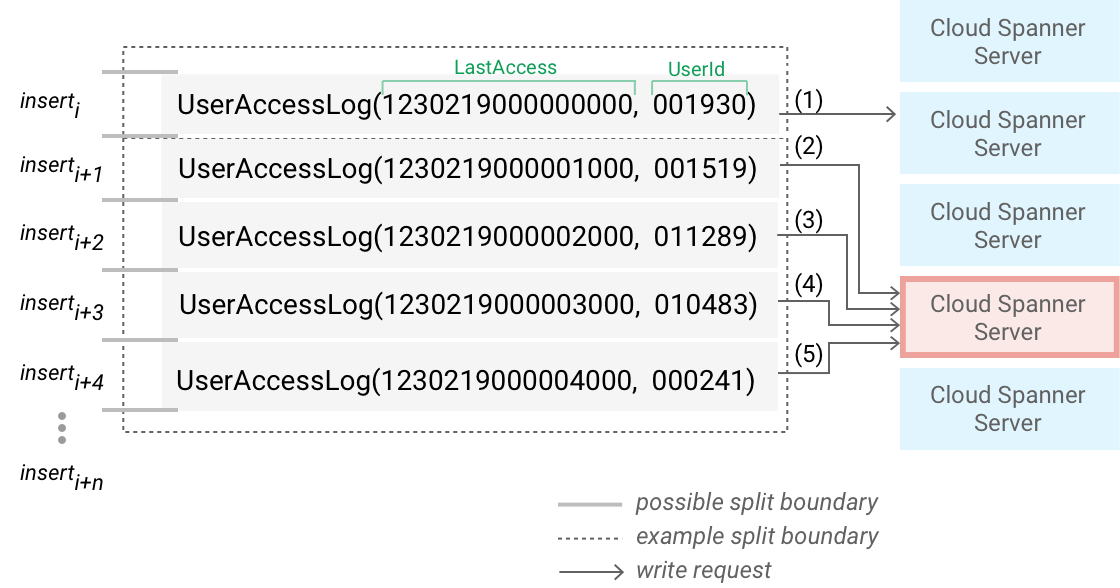
The previousUserAccessLogs table includes five example rows of data, whichrepresent five different users taking some sort of user action about amillisecond apart from each other. The diagram also annotates the order in whichSpanner inserts the rows (the labeled arrows indicate the orderof writes for each row). Because inserts are ordered by timestamp, and thetimestamp value is always increasing, Spanner always adds theinserts to the end of the table and directs them at the same split. (Asdiscussed inSchema and datamodel, a split is a set ofrows from one or more related tables that Spannerstores in order of row key.)
This is problematic because Spanner assigns work to differentservers in units of splits, so the server assigned to this particular split endsup handling all the insert requests. As the frequency of user access eventsincreases, the frequency of insert requests to the corresponding server alsoincreases. The server then becomes prone to becoming a hotspot, and looks likethe red border and background shown in the previous image. In this simplifiedillustration, each server handles at most one split but Spannercan assign each server more than one split.
When Spanner appends more rows to the table, the split grows,and when it reaches approximately 8 GiB, Spannercreates another split, as described inLoad-basedsplitting. Spannerappends subsequent new rows to this new split, and the server assigned to thesplit becomes the new potential hotspot.
When hotspots occur, you might observe that your inserts are slow and other workon the same server might slow down. Changing the order of theLastAccesscolumn to ascending order doesn't solve this problem because then all the writesare inserted at the top of the table instead, which still sends all the insertsto a single server.
Schema design best practice #1: Do not choose a column whosevalue monotonically increases or decreases as the first key part for a highwrite rate table.
Use a Universally Unique Identifier (UUID)
You can use a Universally Unique Identifier (UUID) as defined byRFC 4122 as the primary key.We recommend using UUID Version 4, because it uses random values in the bitsequence. We don't recommend Version 1 UUIDs because they store the timestamp inthe high order bits.
There are several ways to store the UUID as the primary key:
- In a
STRING(36)column. - In a pair of
INT64columns. - In a
BYTES(16)column.
For aSTRING(36) column, you can use the SpannerGENERATE_UUID() function (GoogleSQL orPostgreSQL) as the column default value to haveSpanner automatically generate UUID values.
For example, for the following table:
GoogleSQL
CREATETABLEUserAccessLogs(LogEntryIdSTRING(36)NOTNULL,LastAccessTIMESTAMPNOTNULL,UserIdSTRING(1024),...)PRIMARYKEY(LogEntryId,LastAccess,UserId);PostgreSQL
CREATETABLEuseraccesslogs(logentryidVARCHAR(36)NOTNULL,lastaccesstimestamptzNOTNULL,useridtext,...PRIMARYKEY(lastaccess,userid));You could insertGENERATE_UUID() to generate theLogEntryId values.GENERATE_UUID() produces aSTRING value, so theLogEntryId column must usetheSTRING type for GoogleSQL, or thetext type forPostgreSQL.
GoogleSQL
INSERTINTOUserAccessLogs(LogEntryId,LastAccess,UserId)VALUES(GENERATE_UUID(),'2016-01-25 10:10:10.555555-05:00','TomSmith');PostgreSQL
INSERTINTOuseraccesslogs(logentryid,lastaccess,userid)VALUES(spanner.generate_uuid(),'2016-01-25 10:10:10.555555-05:00','TomSmith');There are a few disadvantages to using a UUID:
- They are slightly large, using 16 bytes or more. Other options for primarykeys don't use this much storage.
- They don't carry information about the record. For example, a primary key of
SingerIdandAlbumIdhas an inherent meaning, while a UUID doesn't. - You lose locality between related records, which is why using a UUIDeliminates hotspots.
Bit-reverse sequential values
You should verify that numerical (INT64 in GoogleSQL orbigint in PostgreSQL) primary keys aren't sequentially increasing ordecreasing. Sequential primary keys can cause hotspots at scale. One way toavoid this problem is to bit-reverse the sequential values, making sure todistribute primary key values evenly across the key space.
Spanner supports bit-reversed sequence, which generates uniqueinteger bit-reversed values. You can use a sequence in the first (or only)component in a primary key to avoid hotspot issues. For more information,seeBit-reversedsequence.
Swap the order of keys
One way to spread writes over the key space more uniformly is to swap the orderof the keys so that the column that contains the monotonic value is not thefirst key part:
GoogleSQL
CREATETABLEUserAccessLogs(UserIdINT64NOTNULL,LastAccessTIMESTAMPNOTNULL,...)PRIMARYKEY(UserId,LastAccess);
PostgreSQL
CREATETABLEuseraccesslogs(useridbigintNOTNULL,lastaccessTIMESTAMPTZNOTNULL,...PRIMARYKEY(UserId,LastAccess));
In this modified schema, inserts are now first ordered byUserId, rather thanby chronological last access timestamp. This schema spreads writes amongdifferent splits because it's unlikely that a single user produces thousands ofevents per second.
The following image shows the five rows from theUserAccessLogs table thatSpanner orders withUserId instead of access timestamp:
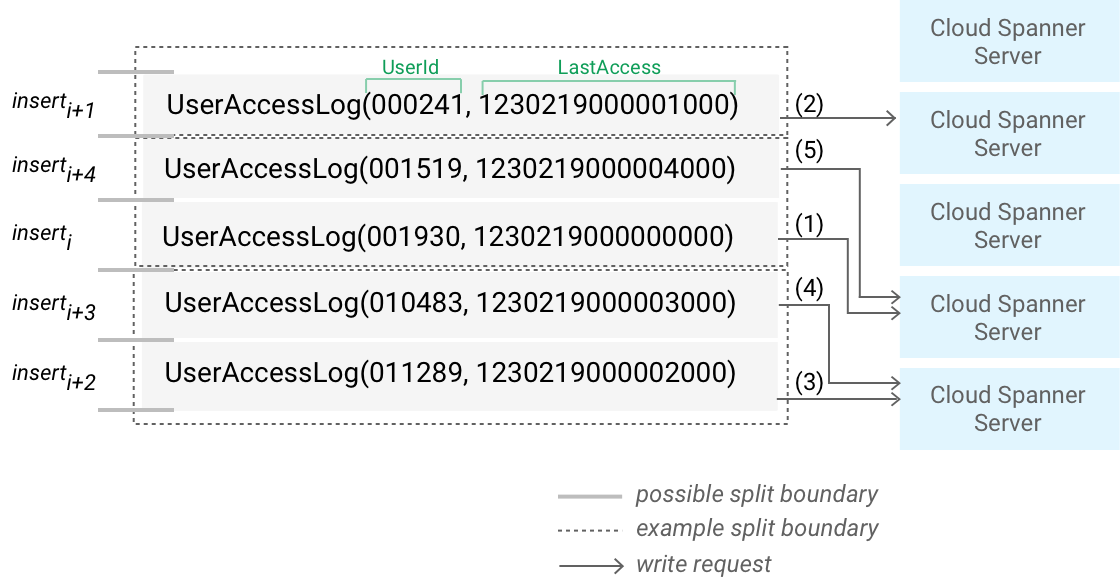
Here Spanner might divide theUserAccessLogs data into threesplits, with each split containing approximately a thousand rows of orderedUserId values. Even though the user events occurred about a millisecond apart,each event was raised by a different user, so the order of inserts is much lesslikely to create a hotspot compared with using the timestamp for ordering. Tolearn more about how splits are created, seeLoad-based splitting
See also the related best practice forordering timestamp-basedkeys.
Hash the unique key and spread the writes across logical shards
Another common technique for spreading the load across multiple servers is tocreate a column that contains the hash of the actual unique key, then use thehash column (or the hash column and the unique key columns together) as theprimary key. This pattern helps avoid hotspots, because new rows are spread moreevenly across the key space.
You can use the hash value to create logical shards, or partitions, in yourdatabase. In a physically sharded database, the rows are spread across severaldatabase servers. In a logically sharded database, the data in the table definethe shards. For example, to spread writes to theUserAccessLogs table across Nlogical shards, you could prepend aShardId key column to the table:
GoogleSQL
CREATETABLEUserAccessLogs(ShardIdINT64NOTNULL,LastAccessTIMESTAMPNOTNULL,UserIdINT64NOTNULL,...)PRIMARYKEY(ShardId,LastAccess,UserId);
PostgreSQL
CREATETABLEuseraccesslogs(shardidbigintNOTNULL,lastaccessTIMESTAMPTZNOTNULL,useridbigintNOTNULL,...PRIMARYKEY(shardid,lastaccess,userid));
To compute theShardId, hash a combination of the primary key columns and thencalculate modulo N of the hash. For example:
GoogleSQL
ShardId=hash(LastAccessandUserId)%N
Your choice of hash function and combination of columns determines how the rowsare spread across the key space. Spanner will then create splits acrossthe rows to optimize performance.
The following diagram illustrates how using a hash to create three logicalshards can spread write throughput more evenly across servers:
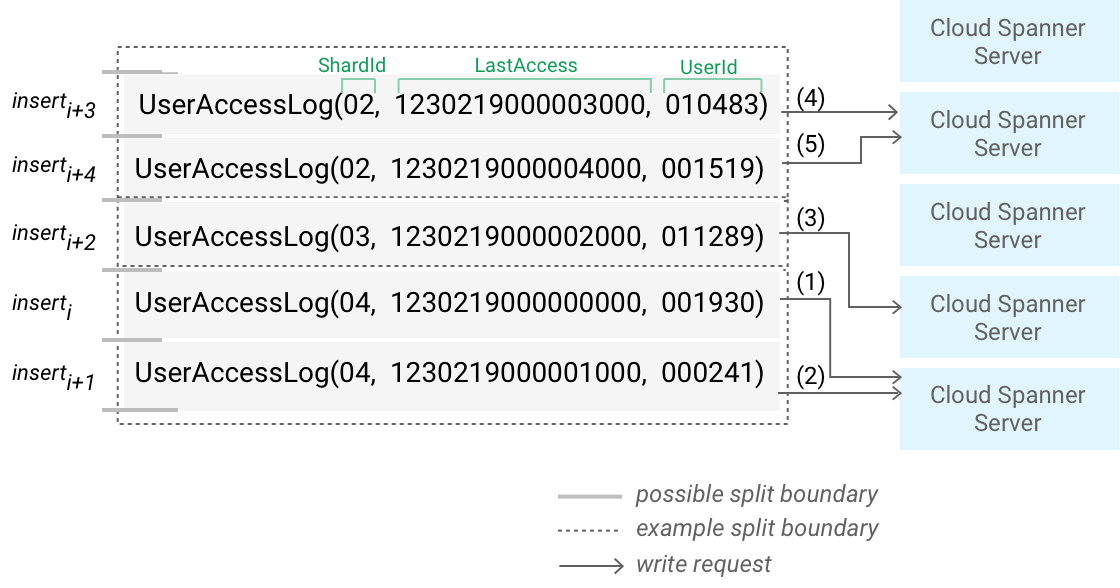
Here theUserAccessLogs table is ordered byShardId, which is calculated as ahash function of key columns. The fiveUserAccessLogs rows are chunked intothree logical shards, each of which is coincidentally in a different split. Theinserts are spread evenly among the splits, which balances write throughput tothe three servers that handle the splits.
Spanner also lets you create a hash function in ageneratedcolumn.
To do this in GoogleSQL, use theFARM_FINGERPRINTfunction during write time, as shown in the following example:
GoogleSQL
CREATETABLEUserAccessLogs(ShardIdINT64NOTNULLAS(MOD(FARM_FINGERPRINT(CAST(LastAccessASSTRING)),2048))STORED,LastAccessTIMESTAMPNOTNULL,UserIdINT64NOTNULL,)PRIMARYKEY(ShardId,LastAccess,UserId);Your choice of hash function determines how well your insertions are spreadacross the key range. You don't need a cryptographic hash, although acryptographic hash might be a good choice. When picking a hash function, youneed to consider the following factors:
- Hotspot avoidance. A function that results in more hash values tends toreduce hotspots.
- Read efficiency. Reads across all hash values are faster if there are fewerhash values to scan.
- Node count.
Use descending order for timestamp-based keys
If you have a table for your history that uses the timestamp as a key, considerusing descending order for the key column if any of the following apply:
- If you want to read the most recent history, you're using an interleavedtable for the history, and you're reading the parent row. In this case,with a
DESCtimestamp column, the latest history entries are storedadjacent to the parent row. Otherwise, reading the parent row and its recenthistory will require a seek in the middle to skip over the older history. - If you're reading sequential entries in reverse chronological order, andyou don't know exactly how far back you're going. For example, you mightuse a SQL query with a
LIMITto get the most recent N events, or you mightplan to cancel the read after you've read a certain number of rows. In thesecases, you want to start with the most recent entries and read sequentiallyolder entries until your condition has been met, whichSpanner does more efficiently for timestamp keys thatSpanner stores in descending order.
Add theDESC keyword to make the timestamp key descending. For example:
GoogleSQL
CREATETABLEUserAccessLogs(UserIdINT64NOTNULL,LastAccessTIMESTAMPNOTNULL,...)PRIMARYKEY(UserId,LastAccessDESC);
Schema design best practice #2: Descending order orascending order depends on the user queries, for example, top being the newest,or top being the oldest.
When to use an interleaved index
Similar to the previous primary key example that you should avoid, it's also abad idea to create non-interleaved indexes on columns whose values aremonotonically increasing or decreasing, even if they aren't primary key columns.
For example, suppose you define the following table, in whichLastAccess is anon-primary-key column:
GoogleSQL
CREATETABLEUsers(UserIdINT64NOTNULL,LastAccessTIMESTAMP,...)PRIMARYKEY(UserId);
PostgreSQL
CREATETABLEUsers(useridbigintNOTNULL,lastaccessTIMESTAMPTZ,...PRIMARYKEY(userid));
It might seem convenient to define an index on theLastAccess column forquickly querying the database for user accesses "since time X", like this:
GoogleSQL
CREATENULL_FILTEREDINDEXUsersByLastAccessONUsers(LastAccess);
PostgreSQL
CREATEINDEXusersbylastaccessONusers(lastaccess)WHERElastaccessISNOTNULL;
However, this results in the same pitfall as described in the previous bestpractice, because Spanner implements indexes as tables under thehood, and the resulting index table uses a column whose value monotonicallyincreases as its first key part.
It's okay to create an interleaved index where last access rows are interleavedunder the corresponding user row. This is because it's unlikely for a singleparent row to produce thousands of events per second.
GoogleSQL
CREATENULL_FILTEREDINDEXUsersByLastAccessONUsers(UserId,LastAccess),INTERLEAVEINUsers;
PostgreSQL
CREATEINDEXusersbylastaccessONusers(userid,lastaccess)WHERElastaccessISNOTNULL,INTERLEAVEINUsers;
Schema design best practice #3: Don't create anon-interleaved index on a high write rate column whose value monotonicallyincreases or decreases.Use an interleaved index, or use techniques like those you would usefor the base table primary key design when designing index columns—forexample, add `shardId`.
What's next
- Look throughexamples of schema designs.
- Learn aboutbulk loading data.
Except as otherwise noted, the content of this page is licensed under theCreative Commons Attribution 4.0 License, and code samples are licensed under theApache 2.0 License. For details, see theGoogle Developers Site Policies. Java is a registered trademark of Oracle and/or its affiliates.
Last updated 2025-12-17 UTC.