

Migrate from Cassandra to Spanner
This page explains how to migrate your NoSQL database from Cassandra toSpanner.
Cassandra and Spanner are both large-scale distributeddatabases built for applications that require high scalability and low latency.While both databases can support demanding NoSQL workloads,Spanner provides advanced features for data modeling, querying,and transactional operations. Spanner supports theCassandra Query Language (CQL).
For more information about how Spanner meets NoSQL databasecriteria, seeSpanner for non-relationalworkloads.
Migration constraints
For a successful migration from Cassandra to the Cassandraendpoint on Spanner, reviewSpanner forCassandra users tolearn how Spannerarchitecture, data model, and data types differ from Cassandra.Carefully consider the functional differences between Spanner andCassandrabefore you begin your migration.
Migration process
The migration process is broken down into the following steps:
- Convert your schema and data model.
- Set up dual writes for incoming data.
- Bulk export your historical data from Cassandra toSpanner.
- Validate data to ensure data integrity throughout the migrationprocess.
- Point your application to Spanner instead ofCassandra.
- Optional.Perform reverse replication from Spanner toCassandra.
Convert your schema and data model
The first step in migrating your data from Cassandra toSpanner is adapting the Cassandra data schema toSpanner's schema, while handling differences in data types andmodeling.
Table declaration syntax is fairly similar across Cassandra andSpanner. You specify the table name, column names and types, andthe primary key which uniquely identifies a row. The key difference is thatCassandra is hash-partitioned and makes a distinction between the twoparts of the primary key: thehashed partition key and thesorted clusteringcolumns, whereas Spanner is range-partitioned. You can think ofSpanner's primary key as only having clustering columns, withpartitions automatically maintained behind the scenes. Like Cassandra,Spanner supports composite primary keys.
We recommend the following steps to convert your Cassandra data schemato Spanner:
- ReviewCassandra overviewto understand the similarities and differences between Cassandraand Spanner data schemas and to learn how to map differentdata types.
- Use theCassandra to Spanner schema toolto extract and convert your Cassandra data schema toSpanner.
- Before starting your data migration, ensure your Spannertables have been created with the appropriate data schemas.
Set up live migration for incoming data
To perform a zero-downtime migration from Cassandra toSpanner, set up live migration for incoming data. Live migrationfocuses on minimizing downtime and ensuring continuous application availabilityby using real-time replication.
Start with the live migration process before the bulk migration. The followingdiagram shows the architectural view of a live migration.
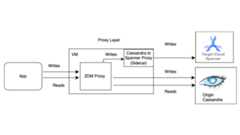
The live migration architecture has the following key components:
- Origin: Your source Cassandra database.
- Target: The destination Spanner database you're migratingto. It's assumed that you have already provisioned yourSpannerinstance anddatabase with aschema that's compatible with your Cassandra schema (with necessaryadaptations for Spanner's data model and features).
Datastax ZDMProxy:The ZDM Proxy is a dual writes proxy built by DataStax forCassandra to Cassandra migrations. The proxy mimics aCassandra cluster which lets an application use the proxy withoutapplication changes. This tool is what your application talks to andinternally uses to perform dual writes to the source and target databases.While it's typically used with Cassandra clusters as both theorigin and target, our setup configures it to use the Cassandra-Spanner Proxy (running as a sidecar) as the target. Thisensures that every incoming read is only forwarded to the origin and returnsthe origin response back to the application. In addition, each incomingwrite is directed to both the origin and target.
- If writes to both the origin and target are successful, the applicationreceives a success message.
- If writes to the origin fails and writes to the target succeeds, theapplication receives the origin's failure message.
- If writes to the target fails and writes to the origin succeeds, theapplication receives the target's failure message.
- If writes to both the origin and target fail, the application receivesthe origin's failure message.
Cassandra-SpannerProxy:A sidecar application that intercepts Cassandra Query Language (CQL) traffic destined for Cassandra andtranslates it into Spanner API calls. It lets applicationsand tools interact with Spanner using the Cassandraclient.
Client application: The application that reads and writes data to thesource Cassandra cluster.
Proxy setup
The first step to perform a live migration is to deploy and configure theproxies. The Cassandra-Spanner Proxy runs as a sidecarto the ZDM Proxy. The sidecar proxy acts as the target for the ZDM Proxy writeoperations to Spanner.
Single instance testing using Docker
You can run a single instance of the proxy locally or on a VM for initialtesting using Docker.
Prerequisites
- Confirm that the VM where the proxy runs has network connectivity to theapplication, the origin Cassandra database, and theSpanner database.
- Install Docker.
- Confirm that there is a service account key file with necessary permissionsto write to your Spanner instance and database.
- Set up your Spanner instance, database, and schema.
- Ensure the Spanner Database name is the same as the OriginCassandra keyspace name.
- Clone thespanner-migration-toolrepository.
Download and configure the ZDM Proxy
- Go to the
sources/cassandradirectory. - Ensure the
entrypoint.shandDockerfilefiles are in the same directory as the Dockerfile. Run the following command to build a local image:
docker build -t zdm-proxy:latest .
Run the ZDM Proxy
- Ensure the
zdm-config.yamlandkeyfilesare present locally where thethe following command is run. - Open the samplezdm-configyamlfile.
- Review the detailedlist of flagsthat ZDM accepts.
Use the following command to run the container:
sudo docker run --restart always -d -p 14002:14002 \-vzdm-config-file-path:/zdm-config.yaml \-vlocal_keyfile:/var/run/secret/keys.json \-e SPANNER_PROJECT=SPANNER_PROJECT_ID \-e SPANNER_INSTANCE=SPANNER_INSTANCE_ID \-e SPANNER_DATABASE=SPANNER_DATABASE_ID \-e GOOGLE_APPLICATION_CREDENTIALS="/var/run/secret/keys.json" \-e ZDM_CONFIG=/zdm-config.yaml \zdm-proxy:latest
Verify the proxy setup
Use the
docker logscommand to check the proxy logs for any errors during startup:docker logscontainer-idRun the
cqlshcommand to verify the proxy is set up correctly:cqlshVM-IP 14002ReplaceVM-IP with the IP address for your VM.
Production setup using Terraform:
For a production environment, we recommend using the provided Terraformtemplates to orchestrate the deployment of the Cassandra-Spanner proxy.
Prerequisites
- Install Terraform.
- Confirm that the application has default credentials with appropriatepermissions to create resources.
- Confirm that the service key file has the relevant permissions to write toSpanner. This file is used by the proxy.
- Set up your Spanner instance, database, and schema.
- Confirm that the Dockerfile,
entrypoint.sh, and the service key file arein the same directory as themain.tffile.
Configure Terraform variables
- Ensure you have the Terraform template for the proxy deployment.
- Update the
terraform.tfvarsfile with the variables for your setup.
Template deployment using Terraform
The Terraform script does the following:
- Creates container-optimized VMs based on a specified count.
- Creates
zdm-config.yamlfiles for each VM, and allots a topology index toit. ZDM Proxy requires multi-VM setups to configure the topology using thePROXY_TOPOLOGY_ADDRESSESandPROXY_TOPOLOGY_INDEXfields in theconfigurationyamlfile. - Transfers the relevant files to each VM, remotely runs Docker Build, andlaunches the containers.
To deploy the template, do the following:
Use the
terraform initcommand to initialize Terraform:terraform initRun the
terraform plancommand to see what changes Terraform plans to make on your infrastructure:terraform plan -var-file="terraform.tfvars"When the resources look good, run the
terraform applycommand:terraform apply -var-file="terraform.tfvars"After the Terraform script stops, run the
cqlshcommand to ensure the VMs are accessible.cqlshVM-IP 14002ReplaceVM-IP with the IP address for your VM.
Point your client applications to the ZDM Proxy
Modify your client application's configuration, setting the contact points asthe VMs running the proxies instead of your origin Cassandra cluster.
Test your application thoroughly. Verify that write operations are being appliedto both the origin Cassandra cluster and, by checking yourSpanner database, that they are also reachingSpanner using the Cassandra-SpannerProxy. Reads are served from the origin Cassandra.
Bulk export your data to Spanner
Bulk data migration involves transferring large volumes of data betweendatabases, often requiring careful planning and execution to minimize downtimeand ensure data integrity. Techniques include ETL (Extract, Transform, Load)processes, direct database replication, and specialized migration tools, allaimed at efficiently moving data while preserving its structure and accuracy.
We recommend using Spanner'sSourceDB ToSpannerDataflow template to bulk migrate your data from Cassandra toSpanner.Dataflow isthe Google Cloud distributed extract, transform, and load (ETL) service thatprovides a platform for running data pipelines to read and process large amountsof data in parallel over multiple machines. The SourceDB ToSpanner Dataflowtemplate is designed to perform highly parallelized reads fromCassandra, transform the source data as needed, and write toSpanner as a target database.
Perform the steps in theCassandra to Spanner BulkMigrationinstructions using theCassandra configurationfile.
Validate data to ensure integrity
Data validation during database migration is crucial for ensuring data accuracyand integrity. It involves comparing data between your source Cassandraand target Spanner databases to identify discrepancies, such asmissing, corrupted, or mismatched data. General data validation techniquesinclude checksums, row counts, and detailed data comparisons, all aimed atguaranteeing that the migrated data is an accurate representation of theoriginal.
After the bulk data migration is complete, and while dual writes are stillactive, you need to validate data consistency and fix discrepancies. Differencesbetween Cassandra and Spanner can occur during the dualwrite phase for various reasons, including:
- Failed dual writes. A write operation might succeed in one database butfail in the other due to transient network issues or other errors.
- Lightweight transactions (LWT). If your application uses LWT (compare andset) operations, these might succeed on one database but fail on the other dueto differences in the datasets.
- High query per second (QPS) on a single primary key. Under very highwrite loads to the same partition key, the order of events might differbetween the origin and target due to different network round trip times,potentially leading to inconsistencies.
Bulk job and dual writes running in parallel: Bulk migrationrunning in parallel with dual writes might cause divergence due to variousrace conditions, such as the following:
- Extra rows on Spanner: if the bulk migration runs whiledual writes are active, the application might delete a row that was alreadyread by the bulk migration job and written to the target.
- Race conditions between bulk and dual writes: there might be othermiscellaneous race conditions where the bulk job reads a row from Cassandraand the data from the row becomes stale when incoming writes update the rowon Spanner after the dual writes finish.
- Partial column updates: updating a subset of columns on an existingrow creates an entry on Spanner with other columns asnull. Since bulk updates don't overwrite existing rows, this causesrows to diverge between Cassandra and Spanner.
This step focuses on validating and reconciling data between the origin andtarget databases. Validation involves comparing the origin and target toidentify inconsistencies, while reconciliation focuses on resolving theseinconsistencies to achieve data consistency.
Compare data between Cassandra and Spanner
We recommend that you perform validations on both row counts and the actualcontent of the rows.
Choosing how to compare data (both count and row matching) depends on yourapplication's tolerance for data inconsistencies and your requirements for exactvalidation.
There are two ways to validate data:
Active validation is performed while dual writes are active. In thisscenario, the data in your databases are still being updated. It might notbe possible to achieve an exact match in row counts or row content betweenCassandra and Spanner. The goal is to ensure thatany differences are only due to active load on the databases and not due toany other errors. If the discrepancies are within these limits, you canproceed with the cutover.
Static validation requires downtime. If your requirements call forstrong, static validation with a guarantee of exact data consistency, youmight need to stop all writes to both databases temporarily. You can thenvalidate data and reconcile differences on your Spannerdatabase.
Choose the validation timing and the appropriate tools based on your specificrequirements for data consistency and acceptable downtime.
Compare the number of rows in Cassandra and Spanner
One method of data validation is by comparing the number of rows in tables inthe source and target databases. There are a few ways to perform countvalidations:
When migrating with small datasets (less than 10 million rows per table),you can use thiscount matchingscriptto count rows in Cassandra and Spanner. Thisapproach returns exact counts in a short time. The default timeout inCassandra is 10 seconds. Consider bumping up the driver requesttimeout and server side timeout if the script times out before finishing thecount.
When migrating large datasets (greater than 10 million rows per table), keepin mind that while Spanner count queries scale well,Cassandra queries tend to timeout. In such cases, we recommendusing theDataStax Bulk Loader tool toget count rows from Cassandra tables. For Spannercounts, using the SQL
count(*)function is sufficient for most large scaleloads. We recommend that you run the Bulk Loader for everyCassandra table and fetch counts from the Spannertable and compare the two. This can be done either manually or using ascript.
Validate for a row mismatch
We recommend that you compare rows from the origin and target databases toidentify mismatches between rows. There are two ways to perform row validations.The one you use depends on your application's requirements:
- Validate a random set of rows.
- Validate the entire dataset.
Validate a random sample of rows
Validating an entire dataset is expensive and time consuming for largeworkloads. In these cases, you can use sampling to validate a random subset ofthe data to check for mismatches in rows. One way to do this is to pick randomrows in Cassandra and fetch the corresponding rows inSpanner, then compare the values (or the row hash).
The advantages to this method is that you finish faster than checking an entiredataset, and it's straightforward to run. The disadvantage is that since it's asubset of the data, there might still be differences in the data present foredge cases.
To sample random rows from Cassandra, you need to do the following:
- Generate random numbers in the token range [
-2^63,2^63 - 1]. - Fetch rows
WHERE token(PARTITION_KEY) > GENERATED_NUMBER.
Thevalidation.go samplescriptrandomly fetches rows and validates them with rows in the Spannerdatabase.
Validate the entire dataset
To validate an entire dataset, fetch all the rows in the originCassandra database. Use the primary keys to fetch all of thecorresponding Spanner database rows. You can then compare therows for differences. For large datasets, you can use a MapReduce-basedframework, such as Apache Spark or Apache Beam, to reliably and efficientlyvalidate the entire dataset.
The advantage to this is that full validation provides higher confidence in dataconsistency. The disadvantages are that it adds read load on Cassandraand it requires an investment to build complex tooling for large datasets. Itmight also take much longer to finish the validation on a large dataset.
A way to do this is to partition the token ranges and query theCassandra ring in parallel. For each Cassandra row, theequivalent Spanner row is fetched using the partition key. Thesetwo rows are then compared for discrepancies. For pointers to follow whenbuilding validator jobs, seeTips to validate Cassandra using rowmatching.
Note: During dual writes, the databases are in a non-static state which mightcause a few mismatches. These mismatches are expected.Reconcile data or row count inconsistencies
Depending on the data consistency requirement, you can copy rows fromCassandra to Spanner to reconcile discrepanciesidentified during the validation phase. One way to do reconciliation isextending the tool used for full dataset validation, and copying the correct rowfrom Cassandra to the target Spanner database if amismatch is found. For more information, seeImplementationconsiderations.
Point your application to Spanner instead of Cassandra
After you validate the accuracy and integrity of your data post migration,choose a time for migrating your application to point to Spannerinstead of Cassandra (or to the proxy adapter used for live datamigration). This is called the cutover.
To perform the cutover, use the following steps:
Create a configuration change for your client application that lets itconnect directly to your Spanner instance using one of thefollowing methods:
- Connect Cassandra to theCassandra Adapter running as asidecar.
- Change the driver jar with the endpoint client.
Apply the change you prepared in the previous step to point your applicationto Spanner.
Set up monitoring for your application to monitor for errors or performanceissues. Monitor Spanner metrics using Cloud Monitoring. Formore information, seeMonitor instances withCloud Monitoring.
After a successful cutover and stable operation, decommission the ZDM Proxyand the Cassandra-Spanner Proxy instances.
Perform reverse replication from Spanner to Cassandra
You can perform reverse replication using theSpanner toSourceDB Dataflowtemplate.Reverse replication is useful when you encounter unforeseen issues withSpanner and need to fall back to the original Cassandradatabase with minimal disruption to the service.
Tips to validate Cassandra using row matching
It's slow and inefficient to perform full table scans in Cassandra (orany other database) usingSELECT *. To solve this problem, divide theCassandra dataset into manageable partitions and process the partitionsconcurrently. To do this, you need to do the following:
- Split the dataset into token ranges
- Query partitions in parallel
- Read data within each partition
- Fetch corresponding rows from Spanner
- Design validation tools for extensibility
- Report and log mismatches
Split the dataset into token ranges
Cassandra distributes data across nodes based on partition key tokens.The token range for a Cassandra cluster spans from-2^63 to2^63 -1. You can define a fixed number of equally sized token ranges to divide theentire keyspace into smaller partitions. We recommend that you split the tokenrange with a configurablepartition_size parameter that you can tune forquickly processing the entire range.
Query partitions in parallel
After you define the token ranges, you can launch multiple parallel processes orthreads, each responsible for validating data within a specific range. For eachrange, you can construct CQL queries using thetoken() functionon your partition key (pk).
A sample query for a given token range would look like the following:
SELECT*FROMyour_keyspace.your_tableWHEREtoken(pk)>=partition_min_tokenANDtoken(pk)<=partition_max_token;By iterating through your defined token ranges and executing these queries inparallel against your origin Cassandra cluster (or through the ZDMproxy configured to read from Cassandra), you efficiently read data ina distributed manner.
Read data within each partition
Each parallel process executes the range-based query and retrieves a subset ofthe data from Cassandra. Check the amount of data retrieved partitionto ensure balance between parallelism and memory usage.
Fetch corresponding rows from Spanner
For each row fetched from Cassandra, retrieve the corresponding rowfrom your target Spanner database using the source row key.
Compare rows to identify mismatches
After you have both the Cassandra row and the correspondingSpanner row (if it exists), you need to compare their fields toidentify any mismatches. This comparison should take into account potential datatype differences and any transformations applied during the migration. Werecommend that you define clear criteria for what constitutes a mismatch basedon your application's requirements.
Design validation tools for extensibility
Design your validation tool with the possibility of extending it forreconciliation. For example, you can add capabilities to write the correct datafrom Cassandra to Spanner for identified mismatches.
Report and log mismatches
We recommend that you log any identified mismatches with sufficient context toallow for investigation and reconciliation. This might include the primary keys,the specific fields that differ, and the values from both Cassandra andSpanner. You might also want to aggregate statistics on thenumber and types of mismatches found.
Enable and disable TTL on Cassandra data
This section describes how to enable and disable time to live (TTL) onCassandra data in Spanner tables. For an overview, seeTime to live (TTL).
Enable TTL on Cassandra data
For examples in this section, assume you have a table with the following schema:
CREATETABLESingers(SingerIdINT64OPTIONS(cassandra_type='bigint'),AlbumIdINT64OPTIONS(cassandra_type='int'),)PRIMARYKEY(SingerId);To enable row-level TTL on an existing table, do the following:
Add the timestamp column for storing the expiration timestamp for each row.In this example, the column is named
ExpiredAt, but you can use any name.ALTERTABLESingersADDCOLUMNExpiredAtTIMESTAMP;Add the row deletion policy to automatically delete rows older than theexpiration time.
INTERVAL 0 DAYmeans rows are deleted immediatelyupon reaching the expiration time.ALTERTABLESingersADDROWDELETIONPOLICY(OLDER_THAN(ExpiredAt,INTERVAL0DAY));Set
cassandra_ttl_modetorowto enable the row-level TTL.ALTERTABLESingersSETOPTIONS(cassandra_ttl_mode='row');Optionally, set
cassandra_default_ttlto configure the default TTL value.The value is in seconds.ALTERTABLESingersSETOPTIONS(cassandra_default_ttl=10000);
Disable TTL on Cassandra data
For examples in this section, assume you have a table with the following schema:
CREATETABLESingers(SingerIdINT64OPTIONS(cassandra_type='bigint'),AlbumIdINT64OPTIONS(cassandra_type='int'),ExpiredAtTIMESTAMP,)PRIMARYKEY(SingerId),ROWDELETIONPOLICY(OLDER_THAN(ExpiredAt,INTERVAL0DAY)),OPTIONS(cassandra_ttl_mode='row');To disable row-level TTL on an existing table, do the following:
Optionally, set
cassandra_default_ttlto zero to clean up the default TTLvalue.ALTERTABLESingersSETOPTIONS(cassandra_default_ttl=0);Set
cassandra_ttl_modetononeto disable the row-level TTL.ALTERTABLESingersSETOPTIONS(cassandra_ttl_mode='none');Remove the row deletion policy.
ALTERTABLESingersDROPROWDELETIONPOLICY;Remove the expiration timestamp column.
ALTERTABLESingersDROPCOLUMNExpiredAt;
Implementation considerations
- Frameworks and libraries: For scalable custom validation, useMapReduce-based frameworks like Apache Spark or Dataflow(Beam).Choose a supported language (Python, Scala, Java) and use connectors forCassandra and Spanner, for example, using a proxy.These frameworks enable efficient parallel processing of large datasets forcomprehensive validation.
- Error handling and retries: Implement robust error handling to managepotential issues like network connectivity problems or temporaryunavailability of either database. Consider implementing retry mechanismsfor transient failures.
- Configuration: Make the token ranges, connection details for bothdatabases, and comparison logic configurable.
- Performance tuning: Experiment with the number of parallel processes andthe size of the token ranges to optimize the validation process for yourspecific environment and data volume. Monitor the load on both yourCassandra and Spanner clusters during validation.
What's Next
- See a comparison between Spanner and Cassandra intheCassandraoverview.
- Learn how toConnect to Spanner using theCassandra Adapter.
Except as otherwise noted, the content of this page is licensed under theCreative Commons Attribution 4.0 License, and code samples are licensed under theApache 2.0 License. For details, see theGoogle Developers Site Policies. Java is a registered trademark of Oracle and/or its affiliates.
Last updated 2025-12-15 UTC.