

Monitor Data Boost usage
This page describes how to use Cloud Monitoring and Spanner auditlogs to monitor and analyze Spanner Data Boost usage.
Cloud Monitoring provides the ability to track total usage over time and tobreak down that usage by user. Spanner audit logs allow moreflexible usage analysis, including providing metrics by user or byBigQuery job ID.
Use Cloud Monitoring to track Data Boost usage
Follow these steps to track overall Data Boost usage:
- In the Google Cloud console, go toMonitoring.
Go to Monitoring - IfMetrics Explorer is shown in the navigation menu, select it.Otherwise, clickResources, and then selectMetrics Explorer.
- At the top of the page, select a time interval.
- In theMetric drop-down list, in theFilter by resource or metricname field, enter
spannerand pressEnterto narrow the search. In theMetric list, selectCloud Spanner Instance > Instance >Processing unit second, and then clickApply.
This creates a line chart of aggregate Data Boost usage acrossall Spanner instances.
To view usage for a particular instance, follow these steps:
- Use theFilter field to add filters, such as the instance ID.
- Click+ to add other attributes.
To view a breakdown of usage by all instances, follow these steps:
- Clear any filters by clicking theX icon next to the filterfields.
- In theAggregation operator drop-down list, selectSum, and thenselect byinstance_id.
To break down usage by principal, in theAggregation operator drop-down,selectSum, and then select bycredential_id.
Use audit logs to analyze Data Boost usage
Spanner audit logs allow more flexible analysis ofData Boost usage. In addition to the ability to break down usageover time by instance or principal as with Cloud Monitoring,Spanner audit logs, if enabled and available, allow breaking downusage over time by database or BigQuery job ID.
Enabling audit logs can incur extra charges. For information aboutLogging pricing, seeGoogle Cloud Observability pricing: Cloud Logging.
Enable Data Boost usage audit logs
You must enable data access audit logs for Spanner before you cancollect usage data for Data Boost. To do so, follow these steps:
- Follow the instructions inConfigure Data Access audit logs with the Google Cloud console.
- Enable theData Read log type for theSpanner API service.
- To obtain Data Boost usage by BigQuery job SQL text,ensure that that the audit logs for BigQuery are enabled as well.
View usage by principal
To query the audit logs to view Data Boost usage by user, followthese steps:
Go to the Logs Explorer in the Google Cloud console.
In the navigation menu, clickLog Analytics.
To show usage by user and database over the past 7 days, run the followingquery. To change the timespan for which usage is shown, modify the
timestampexpression in theWHEREclause.SELECTSUM(CAST(JSON_VALUE(labels.data_boost_usage)ASINT64))ASusage,REGEXP_EXTRACT(proto_payload.audit_log.resource_name,'projects/[^/]+/instances/[^/]+/databases/[^/]+')ASdatabase,proto_payload.audit_log.authentication_info.principal_emailASprincipal_emailFROM`PROJECT_NAME.global._Default._AllLogs`WHEREtimestamp >TIMESTAMP_SUB(CURRENT_TIMESTAMP(),INTERVAL7DAY)ANDresource.type='spanner_instance'ANDoperation.lastISNULLANDJSON_VALUE(labels.data_boost_usage)!=''GROUPBYdatabase,principal_email;Replace
PROJECT_NAMEwith your project name.
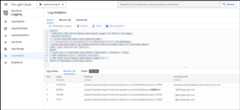
The following example shows usage in processing units for 4 principals.
View usage by BigQuery job ID
To query the audit logs to view Data Boost usage broken down bydatabase, user, and BigQuery job ID, follow these steps:
Go to the Logs Explorer in the Google Cloud console.
In the navigation menu, clickLog Analytics.
Run the following query:
SELECTSUM(CAST(JSON_VALUE(labels.data_boost_usage)ASINT64))ASusage,REGEXP_EXTRACT(proto_payload.audit_log.resource_name,'projects/[^/]+/instances/[^/]+/databases/[^/]+')ASdatabase,proto_payload.audit_log.authentication_info.principal_emailASprincipal_email,IFNULL(JSON_VALUE(labels.data_boost_workload_id),'not from BQ')ASjob_idFROM`PROJECT_NAME.global._Default._AllLogs`WHEREtimestamp >TIMESTAMP_SUB(CURRENT_TIMESTAMP(),INTERVAL7DAY)ANDresource.type='spanner_instance'ANDoperation.lastISNULLANDJSON_VALUE(labels.data_boost_usage)!=''GROUPBYdatabase,principal_email,job_id;Replace
PROJECT_NAMEwith your project name.
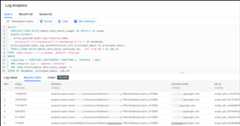
The following example shows usage by BigQuery job ID.
View usage by BigQuery SQL text
To view Data Boost usage for multiple BigQuery jobsaggregated by the SQL text of those jobs, follow these steps:
Go to the Logs Explorer in the Google Cloud console.
In the navigation menu, clickLog Analytics.
Run the following query:
SELECTSUM(CAST(JSON_VALUE(db.labels.data_boost_usage)ASINT64))ASusage,JSON_VALUE(bq.proto_payload.audit_log.metadata.jobInsertion.job.jobConfig.queryConfig.query)ASbq_queryFROM`PROJECT_NAME.global._Default._AllLogs`db,`PROJECT_NAME.global._Default._AllLogs`bqWHEREdb.timestamp >TIMESTAMP_SUB(CURRENT_TIMESTAMP(),INTERVAL7DAY)ANDdb.resource.type='spanner_instance'ANDJSON_VALUE(db.labels.data_boost_usage)!=''ANDdb.operation.lastISNULLANDbq.timestamp >TIMESTAMP_SUB(CURRENT_TIMESTAMP(),INTERVAL7DAY)ANDbq.proto_payload.audit_log.method_name='google.cloud.bigquery.v2.JobService.InsertJob'ANDbq.resource.type='bigquery_project'ANDJSON_VALUE(bq.proto_payload.audit_log.metadata.jobInsertion.job.jobConfig.queryConfig.query)ISNOTNULLANDJSON_VALUE(db.labels.data_boost_workload_id)=REGEXP_EXTRACT(bq.proto_payload.audit_log.resource_name,'[^/]*$')GROUPBYbq_queryORDERBYusageDESCReplace
PROJECT_NAMEwith your project name.
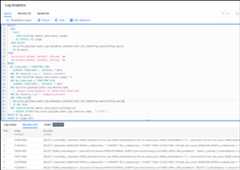
The following example shows Data Boost usage by SQL text.
Create a Data Boost alert
To create an alert that is issued when Data Boost usage exceedsa predefined threshold, seeSet an alert for Data Boost usage.
What's next
- Learn about Data Boost inData Boost overview.
Except as otherwise noted, the content of this page is licensed under theCreative Commons Attribution 4.0 License, and code samples are licensed under theApache 2.0 License. For details, see theGoogle Developers Site Policies. Java is a registered trademark of Oracle and/or its affiliates.
Last updated 2025-12-17 UTC.