

Create and manage databases
This page describes how to create and manage Spannerdatabases:
- Various methods to create a database
- Modify database options
- Delete a database
This page has information for both GoogleSQL-dialect databases and PostgreSQL-dialect databases. To learnhow to update a database schema, seeMake schema updates.For more information on creating an instance, seeCreate and manage instances.You can create a database in an existing instance in any of the following ways:
- Create a database: you can create a new database by selecting the SQL dialectand defining your schema.
- Import your own data: you can import a CSV, MySQL dump, or a PostgreSQLdump file into a new or existing database.
- Create a database with sample data: you can populate a database using oneof the available sample datasets to try out Spanner'scapabilities.
Create a database
You can create a new database in an existing instance. For GoogleSQL-dialect databases,you can define the databaseschema either at the timeof database creation, or after the database has been created. For PostgreSQL-dialect databasesyou must define the schema after creation.
Schemas are defined using the Database Definition Language, which is documentedforGoogleSQL andPostgreSQL. Refer to the following links formore information about creating and updating schemas:
After you create your database, you can safeguard databases that are importantto your applications and services by enabling database deletion protection. Formore information, seePrevent accidental database deletion.
Google Cloud console
In the Google Cloud console, go to theSpanner Instances page.
Select the instance to create the database in.
ClickCreate database.
Enter the following values:
- Adatabase name to display in the Google Cloud console.
- Thedialect to use for this database.
- For GoogleSQL-dialect databases, optionally provide a set of DDL statements thatdefine yourschema. Use theDDL templates to pre-fill common elements. If there are errors inyour DDL statements, the Google Cloud console returns an error whenyou try to create the database.
- Optionally, select acustomer-managed encryption key to use forthis database.
ClickCreate to create the database.
gcloud
Use thegcloud spanner databases create command.
```shgcloud spanner databases createDATABASE \ --instance=INSTANCE \ [--async] \ [--database-dialect=DATABASE_DIALECT] \ [--ddl=DDL] \ [--ddl-file=DDL_FILE] \ [--kms-key=KMS_KEY : --kms-keyring=KMS_KEYRING --kms-location=KMS_LOCATION --kms-project=KMS_PROJECT] \ [GCLOUD_WIDE_FLAG …]```The following options are required:
DATABASE- ID of the database or fully qualified identifier for the database. If specifying the fully qualified identifier, the
--instanceflag can be omitted. --instance=INSTANCE- The Spanner instance for the database.
The following options are optional:
--async- Return immediately, without waiting for the operation in progress to complete.
--database-dialect=DATABASE_DIALECT- The SQL dialect of the Spanner Database. Must be one of:
POSTGRESQL,GOOGLE_STANDARD_SQL. --ddl=DDL- Semi-colon separated DDL (data definition language) statements to run inside the newly created database. If there is an error in any statement, the database is not created. This flag is ignored if
--ddl_fileis set. Not supported by PostgreSQL-dialect databases. --ddl-file=DDL_FILE- Path of a file that contains semicolon separated DDL (data definition language) statements to run inside the newly created database. If there is an error in any statement, the database is not created. If
--ddl_fileis set,--ddlis ignored. Not supported by PostgreSQL-dialect databases.
If you're specifying aCloud Key Management Service key to usewhen creating the database, include the following options:
--kms-key=KMS_KEY- ID of the key or fully qualified identifier for the key.
This flag must be specified if any of the other arguments in this group are specified. The other arguments could be omitted if the fully qualified identifier is provided.
--kms-keyring=KMS_KEYRING- Cloud KMS key ring ID of the key.
--kms-location=KMS_LOCATION- Google Cloud location for the key.
--kms-project=KMS_PROJECT- Google Cloud project ID for the key.
Client (GoogleSQL)
C++
To learn how to install and use the client library for Spanner, seeSpanner client libraries.
To authenticate to Spanner, set up Application Default Credentials. For more information, seeSet up authentication for a local development environment.
voidCreateDatabase(google::cloud::spanner_admin::DatabaseAdminClientclient,std::stringconst&project_id,std::stringconst&instance_id,std::stringconst&database_id){google::cloud::spanner::Databasedatabase(project_id,instance_id,database_id);google::spanner::admin::database::v1::CreateDatabaseRequestrequest;request.set_parent(database.instance().FullName());request.set_create_statement("CREATE DATABASE `"+database.database_id()+"`");request.add_extra_statements(R"""( CREATE TABLE Singers ( SingerId INT64 NOT NULL, FirstName STRING(1024), LastName STRING(1024), SingerInfo BYTES(MAX), FullName STRING(2049) AS (ARRAY_TO_STRING([FirstName, LastName], " ")) STORED ) PRIMARY KEY (SingerId))""");request.add_extra_statements(R"""( CREATE TABLE Albums ( SingerId INT64 NOT NULL, AlbumId INT64 NOT NULL, AlbumTitle STRING(MAX) ) PRIMARY KEY (SingerId, AlbumId), INTERLEAVE IN PARENT Singers ON DELETE CASCADE)""");autodb=client.CreateDatabase(request).get();if(!db)throwstd::move(db).status();std::cout <<"Database " <<db->name() <<" created.\n";}Go
To learn how to install and use the client library for Spanner, seeSpanner client libraries.
To authenticate to Spanner, set up Application Default Credentials. For more information, seeSet up authentication for a local development environment.
import("context""fmt""io""regexp"database"cloud.google.com/go/spanner/admin/database/apiv1"adminpb"cloud.google.com/go/spanner/admin/database/apiv1/databasepb")funccreateDatabase(ctxcontext.Context,wio.Writer,dbstring)error{matches:=regexp.MustCompile("^(.*)/databases/(.*)$").FindStringSubmatch(db)ifmatches==nil||len(matches)!=3{returnfmt.Errorf("Invalid database id %s",db)}adminClient,err:=database.NewDatabaseAdminClient(ctx)iferr!=nil{returnerr}deferadminClient.Close()op,err:=adminClient.CreateDatabase(ctx,&adminpb.CreateDatabaseRequest{Parent:matches[1],CreateStatement:"CREATE DATABASE `"+matches[2]+"`",ExtraStatements:[]string{`CREATE TABLE Singers (SingerId INT64 NOT NULL,FirstName STRING(1024),LastName STRING(1024),SingerInfo BYTES(MAX),FullName STRING(2048) AS (ARRAY_TO_STRING([FirstName, LastName], " ")) STORED) PRIMARY KEY (SingerId)`,`CREATE TABLE Albums (SingerId INT64 NOT NULL,AlbumId INT64 NOT NULL,AlbumTitle STRING(MAX)) PRIMARY KEY (SingerId, AlbumId),INTERLEAVE IN PARENT Singers ON DELETE CASCADE`,},})iferr!=nil{returnerr}if_,err:=op.Wait(ctx);err!=nil{returnerr}fmt.Fprintf(w,"Created database [%s]\n",db)returnnil}Java
To learn how to install and use the client library for Spanner, seeSpanner client libraries.
To authenticate to Spanner, set up Application Default Credentials. For more information, seeSet up authentication for a local development environment.
importcom.google.cloud.spanner.SpannerException;importcom.google.cloud.spanner.SpannerExceptionFactory;importcom.google.cloud.spanner.admin.database.v1.DatabaseAdminClient;importcom.google.common.collect.ImmutableList;importcom.google.spanner.admin.database.v1.CreateDatabaseRequest;importcom.google.spanner.admin.database.v1.Database;importjava.io.IOException;importjava.util.concurrent.ExecutionException;publicclassCreateDatabaseWithDefaultLeaderSample{staticvoidcreateDatabaseWithDefaultLeader()throwsIOException{// TODO(developer): Replace these variables before running the sample.finalStringinstanceName="projects/my-project/instances/my-instance-id";finalStringdatabaseId="my-database-name";finalStringdefaultLeader="my-default-leader";createDatabaseWithDefaultLeader(instanceName,databaseId,defaultLeader);}staticvoidcreateDatabaseWithDefaultLeader(StringinstanceName,StringdatabaseId,StringdefaultLeader)throwsIOException{try(DatabaseAdminClientdatabaseAdminClient=DatabaseAdminClient.create()){DatabasecreatedDatabase=databaseAdminClient.createDatabaseAsync(CreateDatabaseRequest.newBuilder().setParent(instanceName).setCreateStatement("CREATE DATABASE `"+databaseId+"`").addAllExtraStatements(ImmutableList.of("CREATE TABLE Singers ("+" SingerId INT64 NOT NULL,"+" FirstName STRING(1024),"+" LastName STRING(1024),"+" SingerInfo BYTES(MAX)"+") PRIMARY KEY (SingerId)","CREATE TABLE Albums ("+" SingerId INT64 NOT NULL,"+" AlbumId INT64 NOT NULL,"+" AlbumTitle STRING(MAX)"+") PRIMARY KEY (SingerId, AlbumId),"+" INTERLEAVE IN PARENT Singers ON DELETE CASCADE","ALTER DATABASE "+"`"+databaseId+"`"+" SET OPTIONS ( default_leader = '"+defaultLeader+"' )")).build()).get();System.out.println("Created database ["+createdDatabase.getName()+"]");System.out.println("\tDefault leader: "+createdDatabase.getDefaultLeader());}catch(ExecutionExceptione){// If the operation failed during execution, expose the cause.throw(SpannerException)e.getCause();}catch(InterruptedExceptione){// Throw when a thread is waiting, sleeping, or otherwise occupied,// and the thread is interrupted, either before or during the activity.throwSpannerExceptionFactory.propagateInterrupt(e);}}}Note: The old client library interface code samples for Java are archived inGitHub.
Node.js
To learn how to install and use the client library for Spanner, seeSpanner client libraries.
To authenticate to Spanner, set up Application Default Credentials. For more information, seeSet up authentication for a local development environment.
/** * TODO(developer): Uncomment the following lines before running the sample. */// const projectId = 'my-project-id';// const instanceId = 'my-instance-id';// const databaseId = 'my-database-id';// const defaultLeader = 'my-default-leader'; example: 'asia-northeast1'// Imports the Google Cloud client libraryconst{Spanner}=require('@google-cloud/spanner');// creates a clientconstspanner=newSpanner({projectId:projectId,});// Gets a reference to a Cloud Spanner Database Admin Client objectconstdatabaseAdminClient=spanner.getDatabaseAdminClient();asyncfunctioncreateDatabaseWithDefaultLeader(){// Create a new database with an extra statement which will alter the// database after creation to set the default leader.console.log(`Creating database${databaseAdminClient.databasePath(projectId,instanceId,databaseId,)}.`,);constcreateSingersTableStatement=` CREATE TABLE Singers ( SingerId INT64 NOT NULL, FirstName STRING(1024), LastName STRING(1024), SingerInfo BYTES(MAX) ) PRIMARY KEY (SingerId)`;constcreateAlbumsStatement=` CREATE TABLE Albums ( SingerId INT64 NOT NULL, AlbumId INT64 NOT NULL, AlbumTitle STRING(MAX) ) PRIMARY KEY (SingerId, AlbumId), INTERLEAVE IN PARENT Singers ON DELETE CASCADE`;// Default leader is one of the possible values in the leaderOptions field of the// instance config of the instance where the database is created.constsetDefaultLeaderStatement=` ALTER DATABASE \`${databaseId}\` SET OPTIONS (default_leader = '${defaultLeader}')`;const[operation]=awaitdatabaseAdminClient.createDatabase({createStatement:'CREATE DATABASE `'+databaseId+'`',extraStatements:[createSingersTableStatement,createAlbumsStatement,setDefaultLeaderStatement,],parent:databaseAdminClient.instancePath(projectId,instanceId),});console.log(`Waiting for creation of${databaseId} to complete...`);awaitoperation.promise();console.log(`Created database${databaseId} with default leader${defaultLeader}.`,);}createDatabaseWithDefaultLeader();Note: The old client library interface code samples for Node.js are archived inGitHub.
PHP
To learn how to install and use the client library for Spanner, seeSpanner client libraries.
To authenticate to Spanner, set up Application Default Credentials. For more information, seeSet up authentication for a local development environment.
use Google\Cloud\Spanner\Admin\Database\V1\Client\DatabaseAdminClient;use Google\Cloud\Spanner\Admin\Database\V1\CreateDatabaseRequest;/** * Creates a database and tables for sample data. * Example: * ``` * create_database($instanceId, $databaseId); * ``` * * @param string $projectId The Google Cloud project ID. * @param string $instanceId The Spanner instance ID. * @param string $databaseId The Spanner database ID. */function create_database(string $projectId, string $instanceId, string $databaseId): void{ $databaseAdminClient = new DatabaseAdminClient(); $instance = $databaseAdminClient->instanceName($projectId, $instanceId); $operation = $databaseAdminClient->createDatabase( new CreateDatabaseRequest([ 'parent' => $instance, 'create_statement' => sprintf('CREATE DATABASE `%s`', $databaseId), 'extra_statements' => [ 'CREATE TABLE Singers (' . 'SingerId INT64 NOT NULL,' . 'FirstName STRING(1024),' . 'LastName STRING(1024),' . 'SingerInfo BYTES(MAX),' . 'FullName STRING(2048) AS' . '(ARRAY_TO_STRING([FirstName, LastName], " ")) STORED' . ') PRIMARY KEY (SingerId)', 'CREATE TABLE Albums (' . 'SingerId INT64 NOT NULL,' . 'AlbumId INT64 NOT NULL,' . 'AlbumTitle STRING(MAX)' . ') PRIMARY KEY (SingerId, AlbumId),' . 'INTERLEAVE IN PARENT Singers ON DELETE CASCADE' ] ]) ); print('Waiting for operation to complete...' . PHP_EOL); $operation->pollUntilComplete(); printf('Created database %s on instance %s' . PHP_EOL, $databaseId, $instanceId);}Note: The old client library interface code samples for PHP are archived inGitHub.
Python
To learn how to install and use the client library for Spanner, seeSpanner client libraries.
To authenticate to Spanner, set up Application Default Credentials. For more information, seeSet up authentication for a local development environment.
defcreate_database(instance_id,database_id):"""Creates a database and tables for sample data."""fromgoogle.cloud.spanner_admin_database_v1.typesimportspanner_database_adminspanner_client=spanner.Client()database_admin_api=spanner_client.database_admin_apirequest=spanner_database_admin.CreateDatabaseRequest(parent=database_admin_api.instance_path(spanner_client.project,instance_id),create_statement=f"CREATE DATABASE `{database_id}`",extra_statements=["""CREATE TABLE Singers ( SingerId INT64 NOT NULL, FirstName STRING(1024), LastName STRING(1024), SingerInfo BYTES(MAX), FullName STRING(2048) AS ( ARRAY_TO_STRING([FirstName, LastName], " ") ) STORED ) PRIMARY KEY (SingerId)""","""CREATE TABLE Albums ( SingerId INT64 NOT NULL, AlbumId INT64 NOT NULL, AlbumTitle STRING(MAX) ) PRIMARY KEY (SingerId, AlbumId), INTERLEAVE IN PARENT Singers ON DELETE CASCADE""",],)operation=database_admin_api.create_database(request=request)print("Waiting for operation to complete...")database=operation.result(OPERATION_TIMEOUT_SECONDS)print("Created database{} on instance{}".format(database.name,database_admin_api.instance_path(spanner_client.project,instance_id),))Note: The old client library interface code samples for Python are archived inGitHub.
Ruby
To learn how to install and use the client library for Spanner, seeSpanner client libraries.
To authenticate to Spanner, set up Application Default Credentials. For more information, seeSet up authentication for a local development environment.
# project_id = "Your Google Cloud project ID"# instance_id = "Your Spanner instance ID"# database_id = "Your Spanner database ID"require"google/cloud/spanner"require"google/cloud/spanner/admin/database"database_admin_client=Google::Cloud::Spanner::Admin::Database.database_admininstance_path=database_admin_client.instance_pathproject:project_id,instance:instance_idjob=database_admin_client.create_databaseparent:instance_path,create_statement:"CREATE DATABASE `#{database_id}`",extra_statements:["CREATE TABLE Singers ( SingerId INT64 NOT NULL, FirstName STRING(1024), LastName STRING(1024), SingerInfo BYTES(MAX) ) PRIMARY KEY (SingerId)","CREATE TABLE Albums ( SingerId INT64 NOT NULL, AlbumId INT64 NOT NULL, AlbumTitle STRING(MAX) ) PRIMARY KEY (SingerId, AlbumId), INTERLEAVE IN PARENT Singers ON DELETE CASCADE"]puts"Waiting for create database operation to complete"job.wait_until_done!puts"Created database#{database_id} on instance#{instance_id}"Import your own data
You can import your own data into a Spanner database by using aCSV file, a MySQL dump file, or a PostgreSQL dump file. You can uploada local file using Cloud Storage or from a Cloud Storage bucket directly.Uploading a local file using Cloud Storage might incur charges.
If you choose to use a CSV file, you also need to upload a separate JSON filethat contains the database schema.
Google Cloud console
In the Google Cloud console, go to theSpanner Instances page.
Select the instance to create the database in.
ClickImport my own data.
Enter the following values:
Select theFile type.
Upload the file from your computer or select a Cloud Storage bucketpath to the file.
(Optional) If you choose to use a CSV file, you also need toupload a separate JSON file that contains the database schema. The JSONfile must use the following structure to define the schema:
{"name":"COLUMN_NAME","type":"TYPE","notNull":NOT_NULL_VALUE,"primaryKeyOrder":PRIMARY_KEY_ORDER}
Replace the following:
COLUMN_NAME: the name of the column in the table.
TYPE: the data type of the column.
(Optional)NOT_NULL_VALUE: whether the columncan store null values or not. Valid inputs are
trueorfalse.Defaults tofalse.(Optional):PRIMARY_KEY_ORDER: determines theprimary key order. Set the value is set to
0for a non-primarykey column. Set the value to an integer, for example,1for aprimary key column. Lower numbered columns appear earlier in acompound primary key.
The CSV file expects a comma for the field delimiter and a new line forthe line delimiter by default. For more information on using customdelimiters, see the
gcloud alpha spanner databases importreference.Select a new or existing database as the destination.
ClickImport.
Spanner opens the Cloud Shell and populates acommand that installs theSpanner migration tool and runs the
gcloud alpha spanner databases importcommand. Press theENTERkey to import data into yourdatabase.x
Use a sample dataset
You can populate new databases in an existing instance from sample datasetsthat help you explore Spanner capabilities such as its relationalmodel, full-text search, or vector search.
Google Cloud console
In the Google Cloud console, go to theSpanner Instances page.
Select the instance to create the database in.
ClickExplore datasets.
Select one of the following datasets:
- Finance graph: use this dataset to explore Spanner'sgraph features.
- Online banking: use this dataset to explore Spanner'sfull-text search features.
- Online gaming: use this dataset to explore Spanner'srelational database features.
- Retail: use this dataset to explore Spanner'sgraph andfull-text search features.
ClickCreate database.
Update database schema or options
You can update your database schema and options using DDL statements.
For example, to add a column to a table, use the following DDL statement:
GoogleSQL
ALTERTABLESongwritersADDCOLUMNPublisherSTRING(10);PostgreSQL
ALTERTABLESongwritersADDCOLUMNPublisherVARCHAR(10);To update the query optimizer version, use the following DDL statement:
GoogleSQL
ALTERDATABASEMusicSETOPTIONS(optimizer_version=null);PostgreSQL
ALTERDATABASEDB-NAMESETspanner.optimizer_versionTODEFAULT;For more information about supported options, refer to theALTER DATABASE DDLreference forGoogleSQL orPostgreSQL.
For information about schema updates, seeMake schema updates.
Google Cloud console
In the Google Cloud console, go to theSpanner Instances page.
Select the instance containing the database to alter.
Select the database.
ClickSpanner Studio.
ClickNew tab or use the emptyeditor tab. Then, enter the DDL statements to apply.
ClickRun to apply the updates. If there are errors in your DDL,the Google Cloud console returns an error and the database is notaltered.
gcloud
To alter a database with thegcloud command-line tool, usegcloud spanner databases ddl update.
gcloudspannerdatabasesddlupdate\(DATABASE:--instance=INSTANCE)\[--async]\[--ddl=DDL]\[--ddl-file=DDL_FILE]\
Refer to thegcloud reference fordetails about the available options.
Pass the database updates to the command with either the--ddl flag, or the--ddl-file flag. If a DDL file is specified, the--ddl flag is ignored.
Refer to theALTER DATABASE DDL referenceforGoogleSQL orPostgreSQL for the DDL statements to include.
DDL
Refer to theALTER DATABASE DDL referenceforGoogleSQL orPostgreSQL for details.
Check the progress of schema update operations
To check the progress of your schema update operations, select one of thefollowing methods:
Google Cloud console
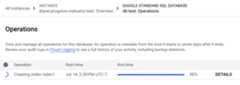
In the Spanner navigation menu, select theOperations tab. TheOperations page shows a list of active running operations.
Find the schema operation in the list. If it's still running, the progressbar in theEnd time column shows the percentage of the operation thatis complete, as shown in the following image:
gcloud
Usegcloud spanner operations describeto check the progress of an operation.
Get the operation ID:
gcloudspanneroperationslist--instance=INSTANCE-NAME\--database=DATABASE-NAME--type=DATABASE_UPDATE_DDL
Replace the following:
- INSTANCE-NAME with the Spanner instancename.
- DATABASE-NAME with the name of the database.
Run
gcloud spanner operations describe:gcloudspanneroperationsdescribeOPERATION_ID\--instance=INSTANCE-NAME\--database=DATABASE-NAME
Replace the following:
- OPERATION-ID: The operation ID of the operation that you want tocheck.
- INSTANCE-NAME: The Spanner instance name.
- DATABASE-NAME: The Spanner database name.
The
progresssection in the output shows the percentage of the operationthat's complete. The output looks similar to the following:done:truemetadata:...progress:-endTime:'2022-03-01T00:28:06.691403Z'progressPercent:100startTime:'2022-03-01T00:28:04.221401Z'-endTime:'2022-03-01T00:28:17.624588Z'startTime:'2022-03-01T00:28:06.691403Z'progressPercent:100...
REST v1
Get the operation ID:
gcloudspanneroperationslist--instance=INSTANCE-NAME\--database=DATABASE-NAME--type=DATABASE_UPDATE_DDL
Replace the following:
- INSTANCE-NAME with the Spanner instancename.
- DATABASE-NAME with the database name.
Check the progress for the operation.
Before using any of the request data, make the following replacements:
- PROJECT-ID: the project ID.
- INSTANCE-ID: the instance ID.
- DATABASE-ID: the database ID.
- OPERATION-ID: the operation ID.
HTTP method and URL:
GET https://spanner.googleapis.com/v1/projects/PROJECT-ID/instances/INSTANCE-ID/databases/DATABASE-ID/operations/OPERATION-ID
To send your request, expand one of these options:
curl (Linux, macOS, or Cloud Shell)
Note: The following command assumes that you have logged in to thegcloudCLI with your user account by runninggcloud initorgcloud auth login, or by usingCloud Shell, which automatically logs you into thegcloudCLI . You can check the currently active account by runninggcloud auth list.Execute the following command:
curl -X GET \
     -H "Authorization: Bearer $(gcloud auth print-access-token)" \
     "https://spanner.googleapis.com/v1/projects/PROJECT-ID/instances/INSTANCE-ID/databases/DATABASE-ID/operations/OPERATION-ID"
PowerShell (Windows)
Note: The following command assumes that you have logged in to thegcloudCLI with your user account by runninggcloud initorgcloud auth login. You can check the currently active account by runninggcloud auth list.Execute the following command:
$cred = gcloud auth print-access-token
$headers = @{ "Authorization" = "Bearer $cred" }

Invoke-WebRequest `
    -Method GET `
    -Headers $headers `
    -Uri "https://spanner.googleapis.com/v1/projects/PROJECT-ID/instances/INSTANCE-ID/databases/DATABASE-ID/operations/OPERATION-ID" | Select-Object -Expand Content
You should receive a JSON response similar to the following:
{... "progress": [ { "progressPercent": 100, "startTime": "2023-05-27T00:52:27.366688Z", "endTime": "2023-05-27T00:52:30.184845Z" }, { "progressPercent": 100, "startTime": "2023-05-27T00:52:30.184845Z", "endTime": "2023-05-27T00:52:40.750959Z" } ],... "done": true, "response": { "@type": "type.googleapis.com/google.protobuf.Empty" }}
If the operation takes too long, you can cancel it. For more information, seeCancel a long-running database operation.
Spanner also automatically detects opportunities to applyschema design best practices.If recommendations are available for a database, you can view them on theSpanner Studio page for that database. For more information, seeView schema design best practice recommendations.
Delete a database
Deleting a database permanently removes the database and all its data. Databasedeletion can't be undone. Ifdatabase deletion protectionis enabled on a database, you can't delete that database until youdisable itsdeletion protection.
Existing backups arenot deleted when a database is deleted. For moreinformation, seeBackup and restore.
Google Cloud console
In the Google Cloud console, go to theSpanner Instances page.
Select the instance containing the database to delete.
Select the database.
ClickDelete database. A confirmation appears.
Type the database name and clickDelete.
gcloud
To delete a database with thegcloud command-line tool, usegcloud spanner databases delete.
gcloudspannerdatabasesdelete\(DATABASE:--instance=INSTANCE)
The following options are required:
DATABASE- ID of the database or fully qualified identifier for the database. If the fully qualified identifier is provided, the
--instanceflag should be omitted. --instance=INSTANCE- The Spanner instance for the database.
For more details refer to thegcloud reference.
DDL
DDL does not support database deletion syntax.
What's next
- Create a database and load it with sample data.
- Learn more aboutGoogleSQL DDL reference.
- Learn more aboutPostgreSQL DDL reference.
- Learn how tobackup and restore a database.
- Learn how toprevent accidental database deletion.
- Learn how tomake schema updates.
Except as otherwise noted, the content of this page is licensed under theCreative Commons Attribution 4.0 License, and code samples are licensed under theApache 2.0 License. For details, see theGoogle Developers Site Policies. Java is a registered trademark of Oracle and/or its affiliates.
Last updated 2025-12-15 UTC.