

Compute capacity, nodes and processing units
This page describes Spanner compute capacity and the two units ofmeasure used to quantify it: nodes and processing units.
Compute capacity
When you create an instance, you choose aninstance configurationand an amount of compute capacity for your instance. Your instance'scomputecapacity has the following characteristics:
- It determines the amount of server and storage resources, that are availableto the databases in your instance, includingdisk load.Disk load applies only to workloads that access data stored on HDD storage.For more information, seeTiered storage overview.
It is measured inprocessing units (PUs) ornodes, with 1000 PUs beingequal to 1 node.
- A node or 1000 PUs is a logical unit of compute capacity and doesn'trepresent a single physical server. The compute resources for each nodeare distributed across multiple underlying physical machines, orservers. The number of servers per node depends on your instanceconfiguration. For example, aregional instanceuses at least three servers per node, while amulti-region instanceuses at least five. For more information, seeCompute capacity and instance configurations.
- When you define or change compute capacity on an instance, you mustspecify PUs in multiples of 100 (for example, 100, 200,300). When the number of PUs reaches 1000, you can specifylarger quantities either as multiples of 1000 PUs (forexample, 1000, 2000, 3000) or as nodes (for example, 1, 2, 3).
Spanner makes the specified compute capacity available(replicated) in its entirety within each zone thathosts a replica of your data. For example, if you provision 1000 PUs for aregional instance, which typically has replicas in three zones, each of thosethree zones has the full 1000 PUs of compute power available to serve itsreplica. Spanner doesn't divide or distribute the total PUs amongthe zones. The measurement unit you use doesn't matter unless you are creatingan instance whose compute capacity is smaller than 1000 PUs (1 node). In thiscase, you must use PUs to specify the compute capacity of the instance.
Instances with fewer than 1000 PUs are built for smaller datasizes, queries, and workloads. They have limited compute resources, which canresult in non-linear scaling and performance issues for some workloads.These instances might also experience intermittent increases in latencies.
Spanner availability
Spanner is designed forhigh availability.Because the compute capacity of each instance is spread across multiple serversin different zones, Spanner is resilient to the failure of anyone server. The loss of an individual server doesn't constitute a node failure.Spanner manages its underlying resources automatically toprovide continuous availability for your instance.
Data storage limits
Note: Storage usage is calculated inbinary gigabytes (GB), where1 GB is 230 bytes. This unit of measurementis also known as agibibyte (GiB). Similarly, 1 TB is240 bytes, or 1024 GB.As detailed inQuotas & limits, to provide high availability and lowlatency when accessing a database, Spanner uses thecompute capacity of an instance as a basis for determining storage limits,using the following guidelines:
- For instances smaller than 1 node (1000 PUs),Spanner allots 1024.0 GiBof data for every 100 PUs in the database.
- For instances of 1 node and larger, Spanner allots10 TiB of data for each node.
For example, to create an instance for a 300 GB database, you canset its compute capacity to 100 PUs. This amount of computecapacity keeps the instance below the limit until the database grows to morethan 1024.0 GiB. After the database reachesthis size, you need to add another 100 PUs to allow the database togrow. Otherwise, Spanner might reject writes to the database. Formore information, seeRecommendations for database storage utilization.
Spanner bills for the storage that instances actuallyutilize, and not their total storage allotment.
Performance
The peak read and write throughput values that a given amount of computecapacity can provide depend on the instanceconfiguration, as well as on schema design and dataset characteristics. For moreinformation, see thePerformance overview.
You use instances with fewer than 1000 PUs for smaller data sizes,queries, and workloads. For larger workloads, their limited compute resourcesmight result in non-linear scaling and performance, with intermittentincreases in latencies.
Compute capacity and instance configurations
As described inRegional, dual-region, and multi-region configurations,Spanner distributes an instance across zones of one or moreregions to provide high performance and high availability. Consequently,Spanner also distributes server resources provided by theinstance's compute capacity.
Here is a diagram that illustrates this distribution of server resources.
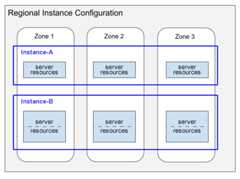
This diagram depicts two instances that have regional configurations:
- Instance-A shows an instance of 1000 PUs (1 node) with itscompute capacity distribution consuming server resources in each of the threezones.
- Instance-B shows an instance of 2000 PUs (2 nodes) with itscompute capacity distribution consuming server resources in each of the threezones.
Note the following in this diagram:
For each instance, Spanner allocates server resources in each zone of the regional configuration. Each per-zone server resource uses the data replica in its zone. For information about data replicas in instance configurations, seeRegional, dual-region, and multi-region configurations. For information about how Spanner keeps these data replicas in sync, seeReplication.
The server resources for Instance-A are shown in single boxes, while the resources for Instance-B are shown in boxes subdivided into two parts. This difference illustrates that Spanner allocates server resources differently for different-sized instances:
- For instances of 1000 PUs (1 node) and smaller, Spanner allocates server resources in a single server task per zone.
- For instances larger than 1000 PUs (1 node), Spanner allocates server resources in multiple server tasks per zone, with one task for each 1000 PUs. Using multiple server tasks per zone provides better performance and enables Spanner to createdatabase splits and provide even better performance.
Change the compute capacity
After you create an instance, you can increase its compute capacity later. Inmost cases, requests complete within a few minutes. On rare occasions, a scaleup might take up to an hour to complete.
You can reduce the compute capacity of a Spanner instance exceptin the following scenarios:
You can't store more than 10 TiB of data pernode (1000 processing units).
There are a large number ofsplits foryour instance's data. In this scenario, Spanner might not beable to manage the splits after you reduce compute capacity. You can tryreducing the compute capacity by progressively smaller amounts until you findthe minimum capacity that Spanner needs to manage all of theinstance's splits.
Spanner can create a large number of splits to accommodate yourusage patterns. If your usage patterns change, then after one or two weeks,Spanner might merge some splits together and you can try toreduce the instance's compute capacity.
When removing compute capacity, monitor your CPU utilization and requestlatencies inCloud Monitoring to ensure CPUutilization stays under 65% for regionalinstances and 45% for each region inmulti-region instances. You might experience a temporary increase in requestlatencies while removing compute capacity.
Spanner doesn't have a suspend mode. Spannercompute capacity is a dedicated resource and, even when you are not running aworkload, Spanner frequently performs background work to optimizeand protect your data.
You can use theGoogle Cloud console,Google Cloud CLI, or the Spanner clientlibraries to change compute capacity. For more information, seeChange the compute capacity.
Note: You can change compute capacity in your instance based on theCloud Monitoring metrics on CPU or storageutilization in conjunction with Cloud Run functions.Compute capacity versus replicas
If you need to scale up the server and storage resources in your instance,increase the compute capacity of the instance. Note that increasing computecapacity doesn't increase the number of replicas (which are fixed for a giveninstance configuration), but rather increases the resources each replica has inthe instance. Increasing compute capacity gives each replica more CPU and RAM,which increases the replica's throughput (that is, more reads and writes persecond can occur).
What's next
- Learn how toCreate and manage instances.
Except as otherwise noted, the content of this page is licensed under theCreative Commons Attribution 4.0 License, and code samples are licensed under theApache 2.0 License. For details, see theGoogle Developers Site Policies. Java is a registered trademark of Oracle and/or its affiliates.
Last updated 2025-12-17 UTC.